MC-005 – Facsimile Transmission Cover Sheet
Fill out nowJurisdiction: Country: United States | Province or State: California
The MC-005 – Facsimile Transmission Cover Sheet is a standard California court form used when you send court documents by fax. It acts as a formal cover page that identifies what you are sending, who is sending it, and where it is going. If you are representing yourself, this form helps make sure your faxed filing is properly labeled and connected to your case.
When you are about to fax documents to a court or another party, details matter. A missing case number or incorrect recipient can delay your filing. The MC-005 – Facsimile Transmission Cover Sheet organizes key information in one place so the receiving office can process your submission correctly.
This form is not the main document in your case. It does not replace your motion, response, or other filing. Instead, it travels in front of those papers as an introduction. It tells the recipient what to expect and how many pages are included.
If you are unsure whether you need a cover sheet for a faxed filing, it helps to understand how courts handle fax submissions. The MC-005 – Facsimile Transmission Cover Sheet exists to reduce confusion, prevent lost pages, and create a record of transmission details.
What is MC-005 – Facsimile Transmission Cover Sheet?
Clear definition
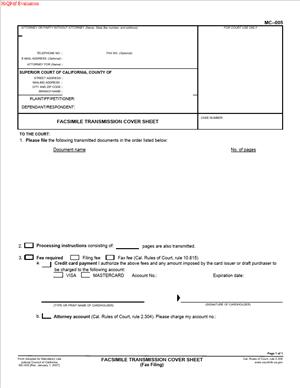
MC-005 – Facsimile Transmission Cover Sheet is a court-approved form used in California when transmitting legal documents by fax. It provides basic identifying information about the sender, the case, and the documents being sent.
The form typically includes the court name, case number, case title, sender’s contact information, recipient’s fax number, and the total number of pages being transmitted. It may also include a short message or instructions related to the transmission.
This document functions as a routing tool. Court clerks and legal staff rely on it to match incoming faxed pages with the correct case file. Without a clear cover sheet, a faxed filing can be misdirected or delayed.
Who typically uses this form?
Self-represented individuals often use this form when filing papers in civil matters. If you are handling your own case and need to fax a document to the court, this cover sheet may be required.
Attorneys and law offices also use it when faxing documents to courts or other parties. Legal support staff frequently prepare and attach the cover sheet to ensure compliance with court procedures.
Court staff may expect to see this form when accepting faxed filings. In some situations, opposing parties or their representatives may also receive documents by fax with this cover sheet attached.
Why might you need this form?
You might need this form when the court allows or requires fax filing. Some courts permit fax transmission for certain documents, especially when time is limited.
The form helps document when the fax was sent and how many pages were included. This can matter if there is a question later about whether a document was transmitted completely.
It also reduces the risk of clerical error. When a court receives many faxed documents in one day, a clear cover sheet makes it easier to sort and file them accurately.
If you are close to a deadline and fax filing is an option, using the proper cover sheet can help ensure your submission is accepted and processed.
Typical real-life scenarios
- You are responding to a motion, and the deadline is approaching quickly. The court permits fax filing for responses. You prepare your response and attach the required cover sheet before sending it to the court’s designated fax number.
- You need to send a stipulation signed by both parties to the court. The clerk has confirmed that fax transmission is acceptable for this type of filing. You include the cover sheet to identify the case and total pages transmitted.
- You are sending a courtesy copy of a document to opposing counsel by fax. The cover sheet identifies the case and confirms the number of pages, helping avoid disputes about missing attachments.
- You discover an error in a previously filed document and must submit a corrected version promptly. If fax filing is allowed, you transmit the corrected document with the cover sheet, clearly labeling the case number and title.
When would you use MC-005 – Facsimile Transmission Cover Sheet?
You would use this form when sending documents by fax in connection with a California court case. It is specifically tied to fax transmission, not email or electronic filing through an online system.
This form is commonly used in civil cases, though procedures may vary depending on the type of case and court. Family law, small claims, or other divisions may have their own rules about fax filings.
You may use it when a court has authorized fax filing for certain documents. In some courts, fax filing is limited to specific types of submissions or emergencies. The cover sheet helps ensure the faxed packet meets basic identification standards.
Legal professionals, self-represented litigants, and sometimes court personnel may rely on this form whenever fax transmission is involved. It is not used for in-person filing or standard mail submissions.
Before preparing your documents for fax, it is important to confirm whether fax filing is permitted in your situation. The cover sheet is relevant only when fax transmission is an accepted method of delivery.
Legal characteristics of MC-005 – Facsimile Transmission Cover Sheet
This form is an administrative document. Its main function is organizational and procedural. It does not argue your case or present evidence.
For the form to be effective, it must accurately identify the case. The correct court name, case number, and case title are essential. Errors in these details can lead to misfiling or rejection.
The total number of pages listed on the cover sheet should match the actual number of pages sent. If there is a mismatch, the receiving office may question whether the transmission was complete.
A common issue arises when the fax number is incorrect or incomplete. Even if the cover sheet is properly filled out, sending it to the wrong number means it may never reach the intended recipient.
Court procedures may vary across California counties. Some courts may require additional information or impose limits on fax filings. The cover sheet itself does not override local rules or filing requirements.
This document does not replace proof of service, filing fees, or other required forms. It is simply an accompanying page that travels with your faxed documents.
Is it legally binding?
The cover sheet itself is not typically a legally binding agreement. It does not create rights or obligations between parties. Instead, it supports the filing process.
However, the information you provide on the form can have practical consequences. If you certify the number of pages sent or identify a case inaccurately, that information becomes part of the record of transmission.
The legal effect of your filing comes from the underlying documents, not from the cover sheet. For example, a motion or declaration may have legal significance, while the cover sheet only facilitates its delivery.
In some situations, proof that a document was faxed can be relevant to timing or compliance with deadlines. The cover sheet, along with fax transmission records, may help show when and what was sent. Its role is supportive rather than substantive.
How to fill out MC-005 – Facsimile Transmission Cover Sheet
Step 1 – Identify the court
Enter the full name of the court where your case is filed. Include the branch name if applicable. Make sure this matches the court listed on your other case documents.
Step 2 – Provide the case title
Write the names of the parties as they appear on your existing filings. Use the same format and order shown in prior documents. This helps court staff connect your fax to the correct file.
Step 3 – Enter the case number
Carefully type or print the complete case number. Double-check each character. A single incorrect digit can cause processing delays.
Step 4 – Fill in sender information
Provide your name, address, and contact details as requested on the form. If you are representing yourself, list your own information. If you are part of an organization, include the appropriate contact person.
Step 5 – Identify the recipient
Enter the name of the person or office receiving the fax. Include the correct fax number. Confirm that the number matches the intended court department or opposing party.
Step 6 – State the number of pages
Count every page being transmitted, including the cover sheet itself. Write the total clearly in the space provided. This allows the recipient to confirm whether all pages were received.
Step 7 – Add a brief message if needed
If the form includes space for comments, you may add short instructions or clarifications. Keep the message direct and related to the transmission.
Step 8 – Review for accuracy
Read the entire form before sending the fax. Confirm that the court name, case number, recipient fax number, and total page count are correct. Attach the cover sheet as the first page of your faxed packet and then transmit the documents.
Legal terms you might encounter in MC-005 – Facsimile Transmission Cover Sheet
- Facsimile (Fax): A method of sending documents over a telephone line using a fax machine or fax service. On this form, you confirm that the attached pages are being transmitted by fax. The term clarifies that the delivery method is electronic image transmission, not mail or in-person filing.
- Transmission Date: The date you send the fax. This is important because it can affect deadlines. The date shown on the cover sheet should match the actual date the fax is sent.
- Sender Information: Your contact details as the person sending the fax. This usually includes your name, phone number, fax number, and sometimes your address. The court or receiving party may use this information to contact you if there is a problem with the transmission.
- Recipient: The person or office receiving the fax. On this form, you must clearly identify the court, department, clerk, or attorney who should receive the documents. Incorrect recipient details can result in delay or rejection.
- Case Title (Caption): The official name of the case, usually listing the parties involved. It appears at the top of court documents. You must copy it exactly as it appears on other filed papers to avoid confusion in the court record.
- Case Number: The unique number assigned to your case by the court. This number ensures your faxed documents are placed in the correct file. Even a small error in the number can cause misfiling.
- Number of Pages: The total number of pages being faxed, including the cover sheet. This helps the recipient confirm they received the full transmission. If the page count does not match, the recipient may contact you or disregard incomplete pages.
- Confidential Information: Sensitive information that should not be disclosed improperly. When sending documents by fax, you are responsible for ensuring that confidential material is sent to the correct and authorized recipient.
- Clerk’s Office: The administrative office of the court that processes filings. If you fax documents to the court, the clerk’s office may be the receiving party listed on the form.
- Transmission Confirmation: The report generated by your fax machine or service showing whether the fax was successfully sent. This report can serve as proof that you attempted to deliver the documents.
FAQs
Do I have to use the MC-005 – Facsimile Transmission Cover Sheet every time I fax court documents?
If you are sending court documents by fax, you should include this document as the first page of your transmission. It tells the receiving office what case the fax relates to and how many pages to expect. Without it, the clerk or other recipient may not know where to route your documents. Always check whether fax filing is allowed in your situation before sending.
What case information must match exactly on this form?
The case title and case number must match your existing court documents exactly. Copy them from a recent filed paper to avoid mistakes. Even a missing middle initial or transposed number can cause the fax to be misfiled. Before sending, compare your entries against the court’s records.
How do I calculate the total number of pages?
Count every page that goes through the fax machine, including the cover sheet itself. If you are sending 12 pages of attachments plus the cover sheet, the total is 13 pages. Write the full number clearly on this document. This allows the recipient to verify that the transmission is complete.
What should I do if I realize I entered the wrong case number after sending?
Act quickly. Prepare a corrected cover sheet with the right case number and resend the entire package. You may also contact the recipient’s office to explain the error and confirm which version they received. Keep your transmission confirmation for both attempts.
Do I need to sign this document?
Review the form to see whether a signature line is included. If there is a space for a signature, sign it before faxing. A missing signature can cause questions about who sent the documents and whether the transmission was authorized.
What if the fax confirmation shows a transmission error?
Do not assume the documents were received. If the confirmation indicates failure or partial transmission, resend the fax. You may also call the receiving office to confirm whether any pages came through. Keep all confirmation reports for your records.
Can I use this form to send documents to someone other than the court?
Yes, this document can be used when faxing legal papers to another party or attorney. You still need to clearly identify the recipient and the related case information. Make sure the recipient’s fax number is correct before sending.
Does sending documents with this form mean they are officially filed?
Not necessarily. Whether a fax counts as an official filing depends on court rules and acceptance procedures. After sending, you should confirm that the clerk processed and filed your documents. Simply transmitting them does not guarantee they are entered into the record.
Checklist: Before, During, and After MC-005 – Facsimile Transmission Cover Sheet
Before
- Confirm that fax filing or fax service is permitted for your type of document.
- Gather the final, signed versions of all documents you plan to send.
- Verify the correct case title and case number from a recent court document.
- Double-check the recipient’s name, department, and fax number.
- Count all pages, including attachments, to determine the total page number.
- Ensure confidential information is appropriate to transmit by fax.
- Prepare a clean, legible copy of each page to avoid transmission issues.
During
- Place the cover sheet as the first page of the fax transmission.
- Enter the correct transmission date.
- Clearly print or type your contact information.
- Write the full and accurate page count.
- Recheck the fax number before pressing send.
- Stay near the fax machine or device until the transmission completes.
- Watch for any error messages during the sending process.
After
- Print or save the transmission confirmation report.
- Review the confirmation to ensure all pages were sent successfully.
- Contact the recipient if you do not receive confirmation of receipt when required.
- File a copy of the cover sheet and all attachments in your case file.
- Note the date and time of transmission in your records.
- Follow up to confirm the documents were accepted and processed.
- Correct and resend immediately if you discover an error.
Common mistakes to avoid with MC-005 – Facsimile Transmission Cover Sheet
- Mistake: Entering the wrong case number because you rely on memory instead of copying it from a recent court document, which can cause misfiling or delays, so do not forget to verify the number directly from official paperwork.
- Mistake: Listing the wrong fax number due to a typing error, which may send confidential information to the wrong recipient and prevent proper filing, so do not forget to double-check every digit before sending.
- Mistake: Miscounting the total number of pages because you forget to include the cover sheet, which can lead the recipient to believe pages are missing, so do not forget to count every single page in the transmission.
- Mistake: Leaving sender contact information incomplete, which makes it difficult for the clerk or recipient to reach you about problems, so do not forget to provide a clear phone number and name.
- Mistake: Assuming a successful send without reviewing the confirmation report, which may hide partial or failed transmissions, so do not forget to check and save the confirmation.
- Mistake: Sending unsigned documents because you focus only on the cover sheet, which can result in rejection of the filing, so do not forget to confirm that all required signatures are included before faxing.
- Mistake: Using outdated case information from an old version of the case caption, which may not match the current court record, so do not forget to compare your entries with the most recent filed document.
- Mistake: Failing to follow up with the court after transmission, which can leave you unaware that the documents were not accepted, so do not forget to confirm processing when necessary.
What to do after filling out MC-005 – Facsimile Transmission Cover Sheet
Once you complete the cover sheet, your next steps focus on accurate transmission and proper recordkeeping. Treat the fax like any other formal delivery of legal documents. You want proof of what you sent and when you sent it.
- Step 1: Place the completed cover sheet on top of your document stack.
- Step 2: Arrange all pages in the correct order, exactly as you want them received.
- Step 3: Count every page again, including the cover sheet, and confirm the total matches what you wrote.
- Step 4: Dial or enter the verified fax number carefully.
- Step 5: Send the fax and wait for the full transmission to complete.
- Step 6: Print or download the transmission confirmation report immediately.
- Step 7: Review the confirmation to ensure all pages were transmitted successfully.
- Step 8: If there is any error or interruption, resend the entire packet with a corrected cover sheet if needed.
- Step 9: Store a complete copy of the cover sheet, attachments, and confirmation report in your case file.
- Step 10: Check with the receiving office, if required, to confirm that the documents were accepted and processed.
Keep your records organized. Create a dedicated section in your file for fax transmissions. Include the date, time, recipient, and number of pages sent. If questions arise later about whether you met a deadline or delivered documents, these records will help you respond clearly and confidently.
If you learn that the documents were not accepted, correct the issue right away. That may mean fixing a case number, adding a missing signature, or resending clearer copies. Act quickly to avoid missing any procedural deadlines.
Finally, update your personal tracking system. Note that the documents were sent by fax, and whether they were confirmed as filed or received. Staying organized helps you manage your case efficiently and reduces stress as deadlines approach.
Disclaimer: This guide is provided for informational purposes only and is not intended as legal advice. You should consult a legal professional.