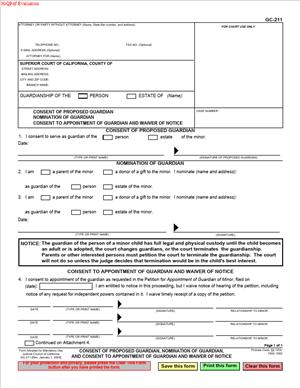
GC-211 – Consent of Proposed Guardian, Nomination of Guardian, and Consent to Appointment of Guardian and Waiver of Notice
Fill out nowJurisdiction: Country: United States | Province or State: California
The GC-211 – Consent of Proposed Guardian, Nomination of Guardian, and Consent to Appointment of Guardian and Waiver of Notice is a California probate court form used in guardianship cases. It allows certain people to formally agree to a proposed guardianship arrangement. It also lets them waive their right to receive formal notice of future court hearings.
If you are involved in a case about appointing a guardian for a child, you may be asked to review or sign this document. It is commonly used when family members support the guardianship and want the court to know they agree. Signing the form can simplify the court process.
This form can serve more than one purpose. It may show that a proposed guardian is willing to serve. It may also show that a parent or other relative nominates someone to act as guardian. In some cases, it includes a waiver of notice, meaning the signer agrees not to receive further formal notice of certain hearings.
Understanding what this form does is important before you complete or sign it. Once filed with the court, it becomes part of the official probate record. Judges rely on it when deciding whether to appoint a guardian.
What is GC-211 – Consent of Proposed Guardian, Nomination of Guardian, and Consent to Appointment of Guardian and Waiver of Notice?
Clear definition
GC-211 – Consent of Proposed Guardian, Nomination of Guardian, and Consent to Appointment of Guardian and Waiver of Notice is a multi-purpose probate court document used in California guardianship cases involving minors. It records written consent, nomination, and sometimes a waiver of notice related to the appointment of a guardian.
The form allows three main types of statements. First, a proposed guardian can confirm in writing that they agree to serve. Second, a person who has the legal right to nominate a guardian, often a parent, can name the person they want appointed. Third, certain individuals can consent to the appointment and waive notice of further proceedings.
The court uses this document to determine whether the required parties agree with the proposed guardianship. When people sign this form, they are formally telling the court their position.
Who typically uses this form?
This form is commonly used by proposed guardians. A proposed guardian is the person asking the court to appoint them to care for a minor child. By signing, they confirm they understand the responsibilities and are willing to take them on.
Parents of the child often use this form as well. A parent may nominate a specific person to serve as guardian. If both parents are living, each may complete a separate form.
Other relatives or individuals entitled to notice in a guardianship case may also sign. For example, grandparents or other close family members who would otherwise receive formal notice may use this form to show they agree and waive notice.
In short, anyone whose consent, nomination, or waiver is relevant to the guardianship may use this document, depending on their role in the case.
Why might you need this form?
You may need this form if you are asking the court to appoint a guardian for a child and want to show that key family members agree. Courts generally require notice to certain relatives. When those individuals sign this document, it can reduce disputes and streamline the hearing process.
If you are the proposed guardian, the court will typically require written confirmation that you are willing to serve. This form provides that confirmation. Without it, the court may question whether you accept the duties of guardianship.
A parent may use this form to formally nominate someone they trust. This can carry significant weight with the court, especially if the parent has legal custody. The written nomination helps clarify the parents’ wishes.
You might also use this form to waive notice of future hearings. Waiving notice can reduce paperwork and service requirements, which can make the case move more efficiently.
Typical real-life scenarios
- A child’s parents are temporarily unable to care for the child due to serious illness. A grandparent steps in to provide daily care. The grandparent files a petition for guardianship, and both parents sign this form to nominate the grandparent and consent to the appointment.
- A single parent plans to enter a long-term treatment program. The child’s aunt agrees to serve as guardian during that time. The parent completes the nomination section of the form, and the aunt signs as the proposed guardian to confirm her willingness.
- In another situation, one parent is deceased and the surviving parent supports the appointment of a family friend as guardian. The surviving parent uses this document to nominate the friend and waive further notice of hearings.
- Sometimes, relatives entitled to notice live out of state and do not wish to participate in court proceedings. They sign this form to indicate their consent and waive notice, allowing the case to proceed without additional service steps.
- In a contested case, some family members may support the proposed guardian while others object. Those who agree can use this form to clearly state their position for the court record.
When would you use GC-211 – Consent of Proposed Guardian, Nomination of Guardian, and Consent to Appointment of Guardian and Waiver of Notice?
You would use this form during a guardianship of the person case involving a minor in a California probate court. It is typically completed after a petition for appointment of a guardian has been filed, but before the court hearing.
The proposed guardian uses the form to confirm acceptance of the role. Courts generally expect written acknowledgment that the person understands the duties of caring for a child’s health, education, and general welfare.
A parent may use the form when they want to formally nominate someone to act as a guardian. This often happens when the parent cannot currently provide care but wants to maintain involvement in choosing who will step in.
Individuals who are entitled to receive notice of the guardianship hearing may use the form to waive notice. This can include relatives listed in the petition. Waiving notice means they agree the court does not need to formally serve them with additional documents about the hearing.
The form may also be used when all parties agree and want to present a unified position to the judge. In uncontested cases, properly completed consent forms can help demonstrate that the guardianship is supported by the family network.
Legal characteristics of GC-211 – Consent of Proposed Guardian, Nomination of Guardian, and Consent to Appointment of Guardian and Waiver of Notice
This document becomes part of the official probate court file once it is signed and filed. For it to be effective, it must be completed accurately and signed by the appropriate person. Signatures generally must be dated, and in some situations may require notarization or verification under penalty of perjury, depending on the section.
The form does not itself appoint a guardian. Only a judge can issue an order appointing a guardian. This document simply communicates consent, nomination, or waiver to the court.
Common reasons for rejection include missing signatures, incomplete sections, inconsistent names, or failure to clearly identify the child and case number. If the information on this form does not match the petition, the court may require corrections.
California probate courts may have local practices about how and when to submit this document. Some courts expect it to be filed before the hearing. Others allow it to be presented at the hearing. Procedures can vary slightly by county.
This form does not terminate parental rights. It does not transfer custody permanently. It does not resolve disputes by itself. The court must review the entire case, including the child’s best interests, before issuing an order.
Is it legally binding?
When properly signed and filed, the statements made in this form are legally significant. By signing, a proposed guardian affirms willingness to accept the legal duties of guardianship if appointed. A person who waives notice gives up the right to receive certain future notices in that proceeding.
However, the form does not bind the court. The judge is not required to appoint the nominated guardian simply because the form is signed. The court must still determine whether the appointment serves the child’s best interests.
A waiver of notice generally applies only to the specific proceeding identified in the form. It does not necessarily apply to unrelated cases or future modifications unless clearly stated.
If circumstances change before the hearing, a person who signed the form may seek to clarify their position with the court. The legal effect of the document depends on how and when it is filed and whether the court has already relied on it.
How to fill out GC-211 – Consent of Proposed Guardian, Nomination of Guardian, and Consent to Appointment of Guardian and Waiver of Notice
Step 1 – Identify the case information
Start by entering the court name and branch, along with the case number if one has been assigned. Use the same information that appears on the guardianship petition. Consistency is important because the court uses the case number to match this document with the correct file.
Step 2 – Enter the child’s name
Write the full legal name of the minor child as it appears on the petition. Double-check spelling and order of names. If the case involves more than one child, ensure each child is clearly identified as required by the form.
Step 3 – Complete the proposed guardian section
If you are the proposed guardian, fill in the section stating that you consent to act as guardian. Read the language carefully. By signing, you confirm that you understand the responsibilities involved if the court appoints you.
Provide your full legal name and any requested contact information. Make sure your name matches the name listed in the petition for appointment of guardian.
Step 4 – Complete the nomination section, if applicable
If you are a person with the right to nominate a guardian, such as a parent, complete the nomination portion. Clearly state the full name of the person you are nominating. This should match the proposed guardian’s name exactly as written elsewhere in the case documents.
Ensure you are signing the correct section. The form contains different parts for consent, nomination, and waiver. Fill out only the sections that apply to your role in the case.
Step 5 – Complete the consent and waiver of notice section
If you are consenting to the appointment and waiving notice, review the language carefully before signing. By waiving notice, you are agreeing not to receive formal notice of certain hearings related to this guardianship case.
Sign and date the form where indicated. Use your legal name. The date should reflect the day you actually sign the document.
Step 6 – Review for accuracy and completeness
Before filing, read the entire document from top to bottom. Confirm that names, dates, and case numbers are correct. Make sure every required signature line is completed.
Check that you have not left blank spaces in sections that apply to you. Incomplete forms can delay the court process.
Step 7 – Sign and submit the form to the court
Sign the form in the appropriate place. If the form requires a declaration under penalty of perjury, ensure you understand that you are affirming the truth of the statements made.
After signing, the form is typically filed with the probate court handling the guardianship case. Once filed, it becomes part of the official record for the judge to review at the hearing.
Legal terms you might encounter in GC-211 – Consent of Proposed Guardian, Nomination of Guardian, and Consent to Appointment of Guardian and Waiver of Notice
- Proposed Guardian: This is the person asking the court to appoint them as guardian of the child. On this form, the proposed guardian confirms they are willing to serve. Their full legal name must match the name used in the guardianship petition and other court documents.
- Nomination of Guardian: A nomination is a written statement naming who you want to act as guardian. On this document, a parent or other authorized person may nominate a specific individual. The court considers this nomination when deciding who to appoint.
- Consent to Appointment: Consent means you agree to something. Here, the proposed guardian signs to confirm they accept the responsibility and agree to be appointed by the court. Without this consent, the court cannot appoint that person.
- Waiver of Notice: Notice is the formal process of informing someone about a court case. A waiver of notice means the signer agrees to give up their right to receive formal notice of certain hearings. By signing this part, you confirm that you do not require additional court papers before the appointment.
- Guardian of the Person: This type of guardian is responsible for the child’s daily care, including housing, education, and medical decisions. If this form refers to guardianship of the person, it relates to those personal and caregiving duties.
- Guardian of the Estate: This guardian manages the child’s money and property. If the guardianship includes the estate, the proposed guardian is agreeing to handle financial matters and may have extra reporting duties to the court.
- Petitioner: The petitioner is the person who filed the guardianship case. Sometimes the petitioner and the proposed guardian are the same person, but not always. The names must match across all filed documents.
- Minor: A minor is a person under 18 years old. The child’s full legal name must be written exactly as it appears on the petition and any birth certificate or official records submitted.
- Case Number: This is the number assigned by the court when the guardianship case is filed. You must enter the correct case number on this document so it is properly linked to the court file.
- Signature Under Penalty of Perjury: When you sign under penalty of perjury, you declare that everything you wrote is true to the best of your knowledge. Providing false information can result in serious legal consequences.
FAQs
Do I need to file GC-211 – Consent of Proposed Guardian, Nomination of Guardian, and Consent to Appointment of Guardian and Waiver of Notice if I am the proposed guardian?
Yes. If you are asking the court to appoint you, you must sign this document to show you agree to serve. The court needs written proof that you accept the role and understand your responsibilities. Without your signed consent, the judge cannot appoint you as guardian.
What happens if the proposed guardian does not sign the consent section?
The court will not appoint that person. The judge needs clear confirmation that the proposed guardian agrees to take on the duties. If the consent section is blank or unsigned, your guardianship request may be delayed or denied.
Who is allowed to complete the nomination section?
The nomination section is usually completed by a parent or another person who has legal authority to nominate a guardian. You must check that the person signing has the legal right to do so. Their name and relationship to the child should be clearly stated.
What does it mean to waive notice on this form?
When you waive notice, you are giving up your right to receive formal advance notice of certain hearings related to the appointment. You are telling the court that you do not require additional service of papers before the guardian is appointed. Make sure you understand that you may not receive further mailed notice before the court acts.
Does the name on this document have to match other court papers exactly?
Yes. The proposed guardian’s name, the child’s name, and the case number must match the petition and any other filed forms. Even small differences, such as a missing middle name or incorrect spelling, can cause filing issues or delays.
Do I need to attach any additional documents to this form?
This document itself does not usually require attachments. However, you must confirm that it is filed together with the guardianship petition and any other required documents in the case. If the court requires identification or supporting declarations elsewhere in the case, those must be filed separately.
When does the consent become effective?
Your consent becomes effective once you sign and file the document with the court. However, you are not officially the guardian until the judge signs an order appointing you. Signing this form alone does not give you legal authority.
What changes in the public record after this form is filed?
Once filed, this document becomes part of the court’s guardianship case file. It shows that the proposed guardian agreed to serve and, if applicable, that notice was waived. The actual change in legal authority happens only after the court issues the guardianship order.
Checklist: Before, During, and After GC-211 – Consent of Proposed Guardian, Nomination of Guardian, and Consent to Appointment of Guardian and Waiver of Notice
Before
- Confirm that a guardianship petition has already been prepared or filed.
- Verify the correct case number assigned by the court.
- Gather the full legal names of the child and proposed guardian.
- Review the petition to ensure names and details match.
- Confirm who has the authority to complete the nomination section.
- Read through the entire form so you understand each section before signing.
- Make sure you understand the responsibilities of a guardian.
During
- Write the court name and case number exactly as shown on the petition.
- Enter the child’s full legal name without abbreviations.
- Complete the proposed guardian section with accurate information.
- Carefully review the nomination section before signing.
- Check the waiver of notice box only if you agree.
- Use your full legal signature.
- Date the form correctly.
- Review all entries for spelling and consistency.
After
- Make at least two copies of the signed document.
- File the original with the court clerk in the correct probate division.
- Confirm that the clerk stamps your copies as filed.
- Keep one stamped copy for your personal records.
- Provide copies to other parties if required in your case.
- Track your hearing date, if one is scheduled.
- Bring a filed copy to your court hearing.
- Store the document with your other guardianship paperwork.
Common mistakes to avoid with GC-211 – Consent of Proposed Guardian, Nomination of Guardian, and Consent to Appointment of Guardian and Waiver of Notice
- Mistake: Leaving the case number blank because you think the clerk will fill it in, which happens when you rush, can cause the form to be rejected or misfiled, so do not forget to copy the exact number from the petition.
- Mistake: Using a nickname or shortened name for the child or guardian, which often happens out of habit, may create inconsistencies in the court record and delay processing, so do not forget to use full legal names exactly as filed.
- Mistake: Signing in the wrong section because you did not read each label carefully, which can invalidate the consent, so do not forget to sign only where your role requires.
- Mistake: Waiving notice without understanding what you are giving up, which may lead to missing important hearing information, so do not forget to read the waiver language fully before checking the box.
- Mistake: Forgetting to date the form at the time of signing, which can raise questions about when consent was given, so do not forget to include the correct signing date.
- Mistake: Filing the form separately from the guardianship petition when the court expects coordinated filings, which can slow your case, so do not forget to confirm the correct filing sequence with the clerk.
- Mistake: Assuming signing this document alone makes you the legal guardian, which can lead to acting without authority, so do not forget that you must wait for the court’s official order.
- Mistake: Failing to keep a filed copy for your records because you believe the court keeps everything, which can leave you without proof of consent, so do not forget to obtain and store a stamped copy.
What to do after filling out GC-211 – Consent of Proposed Guardian, Nomination of Guardian, and Consent to Appointment of Guardian and Waiver of Notice
Once you complete and sign the form, your next focus is proper filing and follow-up. Accuracy and organization now will prevent delays later.
- Step 1: Make at least two copies of the signed form before submitting it.
- Step 2: Confirm the case number and court location where the guardianship petition is filed.
- Step 3: File the original signed form with the probate clerk handling the case.
- Step 4: Ask the clerk to stamp your copies as “Filed” for your records.
- Step 5: Check whether the court requires you to provide copies to other interested parties in the case.
- Step 6: Calendar any scheduled hearing date and note the department or courtroom.
- Step 7: Bring a filed copy of the form with you to the hearing.
- Step 8: Wait for the judge to issue a written order appointing the guardian.
- Step 9: Once appointed, obtain certified copies of the guardianship order if you will need to show proof to schools, doctors, or financial institutions.
- Step 10: Keep this document with the petition, court order, and any letters of guardianship in a secure file.
- Step 11: Update your personal records to reflect the date of appointment and your new responsibilities.
- Step 12: Review any additional reporting or compliance requirements that apply after appointment.
Stay organized. Keep all guardianship documents together in one folder. Write down key dates, including filing dates and hearing dates. If the court contacts you for corrections or additional paperwork, respond promptly and keep copies of everything you submit.
Remember, this document shows your agreement. The legal authority comes from the court’s signed order. Always wait for official confirmation before acting as a guardian.
Disclaimer: This guide is provided for informational purposes only and is not intended as legal advice. You should consult a legal professional.