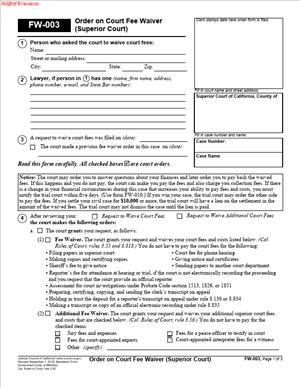
FW-003 – Order on Court Fee Waiver (Superior Court)
Fill out nowJurisdiction: Country: United States | Province or State: California
FW-003 – Order on Court Fee Waiver (Superior Court) is a court order that tells you whether the court has approved or denied your request to waive filing fees. If you asked the court not to charge you fees because you cannot afford them, this is the document that gives you the official answer.
You do not fill this form out to request a waiver. Instead, it follows your earlier request. The judge or court clerk completes and signs it. Once issued, it becomes part of your case file.
This document matters because court fees can be significant. Filing a complaint, responding to a lawsuit, or submitting motions often requires payment. If your waiver is granted, you may not have to pay some or all of those costs.
Understanding what this order says helps you know what fees are covered, what conditions apply, and whether you owe anything later. It also helps you plan your next steps in your case.
What is FW-003 – Order on Court Fee Waiver (Superior Court)?
Clear definition
FW-003 – Order on Court Fee Waiver (Superior Court) is a formal court order issued by a California Superior Court. It states whether your fee waiver request has been granted in full, granted in part, or denied.
This document confirms the court’s decision about your ability to pay court costs. It identifies your case, names the parties, and lists which fees are waived. If the court requires additional information or sets conditions, that appears in the order.
Because it is an order, it reflects a judicial determination. It is not simply an administrative note. It carries authority within your case and affects how fees are handled going forward.
Who typically uses this form?
People who cannot afford court filing fees often use this process. This may include individuals with low income, people receiving certain public benefits, or those facing financial hardship.
Self-represented litigants commonly encounter this document. If you are handling your own divorce, custody case, small claims appeal, civil lawsuit, or other Superior Court matter, you may apply for a fee waiver. The resulting order will appear on this form.
Attorneys also receive and review this order when they file a fee waiver request on behalf of a client. Court staff process and maintain the form in the case record.
Why might you need this form?
You might need this form if paying court fees would create financial strain. Court costs can include filing fees, motion fees, jury fees, and other charges. If approved, the order may relieve you from paying some or all of them upfront.
The order also clarifies your financial obligations. If your waiver is only partially approved, the form will state what you must still pay. If it is denied, you will know that fees remain due.
In some cases, the court may grant a temporary waiver. The order may require you to report changes in your financial situation. Knowing what the order says helps you avoid missed payments or compliance issues.
Typical real-life scenarios
- You file for divorce and submit a fee waiver request because you recently lost your job. After reviewing your financial information, the court issues this order approving the waiver. As a result, you can proceed without paying the initial filing fee.
- You respond to a civil lawsuit and request a waiver due to low income. The court partially grants your request. The order explains that certain fees are waived, but others must be paid later. This helps you plan your budget.
- You apply for a guardianship and request a waiver based on public assistance benefits. The court reviews your application and denies it, finding that your income exceeds the limit. The order informs you that fees are due if you want the case to move forward.
- You file an appeal in a family law matter and ask for a waiver of appellate fees. The court grants the request but includes a condition requiring you to notify the court if your income increases. The order outlines that obligation clearly.
- You request a waiver for jury fees in a civil case. The court issues an order stating that those fees are covered, but service of process fees are not. The order provides specific details about what is and is not included.
When would you use FW-003 – Order on Court Fee Waiver (Superior Court)?
You encounter FW-003 – Order on Court Fee Waiver (Superior Court) after you submit a request to waive court fees. It is not filed on its own. It follows your application and reflects the court’s decision.
This typically happens at the beginning of a case, when you first file a complaint, petition, or response. It may also arise later, if you request a waiver for additional fees during ongoing proceedings.
In family law cases, one party may request a waiver when filing for divorce, custody, or support. In civil cases, either the plaintiff or defendant may apply if financial hardship exists. In probate matters, a petitioner may seek relief from filing costs.
You may also see this order if your financial circumstances change and the court re-evaluates your eligibility. Sometimes the court reviews fee waivers periodically, especially in longer cases.
Court staff process your request and present it to a judicial officer for review. Once a decision is made, this order is signed and entered into the case file. You receive a copy for your records.
Legal characteristics of FW-003 – Order on Court Fee Waiver (Superior Court)
This document is a court order. That means it reflects the authority of the Superior Court in your case. Once signed, it governs how court fees are handled unless it is modified or set aside.
For the order to be effective, it must clearly identify the case number, court location, and party name. It must indicate whether the waiver is granted, partially granted, or denied. It also needs a judicial signature or authorized court approval.
Common problems arise when financial information in the original waiver request is incomplete or inconsistent. If the court cannot verify your eligibility, it may deny the request or ask for more details. That outcome will appear in the order.
Another issue involves changes in financial status. If your income increases and you do not inform the court when required, the court may later order you to pay previously waived fees. The original order may state this condition.
There can be variations in how courts handle administrative details. Some counties may process fee waivers quickly through clerks if eligibility is clear. Others may require judicial review in all cases. The core function of the order, however, remains the same across California Superior Courts.
This document does not resolve your underlying legal dispute. It does not decide custody, property division, liability, or damages. It only addresses court fees and related costs.
It also does not automatically waive all expenses connected to your case. Certain costs, such as service of process by a private server or deposition fees, may not be covered. The order specifies what is included.
Is it legally binding?
Yes, this order is legally binding within your court case. Once signed by a judge or authorized court official, it controls whether you are required to pay certain court fees.
If the order grants a full waiver, the court generally cannot require those covered fees up front. If it grants a partial waiver, you are responsible for the remaining amounts listed.
The binding nature applies to both you and the court’s administrative processes. Court clerks rely on this order to determine whether to collect fees. You rely on it to understand your financial obligations.
However, the order can be modified under certain circumstances. If your financial situation changes or if the court later determines that the information provided was inaccurate, the court may revisit the waiver. In that situation, a new order may be issued.
How to fill out FW-003 – Order on Court Fee Waiver (Superior Court)
Although the court typically completes FW-003 – Order on Court Fee Waiver (Superior Court), it is helpful to understand each section. This allows you to review the document for accuracy and keep clear records.
Step 1 – Identify the Court and Case Information
At the top of the form, you will see the name and address of the Superior Court. The case name and case number must match your existing filings exactly. Check that your name and the opposing party’s name are spelled correctly.
Accurate case identification ensures the order is applied to the correct file. Even small errors can cause confusion in court records.
Step 2 – Review the Type of Waiver Decision
The form includes checkboxes indicating whether the fee waiver is granted in full, granted in part, or denied. Read this section carefully. It tells you the overall outcome of your request.
If granted in full, the order usually states that you do not have to pay court fees and costs listed in the order. If partially granted, it specifies what is covered and what is not. If denied, the order may state that fees must be paid for the case to proceed.
Step 3 – Check Which Fees Are Covered
The order typically lists categories of fees that are waived. These may include filing fees, motion fees, jury fees, and other standard court costs. The specific items are marked or described on the form.
Review this section to understand the scope of the waiver. Coverage may apply only to certain types of costs. The document defines the limits clearly.
Step 4 – Look for Additional Conditions
Some orders include conditions. For example, the court may require you to inform the court if your financial situation improves. There may also be language explaining that the court can later require repayment under certain circumstances.
Read any additional paragraphs or notes carefully. These conditions can affect your obligations during the case.
Step 5 – Confirm the Judicial Signature and Date
For the order to be valid, it must include a signature from a judge or authorized court official. The date of signing is also important. It shows when the waiver decision took effect.
Ensure that this section is complete. An unsigned or undated order may not be enforceable.
Step 6 – Keep Copies for Your Records
Once the order is issued, keep a copy with your case documents. You may need to show it to court staff if questions arise about fees. Having a clear copy helps avoid misunderstandings.
Store it with your other filings in chronological order. This makes it easier to track your case history.
Step 7 – Monitor Any Future Changes
If your financial circumstances change, review the conditions stated in the order. The document may require notification to the court. Staying aware of these terms helps you understand how the order continues to apply throughout your case.
By carefully reviewing each section of FW-003 – Order on Court Fee Waiver (Superior Court), you gain a clear picture of your fee responsibilities and the court’s expectations in your case.
Legal terms you might encounter in FW-003 – Order on Court Fee Waiver (Superior Court)
- Fee Waiver: A court’s decision that you do not have to pay some or all court fees because you cannot afford them. In this document, the judge checks boxes showing whether your waiver is granted, partially granted, or denied. It applies only to specific fees listed in the order.
- Court Costs: The required payments for filing, issuing documents, serving papers, and preparing transcripts. This order identifies which court costs are covered. If a cost is not listed, you may still have to pay it.
- Partial Waiver: A decision where the court waives some fees but not others. The order will specify which fees are covered and which remain your responsibility. You must read each checked item carefully.
- Superior Court: The trial-level court where your case is filed. The court name and branch location appear at the top of the order. This confirms which court issued the ruling.
- Case Number: The unique number assigned to your case. It links this order to your file. Always make sure the case number on this document matches your other court papers.
- Judicial Officer: The judge or commissioner who reviews your fee waiver request. Their name and signature appear on the order. Without a judicial officer’s signature, the document is not complete.
- Order: A written decision by the court. This order tells you exactly what the court decided about your request to waive fees. It becomes part of your official case record.
- Clerk of the Court: The court staff member who processes filings and keeps records. The clerk may stamp the order with a filing date. That date shows when the order was entered into the system.
- Hearing: A scheduled court appearance. In some cases, the court may require a hearing before deciding on your fee waiver. If a hearing is set, the order will list the date, time, and location.
- Financial Information: The income, expense, and asset details you provided in your fee waiver application. The court relies on this information to make its decision. If your financial situation changes, you may need to inform the court.
FAQs
How do I know if my fee waiver was approved?
Look for the section where the judge checks a box granting a full waiver or partial waiver. If approved, the order will clearly state which fees are waived. Check for the judge’s signature and the filing stamp to confirm it is official.
What if the court only approved part of my request?
Read each checked item carefully. The document will list which specific fees are waived and which you must still pay. Make a note of any remaining fees and their deadlines so you do not miss a payment.
When does the order take effect?
The order takes effect on the date the judicial officer signs it. You can usually find that date next to the signature line. The clerk’s filing stamp may show when it was entered into the court record, which can also matter for timing.
Do I need to file FW-003 – Order on Court Fee Waiver (Superior Court) myself?
In most cases, the court prepares and files this form after reviewing your application. You typically receive a copy for your records. Always confirm that a filed copy appears in your case file.
What should I check before using this order at the clerk’s office?
Confirm your name and case number match your other documents. Make sure the order clearly lists the fees waived. If anything is unclear or missing, ask the clerk to explain before relying on it.
Can the court change or cancel my fee waiver later?
Yes. If your financial situation improves, the court can order you to pay waived fees. The court may also schedule a hearing to review your eligibility, so pay attention to any notices you receive.
Does this order cover fees for the entire case?
It covers only the fees listed in the order. Some costs, like certain transcripts or services, may not be included. Review each category to understand the scope of what is waived.
What happens if my request is denied?
The order will indicate that your request was denied and may provide a reason or set a hearing. You will be responsible for paying the required filing fees to move forward. Check the deadline for payment so your case is not delayed or dismissed.
Checklist: Before, During, and After FW-003 – Order on Court Fee Waiver (Superior Court)
Before
- Review your original fee waiver application to remember what you requested.
- Gather copies of all documents showing your case number.
- Confirm your current mailing address is correct in the court file.
- Check whether a hearing was scheduled about your request.
- Prepare a folder to store the signed order.
- Make a list of possible court fees in your case.
During
- Read every checked box on the order carefully.
- Confirm whether the waiver is full or partial.
- Verify your name and case number are correct.
- Look for the judicial officer’s signature and date.
- Check for any conditions or instructions written on the form.
- Ask the clerk for clarification if anything is unclear.
- Request stamped copies for your records.
After
- Keep at least one copy in a safe place.
- Provide a copy if required when filing other documents.
- Track any remaining fees you must pay.
- Calendar deadlines for payment or hearings.
- Monitor your mail for future court notices.
- Notify the court if your financial situation changes.
- Bring the order to court if questions about fees arise.
Common mistakes to avoid with FW-003 – Order on Court Fee Waiver (Superior Court)
- Mistake: Assuming all court costs are waived without reading the checked boxes, which happens when you rely on verbal information, leading to unpaid fees and possible delays; do not forget to review each listed category.
- Mistake: Ignoring a partial waiver because you expected full approval, which often happens when you skim the document, resulting in missed payment deadlines; do not forget to identify and calendar any remaining fees.
- Mistake: Failing to confirm your case number and name, which can occur if you have multiple cases, causing confusion or rejection at filing; do not forget to match this document to the correct case file.
- Mistake: Not checking for the judge’s signature, which happens when you receive a draft or unstamped copy, making the document unofficial; do not forget to ensure it is signed and filed.
- Mistake: Overlooking hearing information written on the order, which can happen if you focus only on the fee decision, leading to missed court dates; do not forget to review the entire page for scheduling details.
- Mistake: Forgetting to update the court if your finances improve, which sometimes happens after employment changes, resulting in repayment orders; do not forget that eligibility can be reviewed later.
- Mistake: Misplacing your only copy, which is common during ongoing litigation, causing stress when proof is needed; do not forget to store multiple copies securely.
- Mistake: Believing the waiver applies to other courts or agencies, which happens when you assume coverage is automatic, leading to unexpected charges; do not forget that this order applies only to the listed court and case.
What to do after filling out FW-003 – Order on Court Fee Waiver (Superior Court)
Once the court issues this order, treat it as a key financial document in your case. It directly affects what you must pay and when. Do not set it aside without reviewing the details.
Start by reading it slowly from top to bottom. Confirm what was granted. If you received a partial waiver, identify exactly which fees are still your responsibility.
- Step 1: Make at least two copies of the signed and filed order.
- Step 2: Place one copy in your main case folder.
- Step 3: Keep a second copy in a separate safe location.
- Step 4: Review upcoming filings in your case and note whether fees apply.
- Step 5: Show the order to the clerk when submitting documents if fees are questioned.
- Step 6: Calendar any payment deadlines for fees not waived.
- Step 7: Check your mail regularly for updates about your fee status.
- Step 8: Update your personal records to reflect any amounts you still owe.
- Step 9: Inform the court promptly if your financial situation changes.
- Step 10: Bring a copy of the order to any hearing where fees might be discussed.
If your request was denied, act quickly. Determine the amount due and the deadline. Paying on time prevents delays or dismissal.
If the waiver was approved, use it responsibly. It helps you access the court system without immediate financial strain. Stay organized. Keep clear records. That way, you can focus on moving your case forward.
Disclaimer: This guide is provided for informational purposes only and is not intended as legal advice. You should consult a legal professional.