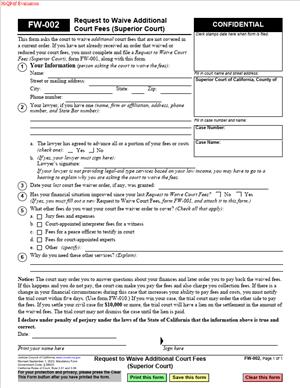
FW-002 – Request to waive Additional Court Fees (Superior Court)
Fill out nowJurisdiction: Country: United States | Province or State: California
FW-002 – Request to Waive Additional Court Fees (Superior Court) is a court form used when you are asking the court to excuse you from paying extra fees that come up later in your case. You may have already received an initial fee waiver. This form is for additional costs that were not covered before.
Court cases often involve more than one payment. Even if you qualified for a fee waiver at the start, new charges can appear as your case moves forward. This form gives you a way to ask the court to extend your financial relief.
If you are representing yourself, unexpected fees can feel overwhelming. Filing this document allows you to formally explain that you cannot afford the added costs. The judge will review your request and decide whether to approve it.
Understanding how this form works helps you avoid delays. If you submit it correctly and on time, your case can continue without interruption due to unpaid fees.
What is FW-002 – Request to Waive Additional Court Fees (Superior Court)?
Clear definition
FW-002 – Request to Waive Additional Court Fees (Superior Court) is a written request submitted to a California Superior Court asking that specific additional court fees be waived. It is used after a case has already started.
This form is not for the first filing fee. It applies when new charges arise, such as fees for a jury, court reporter, motion filing, or other services. You are asking the court to excuse you from paying those new amounts because of financial hardship.
The document becomes part of your case file. A judge or court clerk reviews the information and decides whether you qualify under the court’s standards for fee waivers.
Who typically uses this form?
Self-represented litigants commonly use this form. These are individuals handling their own civil, family, probate, or other Superior Court matters without a lawyer.
It may also be used by people who previously received a fee waiver in the same case. For example, if your initial filing fee was waived but later costs were not automatically covered, you may need to file this additional request.
In some situations, a person whose financial circumstances have changed during the case may use this form. A job loss, medical issue, or other hardship can make it difficult to pay new court charges.
Although attorneys sometimes assist with paperwork, the form is designed so individuals can complete it on their own.
Why might you need this form?
Court cases can generate ongoing expenses. These may include motion filing fees, fees for issuing writs, jury fees, or other procedural costs.
If you do not pay the required fees, the court may delay your request or refuse to process certain filings. That can slow down your case or prevent it from moving forward.
This form gives you a structured way to explain your financial situation. Instead of ignoring the bill or missing a deadline, you submit a formal request for relief.
It also creates a record. By filing the request, you show the court that you are addressing the fee and not simply failing to pay.
Typical real-life scenarios
- You filed a family law case and received a waiver for the initial filing fee. Months later, you need to file a motion that requires an additional filing fee. You cannot afford it, so you submit this form to ask that the new fee be waived.
- You are involved in a civil case and request a jury trial. The court requires advance jury fees. Because your income is limited, you file this document to request that the jury fees be excused.
- You are enforcing a judgment and must pay a fee to issue a writ or other enforcement document. The cost was not covered in your original fee waiver. You use this form to request relief from that new charge.
- Your financial condition has worsened during your case. You were able to manage earlier costs, but you recently lost income. When another required fee appears, you use this form to inform the court that you now qualify for a waiver.
When would you use FW-002 – Request to Waive Additional Court Fees (Superior Court)?
You use this form after your case is already active in a California Superior Court and a new fee becomes due. It applies when the fee is not automatically covered by any prior order.
Often, the need arises when filing additional motions, requesting special court services, or moving your case to the next stage. The court may notify you that payment is required before processing your request.
You may also use it if you previously received a partial fee waiver. In that situation, some fees were covered, but others were not. This form allows you to ask the court to review the remaining charges.
The person filing the request is usually a party to the case. That may be a plaintiff, defendant, petitioner, or respondent. The key factor is that you are responsible for paying the fee and are asking to be excused due to financial hardship.
Timing matters. The form is typically filed before the deadline to pay the additional fee. Submitting it promptly helps avoid delays in hearings or processing.
Legal characteristics of FW-002 – Request to Waive Additional Court Fees (Superior Court)
This form is a procedural request within an existing court case. It does not start a lawsuit or resolve the dispute. Instead, it addresses the financial requirements tied to court services.
For the request to be considered, it must be completed accurately. Courts generally expect full disclosure of income, public benefits, household size, and expenses. Missing or inconsistent information can lead to denial.
The effectiveness of the form depends on the eligibility standards set by court rules. These standards often consider whether you receive certain public benefits, fall below specific income levels, or cannot meet basic household expenses if required to pay the fee.
Common reasons for rejection include incomplete sections, unsigned forms, or failure to provide required financial details. If the court cannot determine your eligibility, it may deny the request or ask for more information.
This document does not erase past unpaid fees automatically. It applies to the specific additional fees listed in the request. Approval is usually limited to those identified charges.
High-level differences can exist between courts in how they review and process fee waivers. Some courts may decide based on the written form alone. Others may set a hearing if more information is needed.
Is it legally binding?
When approved, the court’s order granting the waiver becomes binding within your case. It means you are not required to pay the specified additional fees, unless the court later changes its decision.
If the request is denied, the obligation to pay remains. The court may set a deadline for payment. The denial itself becomes part of the case record.
The form is not a contract between you and another party. It is a request to the court. Its legal effect comes from the judge’s order, not from your signature alone.
If your financial circumstances improve significantly, courts commonly require you to inform them. In some situations, the court may reconsider the waiver if eligibility no longer exists.
How to fill out FW-002 – Request to Waive Additional Court Fees (Superior Court)
Step 1 – Identify your case
At the top of the form, enter the name of the court, the case title, and the case number exactly as they appear on other documents in your file. This connects your request to the correct case. Double-check spelling and numbers to avoid processing delays.
Step 2 – Provide your personal information
Fill in your name, address, and contact information as requested. Use the same information you have provided in prior filings, unless it has officially changed. Consistency helps the court match records.
Step 3 – State the additional fees you want waived
Indicate which specific additional court fees you are asking to have waived. Be clear about the type of fee, such as motion filing fees, jury fees, or other service-related costs. The request should match the actual charges in your case.
Step 4 – Explain your financial situation
Complete the sections that describe your income, public benefits, and household finances. Provide accurate and current information. If the form asks about employment, wages, or government assistance, answer each question fully.
If you have regular expenses that limit your ability to pay, include them where the form allows. The goal is to give the court a clear picture of your financial condition at the time of filing.
Step 5 – Review for completeness
Before signing, read through the entire form. Confirm that no required fields are blank. Make sure numbers are consistent and that your answers are truthful and up to date.
Incomplete forms are a common reason for delay. Taking a few minutes to review can prevent the need to refile.
Step 6 – Sign and date the form
Sign your name where indicated. By signing, you are declaring that the information provided is true and correct to the best of your knowledge. Add the date of signing.
An unsigned form is generally not processed. Your signature gives the court authority to evaluate your request.
Step 7 – File the form with the court
Submit the completed form to the clerk of the same Superior Court handling your case. Filing procedures may vary by location, but the document must be delivered to the court for review.
After submission, the court will review the request and issue a written decision. Keep a copy of everything you file for your records.
Legal terms you might encounter in FW-002 – Request to Waive Additional Court Fees (Superior Court)
- Additional court fees: These are new fees that come up after your initial filing. They can include motion filing fees, jury fees, reporter’s transcript fees, or fees for issuing writs or orders. On this form, you are asking the court to waive these specific future or newly incurred charges.
- Fee waiver order: This is the court’s written decision granting or denying your request. If approved, the order tells the clerk which fees are waived. You must check this order carefully because it may not cover every fee you requested.
- Prior fee waiver: This refers to an earlier court order that waived your initial filing fees. On this form, you typically confirm that you already have a fee waiver in your case and now need coverage for additional costs. The court will often review your existing status before deciding.
- Financial eligibility: This means you qualify for a waiver based on income, public benefits, or inability to pay. Even though you may already have a waiver, the court can reassess your eligibility if your financial situation has changed. The form may require you to confirm that your finances remain the same.
- Case number: This is the unique number assigned to your court case. It connects your request to the correct file. If you enter it incorrectly, the clerk may not be able to process your request.
- Declaration: A declaration is a written statement you sign under penalty of perjury. By signing, you confirm that the information you provided is true and accurate. False statements can lead to penalties and loss of your waiver.
- Penalty of perjury: This means you are legally responsible for the truthfulness of your statements. If the information is knowingly false, you can face legal consequences. Your signature activates this legal obligation.
- Clerk: The clerk is the court staff member who processes filings. The clerk reviews your form for completeness and enters it into the court system. The clerk does not decide your eligibility; a judge typically makes that decision.
- Court order: A court order is a binding written directive issued by a judge. Once signed, it controls what happens next in your case. If your fee waiver is granted, the order directs the clerk not to collect the covered fees.
- Hearing: In some situations, the court may schedule a hearing if it needs more information. You may be asked to explain your financial situation in person. If that happens, you must attend or risk denial of your request.
FAQs
Do I need to complete FW-002 – Request to Waive Additional Court Fees (Superior Court) if I already have a fee waiver?
If your original fee waiver did not cover the new costs you are facing, you may need this form. Review your existing court order carefully. Look for language that lists which fees are waived. If the additional fee is not clearly included, this document is the way you ask the court to extend your waiver to cover it.
What specific fees can I ask the court to waive with this form?
You can request a waiver of fees that arise after your initial filing, such as motion filing fees, jury fees, or other procedural charges. Check the court’s notice or invoice that lists the exact fee being charged. You must clearly identify the type of fee so the court knows what you are asking to have waived.
Do I have to submit updated financial information with this document?
In many cases, you confirm that your financial situation has not improved since your last fee waiver was granted. Read the section that asks about changes in income, employment, or assets. If anything has changed, you must disclose it. The court uses this information to decide whether you still qualify.
Where do I write my case number, and why does it matter?
You enter your case number in the caption area at the top of the form. This section usually includes the court name, parties’ names, and case number. The clerk uses this number to file your request in the correct case file. If the number is wrong or missing, your request may be delayed or rejected.
Who signs this form, and what does the signature mean?
You sign the declaration section. By signing, you state under penalty of perjury that the information is true. If you have an attorney, the attorney may also need to sign in certain circumstances, but you remain responsible for the accuracy of your financial information.
How will I know if the court approved my request?
The court will issue a written order. You should receive a copy showing whether your request was granted or denied. Check the order carefully to see which fees are covered. Keep this document in your records in case the clerk later questions whether a fee applies.
Can the court deny this document even if I previously qualified for a waiver?
Yes. The court can deny your request if your financial situation has improved or if the requested fee is not eligible for waiver. Review the denial notice carefully. It may explain what information was missing or what steps you can take next.
What happens to the public record if my request is approved?
If the court grants your request, the order becomes part of your case file. The record will show that certain additional fees were waived. It does not change the substance of your legal claims, but it does document your financial status for court cost purposes.
Checklist: Before, During, and After FW-002 – Request to Waive Additional Court Fees (Superior Court)
Before
- Review your existing fee waiver order to confirm what is already covered.
- Identify the exact additional fee being charged.
- Confirm your case number and court location.
- Check whether your financial situation has changed since your last application.
- Gather any documents that show income, benefits, or expenses if needed.
- Make sure you have the correct and most current version of the form.
- Read the instructions on the first page carefully.
- Verify the deadline for paying the additional fee.
During
- Enter the court name exactly as it appears on your case documents.
- Write the full names of all parties as listed in the case caption.
- Carefully enter the correct case number.
- Clearly mark or describe the additional fees you want waived.
- Answer all questions about changes in income or assets honestly.
- Do not leave required sections blank.
- Review the declaration language before signing.
- Sign and date the form in the correct location.
After
- Make at least one copy for your personal records.
- File the original form with the court clerk.
- Ask the clerk how you will receive the court’s decision.
- Calendar any hearing date if one is scheduled.
- Monitor your mail or online case portal for updates.
- Keep the signed order in a safe place once received.
- Confirm with the clerk that the waived fees are reflected in your account.
- Follow up promptly if you receive a notice of deficiency or denial.
Common mistakes to avoid with FW-002 – Request to Waive Additional Court Fees (Superior Court)
- Mistake: Assuming your original waiver covers all future fees, which happens because people think one approval lasts forever; this can lead to unpaid balances and delays, so do not forget to review your prior order and confirm coverage.
- Mistake: Entering the wrong case number due to copying from memory; this can cause misfiling or rejection, so do not forget to double-check the number from an official court document.
- Mistake: Failing to disclose changes in income because you believe small changes do not matter; this can result in denial or penalties, so do not forget to report any increase in income or assets.
- Mistake: Leaving sections blank because they seem repetitive; incomplete forms may be returned, so do not forget to answer every required question.
- Mistake: Forgetting to sign under penalty of perjury, often due to rushing; an unsigned form is invalid, so do not forget to sign and date in the correct place.
- Mistake: Not keeping a copy of what you filed, which happens when filing in person; this can create confusion later, so do not forget to make and retain a complete copy.
- Mistake: Missing a scheduled hearing because you assumed the decision would be automatic; this can result in denial, so do not forget to check for hearing notices.
- Mistake: Ignoring a denial notice instead of reviewing the reason; this can stall your case, so do not forget to read the court’s explanation and act promptly.
What to do after filling out FW-002 – Request to Waive Additional Court Fees (Superior Court)
Once you complete the form, slow down and review everything one more time. Small errors can delay processing. Make sure names, dates, and your case number match your other court documents exactly.
- Step 1: Review every page for completeness and accuracy.
- Step 2: Sign and date the declaration section.
- Step 3: Make at least one copy for your records.
- Step 4: File the original with the court clerk, either in person, by mail, or through any available electronic filing system.
- Step 5: Ask the clerk how and when you will receive the court’s decision.
- Step 6: Check your mail, email, or court portal regularly for the order.
- Step 7: Read the court’s order carefully to confirm which additional fees were waived.
- Step 8: Provide a copy of the signed order to any court department that requests payment.
- Step 9: Update your personal case file so you can quickly show proof of the waiver if needed.
- Step 10: Calendar any follow-up dates or hearings listed in the order.
If the court grants your request, confirm that the clerk’s office has removed the charge from your case balance. If you see a remaining balance that should have been waived, contact the clerk promptly with a copy of the order.
If the court denies your request, read the reason stated in the order. You may need to provide more financial information or prepare to pay the fee by a certain deadline. Act quickly so your case does not stall because of unpaid costs.
Staying organized is key. Keep all fee waiver documents together in one folder. That way, if a question arises later about payment, you can immediately show proof of the court’s decision.
Disclaimer: This guide is provided for informational purposes only and is not intended as legal advice. You should consult a legal professional.