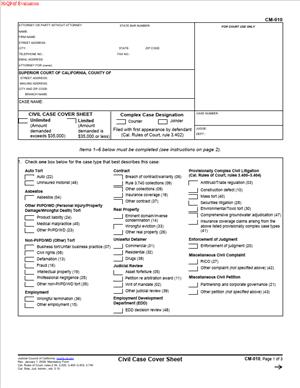
CM-010 – Civil Case Cover Sheet
Fill out nowJurisdiction: Country: United States | Province or State: California
The CM-010 – Civil Case Cover Sheet is one of the first documents you encounter when filing a civil lawsuit in a California court. It may look administrative, but it plays an important role in how your case is processed. Before the court reviews your complaint, it reviews this form.
If you are representing yourself, this form helps the court understand what type of case you are filing. It tells the clerk how to classify your lawsuit and how it should move through the system. Even though it is short, accuracy matters.
You usually file this document at the same time as your complaint or petition. It is not a substitute for your main pleading. Instead, it works as a summary sheet that gives the court essential case information at a glance.
Filling it out correctly can prevent delays. Courts use the information on this form to assign departments, calculate fees, and track case statistics. A mistake here can lead to rejection or require you to correct and refile documents.
Understanding what each section asks for will make the filing process smoother. The rest of this guide explains what the form does, when you use it, and how to complete it step by step.
What is CM-010 – Civil Case Cover Sheet?
Clear definition
The CM-010 – Civil Case Cover Sheet is a standard California court form used in civil cases. It provides a summary of the basic details of your lawsuit. This includes the parties, the type of case, and whether the case is considered complex.
It does not contain the full facts of your dispute. Instead, it categorizes your case based on checkboxes and brief entries. The court relies on this categorization for internal case management.
This form is typically required when you file a new civil complaint in the superior court. It accompanies your main pleading and becomes part of the official court record.
Who typically uses this form?
Most often, the plaintiff or the plaintiff’s attorney completes this form. The plaintiff is the person or business starting the lawsuit. If you are filing on your own without a lawyer, you will likely be the one filling it out.
Attorneys use this form as part of routine filing. Self-represented litigants use it less often, but it is still required in many civil cases. The clerk expects it at the time of submission.
Defendants generally do not complete this form unless they are filing a cross-complaint that requires a separate cover sheet. In most cases, it is associated with the initial filing of the lawsuit.
Why might you need this form?
You need this form when starting certain types of civil cases in the California superior court. It helps the court determine how to process your filing from the beginning.
The information you provide affects filing fees and case classification. For example, some categories may involve different fee structures or procedures. The form helps the clerk apply the correct rules.
It also identifies whether your case qualifies as “complex.” Complex cases often involve large numbers of parties, extensive evidence, or special case management procedures. Marking this correctly affects how your case is assigned and scheduled.
Without this form, your filing may be incomplete. In many courts, that means your complaint will not be accepted for processing until the cover sheet is properly submitted.
Typical real-life scenarios
- You are suing a contractor for breach of contract after incomplete work on your home. When you file your complaint for damages in the superior court, you include this cover sheet to classify the case as a contract matter.
- You are filing a personal injury lawsuit after a car accident. Along with your complaint describing the accident and injuries, you complete the cover sheet to identify the case as a personal injury action.
- You are a small business owner pursuing unpaid invoices from a client for an amount above the small claims limit. Because the case is filed as a civil lawsuit, you complete the cover sheet to identify it as a collections or contract dispute.
- You are filing a complaint involving allegations of fraud in a business transaction. The form allows you to select the category that best describes fraud or business tort claims so the court can properly track and manage the case.
When would you use CM-010 – Civil Case Cover Sheet?
You use this form at the very beginning of a civil case. It is typically submitted at the same time as your complaint or petition. The clerk reviews it when you first file your documents.
If you are the plaintiff, you complete and submit it as part of your initial filing package. This usually includes your complaint, summons, and any required attachments. The cover sheet sits on top of or alongside these documents.
In some situations, a cross-complainant may also need to file a cover sheet when initiating a cross-action. This depends on how the court processes cross-complaints and whether a separate classification is required.
You would not use this form for every type of court matter. For example, family law, probate, or small claims cases often use different forms and procedures. The cover sheet discussed here is designed for general civil cases in the superior court.
If you are unsure whether your case qualifies as a civil case requiring this form, reviewing the type of complaint you are filing can help clarify. Most general civil lawsuits for money damages, contract disputes, or tort claims involve this cover sheet.
Legal characteristics of CM-010 – Civil Case Cover Sheet
This form is administrative in nature. It supports the court’s case management system. It does not contain the legal arguments or detailed facts of your dispute.
For the form to be effective, it must be complete and consistent with your complaint. The case type you select should match the claims described in your main pleading. Inconsistencies can raise questions and may require correction.
Common issues that cause problems include checking the wrong case category, leaving required fields blank, or failing to sign the form when a signature is required. Clerks may reject incomplete submissions or request amended paperwork.
The form may also ask whether your case is complex. Marking a case as complex can change how it is handled. Incorrectly designating a case as complex, or failing to do so when appropriate, may affect scheduling and case management.
Although this form is specific to California, procedures can vary slightly between counties. Some courts may have local requirements related to filing methods or additional documents. The core purpose of the form remains the same statewide.
It is important to understand what this document does not do. It does not start your lawsuit by itself. It does not serve as notice to the other party. It does not establish the truth of your claims. Your complaint and proper service of process perform those functions.
Is it legally binding?
The CM-010 – Civil Case Cover Sheet is not a contract between parties. It does not create rights or obligations in the way an agreement does. Its primary function is administrative classification.
However, the information you provide is part of the court record. You are representing that the selections you make are accurate to the best of your knowledge. Providing incorrect information may lead to delays or procedural complications.
In that sense, it carries procedural weight. The court relies on it to determine fees, case tracks, and statistical reporting. Accuracy matters because it affects how your case moves forward.
The form becomes effective when it is filed and accepted by the court clerk along with your complaint. Once filed, it helps shape the procedural path of your lawsuit, even though it does not determine the outcome of your claims.
How to fill out CM-010 – Civil Case Cover Sheet
Step 1 – Enter attorney or party information
At the top of the form, fill in your name, address, telephone number, and any other requested contact details. If you are representing yourself, you enter your own information and indicate that you are self-represented. If an attorney represents you, the attorney’s details appear here instead.
Step 2 – Provide court information
Identify the superior court where you are filing the case. Enter the county name and the branch court address, including street address and mailing address if requested. This information must match the court where your complaint is being submitted.
Step 3 – List the case title
Write the names of the parties exactly as they appear on your complaint. The plaintiff’s name appears first, followed by the defendant’s name. Consistency is important so the court can match the cover sheet to your main filing.
Step 4 – Leave the case number blank if not yet assigned
If you are filing a new case, the clerk will assign a case number after submission. Leave the case number field blank unless you are instructed otherwise. If a number has already been assigned, enter it exactly as provided.
Step 5 – Select the case type category
Review the list of case categories carefully. Choose the one that most closely matches the primary claim in your complaint. This may include contract, personal injury, property damage, fraud, or other civil categories. Select only the category that best reflects the main issue in your lawsuit.
Step 6 – Indicate whether the case is complex
The form asks whether your case is complex. Read the listed factors, such as the number of parties or anticipated motions. Mark the appropriate box based on whether those factors apply. If the case is marked as complex, additional case management procedures may follow.
Step 7 – State the amount demanded if required
Some versions of the form request information about the amount of damages demanded. Provide the general range or classification if the form asks for it. Ensure this aligns with the amount stated in your complaint.
Step 8 – Review for consistency with your complaint
Before signing, compare the form to your complaint. Confirm that party names, case type, and other details match exactly. Small inconsistencies can create confusion in the clerk’s office.
Step 9 – Sign and date the form
If a signature line is included, sign and date the form where indicated. The signature confirms that the information provided is accurate to the best of your knowledge. Use the same name format that appears elsewhere in your filing.
Step 10 – Submit your initial filing
Include the completed cover sheet with your complaint and other required documents at the time of filing. Ensure it is properly assembled according to the court’s formatting requirements so the clerk can process your submission without delay.
Legal terms you might encounter in CM-010 – Civil Case Cover Sheet
- Unlimited Civil Case: This refers to a case where the amount in controversy exceeds a specific monetary threshold set by the court system. On this form, you select this option if your complaint seeks damages above that limit or requests certain types of relief, such as declaratory or injunctive relief. Checking the correct box affects filing fees and how the court manages your case.
- Limited Civil Case: A limited civil case involves claims under a set monetary cap. When you mark this category on the form, you are telling the court your damages do not exceed that limit. This choice impacts filing fees, discovery rules, and appeal rights.
- Complex Case: A complex case usually involves many parties, extensive evidence, or complicated legal issues. The form asks whether your case should be designated as complex. This designation may result in assignment to a specialized judge and different case management procedures.
- Amount Demanded: This is the total monetary compensation you are asking the court to award. On the form, you may need to indicate whether the amount exceeds certain thresholds. Your selection must match the dollar amount stated in your complaint.
- Cause of Action: A cause of action is the legal basis for your lawsuit, such as breach of contract or personal injury. In this document, you identify the primary type of case by selecting from the listed categories. Your selection should reflect the main legal claim in your complaint.
- Declaratory Relief: This is a request for the court to determine the rights and obligations of the parties without awarding damages. If your complaint seeks this type of relief, you must ensure the case type selection aligns with that request.
- Injunctive Relief: Injunctive relief asks the court to order someone to do or stop doing something. If you request this in your complaint, your case may qualify as unlimited depending on the nature of the order sought. Your selection on the form should be consistent with your requested remedy.
- Cross-Complaint: A cross-complaint is a claim filed by a defendant against the plaintiff or another party in the same case. If you are filing a cross-complaint, you may also need to complete this document. The case classification must align with the original complaint unless the court directs otherwise.
- Case Management: Case management refers to the court’s process for monitoring deadlines, hearings, and procedural steps. The selections you make on this form help the court assign timelines and determine how actively it will supervise the case.
- Venue: Venue refers to the proper geographic location where your case should be heard. While this document does not determine venue by itself, the court information you provide must match the correct courthouse and county for your case.
FAQs
Do I need to file the CM-010 – Civil Case Cover Sheet if I am representing myself?
Yes. If you are filing a new civil complaint, you typically submit this form with your initial filing, even if you do not have a lawyer. The court uses this document to classify your case at intake. If you leave it out, the clerk may reject or delay your filing.
What happens if I choose the wrong case category on this form?
The clerk will not usually correct it for you. If your selection conflicts with your complaint, the court may issue a notice, require clarification, or reclassify the case. That can delay scheduling and may affect filing fees. Always compare your selected category to the actual claims and dollar amounts in your complaint before submitting.
Do I write the case number on the document?
If you are filing a brand-new case, leave the case number blank. The court assigns it after filing. If you are submitting this form later in the case, use the exact case number already assigned. Make sure the number matches the court’s records exactly, including all letters and digits.
How does this form affect filing fees?
Your selections about limited or unlimited status directly relate to filing fees. The clerk calculates fees based on the case classification shown on this document. If your complaint seeks damages above the limited threshold but you mark limited, you may be required to pay the difference or amend the classification.
Does this document become part of the public record?
Yes. Once filed, it becomes part of the court file. The case type and amount category you select will appear in the court’s docket information. Review it carefully before filing because corrections require additional paperwork.
Who is allowed to sign the form?
The person filing the complaint or their attorney must sign. If you are self-represented, you sign your own name. Make sure the name you sign matches the name listed in the complaint so the court record remains consistent.
What if my case involves several types of claims?
Choose the category that best describes the primary cause of action. This form is designed for classification, not for listing every claim. Your complaint provides a detailed breakdown of each cause of action.
Can I correct an error on the CM-010 – Civil Case Cover Sheet after filing?
Yes, but you must act promptly. You may need to file an amended version or a separate notice explaining the correction. Once accepted, the updated information replaces the prior classification in the court record.
Checklist: Before, During, and After CM-010 – Civil Case Cover Sheet
Before
- Review your completed complaint and confirm the total amount you are requesting.
- Determine whether your case qualifies as limited or unlimited based on your damages and requested relief.
- Identify the primary cause of action in your complaint.
- Confirm the correct courthouse and county for filing.
- Verify the full legal names of all parties as listed in your complaint.
- Check current filing fees associated with your case classification.
- Prepare any required additional civil filing forms required by the court.
During
- Enter your name, address, phone number, and email clearly and legibly.
- Provide the correct court name and branch location.
- Copy the exact case title from your complaint.
- Leave the case number blank if this is a new filing.
- Select only one primary case type that best matches your complaint.
- Mark has a limited or unlimited status consistent with your damages request.
- Review every checked box for accuracy before signing.
- Sign and date the form in the designated area.
After
- Make at least one copy for your personal records.
- Attach the form to the front of your complaint when submitting.
- Pay the correct filing fee based on the classification.
- Confirm that the clerk stamps your copy “Filed.”
- Check the assigned case number once issued.
- Store the filed copy in a secure and organized case file.
- Update your internal records with the case number and filing date.
- Calendar any deadlines provided by the court after filing.
Common mistakes to avoid with CM-010 – Civil Case Cover Sheet
- Mistake: Selecting limited when your complaint requests damages above the threshold, which often happens when you miscalculate total losses; this can lead to reclassification, fee adjustments, and delays, so do not forget to total all claimed damages before choosing.
- Mistake: Checking multiple primary case categories because your case involves several issues; this happens from uncertainty, but it can confuse case assignment, so do not forget to choose the single main cause of action.
- Mistake: Writing an incorrect or incomplete party name, often due to abbreviations or typos; this can create inconsistencies in the court record, so do not forget to copy names exactly as they appear in the complaint.
- Mistake: Filling in a case number before one is assigned, which sometimes occurs when reusing a template; this may cause filing rejection, so do not forget to leave it blank for new cases.
- Mistake: Forgetting to sign and date the form, usually due to focusing on the complaint; unsigned forms can be rejected by the clerk, so do not forget your signature.
- Mistake: Submitting the form without reviewing it against the complaint, often because of time pressure; mismatched information can trigger court notices, so do not forget a final side-by-side comparison.
- Mistake: Assuming the clerk will fix classification errors for you, which happens when self-represented filers rely on court staff; this can result in delays or added costs, so do not forget that accuracy is your responsibility.
- Mistake: Failing to keep a filed copy, often because you believe the court keeps everything; without your own copy, you may struggle to confirm what was submitted, so do not forget to retain stamped records.
What to do after filling out CM-010 – Civil Case Cover Sheet
Once you complete the form, treat it as part of your official filing packet. It should travel with your complaint and any required civil filing documents. Do not submit it separately unless the court specifically instructs you to do so.
- Step 1: Review the form side by side with your complaint and confirm that the case title, party names, and amount demanded match exactly.
- Step 2: Make at least two copies of the completed form—one for your records and one for service if needed.
- Step 3: Assemble your filing packet with the cover sheet placed on top of your complaint, followed by any required attachments.
- Step 4: Submit the packet to the appropriate civil clerk’s office, either in person, by mail, or through an approved electronic filing system if available.
- Step 5: Pay the filing fee that corresponds to your case classification, or submit a fee waiver request if applicable.
- Step 6: Obtain confirmation of filing. If filing in person, ask the clerk to stamp your copy. If filing electronically, download and save the confirmation receipt.
- Step 7: Write down the assigned case number immediately and update it on your copies and internal records.
- Step 8: Create a dedicated case folder—paper or digital—and store the filed cover sheet, complaint, and proof of payment together.
- Step 9: Review any notices from the court regarding case management conferences or deadlines and calendar them right away.
- Step 10: If you later amend your complaint in a way that changes the case classification or amount demanded, review whether an updated cover sheet must be filed to reflect those changes.
By staying organized and consistent, you reduce delays and help the court process your case efficiently.
Disclaimer: This guide is provided for informational purposes only and is not intended as legal advice. You should consult a legal professional.