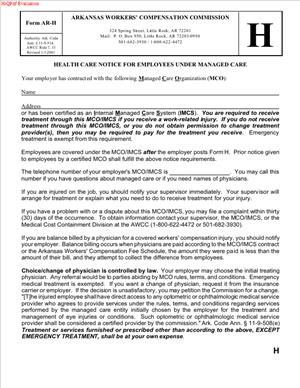
Form AR-H – Health Care Notice for Employees Under Managed Care
Fill out nowJurisdiction: Country: United States | Province or State: Arkansas
What is a Form AR-H – Health Care Notice for Employees Under Managed Care?
Form AR-H is the Arkansas Workers’ Compensation Commission’s standardized employee notice for workplaces that deliver workers’ compensation medical care through a certified managed care plan. It is a plain-language summary that tells injured employees how to get medical treatment within the employer’s workers’ compensation managed care network, who to contact, and what rules apply when selecting or changing doctors.
You use this form to make sure employees know the first steps to take after a work injury. It also identifies the managed care organization (MCO) or plan that administers treatment and directs employees to the correct contact numbers. In short, Form AR-H is the “front door” to care under a managed care arrangement. It explains network requirements, emergency exceptions, and the basic process for authorization and referrals.
Who typically uses this form?
Employers and insurance carriers/third-party administrators use it to notify employees. Human resources managers, safety coordinators, and risk managers are usually the ones who complete, post, and distribute it. Employees receive and rely on the notice after a workplace injury. The Commission expects employers operating under managed care to provide clear, timely notice, and this form meets that requirement.
You need this form if your workers’ compensation medical care is provided through a Commission-certified managed care plan. If you are not under managed care, this notice is not the right fit. But when managed care applies, Form AR-H is how you tell employees which network applies, where to go, and how to avoid unauthorized treatment. Without a proper notice, you risk confusion, delays in care, billing disputes, and avoidable denials.
Typical usage scenarios
- A manufacturing plant that uses a managed care plan posts the Form AR-H at entrances, the break room, and near time clocks. Every new hire receives a copy during onboarding. When an injury occurs, HR gives the employee a completed Form AR-H so they can contact the right clinic.
- A multi-location retailer updates its Form AR-H when it switches managed care vendors. The updated notice shows the new 24/7 nurse line and the nearest in-network occupational clinic for each store.
- A construction company with remote job sites attaches a site-specific page to the Form AR-H, identifying the nearest in-network urgent care and the after-hours contact. Field supervisors keep laminated copies in work trucks.
The form is a notice, not a narrative. It includes the employer and carrier/TPA information, the managed care plan name, and clear instructions for emergencies and routine care. It should be visible and easy to follow for any employee, on any shift.
When Would You Use a Form AR-H – Health Care Notice for Employees Under Managed Care?
Use Form AR-H whenever your organization has an Arkansas workers’ compensation managed care arrangement in place. You should complete it during program rollout, at renewal, or any time there is a change to your managed care plan, claim contact information, or after-hours procedures. Post it prominently at each Arkansas worksite and provide a copy to every employee. When a work injury occurs, hand the employee the completed notice and walk through the first steps together.
Typical users include employers, HR managers, safety leaders, and claim administrators. Supervisors and on-site medics also need to know what the notice says, so they can point injured employees to the correct care without delay. Carriers and TPAs often help draft and update the form, but the employer is the face of the notice in the workplace.
You would also use the form in specific operational moments:
- During onboarding. New hires get the notice with other required employment forms. This sets expectations before an injury occurs.
- After a workplace injury. You give the employee the notice and highlight who to call and where to go for same-day care, including after-hours options.
- When you open a new facility or move locations, update the nearest in-network clinics and the posted copy at the new site.
- When your managed care plan or TPA changes. Replace all posted copies and reissue the notice to employees to avoid routing errors.
- For remote or hybrid employees who work in Arkansas. Provide the form electronically and make sure it includes clear guidance on how to access in-network care near their home or assigned work area.
If your workforce speaks multiple languages, use translated versions so employees can understand it on first read. The purpose is to guide correct action in the first minutes after a workplace injury. Clear notice helps employees get prompt treatment and helps you avoid out-of-network charges.
Legal Characteristics of the Form AR-H – Health Care Notice for Employees Under Managed Care
Form AR-H is not a contract. It is a legally recognized employee notice under Arkansas workers’ compensation rules for employers who provide medical care through a certified managed care plan. While the form itself does not create or limit benefits, proper use of the notice supports the employer’s right to direct care within the managed care network. It also helps preserve defenses to non-network treatment that was not authorized, except in emergencies.
Enforceability rests on compliance with Commission rules governing managed care, notice, and provider selection. When you post and distribute the Form AR-H as required, you give employees clear instructions. That transparency matters in disputes about whether a provider was authorized, whether preauthorization was needed, or whether the employee could change physicians without approval. If you fail to give adequate notice, you may lose the ability to insist on managed care network use or to deny payment for unauthorized treatment that was reasonable under the circumstances.
The form also aligns with the change-of-physician process. In Arkansas, employees generally cannot change treating physicians without proper authorization, except for true emergencies or other limited circumstances. The notice explains who the first treating provider should be and how to request changes or referrals within the managed care plan. This reduces friction and keeps care coordinated.
Emergency care is always an exception to network rules. The notice must make that clear. Employees can and should seek immediate emergency treatment when needed. After stabilization, care transitions into the managed care network, and the notice guides that transition.
Other legal considerations you should keep in mind:
- Accuracy. Outdated contact information can lead to delays and unauthorized care. You must keep the notice current.
- Accessibility. The notice should be posted where employees will see it and be provided in a language they understand, so the notice is meaningful.
- Retaliation bar. Employees have a right to report injuries and seek medical treatment. The notice should facilitate, not chill, that right.
- Privacy. The form is a general notice. Do not write medical details on it. Keep any signed acknowledgments or distribution logs in the claim or personnel file.
- Recordkeeping. Retain copies of posted and distributed notices, including effective dates, in case the Commission or a court later examines your notice practices.
In practice, Form AR-H streamlines care and reduces disputes. It sets expectations for the first visit, authorization, referrals, pharmacy, and imaging. When you follow the notice requirements, you show good-faith compliance with the Commission’s framework for managed care.
How to Fill Out a Form AR-H – Health Care Notice for Employees Under Managed Care
You complete the Form AR-H before an injury happens, then keep it posted and ready to hand out. The goal is simple: give employees clear directions to the right care on the first try. Follow these steps and tailor details to each worksite.
1) Gather required information
- Employer information. Legal name, any DBA used on-site, physical address of the Arkansas location(s), main phone number, and the name and title of the employer representative responsible for workers’ compensation matters.
- Insurance carrier or third-party administrator. Name, claim reporting phone number, mailing address for claims, and any designated fax or email used for authorizations. Include the 24/7 injury reporting number if different.
- Managed care plan details. Name of the managed care organization or plan that is certified to provide workers’ compensation managed care in Arkansas. Include the plan’s member services number, after-hours nurse line, and instructions for selecting a primary treating provider.
- Network access points. Identify the nearest in-network occupational health clinic(s), urgent care center(s), and hospital(s) by location. If your plan uses a provider panel or directory, note how an employee obtains that list on request.
- Emergency guidance. Write a simple sentence that emergency care comes first. After stabilization, employees must coordinate ongoing care through the managed care plan.
- Language access. If you have translated versions, attach them. If interpreter services are available through the plan or facility, note the phone number.
- Effective date and revision control. Decide the “effective as of” date and set a reminder to review quarterly or when any details change.
2) Complete the employer section
- Employer name and address. Use the exact legal name found on your workers’ compensation policy. For multi-site employers, create site-specific copies. Put the physical address and a local phone number that employees recognize.
- Contact person. List the title (for example, “HR Manager,” “Safety Supervisor,” or “Workers’ Compensation Coordinator”) and a direct phone number. Employees should reach a human quickly if they have questions after an injury.
- Shift coverage. If your operations run evenings or weekends, add a line telling employees whom to contact after hours on-site, such as a supervisor’s phone or a security desk that can help coordinate care.
3) Complete the carrier/TPA section
- Carrier/TPA name. Spell out the full legal name.
- Claims intake. Provide a telephone number and hours. If the carrier/TPA maintains a 24/7 reporting line, list it prominently. Include the claim mailing address and any dedicated authorization email, if the form provides space for it.
- Claim number guidance. Add a plain note: “If a claim number is not yet assigned, provide your supervisor’s name and work location when calling.” This helps providers register the visit without delay.
4) Complete the managed care plan section
- Plan/MCO name. Use the official name of the plan as certified by the Commission.
- Member services line. List the general member services number and the after-hours nurse line if different. If the plan offers telehealth triage or case management, note the number or the instruction to ask for triage.
- First treating provider rule. State clearly whether the plan requires the employee to call the nurse line first, report to a designated clinic, or choose from a panel. Use plain language, for example: “For non-emergency injuries, call the nurse line before visiting a clinic. They will direct you to an in-network provider.”
- Provider selection. If the form includes a field to list panel physicians or preferred clinics, enter the nearest options by name and address. If the plan requires selecting a primary treating provider, add: “You must select a primary treating provider from the plan’s network. Ask member services for help if needed.”
- Referrals and preauthorization. Add a concise statement: “Referrals to specialists and certain services may require preauthorization. Your treating provider will coordinate authorization with the plan.”
5) Draft the emergency and after-hours instructions
- Emergency. Write a single sentence: “In a life-threatening emergency, call 911 or go to the nearest emergency room.” Follow with: “After stabilization, tell the provider this is a work injury and notify the plan using the number above.”
- After-hours. If clinics are closed, give a clear next step: “If the injury is not an emergency and occurs after hours, call the nurse line for direction to the appropriate in-network facility.”
6) Include pharmacy, diagnostics, and therapy guidance if applicable
- Pharmacy. If your plan uses a first-fill program or specific pharmacy network, add: “Prescription medications must be filled at an in-network pharmacy. Ask your provider or call member services for locations.”
- Diagnostics. For imaging or lab work, note: “Your provider will arrange in-network imaging and lab services. Preauthorization may be required.”
- Physical therapy. If a designated therapy network exists, add: “Physical therapy must be scheduled with in-network providers. Your treating provider will refer you.”
7) Explain the change-of-physician process
- Keep it simple and accurate. For example: “Do not change treating physicians without approval from the managed care plan or the Commission, except in an emergency. Contact member services if you believe a change is needed.” This aligns expectations without legal jargon.
8) Add reporting instructions and employee responsibilities
- Injury reporting. Include a straightforward line: “Report the injury to your supervisor as soon as possible and no later than the end of your shift when practical.”
- Identification at the clinic. Add: “Tell the clinic this is a work injury under our managed care plan. Provide the employer name and the claim reporting number listed above.”
9) Signature, date, and posting
- Employer representative signature. Sign and date the form to confirm accuracy. Include printed name and title.
- Effective date. Enter the date the notice becomes active. If you revise the form, change the effective date, and replace all posted copies.
- Posting. Post at all Arkansas worksites where employees congregate, including entrances, break areas, and near timekeeping stations. Ensure visibility on all shifts.
- Distribution. Provide a copy to each employee during onboarding and after any material changes. Keep extra copies in first-aid kits and supervisor binders. For remote workers, distribute electronically and confirm receipt.
10) Recordkeeping
- Retain evidence of posting and distribution. Keep a copy of the signed notice, posting locations, and dates. If you use translated versions, keep those too.
- Audit and refresh. Review quarterly or whenever the carrier, TPA, clinics, or phone numbers change. Out-of-date notices cause care delays and billing issues.
11) Site-specific customization
For employers with multiple Arkansas locations, attach a short site sheet to each posted notice:
- The two closest in-network clinics with addresses and hours.
- The nearest emergency room.
- Parking or gate instructions if the clinic is on a campus.
- Any plant nurse station or first-aid room hours and phone number.
12) Employee acknowledgment (if your practice uses one)
While the form is a notice, many employers add an acknowledgment page for onboarding:
- Employee printed name.
- Employee signature and date.
- Worksite/location and supervisor name.
File acknowledgments in the personnel file or claim file. This helps show the employee received meaningful notice before an injury occurred.
Practical example
Imagine a warehouse with shifts running 24/7. Your completed Form AR-H lists the managed care plan name, the 24/7 nurse line, and two in-network clinics—one open weekdays, one open weekends. The notice tells employees to call the nurse line first for non-emergencies and go to the nearest emergency room for emergencies. A worker strains a shoulder at 10 p.m. on Saturday. They read the posted notice, call the nurse line, and get directed to the weekend clinic. The clinic confirms managed care coverage using the carrier’s number on the notice, treats the injury, and sends a claim to the TPA. Care stays in network, the claim starts smoothly, and the employee gets timely treatment.
Common errors to avoid
- Leaving blanks. Every field should be complete and readable. Unfilled fields force guesswork during a stressful moment.
- Using outdated clinics or numbers. Confirm clinic hours and phone numbers before posting. Update immediately after any change.
- One-size-fits-all across locations. Employees need the nearest in-network option, not a clinic 50 miles away.
- Overloading the notice with jargon. Keep sentences short. Use direct instructions and emphasize the first steps.
- Mixing claim details. Don’t write private medical information on the posted notice. Keep the notice general and instructional.
Final check before posting
- Read the notice as an injured employee. Can you answer, in 30 seconds, “Who do I call?” and “Where do I go?”
- Verify emergency and after-hours pathways are unambiguous.
- Confirm the managed care plan’s member services and nurse line work from a mobile phone on-site.
- Ensure supervisors know the process and can explain it consistently.
By completing and maintaining Form AR-H properly, you give employees a clear path to care and protect your ability to coordinate treatment within the managed care network. Keep it current, keep it visible, and keep it simple.
Legal Terms You Might Encounter
- Managed care means your employer uses a network of approved medical providers for work injuries. Form AR-H explains how that network works for you. It tells you who you can see, what happens in an emergency, and how to change doctors if needed.
- A Managed Care Organization, often called an MCO, is the group that runs the network. It sets the rules for choosing doctors, referrals, and follow-ups. When you sign Form AR-H, you acknowledge you’ve been told about your employer’s MCO and how to use it.
- A network provider is a doctor, clinic, or hospital in the MCO’s approved list. The form highlights that you’re expected to use network providers for non-emergency care. If you go outside the network without permission, treatment may not be covered.
- An authorized treating physician is your main work-injury doctor in the network. This doctor directs your care, orders tests, and determines work restrictions. Form AR-H explains how to select or be assigned this physician and how referrals are handled.
- A primary care provider, sometimes called a gatekeeper physician, is the first doctor you see in the managed care system. This physician may coordinate all specialty referrals. If Form AR-H asks you to select a primary provider, pick someone in the network and note any provider ID number if the form requires it.
- Change of physician is the process of switching your treating doctor after your initial choice or assignment. The form describes your ability to request a change and what steps you must take. It also warns that changing doctors without approval can jeopardize payment for care.
- Emergency care covers immediate treatment when a delay would risk serious harm. Form AR-H clarifies that you can go to the nearest emergency room for urgent needs, even if it’s out of network. Once stable, you must return to the network for ongoing care.
- Preauthorization, sometimes called utilization review, is approval you need before certain treatments or tests. The form may point you to the contact for preauthorization and explain how requests are reviewed. If preauthorization is required and you skip it, the bill may be denied.
- A compensable injury is an injury or illness that qualifies for workers’ compensation benefits. The form presumes you are reporting or treating a compensable injury within the managed care system. If the injury isn’t accepted, coverage for treatment may be disputed.
- A claims administrator or adjuster manages your claim on behalf of your employer or their insurer. Form AR-H usually lists a phone number or contact point so you know where to call for questions about providers, authorizations, or disputes. Keep that contact handy.
FAQs
Do you have to sign if you haven’t seen a doctor yet?
Yes. The form is a notice about how you get medical care if you’re hurt at work. Signing shows you received the information. It doesn’t confirm that an injury happened or that you agree with any diagnosis. It simply acknowledges you understand the managed care rules.
Do you have to use a network provider for your first visit?
In an emergency, no. Get urgent care wherever you need it. For non-emergencies, yes. Use the network unless you get written permission to go out of network. If you’re unsure whether it’s an emergency, prioritize your health and get immediate care, then inform the claims contact.
Do you get to choose your doctor?
Often, yes, within the network. Some programs let you pick a primary treating physician, while others assign one. If you want to switch later, follow the change-of-physician process outlined in the notice. Always confirm the doctor is in network before you schedule.
Do you need to complete this form if your employer doesn’t have managed care?
If your employer isn’t under managed care, they should not ask you to sign a managed care notice. If you’re unsure, ask your HR contact or the claims administrator whether managed care applies to your worksite. Use the provider options that apply to your situation.
Do you need preauthorization for tests or physical therapy?
Possibly. Many plans require preauthorization for advanced imaging, surgery, injections, or extended therapy. The notice tells you who to contact to verify authorization. Don’t schedule higher-cost services until you or your provider confirms approval.
Do you lose your right to request a change of physician if you sign?
No. Signing the notice doesn’t waive your rights. It explains how to use the managed care system, including how to request a change of physician. Follow the steps in the notice and use the correct contact for requests.
Do you have to pay out of pocket if you accidentally see an out-of-network provider?
You could. If you see a provider outside the network without authorization (and it’s not an emergency), the bill may be denied. Call the claims contact listed on your notice as soon as you realize the mistake. Ask about options to transition your care into the network.
Do you need to file this form with a state agency?
In most cases, no. This notice is typically exchanged and retained by you and your employer or claims administrator. Keep a personal copy. If you are told to submit it elsewhere, follow those instructions and document when and how you delivered it.
7. Checklist: Before, During, and After the Form AR-H – Health Care Notice for Employees Under Managed Care
Before signing: gather details and confirm the basics
- Your full legal name and updated contact information.
- Your job title, department, and work location.
- Your injury date, body part(s) affected, and brief description (if already injured).
- Any prior treatment already received for this injury, and where it occurred.
- A list of medications or medical conditions your provider may need to know.
- The correct claims contact information is provided by your employer.
- The network provider directory or instructions to access it.
- Whether you must select a primary treating physician now or later.
- Any deadlines for reporting injuries or choosing a doctor?
- Who receives the signed notice and how (email, portal, or physical copy).
During signing: verify these sections for accuracy
- Your identifying information matches your records, including spelling.
- The date of your acknowledgment is correct and legible.
- The injury details are consistent with your incident report (if applicable).
- The managed care rules are clearly stated, including emergency care.
- The change-of-physician process is explained and includes a contact.
- Whether preauthorization requirements are listed or where to find them.
- Any requirement to select a primary physician is addressed now if needed.
- The claims contact name, phone, and email are complete and readable.
- Any employer or administrator signatures or stamps required are present.
- The form version or effective date aligns with what your employer uses.
After signing: file, notify, and store
- Deliver the signed notice to your employer or claims contact as instructed.
- Keep a complete copy for your records. Use a secure digital folder if possible.
- Save the provider directory or link so you can verify in-network status later.
- Add the claims contact details to your phone and email address book.
- If you selected a primary doctor, confirm the first appointment and bring the notice.
- If you received emergency care out of network, notify the claims contact immediately and ask about transitioning care.
- If details change (address, phone, treating physician), update the claims contact and retain confirmations.
- If you are asked for an additional acknowledgement or addendum, sign and store that with your copy of the notice.
Common Mistakes to Avoid
Don’t forget to confirm network status before you book.
- Consequence: Out-of-network care without authorization may lead to denied bills. Always verify the provider is in network, especially for specialists.
Don’t skip the change-of-physician process.
- Consequence: Switching doctors informally can interrupt care and payment. Use the process described in the notice and wait for approval.
Don’t delay reporting your injury while you search for a doctor.
- Consequence: Late reporting can stall your claim and delay treatment. Report the injury promptly, then choose a network provider as instructed.
Don’t assume emergency rules cover routine visits.
- Consequence: Non-emergency treatment outside the network may not be paid. After stabilization, return to in-network care for follow-ups.
Don’t ignore preauthorization requirements.
- Consequence: Imaging, surgery, or therapy done without prior approval can trigger denials. Ask your provider and claims contact before scheduling.
What to Do After Filling Out the Form
Deliver the signed notice to the right place.
- Use your employer’s stated delivery method. That could be a portal, secure email, or hand delivery.
- If you send a digital copy, keep your sent email and any confirmation receipts.
Document your provider plan.
- If you selected a primary treating physician, write down their name, address, and appointment date.
- If you were assigned a doctor, confirm network participation and scheduling instructions.
Coordinate authorizations.
- Ask your treating provider’s office to confirm whether preauthorization is needed for tests or referrals.
- Provide the claims contact and claim number so approvals route correctly.
Transition from emergency to network care.
- If you received emergency treatment, alert the claims contact right away.
- Request help transferring records and arranging in-network follow-up.
Monitor communications.
- Watch for emails or mail about network rules, approvals, or appointments.
- Respond promptly to requests for information to avoid delays in care.
Update when circumstances change.
- If your address or phone changes, inform the claims contact and your treating provider.
- If you need to request a change of physician, follow the process in your notice and keep copies of the request and approval.
Maintain a clean record trail.
- Store the signed notice, provider list, appointment confirmations, and any authorization letters together.
- Keep a simple treatment log: dates, providers, services, and outcomes. This helps you track care and address billing questions quickly.
Know when to request help.
- If you can’t find an in-network specialist, tell the claims contact and ask for options.
- If a procedure is delayed for lack of preauthorization, ask what documentation is missing and who must submit it.
Prepare for return-to-work coordination.
- Ask your treating physician for clear work restrictions in writing.
- Share restrictions with your supervisor and HR so that modified duty can be arranged, if available.
Stay consistent with the managed care rules.
- Use network providers for ongoing care unless you receive written authorization to go out of network.
- Keep the notice accessible so you can reference contacts, rules, and steps at any point in your treatment.
Disclaimer: This guide is provided for informational purposes only and is not intended as legal advice. You should consult a legal professional.