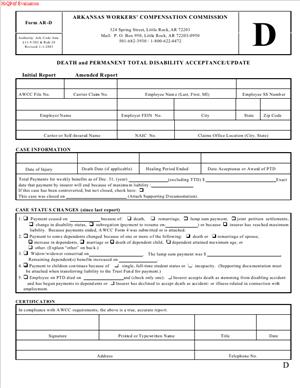
Form AR-D – Death and Permanent Total Disability Acceptance/Update
Fill out nowJurisdiction: Country: United States | Province or State: Arkansas
What is a Form AR-D – Death and Permanent Total Disability Acceptance/Update?
Form AR-D is the official Arkansas form used to accept and report benefits for a work-related death or a permanent total disability. You use it to notify the state that you accept liability, set the compensation rate, and identify who is being paid. You also use it to update the record when something changes, like a dependent aging out or a benefit rate correction.
In Arkansas, work injuries and occupational diseases are handled through the workers’ compensation system. Death benefits go to eligible dependents. Permanent total disability benefits go to the injured worker if they cannot earn meaningful wages. Form AR-D tells the state and all parties that you have evaluated the claim and will pay the correct benefits. It also keeps the file current over time.
Who typically uses this form?
Insurers, third-party administrators, and self-insured employers complete and file it. Defense counsel may prepare it for signature. Claimant attorneys often review it for accuracy, but they do not file it. Dependents or injured workers do not complete this form.
Why would you need this form?
You need it when you accept that a work injury caused a death, or that an injured worker is permanently and totally disabled. You also need it when dependents change, when the compensation rate changes, or when you reach a statutory threshold affecting who pays next. In short, you use it to document acceptance and keep benefits accurate.
Typical usage scenarios
- A worker dies from a job-related accident. You accept the claim and begin death benefits for a spouse and children. You file Form AR-D to report acceptance, list dependents, and set the weekly rate. You also report funeral expenses and the start date of payments.
- A worker suffers a severe injury that prevents any gainful employment. You accept permanent total disability benefits. You file the form to confirm the PTD designation, the average weekly wage, and the weekly compensation rate. You then update the same form if the rate changes or if another party assumes payments later.
- You discover the average weekly wage was incorrect. You file an updated Form AR-D to correct the compensation rate and reconcile any overpayment or underpayment.
- A dependent ages out, marries, or becomes ineligible. You file an update to show the change and adjust the weekly allocation.
- The case triggers involvement of a state-administered fund that may assume benefits after certain thresholds. You file the update to reflect timing and payor transition, if applicable.
This form does not settle a claim. It does not end a case. It documents acceptance and ensures continuing oversight. The Commission relies on it to monitor payment compliance on the most serious claims.
When Would You Use a Form AR-D – Death and Permanent Total Disability Acceptance/Update?
You use this form any time you accept liability for a death claim or a permanent total disability claim, and whenever there is a material change that affects who gets paid, how much, or who is paying. The most common trigger is initial acceptance. Once you confirm that death or PTD is compensable, you file Form AR-D promptly. This creates a formal record that benefits have started and sets the rate tied to the worker’s average weekly wage. It also establishes who is legally entitled to receive payments.
In a fatality, you use the form after you determine that the death arose out of and in the course of employment. You gather dependency information. You verify a spouse, minor children, or other dependents. You confirm whether the death was immediate or occurred later due to complications from the injury. You then file the form to record the acceptance, start date, dependents, allocation, and funeral expense payment.
In a permanent total disability case, you typically use the form after the medical and vocational picture is stable enough to support PTD. Some cases are obvious from the outset, such as devastating injuries. Others require a progression from temporary total disability to maximum medical improvement and then a PTD finding. When you accept PTD, you file Form AR-D to set the rate and confirm the PTD designation. If the worker later returns to work or if evidence shows they are no longer permanently and totally disabled, you file an update.
You also use the form when the underlying facts change. This includes changes to average weekly wage, weekly compensation rate, or dependency status. For death claims, you update when a child reaches the age limit, completes education that extends eligibility, or becomes emancipated. You also update if a surviving spouse’s eligibility changes. For PTD claims, you update if the worker starts earning wages, receives structured support that affects vocational capacity, or if you discover an error in the wage base.
Who actually fills it out? The claims adjuster handling the file prepares and signs it. A self-insured employer may have a risk manager or designated representative sign. Defense counsel may draft it, but the insurer or self-insured payor usually signs because they certify the accuracy and the payments. Claimant attorneys and dependents supply proof to support the entries—wage records, birth certificates, marriage certificates, student status confirmations, and a death certificate for fatal claims.
You should also think about this form when a case is approaching thresholds that change who pays next. Arkansas has had mechanisms where a fund could assume benefits after a certain amount was paid by the employer or insurer. The form functions as the baseline record to support any later transition. Even if your case does not involve a fund, accurate reporting here prevents disputes over what was paid and when.
In short, use Form AR-D to accept and keep current. Treat it as the living summary of entitlements, rates, and payments on death and PTD files.
Legal Characteristics of the Form AR-D – Death and Permanent Total Disability Acceptance/Update
This form is a formal filing within the Arkansas workers’ compensation system. It is not a private contract. It is not a settlement. It is a certified report made by the liable payor under statutory authority. When you execute and file it, you make an official declaration that you accept liability for death or PTD and will pay at the stated rate to the listed beneficiaries. That declaration carries legal weight.
Is it legally binding?
Yes, to the extent that it memorializes acceptance of liability and the obligation to pay. Once filed, the form becomes part of the Commission’s record. The Commission can enforce timely and accurate payment consistent with the accepted status and rates on the form. If you later discover an error, you can file an update. But until you do, the form stands as your operative representation of benefits owed.
What ensures enforceability?
Several features do:
- Required content. The form captures essential facts: identity of the employee, employer, and carrier; date of injury; death or PTD status; average weekly wage; compensation rate; beneficiaries; and start date of benefits. These are the key elements for enforcement.
- Certification and signature. An authorized representative signs, certifying accuracy. False statements can lead to penalties and other sanctions.
- Regulatory oversight. The Commission monitors filings. Late, missing, or inaccurate filings can prompt audits, fines, or orders to pay.
- Cross-notice to parties. Filing serves as a formal notice to dependents, injured workers, and counsel. This supports due process and reduces disputes.
General legal considerations apply. You must pay benefits at the correct rate, subject to state maximums and minimums in effect for the date of injury. You must calculate the average weekly wage based on Arkansas rules. You must identify and verify dependents using recognized proofs. You must keep medical and payment records that support your entries. You must update the form when facts change or when you correct an error. Finally, you must coordinate with any state-administered fund or program if your claim qualifies for cost sharing or assumption of benefits, and you must document that in your updates.
Remember that this form does not release any party from future obligations. It does not end the claim. It documents your acceptance and sets the framework for ongoing compliance.
How to Fill Out a Form AR-D – Death and Permanent Total Disability Acceptance/Update
Follow these steps. Keep your entries exact, supported, and current.
1) Confirm the claim type and acceptance decision.
- Decide whether you are accepting a death claim or a permanent total disability claim.
- Ensure the evidence supports acceptance under Arkansas law.
- Verify that you have the authority to sign for the insurer or self-insured employer.
2) Gather core identifiers.
- Employee’s full name, date of birth, and last four digits of the Social Security number.
- Employer’s legal name, address, and FEIN if available.
- Insurer or self-insured payor name, claims office address, and claim number.
- Arkansas claim number if already assigned.
- Names and contact information for all counsel.
3) Record basic incident details.
- Date of injury or occupational disease manifestation.
- Brief description of the injury or disease.
- For death claims, the date of death and the relationship to the work injury.
- For PTD claims, the date you are designating permanent total disability.
4) Establish the average weekly wage (AWW).
- Calculate the AWW according to Arkansas wage rules for the date of injury.
- Use wage statements, payroll records, or statutory alternatives if weeks are missing.
- Keep copies of the calculations and source records in your file.
5) Set the weekly compensation rate.
- Apply the Arkansas rate formula to the AWW, subject to state caps and minimums.
- Confirm the rate aligns with the date of injury limits.
- Enter the weekly indemnity rate on the form.
6) Identify and verify beneficiaries for a death claim.
- List each dependent by name, relationship, and date of birth.
- Identify primary beneficiaries such as a surviving spouse or minor children.
- Include other dependents recognized by law if applicable.
- Note any student status, disability, or other facts that extend dependency.
- Keep proof in your file: marriage certificate, birth certificates, custody orders, or affidavits.
7) Allocate death benefits.
- Indicate the total weekly rate being paid and how it is allocated among dependents.
- State the start date of death benefits.
- If you are paying funeral expenses, record the amount and date paid.
- Note any lump-sum payments required under law and the trigger events.
- If a dependent’s eligibility has an end date, note it for tracking.
8) Confirm permanent total disability specifics for PTD claims.
- State the PTD start date and the weekly rate.
- Briefly note the basis for PTD status (e.g., medical restrictions and vocational factors).
- If the worker has any earnings, describe them and explain why PTD remains appropriate or how offset rules apply, if any.
9) Report indemnity paid to date.
- Enter indemnity benefits paid to date for transparency.
- If you are transitioning from temporary benefits to PTD, mark the transition date.
- Keep a payment ledger to support the totals.
10) Address medical status and ongoing care.
- Note whether medical benefits remain open and are being paid.
- Indicate any major medical devices or home care supporting PTD status.
- Do not include protected health details; keep entries general and necessary.
11) Identify the payor and, if applicable, fund coordination.
- Confirm who is paying benefits now (insurer, self-insured, or other).
- If the claim may involve a state-administered fund after thresholds, note the potential and anticipated timing based on payments made.
- Update the form if and when a payor transition occurs.
12) Add attorney and contact information.
- List the claimant’s attorney, defense attorney, and any TPA contact.
- Provide direct contact details for the adjuster responsible for payments.
- This ensures swift communication if questions arise.
13) Attach supporting documentation where required.
- Death certificate for fatal claims.
- Wage documentation supporting AWW.
- Dependency-proof documents.
- Any Commission orders relevant to the current status.
- Keep originals; attach copies as the form allows.
14) Review for accuracy and internal approval.
- Recalculate the AWW and weekly rate to confirm accuracy.
- Verify names, dates, and claim numbers.
- Have a second reviewer check the form in serious claims.
15) Sign and certify.
- The authorized representative signs and dates the form.
- By signing, you certify the entries are accurate to the best of your knowledge.
- Know that false statements can lead to penalties.
16) File with the Commission.
- Submit the completed form to the Commission using the accepted filing method.
- File promptly after acceptance and whenever you update material facts.
- Retain a timestamped proof of filing in your claim file.
17) Serve copies on all parties.
- Send copies to the claimant or dependents, their attorney, and defense counsel.
- If a fund is or may be involved, send a copy to that program as required.
- Document service in your file.
18) Calendar critical dates and follow-ups.
- Calendar the next review date for dependency status changes.
- Track approaching age milestones for minor dependents.
- Set reminders for any anticipated payor transitions.
19) Update when facts change.
- File an updated Form AR-D if the AWW or rate changes.
- Update when a dependent loses or gains eligibility.
- Update if the PTD status changes due to return to work or new evidence.
- Update if you discover payment accuracy issues.
20) Reconcile and communicate.
- If you identify underpayments, cure them and note the correction.
- If you identify overpayments, consult on appropriate credit or recovery steps.
- Communicate changes to all parties to avoid disputes.
Practical tips
- Be precise about dates. Benefit start dates and transition dates drive enforcement and any future audits.
- Keep your wage calculation file airtight. If you must estimate, document your basis and correct it when full records arrive.
- For death claims, verify dependency early. Do not rely solely on statements. Obtain documents.
- For PTD claims, track vocational efforts and medical status. If PTD remains appropriate, your documentation should show why.
- When you update, label the form clearly as an update and reference the prior filing date. Make it easy to compare changes.
- Maintain consistent claim numbering across all filings. Cross-reference the insurer claim number and the Commission claim number.
Remember the purpose. The form records your acceptance and the facts that drive payment. Accuracy protects everyone. It brings benefits to families and injured workers and reduces disputes. Keep it current, and you will avoid most downstream problems.
Legal Terms You Might Encounter
- Acceptance means you, as the insurer or employer, agree the claim is compensable. On this form, you confirm acceptance of death or permanent total disability. That choice triggers ongoing obligations. It also sets the baseline for benefits and reporting.
- Permanent total disability means the worker cannot earn meaningful wages. It is not the same as temporary disability. On this form, you confirm PTD status and benefit start dates. You also state the ongoing weekly rate.
- Death benefits are payments to eligible dependents after a worker’s death. These payments replace the worker’s lost income. On this form, you identify each dependent and list the weekly rate. You also record funeral expenses and any lump-sum payments.
- Dependents are people who rely on the worker for support. Common dependents include a spouse and minor children. On this form, you list each dependent by name and relationship. You also state how you calculated shares and start dates.
- Average weekly wage is the worker’s earnings average used to set benefits. The compensation rate is based on this figure. On this form, you enter the average weekly wage and the resulting rate. You also update it if your calculation changes.
- Compensation rate is the weekly amount owed under the law. It is a percentage of the average weekly wage, up to a cap. On this form, you state the weekly rate for PTD or death benefits. You must correct it if your wage data changes.
- Accrued benefits are amounts that have come due but were not yet paid. These may include weeks from the date of death or disability. On this form, you report accrued totals and any payments made. This helps reconcile your ledger and prevents underpayment.
- Indemnity benefits are wage-replacement payments to the worker or dependents. They are distinct from medical payments. On this form, you document indemnity type, rate, and dates. You also track totals paid to date.
- Controversion means you dispute some part of the claim. Acceptance is the opposite. On this form, you do not controvert; you accept or update acceptance. If your position changes, you must update the record promptly.
- Lump-sum payments are one-time amounts, often for funeral costs or arrears. They differ from weekly benefits. On this form, you record any lump sums and their purpose. You also confirm that weekly benefits continue as required.
FAQs
Do you file this form if you are only paying medical bills?
Yes, if you accept a death or PTD claim, you file this form. Medical-only acceptance is not enough. This form documents your acceptance of indemnity obligations. It also confirms beneficiaries and weekly rates for oversight.
Do you file one form for multiple dependents?
Yes. Use one form to list all known dependents. Include names, relationships, and start dates. If a new dependent appears, submit an updated form. Keep your payment ledger in sync with the form.
Do you need to attach proof of dependency?
You should have documentation in your claim file. Typical items include marriage and birth certificates. You may not attach them to this form. But you should be ready to supply them if asked. Reference those documents in your notes for clarity.
Do you have to update the form if the weekly rate changes?
Yes. Update the form when the average weekly wage or rate changes. Also, update if a dependent’s status changes. Do not wait for an annual review. File the update promptly and adjust payments back to the correct date.
Do you include funeral expenses on this form?
Yes. Record the funeral expenses you have paid or accepted. Note the amount and payment date if available. This helps reconcile total indemnity exposure. It also shows that you met your obligations.
Do you need a wet signature?
Follow the Department’s current signature rules. Many filings permit an authorized electronic signature. Make sure the signer has authority to bind the insurer or employer. Confirm date of signature and contact details.
Do you send copies to the worker’s dependents?
You should share a copy with known dependents or their representatives. Also, provide the employer and any attorneys with copies. Keep a copy in your claim file. Clear distribution reduces disputes and confusion.
Do you file an update when you stop paying?
Yes. If benefits end or are suspended, file an updated form. State the reason and the effective date. Document the remaining balance, if any. Send copies to all parties so they understand the change.
Checklist: Before, During, and After the Form AR-D – Death and Permanent Total Disability Acceptance/Update
Before signing
- Confirm the correct claim number and internal file number.
- Verify worker identification details match your records.
- Gather the injury date and, if applicable, the date of death.
- Calculate the average weekly wage using payroll records.
- Confirm the compensation rate and any applicable cap.
- Identify all known dependents and their relationships.
- Collect dependency proofs for your file (not attached).
- Obtain funeral expense invoices or receipts.
- Prepare a payment ledger showing accrued and paid amounts.
- Note any offsets or credits that apply under law.
- Confirm attorney representation for any party, if applicable.
- Verify the employer’s legal name and location.
- Confirm insurer or third-party administrator details.
- Designate the authorized signer and contact information.
- Check if prior versions of this form exist for this claim.
During signing
- Verify the acceptance box matches your intent (accept or update).
- Check that the injury description is accurate and consistent.
- Confirm AWW and weekly rate entries match your calculations.
- Ensure start dates for PTD or death benefits are correct.
- Confirm dates for first check mailed and first check received.
- Review total indemnity paid-to-date and accrued amounts.
- Verify each dependent’s name, relationship, and share.
- Confirm funeral expenses are recorded accurately.
- Check all dates for consistency across sections.
- Ensure your contact details and claim contact are legible.
- Review any notes or explanations for clarity.
- Confirm the signature, printed name, title, and date.
After signing
- File the form with the Department as required.
- Deliver copies to the dependents or their representatives.
- Send copies to the employer and any attorneys.
- Save a signed copy in your claim system and paper file.
- Set diary reminders for the next payment and review dates.
- Update your payment ledger to reflect the filed data.
- Reconcile any back pay owed from the effective start date.
- Schedule an audit if wage records may change the rate.
- Monitor for new dependents or changes in eligibility.
- Plan for updates if any status, rate, or beneficiary changes.
- Train your team on the field commitments and next steps.
- Keep proof of filing and service for your records.
Common Mistakes to Avoid
- Don’t forget to list every known dependent. Missing a dependent leads to underpayment. You may owe back pay and interest. It also creates relationship issues and possible penalties.
- Don’t use an unverified wage figure. An incorrect AWW leads to a wrong weekly rate. You risk overpayment or underpayment. Both create operational and legal headaches.
- Don’t skip the benefit start date. Without a clear start date, checks may go out late. Delays increase complaints and oversight risk. They also complicate back-pay reconciliation.
- Don’t fail to update after changes. Dependency, wage data, or rates can change. If you delay updates, errors compound. You will spend more time fixing the ledger.
- Don’t submit without an authorized signature. An improper signature can invalidate the filing. That stalls claim progress. It can also trigger extra correspondence and re-filing.
What to Do After Filling Out the Form
- File the completed form with the Department. Follow current submission rules and timelines. Keep proof of filing. Date-stamp your file with the confirmed submission date.
- Send copies to all interested parties. Share the form with dependents or their representatives. Provide the employer and any attorneys with copies. Document distribution in your claim notes.
- Set up payments to match the filed details. Confirm the weekly rate in your payment system. Enter the start date for benefits. Queue accrued amounts for immediate issuance if owed.
- Reconcile your ledger. Align paid-to-date with the amounts on the form. Resolve any variance in accrued totals. If you owe back benefits, issue them promptly.
- Update your internal plan. Create task reminders for weekly payments. Schedule reviews for wage accuracy. Set reminders for status checks on dependents.
- Monitor for changes. Track events that affect benefits. These may include dependency changes or rate corrections. When they occur, file an updated form.
- Submit updates when needed. Use the same form to report changes. Mark it as an update. State what changed, why, and the effective date.
- Coordinate with stakeholders. Inform dependents about changes to payment amounts. Notify the employer and representatives as well. Keep communications in writing when possible.
- Secure your documentation. Store the form and supporting records in your claim system. Restrict access to authorized staff. Retain records per your retention policy.
- Audit your practices. Review a sample of similar claims for consistency. Check that rates, dates, and dependents align. Correct issues and train your team.
- Handle disputes promptly. If someone contests a detail, respond in writing. Review evidence and adjust if needed. File an updated form when you correct the record.
- Plan for long-term oversight. PTD and death benefits can run for years. Build a calendar of review points. Keep your data clean and your filings current.
Disclaimer: This guide is provided for informational purposes only and is not intended as legal advice. You should consult a legal professional.