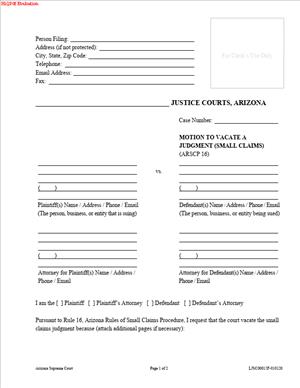
LJSC00015F – Motion to Vacate a Judgment (Small Claims)
Fill out nowJurisdiction: Country: United States | Province or State: Arizona
If a small claims judgment was entered against you and you believe it should not stand, the LJSC00015F – Motion to Vacate a Judgment (Small Claims) is the form used to ask the court to set that judgment aside. This document gives you a formal way to explain what happened and why the judgment should be reconsidered.
In small claims court, judgments are often entered quickly. Sometimes that happens because one party did not appear, did not receive notice, or faced an emergency. Other times, there may have been a serious mistake that affected the outcome.
This form is not a new lawsuit. It is a request directed to the same court that entered the original judgment. You are asking the judge to reopen the case and review what occurred.
For people representing themselves, understanding this filing matters. Once a judgment is entered, it can lead to wage garnishment, bank levies, or liens. A motion to vacate is one of the few tools available to challenge that judgment after it has been issued.
What is LJSC00015F – Motion to Vacate a Judgment (Small Claims)?
Clear definition
LJSC00015F – Motion to Vacate a Judgment (Small Claims) is a court form used in Arizona small claims cases to request that a previously entered judgment be canceled or set aside. When you file this document, you are asking the court to undo the judgment and reopen the case.
“Vacate” means to cancel or nullify. If the court grants your motion, the prior judgment is removed, and the case may return to an active status. That can lead to a new hearing or further proceedings.
This form is filed in the same small claims case number as the original lawsuit. It does not start a new case. Instead, it becomes part of the existing court record.
Who typically uses this form?
Most often, the defendant in a small claims case uses this form. This usually happens when a default judgment was entered because the defendant did not appear at the hearing.
A plaintiff may also use the form in certain situations. For example, if a case was dismissed or decided without the plaintiff being present due to an unexpected event, the plaintiff may request that the judgment be vacated.
Self-represented individuals frequently complete this document. Small claims court is designed for people without lawyers, so many filers rely on clear written explanations and supporting documents to present their request.
Why might you need this form?
You might need this form if you were unaware of the hearing date and a judgment was entered without your participation. In that situation, the motion gives you a way to explain why you did not appear.
You may also need it if you were present but believe there was a serious procedural problem. For example, if you were not properly served with the lawsuit, that can affect whether the court had authority over you.
Another reason is excusable neglect. This typically refers to a situation beyond your control, such as a medical emergency, sudden accident, or other unavoidable event that prevented you from attending the hearing.
In some cases, you may believe the judgment was entered due to a clerical error or misunderstanding. The motion allows you to bring that issue to the judge’s attention in writing.
Typical real-life scenarios
- You receive a notice in the mail stating that a judgment has been entered against you for a debt. You never went to court because you did not know about the hearing. After reviewing the case file, you learn that the hearing occurred weeks earlier. You use this form to explain that you did not receive proper notice and ask for the judgment to be set aside.
- You planned to attend your small claims hearing, but you were hospitalized the day before due to a sudden illness. The court entered a default judgment when you did not appear. After recovering, you file a motion explaining the emergency and attach documentation of your hospital stay.
- You appeared at the hearing, but the case was decided based on information you believe was incomplete due to a clerical mix-up in the court file. You use the motion to point out the error and request that the judgment be vacated so the court can review the correct information.
- You are a plaintiff whose case was dismissed when you failed to appear because you were sent the wrong courtroom information. After discovering the mistake, you file a motion asking the court to vacate the dismissal and restore the case to the calendar.
- Each of these scenarios involves a judgment already entered. The motion is the formal method to ask the court to reconsider and possibly reverse that outcome.
When would you use LJSC00015F – Motion to Vacate a Judgment (Small Claims)?
You would use this form after a judgment has already been entered in a small claims case. It is not used before trial and is not used to respond to an initial complaint.
Often, this form is used shortly after learning that a default judgment was entered. A default judgment typically occurs when one party fails to appear at the scheduled hearing.
You may also use it if you attended the hearing but later discovered a significant issue affecting the fairness of the proceeding. This could involve notice problems, service concerns, or events outside your control.
In small claims matters, both individuals and small business representatives may file this motion. The key requirement is that you are a party to the case and are directly affected by the judgment.
Timing can be important. Courts often have rules about how soon after a judgment you may request that it be vacated. The motion is generally used within a limited period following the judgment date.
This form is not typically used to argue that the judge simply made the wrong decision based on the evidence. It is more commonly used when there was a procedural problem or a valid reason you could not participate fully in the hearing.
Legal characteristics of LJSC00015F – Motion to Vacate a Judgment (Small Claims)
This document is a formal court filing. It must include the correct case caption, case number, and names of the parties exactly as they appear in the original case.
For the motion to be effective, it generally needs to clearly state the reason you are asking to vacate the judgment. Vague statements are often not enough. Courts typically expect specific facts and, when possible, supporting documentation.
Proper filing with the court clerk is essential. If the form is incomplete, missing signatures, or filed in the wrong case, it may be rejected or delayed. Some courts also require service of the motion on the other party.
Common problems include failing to explain why you did not appear, not attaching relevant documents, or misunderstanding the difference between a motion to vacate and an appeal. A motion to vacate focuses on setting aside the judgment due to certain circumstances. An appeal usually challenges the legal correctness of the decision itself.
In the Arizona small claims court, procedures may differ from higher courts. Small claims courts are designed to be simpler and more accessible, but they still require compliance with procedural rules. Not every unfavorable judgment can be vacated. The court evaluates whether the stated reason meets the standard required to reopen the case.
It is also important to understand what this motion does not do. Filing the motion does not automatically stop collection efforts unless the court orders otherwise. It does not guarantee that the judgment will be canceled. It simply requests that the court review the situation.
Is it legally binding?
The LJSC00015F – Motion to Vacate a Judgment (Small Claims) itself is not a binding agreement between parties. It is a request to the court. The binding effect comes from the judge’s ruling on the motion.
If the court grants the motion, the prior judgment is typically set aside. That court order is legally binding. The case may then proceed as if the judgment had not been entered.
If the court denies the motion, the original judgment remains in effect. That judgment continues to carry legal consequences, including possible enforcement actions.
Once the judge issues a decision on the motion, that decision becomes part of the official court record. Both parties are required to follow the court’s order.
How to fill out LJSC00015F – Motion to Vacate a Judgment (Small Claims)
Step 1 – Case caption and court information
At the top of the form, fill in the name of the court exactly as it appears on your original case documents. Enter the case number, the names of the plaintiff and defendant, and your contact information. Use the same spelling and format shown in the original case to avoid confusion.
Step 2 – Identify the judgment you want vacated
State the date the judgment was entered. Clearly identify whether it was a default judgment, dismissal, or other type of decision. This helps the court understand exactly which order you are asking to set aside.
Step 3 – State the reason for your request
In the section provided, explain why the judgment should be vacated. Describe what happened in clear, chronological order. Include specific dates, events, and circumstances that prevented you from appearing or fully participating.
Keep your explanation focused on facts. Avoid emotional language. The judge will look for concrete reasons that fit within recognized grounds for setting aside a judgment.
Step 4 – Describe any supporting facts or defenses
If the form includes space to explain your position in the case, briefly summarize your defense or claim. This shows the court that there is a meaningful dispute to be heard if the judgment is vacated.
Attach copies of any documents that support your explanation, such as medical records, travel confirmations, or proof of incorrect address information. Label each attachment clearly.
Step 5 – Sign and date the form
Review the entire document for accuracy before signing. Sign and date the form where indicated. Your signature confirms that the information you provided is true to the best of your knowledge.
Ensure that all required fields are completed. Missing signatures or incomplete sections can delay processing.
Step 6 – File the motion with the court
Submit the completed form to the clerk of the same small claims court that entered the judgment. The clerk will stamp the document and add it to the case file.
Keep a copy of the filed motion for your records. Note the filing date, as it may be relevant to any deadlines or further proceedings.
Step 7 – Provide notice to the other party
After filing, ensure that the other party receives a copy of your motion if required by the court’s procedure. This gives them an opportunity to respond.
Follow the court’s instructions regarding how notice must be provided. Proper notice is often necessary before the court will rule on your request.
Step 8 – Prepare for the hearing, if scheduled
The court may schedule a hearing on your motion. If so, bring copies of your motion, attachments, and any additional documents that support your explanation.
Be prepared to briefly explain why the judgment should be vacated and answer questions from the judge. Focus on the reason for reopening the case rather than arguing the entire dispute at this stage.
Legal terms you might encounter in LJSC00015F – Motion to Vacate a Judgment (Small Claims)
- Default Judgment: A default judgment is a court decision entered because you did not appear or respond on time. On this form, you identify whether the judgment was entered by default. If it was, you must explain why you failed to appear or respond and why that failure should be excused.
- Vacate: To vacate means to cancel or set aside a court judgment. When you file this document, you are asking the court to treat the previous judgment as if it did not happen. If granted, the case may be reopened for a new hearing.
- Service of Process: This refers to how you were officially notified about the lawsuit. The form may require you to state whether you were properly served. Problems with service can be a key reason for asking the court to vacate the judgment.
- Good Cause: Good cause means a legally acceptable reason for missing court or failing to respond. You must clearly state your reason, such as illness, emergency, or not receiving notice. The judge reviews your explanation to decide if it justifies reopening the case.
- Meritorious Defense: A meritorious defense is a valid legal reason why you believe you should not owe the money or lose the case. The court often wants to know not only why you missed court, but also whether you have a real defense. You may briefly describe this defense in your motion.
- Affidavit or Declaration: This is a written statement of facts that you sign under penalty of perjury. If the form includes a declaration section, you must tell the truth. False statements can lead to penalties.
- Notice of Hearing: After filing, the court may schedule a hearing. A notice of hearing tells you the date, time, and location. You must attend unless the court says otherwise.
- Certificate of Service: This section confirms that you delivered a copy of your motion to the other party. You must state how and when you sent it. Without proper service, the court may delay or deny your request.
- Timeliness: Timeliness refers to filing your motion within the required time after the judgment. Courts often require prompt action. If you wait too long, the judge may deny your request even if you have a strong reason.
FAQs
How do I know which judgment information to enter on this form?
Look at the judgment document you received from the court. You need the exact case number, the names of the parties as written, and the date the judgment was entered. Copy this information exactly onto this form so the clerk can match your request to the correct case file.
What date should I list when explaining when I found out about the judgment?
Enter the specific calendar date you first learned about the judgment. If you found out through wage garnishment, bank notice, or mail, check that document for the date. Be consistent. If you attach proof, make sure the date in your explanation matches the date shown on your attachment.
Do I need to attach documents to support my explanation?
If you refer to events like hospitalization, travel, or lack of service, attach copies of any records that support what you wrote. Label each attachment clearly and refer to it in your explanation. Do not send originals unless required. Keep copies for yourself.
Who is allowed to sign the LJSC00015F – Motion to Vacate a Judgment (Small Claims)?
You must sign if you are the party asking for relief. If the party is a business entity, an authorized representative may need to sign, depending on court rules. Make sure the name under the signature line matches the party name listed in the case caption, or clearly state your authority.
What happens to the public record if the judgment is vacated?
If the judge grants your request, the court record will reflect that the judgment has been set aside. The prior judgment entry remains part of the file, but it will show that it was vacated. Future background or credit checks may depend on how agencies update their records, so keep a copy of the court’s order.
How do I confirm the court accepted my filing?
After you submit this document, ask the clerk how you will receive confirmation. You may receive a stamped copy, a receipt, or an electronic notice. Check that the file stamp shows the correct date and case number. Keep this confirmation in your records.
What if my name is spelled differently on the judgment than on my ID?
Use the exact spelling that appears on the court case in the caption section. If there is a spelling error, you can note it in your explanation and clarify the correct spelling. Consistency helps the clerk process your motion without confusion.
Will filing LJSC00015F – Motion to Vacate a Judgment (Small Claims) automatically stop collection efforts?
Filing this form does not automatically stop enforcement. You may need a separate court order to pause collection. Check the court’s response and any scheduled hearing date. Until the court grants relief, the existing judgment generally remains in effect.
Checklist: Before, During, and After LJSC00015F – Motion to Vacate a Judgment (Small Claims)
Before
- Read the judgment carefully and note the exact entry date.
- Confirm the deadline for filing your motion.
- Gather documents that support your reason for missing court.
- Outline your explanation in clear, chronological order.
- Review the case caption for the correct spelling of names and the case number.
- Prepare copies of all attachments.
- Check whether a filing fee applies.
- Plan how you will serve the other party.
During
- Print or type clearly in all required sections.
- Copy the case number and party names exactly as shown on the judgment.
- State the date you learned of the judgment.
- Clearly explain your reason for not appearing or responding.
- Briefly describe your defense to the claim.
- Attach labeled copies of supporting documents.
- Sign and date the declaration section.
- Complete the certificate of service accurately.
After
- Make at least two copies of the completed motion and attachments.
- File the original with the court clerk.
- Obtain a stamped copy for your records.
- Serve the other party as required.
- Keep proof of how and when you served the documents.
- Calendar any hearing date immediately.
- Prepare notes and organize evidence for the hearing.
- Monitor mail and email for court notices.
Common mistakes to avoid with LJSC00015F – Motion to Vacate a Judgment (Small Claims)
- Mistake: Waiting too long to file because you hope the issue will resolve itself, which happens out of fear or confusion, but delays can cause the court to deny your motion as untimely, so do not forget to check and act within the required timeframe.
- Mistake: Giving a vague reason like “I was busy,” which happens when you rush through the explanation, but weak details reduce credibility and may lead to denial, so do not forget to provide specific dates and facts.
- Mistake: Failing to describe a real defense to the claim, which happens when you focus only on why you missed court, but the judge may require both a good reason and a valid defense, so do not forget to explain why you believe the judgment is wrong.
- Mistake: Not attaching supporting documents because you assume your word is enough, which can weaken your request and lead to skepticism, so do not forget to include copies that match your explanation.
- Mistake: Forgetting to serve the other party, which happens when you focus only on filing with the clerk, but improper service can delay or invalidate your motion, so do not forget to complete the certificate of service.
- Mistake: Using a different name or case number than what appears on the judgment, which often results from copying from memory, but clerical mismatches can cause processing delays, so do not forget to copy the information exactly from the court record.
- Mistake: Ignoring a scheduled hearing after filing, which can happen if you assume the paperwork is enough, but failing to appear may result in automatic denial, so do not forget to attend and bring your documents.
What to do after filling out LJSC00015F – Motion to Vacate a Judgment (Small Claims)
Once you complete the form, slow down and review every page. Check names, dates, and attachments. Make sure your explanation is clear and readable. Small errors can cause delays.
- Step 1: Make at least two full copies of everything, including attachments.
- Step 2: Organize the packet in order, with the motion on top and attachments behind it.
- Step 3: File the original with the appropriate court clerk, either in person or through the court’s accepted filing method.
- Step 4: Pay any required filing fee or request a fee waiver if you qualify.
- Step 5: Obtain confirmation of filing, such as a stamped copy or electronic receipt.
- Step 6: Serve a copy on the opposing party using an approved method.
- Step 7: Complete and keep proof of service for your records.
- Step 8: Calendar any response deadline or hearing date listed by the court.
- Step 9: Prepare a short outline of what you will say at the hearing, focusing on your reason for missing court and your defense.
- Step 10: Bring all documents, copies, and proof of service to the hearing.
After filing, monitor your mail and any online case portal regularly. The court may issue a minute entry or order setting a hearing. Read every notice carefully. If the court grants your motion, obtain a copy of the signed order vacating the judgment. Keep it in a safe place. You may need it to correct records or stop enforcement actions.
If the motion is denied, review the court’s order to understand why. Note any further deadlines that may apply. Stay organized. Keep all paperwork together in one folder. Good recordkeeping helps you respond quickly if the case moves forward again.
Disclaimer: This guide is provided for informational purposes only and is not intended as legal advice. You should consult a legal professional.