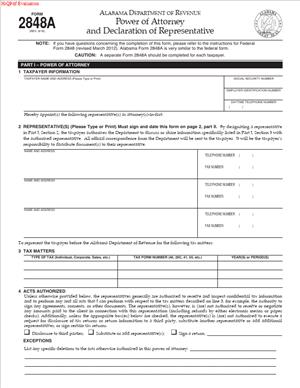
Form 2848A – Power of Attorney and Declaration of Representative
Fill out nowJurisdiction: Country: United States | Province or State: Alabama
Form 2848A – Power of Attorney and Declaration of Representative is a document used to authorize someone to act on your behalf in tax matters before the Alabama Department of Revenue. If you are about to complete this form, you are likely dealing with a tax issue that requires communication or representation.
This form allows you to formally appoint a representative. That representative can speak with the Department of Revenue, access your tax information, and handle specific matters you identify. It creates a clear line of authority between you, your representative, and the agency.
You may be filling it out because you feel overwhelmed by a notice, audit, or dispute. You may also want professional help managing tax filings or resolving past issues. This form makes that assistance official.
Understanding what this document does—and does not do—helps you complete it accurately. Small mistakes can delay processing or limit your representative’s authority.
What is Form 2848A – Power of Attorney and Declaration of Representative?
Clear definition
Form 2848A – Power of Attorney and Declaration of Representative is a written authorization that allows another person to represent you in specific tax matters before the Alabama Department of Revenue. It is not a general power of attorney for all financial or legal decisions. It applies only to tax issues you clearly list in the document.
The form identifies three key elements: you as the taxpayer, the representative you are appointing, and the specific tax matters covered. It also includes a declaration by the representative confirming that they are eligible to act in that role.
Once accepted by the Department of Revenue, this filing permits the representative to communicate directly with the agency on your behalf. That may include receiving confidential tax information and discussing your account.
Who typically uses this form?
Individual taxpayers often use this form when they are responding to a tax notice, audit, or billing issue. They may appoint an accountant, attorney, or other qualified tax professional.
Business owners also use it. A corporation, partnership, or limited liability company may authorize a representative to handle payroll tax matters, sales tax questions, or other state tax issues.
In some cases, a person managing another individual’s affairs, such as a fiduciary or business officer, may use the form to ensure proper representation before the agency.
The representative listed must meet the eligibility requirements described in the form. The declaration section confirms that the representative is authorized to practice before the Alabama Department of Revenue in the capacity stated.
Why might you need this form?
You may need this form if you want someone else to speak to the Department of Revenue about your tax account. Without it, the agency generally cannot discuss your confidential information with a third party.
If you receive a notice requesting documentation or payment, you might prefer that a professional respond. Filing this document gives them formal authority to act for you in the defined matters.
You may also need it during an audit. An audit can involve detailed records and ongoing communication. Appointing a representative can centralize communication and reduce confusion.
Another common reason is resolving past-due taxes or setting up payment arrangements. A representative can negotiate and communicate terms once properly authorized.
Typical real-life scenarios
- You receive a letter stating that your individual income tax return is under review. The notice requests additional records and sets a deadline for response. You complete this form so your accountant can handle the communication and submit documents directly to the Department of Revenue.
- Your small business is audited for sales tax compliance. You appoint a tax professional to attend meetings, review findings, and discuss adjustments with the auditor. The form allows the auditor to share detailed account information with that representative.
- You disagree with an assessment of additional tax. You authorize an attorney to represent you in discussions or administrative proceedings. The form identifies the specific tax years and types of tax involved in the dispute.
- Your company changes management, and a new financial officer takes over tax responsibilities. The business submits this form to ensure the officer can access existing tax records and communicate with the agency without interruption.
When would you use Form 2848A – Power of Attorney and Declaration of Representative?
You use this form when you want to grant authority for specific Alabama tax matters. Timing often depends on when communication with the Department of Revenue becomes active or complex.
A common moment to use it is after receiving a written notice. That notice may relate to an audit, balance due, missing return, or penalty. If you want a representative to respond directly, the agency must have a valid authorization on file.
You may also use it proactively. For example, if you anticipate questions about a return you are filing, you may submit the form so your preparer can address issues without delay.
Businesses often use it during ongoing operations. Sales tax, withholding tax, or other recurring filings may require regular contact with the Department of Revenue. A standing authorization for specified tax types and periods allows consistent representation.
It is also relevant during administrative appeals. If you challenge an assessment or request reconsideration, a representative may handle correspondence and conferences on your behalf once authorized.
The form can be limited to particular tax types and years. It does not automatically cover all taxes or all periods. You define the scope in the document.
Legal characteristics of Form 2848A – Power of Attorney and Declaration of Representative
This form creates a specific, limited power of attorney for state tax matters. It becomes effective when properly completed, signed, and accepted by the Alabama Department of Revenue.
For validity, the document typically requires accurate taxpayer information. This includes your name, address, and identifying number. The representative’s information must also be complete and clear.
The form must specify the tax matters involved. Vague descriptions may lead to rejection or limited authority. For example, listing “all taxes” without identifying the type and period may not be sufficient, depending on the agency’s processing standards.
Both you and the representative must sign the form. The representative’s declaration confirms eligibility and professional status. Missing signatures are a common reason for delay or rejection.
Common problems include incorrect identification numbers, mismatched names, or failing to specify tax periods. Illegible handwriting can also cause processing issues. If the Department of Revenue cannot clearly identify the taxpayer or the scope of authority, it may not recognize the authorization.
This form does not transfer ownership of property. It does not allow the representative to make personal financial decisions unrelated to the specified tax matters. It is limited to representation before the Alabama Department of Revenue.
Different states have their own power of attorney forms for tax matters. Form 2848A – Power of Attorney and Declaration of Representative applies specifically within Alabama’s state tax system. Federal tax representation typically requires a separate federal form.
Is it legally binding?
Yes, this document is generally legally binding once properly completed and accepted. By signing it, you are formally granting authority within the scope described in the form.
The representative’s authority is limited to what you list. If you identify only certain tax years or tax types, the representative cannot act outside that scope based on this document alone.
The binding nature depends on proper execution. If required information is missing or inaccurate, the agency may not treat it as valid. Once accepted, however, the Department of Revenue may communicate directly with the representative as your authorized agent.
You can typically revoke or replace a prior authorization by submitting a new form or a written revocation, depending on agency procedures. The most recent valid filing often controls, especially if it covers the same matters and is representative.
How to fill out Form 2848A – Power of Attorney and Declaration of Representative
Step 1 – Identify the taxpayer
Begin by entering your full legal name exactly as it appears on your tax records. Include your current mailing address and any required identifying number, such as a Social Security number or federal employer identification number, depending on whether you are an individual or a business.
If the taxpayer is a business entity, use the registered business name and include the appropriate identification number. Make sure the information matches what the Alabama Department of Revenue has on file to avoid delays.
Step 2 – Provide representative information
Enter the full name of the person you are appointing as your representative. Include their mailing address, telephone number, and any professional identification details requested in the form.
If you are appointing more than one representative, list each one as directed in the document. Ensure all contact information is accurate and legible so the agency can communicate effectively.
Step 3 – Specify the tax matters covered
Clearly describe the type of tax involved. This may include individual income tax, corporate income tax, sales tax, withholding tax, or other state-administered taxes.
Next, identify the tax periods or years covered. Be specific. For example, list calendar years or specific filing periods as requested in the form. This section defines the limits of the representative’s authority.
Step 4 – Grant or limit specific powers
Review any section that describes the powers granted to the representative. Some versions of the form may include options or additional authorizations, such as the ability to receive refund checks or sign certain documents.
Complete these sections carefully. The form may allow you to limit authority by crossing out or specifying restrictions. The wording in this section controls what the representative can and cannot do.
Step 5 – Sign and date the form as the taxpayer
Sign your name in the space provided. Enter the date of signing. If you are signing on behalf of a business, include your title, such as officer, partner, or authorized member.
The signature confirms that you are voluntarily granting authority as described. Make sure the signature is clear and matches the name provided earlier in the form.
Step 6 – Have the representative complete the declaration
The representative must complete the declaration section. This usually includes stating their professional status and confirming they are authorized to practice before the Alabama Department of Revenue.
The representative must sign and date this section. Without this declaration and signature, the form is generally incomplete.
Step 7 – Review for accuracy and completeness
Before submitting, read the entire document from start to finish. Check names, identification numbers, tax types, and periods for accuracy. Confirm that all required signatures and dates are present.
Ensure the information is legible and consistent. A careful review at this stage can prevent processing delays and ensure that your representative’s authority is recognized as intended.
Legal terms you might encounter in Form 2848A – Power of Attorney and Declaration of Representative
- Taxpayer: This is the individual or business granting authority. In this document, you must enter the taxpayer’s full legal name and identifying number exactly as they appear on state tax records. If the name or number does not match, the authorization may not be processed.
- Representative: The person you authorize to act on your behalf before the Alabama Department of Revenue. You must list each representative separately, including contact details and identifying information. Only the individuals named on this form can communicate with the agency about the listed tax matters.
- Declaration of Representative: A signed statement completed by the representative. By signing, the representative confirms their eligibility and authority to represent you. Without this declaration, the agency will not recognize the appointment.
- Tax Matters: The specific types of taxes covered by the authorization. You must clearly identify each tax type, such as income tax, sales tax, withholding tax, or business privilege tax. If you leave a tax type out, your representative cannot discuss it with the department.
- Tax Periods: The exact years or periods covered. This could be calendar years, fiscal years, or specific months or quarters. The department will limit your representative’s authority to only the periods you list.
- Authorization: The legal permission you grant. In this context, it allows your representative to receive information, discuss your account, and, in some cases, sign certain documents. The scope depends on how you complete the form.
- Revocation: The cancellation of a prior power of attorney. Filing a new authorization for the same tax matters and periods may revoke earlier ones. You need to check the revocation section carefully if you want to keep a prior representative in place.
- Disclosure: The release of confidential tax information. By signing, you allow the department to share protected information with your representative. This disclosure is limited to the tax matters and periods you specify.
- Signature Authority: The power to sign certain documents on your behalf. You can grant or limit this authority in the form. If you do not clearly grant it, your representative may not be able to sign returns or agreements for you.
- Fiduciary Capacity: A legal role where someone acts for another person or entity, such as a guardian, executor, or corporate officer. If you sign in a fiduciary capacity, you must indicate your title so the department understands your authority to sign.
FAQs
When does this form become effective?
This document becomes effective when it is properly completed, signed, and accepted by the Alabama Department of Revenue. The effective date is usually the date you sign it, but the agency must also process and record it. Until it is processed, your representative may not be able to access your account. Always confirm that the signature date is clearly written and that all required sections are complete before submission.
Can I appoint more than one representative on Form 2848A – Power of Attorney and Declaration of Representative?
Yes, you can list multiple representatives if the form provides space for them. You must include complete contact details and required identification information for each person. If you need to add more individuals than the form allows, you may need to attach an additional page with the same required details and signatures. Make sure each representative completes their own declaration section.
What tax periods should I enter if I want ongoing representation?
You need to be specific. If the form allows future periods, clearly indicate the range, such as a starting year through a defined future year. If you only list one year or one quarter, the authorization will stop there. Review the tax period section carefully so your entry matches the coverage you intend.
Does this form allow my representative to sign my tax return?
Not automatically. You must look at the section that addresses signature authority. If you want your representative to sign returns or other binding documents, the form must clearly grant that power. If the section is left blank or limited, your representative’s authority may be restricted to discussions and information access only.
What happens if I already have another power of attorney on file?
Submitting a new Form 2848A – Power of Attorney and Declaration of Representative for the same tax matters and periods may revoke the earlier authorization. Review the revocation language carefully before filing. If you want to keep an existing representative, make sure the new document does not unintentionally replace them.
Do I need to attach any supporting documents?
If you are signing in a special capacity, such as a corporate officer or executor, you may need to ensure your title is properly listed. The department may request proof of your authority if it is not clear from the form. Double-check that any required attachments referenced in the document are included before submission.
What if I make a mistake after signing this form?
If the error is minor and discovered before filing, correct it neatly and ensure all required parties initial the change if necessary. If the document has already been submitted and processed, you may need to file a new form to correct the information. Review all names, identification numbers, tax types, and periods carefully to avoid delays.
How will I know if the department has accepted this form?
Acceptance usually occurs when the department updates its records to show your representative as authorized. Your representative should be able to contact the agency and confirm access to your account. If they cannot discuss your tax matters, it may mean the form has not yet been processed or was incomplete.
Checklist: Before, During, and After Form 2848A – Power of Attorney and Declaration of Representative
Before
- Confirm the exact legal name and identification number on your tax account.
- Decide which tax types and periods you want covered.
- Verify the full legal name and contact details of each representative.
- Clarify whether you want to grant signature authority.
- Check if you already have a power of attorney on file.
- Gather any supporting documents that show your authority to sign.
- Review instructions to understand required fields.
During
- Print or type names exactly as they appear on official records.
- Enter all requested identification numbers accurately.
- Specify each tax matter clearly and completely.
- List exact tax periods without leaving them vague.
- Review the section about revoking prior authorizations.
- Sign and date the form in the correct place.
- Ensure each representative signs the declaration section.
- Double-check every page for completeness.
After
- Make a copy of the signed document for your records.
- Provide a copy to each representative.
- Submit the form using the approved method.
- Confirm that the department has received and processed it.
- Keep written confirmation of acceptance if available.
- Update your internal records to reflect the new authorization.
- Monitor initial communications between your representative and the agency.
Common mistakes to avoid with Form 2848A – Power of Attorney and Declaration of Representative
- Mistake: Listing the wrong taxpayer name or identification number, which happens when people copy from memory instead of official records, causing processing delays or rejection; do not forget to match the information exactly to state tax records.
- Mistake: Failing to specify tax periods clearly, which often occurs when someone assumes “all years” is implied, limiting the representative’s authority and blocking discussions about unlisted periods; do not forget to write each year or range explicitly.
- Mistake: Leaving the representative’s declaration unsigned, which happens when attention focuses only on the taxpayer’s signature, resulting in the authorization being invalid; do not forget that each representative must complete their section.
- Mistake: Overlooking the revocation section, which can unintentionally cancel a prior valid authorization and disrupt ongoing representation; do not forget to review how the new filing affects existing powers of attorney.
- Mistake: Not granting signature authority when needed, often because the section is misunderstood, preventing the representative from signing returns or agreements; do not forget to clearly indicate if signing power is required.
- Mistake: Submitting the form without keeping a copy, which happens during urgent situations and creates confusion later about what authority was granted; do not forget to retain a complete, signed copy for your records.
- Mistake: Using outdated contact information for the representative, which leads to missed notices and communication gaps; do not forget to confirm current addresses and phone numbers before filing.
- Mistake: Signing in the wrong capacity or failing to list a title, which creates doubt about your authority to authorize representation and may require follow-up documentation; do not forget to clearly state your role if signing for a business or estate.
What to do after filling out Form 2848A – Power of Attorney and Declaration of Representative
Once you complete the document, your job is not finished. You need to make sure it is properly delivered, recorded, and used as intended. Careful follow-up prevents delays and confusion.
Start by reviewing the entire form one more time. Look at every name, number, tax type, and tax period. Confirm that all required signatures are present and dated.
- Step 1: Make at least one clear copy of the fully signed form for your personal records.
- Step 2: Provide a copy to each representative so they know exactly what authority they have.
- Step 3: Submit the form to the Alabama Department of Revenue using the accepted submission method listed in the form instructions.
- Step 4: Note the date you submitted it and the method used, such as mail or electronic submission if permitted.
- Step 5: Allow reasonable processing time and then confirm that the authorization has been entered into the department’s system.
- Step 6: Ask your representative to verify they can access your account or speak with the agency about the listed matters.
- Step 7: Keep any confirmation letters or account updates that show the authorization is active.
- Step 8: Update your internal files, especially if you are a business, so staff know who is authorized to communicate with the department.
- Step 9: Inform prior representatives if their authority has been revoked, to avoid overlapping communications.
- Step 10: Review the authorization periodically, especially if tax matters or representatives change.
If your situation changes, such as adding new tax types or new years under review, you may need to submit an updated authorization. Do not assume the original filing covers everything indefinitely.
Finally, stay engaged. Even with a representative in place, you remain responsible for your tax obligations. Keep communication open with your representative and review important notices yourself. Clear coordination helps ensure that your representation works exactly as you intended.
Disclaimer: This guide is provided for informational purposes only and is not intended as legal advice. You should consult a legal professional.