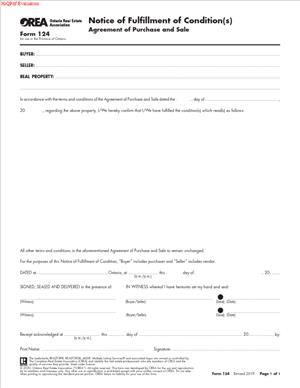
OREA Form 124 – Notice of Fulfillment of Condition(s)
Fill out nowJurisdiction: Country: Canada | Province/State: Ontario
What is an OREA Form 124 – Notice of Fulfillment of Condition(s)?
OREA Form 124 is a short, formal notice. You use it to confirm that a condition in your Agreement of Purchase and Sale has been satisfied. It applies to real estate deals in Ontario. It is part of the standard forms set used by Ontario brokerages.
Conditions protect a party while they complete due diligence. Common examples include financing, home inspection, review of a status certificate, or sale of the buyer’s existing home. The Agreement sets deadlines. If you meet a condition on time, you must deliver written notice. OREA Form 124 is that notice.
This form does not change the deal. It does not amend the price, dates, or terms. It only confirms that a specified condition is now fulfilled. When all conditions in the agreement are fulfilled or waived, the deal becomes firm. After that, you cannot rely on the condition to cancel the transaction.
Who Typically Uses This Form?
Buyers use it most often. Many conditions are drafted for the buyer’s benefit. These include financing, inspection, insurance, and legal review. Sellers can also use it if the agreement includes a seller’s condition. For example, a seller might have a condition to secure early discharge of a mortgage, obtain probate, or confirm specific tax matters. If a seller’s condition is met, the seller would deliver this notice.
Brokerages deliver the form on behalf of their clients. The buyer’s brokerage usually sends it to the listing brokerage. The client signs. The agent handles delivery and records proof.
Why would you need this form?
You need to remove conditions the right way. The Agreement of Purchase and Sale requires written notice of fulfillment. OREA Form 124 satisfies that requirement. If you only say “we’re good” in a call or text, you risk a dispute. The other side could argue the condition remains outstanding or the deal died at the deadline.
You also need a clean paper trail. This form captures the property, the agreement date, the parties, the exact clauses fulfilled, and the time of delivery. That record protects you if the deal later unravels. It shows you met the terms on time.
Typical usage scenarios
- You are a buyer with a financing condition. Your lender issues a mortgage approval that satisfies you. Your agent prepares Form 124. You sign it. Your agent delivers it before the deadline to the listing brokerage. The financing condition is now fulfilled.
- You are a buyer with an inspection condition. The inspector’s report is acceptable. You choose to proceed. You sign Form 124 listing the inspection clause. Your agent sends it on time. The inspection condition is fulfilled.
- You are a buyer in a condo purchase with a status certificate review condition. Your lawyer reviews the status certificate and is satisfied. You sign and deliver Form 124, citing that clause. The condition is fulfilled.
- You are a seller with a rare “seller’s condition on suitable replacement property.” You find a new home and remove your condition. You sign and deliver Form 124 to the buyer’s side within the deadline. Your seller’s condition is fulfilled.
- If you meet several conditions at once, you can fulfill multiple clauses in one form. If you meet them at different times, you can send separate forms for each clause, as long as each is delivered before its deadline.
When Would You Use an OREA Form 124 – Notice of Fulfillment of Condition(s)?
Use this form during the conditional period, and only if you have actually satisfied the condition as written. If the condition says you must obtain financing on terms satisfactory to you, you use this form after you have that approval and you are satisfied. If the condition says you must obtain a satisfactory home inspection, you use this form after you receive the report and decide it is satisfactory.
Timing is critical. Your Agreement sets a date and time by which you must deliver written notice. Time is of the essence in Ontario purchase agreements. That means the deadline is strict. Send the form before the cut-off. Do not rely on grace periods. If you pass the deadline with no notice, the agreement will usually become null and void. Your deposit would be returned, and the property could be sold to someone else.
Delivery must follow the Agreement. Most Ontario purchase agreements allow delivery by email, fax, or personal delivery to the other party or their brokerage. Use the delivery details listed on the face of the agreement or Schedule A. Your agent will use those instructions. Keep the sent email, fax confirmation, or a signed receipt. That proof matters in tight timelines.
Different users will see this form at different times. Buyers use it after a lender confirms the mortgage, an inspector reports back, the insurer binds coverage, or a lawyer clears title concerns. Sellers use it if they have a seller’s condition. Lawyers often review the form before delivery when the condition involves legal review or a complex status certificate. In rural deals, you might use this form after you obtain a clean well water test, a septic inspection report, or fire retrofit confirmation.
If a condition is not met, but you still want to proceed, you do not use this form. In that case, you would consider waiving the condition instead, if the condition allows waiver. If a condition cannot be met and you do not wish to proceed, you do not send Form 124. You allow the condition to lapse, or you seek an extension by amendment before the deadline.
Use this form when the fact is true: the condition has been fulfilled. Do not use it to “keep the deal alive” and hope to sort things out later. Once you declare fulfillment, you remove your safety net for that condition.
Legal Characteristics of the OREA Form 124 – Notice of Fulfillment of Condition(s)
This form is legally binding because the Agreement of Purchase and Sale says so. The agreement sets out that certain conditions must be fulfilled by delivering written notice by a set deadline. When you deliver the notice as required, the condition is satisfied. The agreement then continues in force without that condition.
It is a unilateral notice, not a negotiation. The other side does not need to accept or sign for it to take effect. You are not changing any terms. You are giving written confirmation that the condition has been met. The agreement itself grants you that right. Because of that, no counter-signature is needed for enforceability. That said, you should capture proof of delivery.
Enforceability rests on a few things. First, you must send the notice before the deadline in the agreement. If the deadline passes, the condition usually fails, and the agreement may become null and void. Second, you must deliver the notice in the manner permitted by the agreement. Delivery to the wrong email or office can cause disputes. Third, you should identify the condition with precision. Reference the clause number and schedule. That removes any doubt about which condition you fulfilled.
Electronic signatures and email delivery are generally valid in Ontario real estate practice. Most agreements allow email delivery to brokerages or the parties. The law recognizes electronic signatures on real estate documents, unless the parties agreed otherwise. Still, always follow the agreement’s delivery clause. If it lists specific emails or fax numbers, use them. If it says delivery to the other party’s brokerage is effective, send it there.
The form does not create a new duty. It confirms that an existing condition is now satisfied. When the last outstanding condition is fulfilled or waived, the agreement becomes firm. If you later fail to close without a valid excuse, you could face deposit loss and damages. Declaring fulfillment when you are not actually satisfied may increase your risk. For example, if you declare that financing is fulfilled but your lender later declines, you may not be able to rely on the financing condition to escape the deal.
Some conditions require action plus satisfaction in your discretion. The wording often reads “conditional upon the Buyer obtaining financing satisfactory to the Buyer in the Buyer’s sole and absolute discretion.” In those cases, you decide whether you are satisfied. But once you send Form 124, you confirm satisfaction. You cannot later say you were not satisfied.
If a condition requires you to deliver an attached document, fulfill that requirement as well. For a status certificate review, the condition may require that you receive the status certificate by a certain date and be satisfied. You still use Form 124 to declare satisfaction. The status certificate itself remains part of your records and the lawyer’s file. The agreement rarely requires you to attach proof to the notice, but check the exact clause.
If you miss the deadline but both sides still want to move forward, you cannot revive the original condition by sending Form 124 late. Instead, both parties must sign an amendment extending the conditional period before the deadline. Once expired, you generally need a new agreement or a properly executed revival. Do not send Form 124 after expiry and assume it works.
Finally, if multiple buyers or sellers are named, the best practice is that all of them sign the notice. Although one signature sometimes appears in practice, multiple signers remove arguments about authority. Have every named buyer sign the notice if the buyer is the beneficiary of the condition. The same applies to the seller’s conditions.
How to Fill Out an OREA Form 124 – Notice of Fulfillment of Condition(s)
Follow these steps. Work from your signed Agreement of Purchase and Sale. Keep it nearby for clause numbers and delivery details.
1) Identify the property and agreement
- Enter the full civic address as it appears in the agreement.
- State the date of the Agreement of Purchase and Sale. Use the acceptance date shown on the face of the agreement. This ties the notice to the correct contract.
- Confirm the MLS number if your brokerage uses it internally. It is not required on the form, but helpful.
2) Name the parties exactly as in the agreement
- Write the full legal names of the Buyer(s) and Seller(s) as they appear in the agreement.
- Do not shorten names or use initials if the agreement does not.
3) Select who is giving the notice
- Indicate whether the Buyer or Seller is delivering the notice. This depends on whose benefit the condition was drafted for.
- Confirm that the signer has authority. If a corporation is a party, use the corporate signing block and include the signing officer’s title.
4) Pinpoint the condition(s) being fulfilled
- Refer to the exact clause number and where it sits (e.g., “Clause 8, Schedule A” or “Paragraph 10 of the Agreement”).
- Use the same label used in the agreement, such as “financing,” “home inspection,” “status certificate review,” “sale of buyer’s property,” “insurance,” or “lawyer’s approval.”
- If you are fulfilling more than one condition in one notice, list each clause number clearly on the form in the space provided. If space is tight, attach a short schedule that lists each clause by number and title. Keep it simple and precise.
5) Confirm that the condition is fulfilled, not waived
- Ensure your instruction matches reality. This form is for fulfillment. Use it only when the condition has been met as written.
- If you have not met the condition but still want to proceed, talk to your agent about the correct form and approach.
6) Check the deadline and timing
- Look at the time and date the condition must be fulfilled by. Note the time zone used in your agreement.
- Aim to sign and deliver several hours early. Give your agent time to deliver and confirm receipt.
- Do not backdate or rely on implied consent. The safest route is timely, documented delivery.
7) Sign the form
- Have every named Buyer sign if it is a buyer’s condition. Have every named Seller sign if it is a seller’s condition.
- Date the form at the time of signing. Keep signatures consistent with the agreement.
- Electronic signatures are acceptable unless the agreement says otherwise. If using e-sign, ensure the timestamp is before the deadline.
8) Deliver the notice as the agreement permits
- Send it to the other party or their brokerage according to the delivery clause in the agreement. This often allows email to the brokerage or the agent’s email listed in the agreement.
- Ask your agent to send from a monitored email account and request confirmation. If using fax, keep the transmission report. If delivering in person, obtain a signed acknowledgment of receipt.
- Delivery to the brokerage is usually effective if the agreement allows it. Sending only to an agent’s personal address not listed in the agreement can be risky. Follow the agreed contact details.
9) Keep proof of delivery
- Save the sent email with attachments and the timestamp. Save any read receipts or replies.
- If delivered by hand, keep a copy signed “received,” with date and time.
- File the notice with your deal documents. Your lawyer and brokerage should keep a copy.
10) Confirm the deal status
- If this were the last outstanding condition, the agreement is now firm. Tell your lawyer and lender. Book next steps like appraisals, insurance binders, and utility setup.
- If other conditions remain, track their deadlines. Use separate notices as each is fulfilled, or deliver one notice that lists all fulfilled clauses, as appropriate.
- If you cannot meet a remaining condition, seek an amendment to extend before the deadline, or let the condition lapse if you intend to end the deal.
Practical examples
- Financing fulfilled: Your lender issues a mortgage commitment that meets your needs. Your agent writes, “The Buyer hereby gives notice that the condition in Clause 8 of Schedule A (Financing) is fulfilled.” You sign. Your agent emails it to the listing brokerage at the address set out in the agreement before 5:00 p.m. The condition is removed.
- Inspection fulfilled with repairs negotiated: The inspection reveals minor issues. You negotiate a small credit by amendment. Once the amendment is signed, you still complete Form 124 to fulfill the inspection condition. You cite the inspection clause and deliver notice before the deadline.
- Multiple conditions fulfilled in stages: You receive the status certificate early, and your lawyer is satisfied. You send a Form 124 for that condition. Days later, you confirm insurance and send a second Form 124 for the insurance condition. Each notice lists only the clause being fulfilled at that time.
Common pitfalls to avoid
- Vague references: Do not write “all conditions fulfilled” unless that is accurate and you intend to remove every condition. It is safer to list the clauses by number.
- Late delivery: “Sent at 4:59 p.m.” is not enough if the recipient claims it arrived after 5:00 p.m. Build in a buffer. Aim for clear, early delivery with proof.
- Wrong recipient: Deliver to the recipient listed in the agreement. If the listing agent changed email addresses, get written confirmation and copy the brokerage address on file.
- Partial signatures: If there are two buyers, have both sign. Avoid arguments over authority.
- Using fulfillment when you mean waiver: If you have not met the condition but decide to proceed, do not use this form. Choose the correct tool. Your agent will guide you.
Final checks
- The property address and APS date match the signed agreement.
- The party names match exactly.
- Clause numbers and schedule references are correct.
- All required signers have signed.
- Delivery matches the agreement’s delivery clause.
- Proof of delivery is saved.
Handled this way, OREA Form 124 is straightforward. You confirm the exact condition, deliver on time, and move the deal forward with a clean record.
Legal Terms You Might Encounter
- Condition. A condition is a requirement that must be satisfied for the deal to proceed. On OREA Form 124, you confirm that a condition in your Agreement of Purchase and Sale has been satisfied. Typical conditions include financing, inspection, insurance, or review of a status certificate.
- Condition precedent. A condition precedent must be fulfilled before the contract becomes firm. Most buyer protections are conditions precedent. When you sign OREA Form 124, you state that the condition precedent has been fulfilled within the deadline in the offer.
- Fulfillment. Fulfillment means the requirement has been met. You are not describing how it was met, only that it was. OREA Form 124 records that you have achieved fulfillment on or before the condition date.
- Waiver. Waiver is different from fulfillment. Fulfillment means you got what the condition required. Waiver means you give up the benefit of the condition even if it is not met. OREA Form 124 is used to confirm fulfillment. Do not use it if you intend to waive a condition.
- Notice. Notice is a formal communication delivered under the terms of your Agreement of Purchase and Sale. OREA Form 124 is the written notice you deliver to the other party. It must be delivered using the notice methods allowed in your agreement.
- Time is of the essence. This phrase means deadlines are strict. If you miss the condition deadline, the agreement may become null and void. OREA Form 124 must be completed and delivered before the deadline, unless the parties agree to extend the condition.
- Agreement of Purchase and Sale. This is the core contract between the buyer and seller. OREA Form 124 refers to a specific condition within that agreement. Your form must match the parties, property, and condition details in the agreement.
- In writing. Many agreements require notice to be “in writing” and delivered as the agreement allows. OREA Form 124 satisfies the “in writing” requirement. You still need to deliver it properly and keep proof of delivery.
- Delivery and receipt. Delivery is how you send notice. Receipt is when the other side is deemed to have received it. Your agreement sets the delivery methods and when receipt occurs. OREA Form 124 becomes effective on receipt, not just on signing.
- Extension or amendment. If you need more time, you use an amendment to extend the condition deadline. OREA Form 124 does not extend deadlines. It only confirms fulfillment. Do not rely on this form to change any terms.
- Firm deal. A deal becomes firm when all conditions are fulfilled or waived as required. When you deliver OREA Form 124 for every active condition in your favour, your deal moves toward firm status. If both sides had conditions, both must be cleared.
FAQs
Do you use this form for every condition?
Use it for each condition in your favour that requires a notice of fulfillment. If the offer states you must give written notice when a condition is satisfied, send OREA Form 124 for that condition. Some conditions may state that they are fulfilled unless you give written notice of non-fulfillment. Read your agreement to confirm what is required.
Do you need the other party’s signature on this form?
No. OREA Form 124 is a unilateral notice. You sign it and deliver it to the other side. The other party does not accept, approve, or countersign it. Keep proof of delivery to show it was received before the deadline.
Do you need to attach proof, like a financing approval or inspection report?
Usually, no. The form is a notice, not a disclosure package. You generally do not attach reports or lender letters. If your agreement requires certain documents, follow that requirement. Keep your proof of fulfillment in your file in case of questions.
Do you send one form per condition or list all conditions on one form?
Send one form per condition unless your agreement clearly allows a combined notice. One-per-condition avoids confusion and reduces disputes about what was fulfilled. If you send a combined notice, name each condition clearly and make sure nothing is ambiguous.
Do you use this form to waive a condition?
No. This form confirms fulfillment, not waiver. If you intend to waive, use the proper waiver form or an amendment stating you waive the condition. Do not mix fulfillment and waiver language on the same notice.
Do you need to deliver it by a specific time?
Yes. Deliver it before the condition deadline in your agreement. The agreement often states that time is of the essence. Delivery after the deadline may be ineffective, and the deal may become null and void. If you need more time, arrange an extension before the deadline.
Do you send it to the other brokerage or directly to the other party?
Follow the notice clause in your agreement. Delivery to the other party’s brokerage is commonly permitted and often preferred. Use the addresses, emails, or fax numbers stated in the agreement. If in doubt, deliver to every permitted address and confirm receipt.
Do you need wet-ink signatures, or can you sign electronically?
Electronic signatures are generally acceptable if your agreement allows them. Most modern agreements permit electronic delivery and signatures. Use a reliable platform and keep the signed copy and delivery confirmations.
Do you need to match the exact condition wording from the offer?
Yes. Reference the condition accurately. Use the same section, schedule, or wording so there is no doubt which condition you fulfilled. Avoid vague references like “inspection done.” Be precise and consistent with the agreement.
Do you send the form if the condition was auto-fulfilled by the agreement?
If the agreement says the condition is fulfilled unless you deliver non-fulfillment, you may not need Form 124. Many agreements still call for written notice of fulfillment for clarity. If written notice is optional, consider sending it anyway to avoid doubt.
Checklist: Before, During, and After the OREA Form 124 – Notice of Fulfillment of Condition(s)
Before signing
- Identify the exact condition to fulfill.
- Confirm the condition deadline and time zone.
- Review the notice clause in your agreement.
- Gather the Agreement of Purchase and Sale, including all schedules.
- Verify parties’ legal names as written in the agreement.
- Confirm the property’s full civic address and legal description if listed.
- Assemble evidence that the condition is fulfilled for your own file.
- Confirm the permitted delivery methods (email, fax, hand delivery).
- Confirm the correct delivery addresses and contacts.
- Check if electronic signatures are allowed by the agreement.
- Diarize the deadline with a buffer for delivery and confirmation.
- Coordinate with your brokerage for compliance steps.
During signing
- Use the latest, clean version of the form.
- Enter the correct property address exactly as in the agreement.
- Enter buyer and seller names exactly as in the agreement.
- Identify the precise condition fulfilled, matching the agreement wording.
- State the fulfillment date. Ensure it is on or before the deadline.
- Avoid placeholders or blanks. Do not leave key fields empty.
- Make no handwritten changes without initialing by the signing party.
- Do not include waiver language. This form is for fulfillment only.
- Sign and date the form. Ensure the signer is the correct party.
- If multiple buyers or sellers benefit from the condition, ensure proper signatures.
- Review the form end-to-end for accuracy and legibility.
After signing
- Deliver the form using the permitted methods in the agreement.
- Send to the addresses set in the agreement for notices.
- Request written acknowledgment of receipt.
- Capture and save delivery proof (email headers, fax reports, courier logs).
- Notify your brokerage immediately and send a copy of the file.
- Provide a copy to the other brokerage as required.
- Share a copy with your lawyer for closing preparation.
- Store the signed form and delivery proof in your transaction record.
- Update your timeline: identify remaining conditions and due dates.
- If all conditions are now cleared, mark the deal as firm in your workflow.
- If you discover an error, reissue a corrected notice before the deadline.
Common Mistakes to Avoid OREA Form 124 – Notice of Fulfillment of Condition(s)
- Missing the deadline. Don’t forget that time is strict. If you deliver late, the condition may not be cleared. The agreement could become null and void. You may lose the deal and face deposit disputes.
- Referring to the wrong condition. Don’t use vague or incorrect wording. If you misidentify the condition, your notice can be challenged. Use the exact description from the agreement to avoid confusion.
- Sending to the wrong place. Don’t rely on informal delivery. If you send notice to an unapproved address, it may not count. Follow the notice clause and keep proof of receipt.
- Mixing waiver and fulfillment. Don’t blend concepts. If you intend to waive, use the correct document. Using the wrong form can cause uncertainty and disputes about the deal’s status.
- Leaving blanks or un-initialed changes. Don’t submit an incomplete notice. Missing names, dates, or property details can undermine the notice. Fill every field and initial any edits.
- Assuming verbal notice is enough. Don’t rely on calls or texts. Your agreement likely requires written notice. OREA Form 124 satisfies this if delivered properly.
- Forgetting co-buyers or co-sellers. Don’t omit required signatures. If the condition benefits multiple parties, ensure authorization and signatures are in order.
What to Do After Filling Out the Form OREA Form 124 – Notice of Fulfillment of Condition(s)
- Deliver the notice immediately. Use the delivery methods stated in your Agreement of Purchase and Sale. Send to the addresses named in the notice clause. If email is allowed, send from and to the specified addresses. If fax or hand delivery is allowed, follow those instructions precisely.
- Confirm receipt in writing. Ask the recipient to acknowledge receipt. Save automated delivery receipts as well. Keep email timestamps, fax confirmation pages, or courier logs. If the agreement defines when receipt occurs, record the exact time.
- Notify your brokerage. Provide a copy to your brokerage soon after sending. Many brokerages require notice and proof of delivery for compliance. Your file should show that you met the deadline.
- Inform your lawyer. Send a copy to your lawyer. Clearing conditions may trigger the next steps for title searches, mortgage instructions, and closing prep. Early notice helps avoid delays later.
- Update your timeline. If other conditions remain, confirm their deadlines and plan fulfillment. If the last condition is now cleared, the deal is firm. Start preparing for closing tasks like insurance, lender coordination, and utility setups.
- Store records securely. Save the signed OREA Form 124 and all delivery proofs. Use a consistent naming format and folder. Keep backups. Retain records for the required retention period.
- Correct mistakes promptly. If you find an error and the deadline has not passed, issue a corrected notice. Deliver it using the same permitted methods. Clearly label it as a corrected notice and ensure timely receipt.
- Do not use this form to extend time. If you need more time, prepare an amendment to extend the condition deadline. Deliver and sign the amendment before the original deadline. Once extended, you can deliver OREA Form 124 within the new timeline.
- Do not add new terms. OREA Form 124 is not a tool to change the deal. You cannot alter prices, dates, or inclusions here. Any change requires an amendment.
- Match the agreement exactly. Ensure names, property address, and condition wording align with the Agreement of Purchase and Sale. Consistency reduces the risk of disputes about what was fulfilled.
- Coordinate with the other party’s brokerage. Send a duplicate copy if requested. Ask for confirmation that the notice is in their file. Clear communication keeps everyone aligned on the deal’s status.
- Mark the transaction status. When all conditions are fulfilled or waived, update your internal system to “firm.” Notify clients, your team, and any service providers. Begin closing checklists.
- Prepare for closing. Once firm, complete lender conditions, arrange insurance, book movers, and set up utilities. Confirm key dates like the title search date and the closing date. Keep all stakeholders informed.
- Plan for contingencies. If the other side disputes receipt or timing, rely on your delivery proof. If a dispute continues, consult your brokerage and lawyer promptly. Preserve all records until resolution.
- If the condition is not fulfilled. Do not use this form. Follow your agreement’s process for non-fulfillment or seek an extension. If the deal becomes null and void, handle deposit steps according to the agreement and any required releases.
- If you had multiple conditions, send a separate OREA Form 124 for each condition, unless your agreement allows a combined notice. Track each notice’s delivery and receipt individually.
- Review privacy and sensitivity. Do not attach reports or personal financial data unless your agreement requires it. Keep sensitive documents within your secure file. Share only what is necessary.
- Final check. Confirm that every required party has a copy. Confirm that your file includes the signed form, delivery proof, and any acknowledgments. Note the exact date and time the deal became firm.
Disclaimer: This guide is provided for informational purposes only and is not intended as legal advice. You should consult a legal professional.