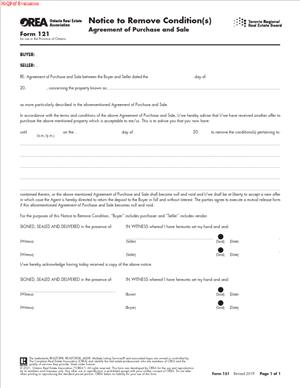
OREA Form 121 – Notice to Remove Condition(s) – Agreement of Purchase and Sale
Fill out nowJurisdiction: Country: Canada | Province/State: Ontario
What is an OREA Form 121 – Notice to Remove Condition(s) – Agreement of Purchase and Sale?
This form is a short, formal notice used to remove conditions from a signed Agreement of Purchase and Sale in Ontario. You use it to confirm that one or more conditions have been fulfilled or waived. Once the relevant conditions are removed, the agreement becomes firm to that extent.
Most offers in Ontario include conditions. Common examples include financing, home inspection, sale of buyer’s property, review of condominium documents, insurance approval, or a lawyer’s review. Those conditions protect you while you complete due diligence. They also set a deadline. If you want the deal to move forward, you must remove the conditions before the deadline. This is the form you use to do that.
Who typically uses this form?
Buyers use it most of the time because most conditions benefit the buyer. Sellers sometimes have their own conditions too, such as board approval, severance, or lease review in a commercial deal. The party who has the benefit of the condition is the one who must sign and deliver this notice.
You would need this form the moment you decide to firm up all or part of your deal. If you secure financing, pass inspection, or choose to waive a condition, you must give written notice. Verbal notice is not enough. Email text alone is risky. This form provides clear, standard wording to avoid confusion and disputes.
Typical usage scenarios
Your lender has issued a mortgage commitment, so you remove the financing condition. Your inspector’s report is acceptable, so you remove the inspection condition. You received a satisfactory status certificate for a condominium, so you remove the status condition. Or you choose to waive the sale-of-property condition after the seller gives you a notice period under an escape clause. In each case, you sign and deliver this notice within the time set out in the agreement.
This is not an amendment form. It does not change price, closing date, or any other term. It only removes stated conditions. If you need to change terms, you use an amendment, not this notice.
When Would You Use an OREA Form 121 – Notice to Remove Condition(s) – Agreement of Purchase and Sale?
Use this form any time you intend to make the agreement firm by removing one or more conditions before they expire. You use it during the conditional period, not after. The agreement will set a date and, often, a time for each condition. Deliver the notice before that deadline. If you miss the deadline, the condition is not removed, and the agreement may become null and void.
As a residential buyer, you use it when your financing is approved, inspection issues are resolved or accepted, or your lawyer completes title review to your satisfaction. For a condominium, you use it after you receive and accept the status certificate and related documents. In rural purchases, you may remove well, septic, or water potability conditions after you obtain satisfactory test results. In new build or assignment scenarios, you may remove lawyer review conditions when that review is done.
As a commercial buyer or tenant, you use it when you complete due diligence. That can include environmental assessments, building condition reports, lease audits, zoning checks, financing, and insurance. You remove each condition as you clear it, or all at once when you are ready to commit.
Sellers use it less often, but it still arises. For example, a seller may have a condition on severance or final approval of a plan. In a business sale tied to real property, a seller might have a condition regarding the assignment of key contracts. If the seller’s condition is satisfied, the seller uses the same form to remove it.
This form is also used in time-sensitive situations. Imagine you agreed to a sale-of-buyer’s-property condition with a 48-hour escape clause. The seller receives another offer and triggers the clause. You now have a short window to remove your condition or lose the deal. You would sign and deliver this notice in that window to keep the purchase alive.
Always check who benefits from the condition. Only the party that benefits can waive it. Most standard conditions state they are for the sole benefit of the buyer. Those can be removed only by the buyer. If a condition benefits both sides or is mutual, it generally cannot be unilaterally waived.
Legal Characteristics of the OREA Form 121 – Notice to Remove Condition(s) – Agreement of Purchase and Sale
This form is legally binding because it exercises a right granted in the agreement. The Agreement of Purchase and Sale usually says that the deal is conditional until certain conditions are fulfilled or waived by written notice. This notice is the required written communication. When delivered within the deadline, it removes the specified condition. If it is the final outstanding condition, the agreement becomes firm and binding.
Enforceability depends on clarity, authority, and timing. The notice must identify the parties and the property, and connect to the correct agreement date. It must clearly state which condition or conditions are being removed. Ambiguity creates risk. Quote the clause number and key wording to avoid doubt. The person signing must be the party with the benefit of the condition or that party’s authorized signatory. The notice must be delivered in the manner allowed by the agreement and before the condition deadline. Time is critical. Late delivery usually means the condition was not removed.
Delivery rules matter. Your agreement will set out how notices can be given. It may allow delivery by personal service, fax, email, or other electronic means. Follow those rules. Keep proof of delivery and time. A time-stamped email to the other party’s brokerage often suffices if the agreement allows it. If you are unsure, deliver by more than one method.
You do not need the other party’s signature to remove your own condition. This is a unilateral notice. The other side does not “accept” it. You also do not need a witness or notary. Standard contract law supports delivery of a signed written notice as provided in the agreement. Electronic signatures are generally acceptable if the agreement permits them and the law allows it.
This form does not change any other term. It cannot extend a deadline or adjust price, inclusions, closing date, or rent roll details. If you need to extend a condition deadline, you must sign an amendment before the deadline expires. After expiry, the deal may be dead and you cannot revive it with this notice.
Removing a condition carries consequences. If you remove your financing condition but your lender later declines, you still have to close. If you fail to close, you may lose your deposit and face damages. If inspection reveals issues and you remove that condition anyway, you accept the risk. That is why you should be confident in your due diligence before you send this notice.
Finally, good faith applies. Use this notice to communicate clearly and honestly. Do not use it to seek new terms or misstate facts. You are confirming that you choose to waive protection or that you have met it. Treat the timing and content with care.
How to Fill Out an OREA Form 121 – Notice to Remove Condition(s) – Agreement of Purchase and Sale
1) Gather your documents and confirm the deadline.
Pull the signed Agreement of Purchase and Sale and all schedules. Note the exact wording of each condition. Note the deadline date and time for each condition. Confirm your time zone if the agreement states one. If you need more time, negotiate and sign an amendment before the deadline. Do not rely on verbal extensions.
2) Identify the parties as they appear in the agreement.
Enter the buyer’s legal name and the seller’s legal name exactly as written in the agreement. If the buyer is a corporation, use the full corporate name. If there are multiple buyers, list all of them. Consistency avoids confusion.
3) Identify the property clearly.
Insert the full municipal address, including unit number for a condo, city or town, and postal code. If the agreement used a legal description or PIN, you can add it, but the address is usually enough for identification.
4) Reference the agreement details.
State the date of the Agreement of Purchase and Sale. This is often called the “date of agreement” or the “offer date” in the document. Referencing the correct date links your notice to the right deal. If there were multiple offers, clarity here is essential.
5) Specify whose condition is being removed.
Confirm that the condition you are removing is for your benefit. Most conditions state that they are for the sole benefit of the buyer. If the seller is removing a seller’s condition, the seller signs. Do not try to remove a condition that benefits the other party.
6) List the condition or conditions with precision.
In the space provided, identify the specific condition(s) being removed. Quote the clause number and the key wording from the agreement or Schedule “A.” For example: “The Buyer removes the Condition on Financing in paragraph 8 of Schedule A.” If you are removing multiple conditions at once, list them all clearly in separate sentences. If you intend to remove all conditions for your benefit, say so plainly: “The Buyer removes all conditions for the Buyer’s benefit contained in Schedule A, paragraphs 8, 9, and 10.”
7) Indicate whether the condition is fulfilled or waived.
Some versions of the form include the words “fulfilled or waived.” You can leave that wording as-is, because either path removes the condition. If you want extra clarity, add simple phrasing such as “The Buyer confirms the financing condition is fulfilled” or “The Buyer waives the home inspection condition.” Do not attach lender letters or inspection reports unless required. Keep the notice short and clear.
8) Do not add new terms.
Do not change price, closing date, inclusions, repairs, credits, or holdbacks in this form. This notice is only for removing conditions. If you need any change, prepare an amendment and get both parties to sign it before you deliver this notice or before the deadline expires.
9) Sign and date the notice.
The party with the benefit of the condition signs. If there are multiple buyers, have all buyers sign unless the agreement names a signing authority. Add the date and, ideally, the time of signing. Print names below signatures for clarity. You do not need a witness.
10) Deliver the notice properly and on time.
Send the signed notice to the other party in the way the agreement allows. That usually means delivery to the brokerage representing the other party by email or fax, or personal delivery. Send it well before the deadline. Keep proof of transmission and receipt. Ask your agent to confirm receipt in writing. If the agreement sets a specific time, do not cut it close.
11) Confirm status after delivery.
Once delivered, the named condition is removed. If it were the last buyer and seller condition, the deal is now firm. If other conditions remain, track those deadlines and remove them with separate notices when ready. Calendar every remaining date. Share the update with your lawyer and lender so they can proceed.
12) File and store the document.
Save a signed copy in your transaction file. Your brokerage will keep a record, but you should keep one too. You may need it if a dispute arises about whether and when a condition was removed.
Practical example
You are buying a detached home with three buyer conditions: financing by June 15 at 5:00 p.m., home inspection by June 15 at 5:00 p.m., and insurance approval by June 17 at 11:59 p.m. Your mortgage commitment arrives on June 12. Your inspector reports acceptable issues on June 13. Your insurance broker confirms coverage on June 14. You can remove all three at once on June 14. In the form, you list each condition by clause number and state that you remove them. You sign and email the notice to the seller’s brokerage at 2:10 p.m. that day. The agreement is now firm.
Another example: You are buying a condo with a status certificate condition due five business days after receipt of the documents. You receive the documents on Monday. Your lawyer reviews them and confirms they are satisfactory on Thursday. On Thursday, you remove only the status condition. You do not touch other terms. You state the clause and confirm removal in the notice. You sign and deliver the same day.
Common mistakes and how to avoid them: Do not miss the deadline. Build in reminders two days and one day before each condition expires. Do not describe conditions vaguely. Use the clause number and the label used in the agreement. Do not send to the wrong recipient. Deliver to the other party’s brokerage as required. Do not assume a text message is enough. Use the proper form and attach the signed PDF to an email if allowed. Do not add side terms in the notice. If you need repairs or credits, negotiate and sign an amendment before removing your inspection condition. Do not forget that all buyers must sign. If a corporation is buying, confirm who has signing authority and include the corporate name correctly.
If you realize you need more time before the deadline, act early. Ask for an amendment that extends the condition. Get it signed by both parties before the condition expires. If the deadline passes without removal or extension, the deal may be over. Do not try to revive it by sending a late notice. That creates uncertainty you want to avoid.
Finally, consider the risk of waiving versus fulfilling. When you fulfill, you have achieved the result that the condition was meant to protect. When you waive, you give up that protection even if you have not achieved it. For financing, waiving before you have a firm mortgage commitment is risky. For inspection, waiving without an inspection leaves you exposed to unknown issues. Use the form only when you accept those risks or have satisfied the condition to your standards.
Treat this notice as the moment you commit. Complete your due diligence, review the wording carefully, sign, and deliver on time. Then move forward with closing steps knowing the agreement is now firm to the extent of the conditions you removed.
Legal Terms You Might Encounter
- Condition means a requirement that must be met for your deal to move forward. On this form, you confirm that a condition is removed because it is waived or fulfilled. You are telling the other side that the condition no longer stands in the way of closing.
- Condition precedent describes a condition that must be satisfied before the agreement becomes firm. Most financing, inspection, and status certificate clauses are conditions precedent. With this notice, you remove a condition precedent so the purchase or sale becomes firm as to that item.
- Waiver means you give up the benefit of a condition. You can only waive a condition that benefits you. This form lets you waive a condition when you decide to proceed without needing that protection.
- Fulfillment means the condition has been satisfied. You are not giving up a right. Instead, the requirement is met. On the form, you confirm fulfillment when, for example, your lender approved financing or an inspection met your standards.
- Irrevocable means you cannot take back this notice until the deadline on the form passes. The irrevocable time sets how long the other side has to accept delivery and acknowledge receipt. After delivery, the removal itself is not conditional on their signature if delivery meets the agreement’s rules.
- Notice means a formal communication under your agreement. This form is a notice. When you sign and deliver it to the other side in the permitted way, you have given proper notice to remove the condition.
- Agreement of Purchase and Sale (APS) is the main contract for your deal. This form links to the APS by date and parties. It updates the APS by removing one or more conditions you list, exactly as they appear in the APS or attached schedules.
- Delivery means how the form gets to the other side. Your APS sets allowed methods, such as email, fax, or personal delivery. This form is effective when delivered as the APS requires, not when signed.
- Acknowledgement of receipt confirms that the other side got the notice. The receiving side often signs the bottom section to record delivery details. Your notice still works if delivered properly, even if they do not sign the acknowledgement.
- Brokerage refers to the real estate brokerage representing a party. You may deliver this notice to the other party’s brokerage if the APS permits. Delivery to a brokerage can count as delivery to the party.
- Electronic signature means signing the form digitally. If your APS allows electronic signatures, you can sign this notice electronically. Keep the signed copy and proof of delivery in your file.
FAQs
Do you need this form to remove a condition?
Yes. Use it to remove a condition in writing by the deadline in your APS. You can remove a condition by waiver or fulfillment. Oral notice is not enough. This written notice creates a clear record and avoids disputes.
Do you need to remove all conditions at once?
No. You can remove one or more conditions at a time. List each condition by its exact wording or label from the APS. If other conditions remain, your deal is still conditional on those items.
Do you have to attach proof, like a lender letter or inspection report?
You usually do not attach proof. The form itself is the formal notice. Your APS may not require evidence with the notice. Keep your proof in your file in case of questions later.
Do you need both parties to sign this form?
You sign as the party removing your condition. The other side does not need to sign to make your removal effective if delivery meets the APS rules. Their acknowledgement is helpful for your records, but not required to give notice.
Do you have to use this form to extend a condition deadline?
No. Use an amendment document to extend a condition deadline. Both parties must agree in writing before the current deadline expires. This notice only removes conditions. It does not extend or change them.
Do you lose your deposit if you miss the condition deadline?
If you do not remove a condition in time, the APS usually becomes null and void. The deposit is typically returned, less any instructions or deductions allowed by the APS. Check your deposit clause and trust instructions. Timing matters.
Do you need to send the notice to both the other party and their brokerage?
Follow the delivery rules in your APS. If delivery to the brokerage counts, send it there. If email to a specific address counts, use that address. Sending to more than one permitted recipient reduces risk.
Do you have to remove a condition that benefits the other party?
No. You can only remove a condition that benefits you. If a condition benefits the other side, they must remove it. If both parties benefit from a mutual condition, both must remove it or confirm fulfillment.
Checklist: Before, During, and After the Notice
Before signing
- Confirm the exact condition wording from the APS and schedules.
- Verify the condition deadline date and time, including time zone.
- Decide whether you are waiving or confirming fulfillment.
- Confirm your delivery options under the APS (email, fax, or personal).
- Gather supporting proof for your file (e.g., lender approval, report).
- Confirm names of parties match the APS exactly.
- Confirm the APS date to reference on the notice.
- Set a realistic irrevocable time that allows delivery and confirmation.
- Coordinate with your representative on timing and delivery method.
- Update your calendar with the deadline and a buffer reminder.
During signing
- Use the exact legal names of the parties from the APS.
- Insert the full property address as shown in the APS.
- Reference the APS date correctly, including any amended date if used.
- List each condition you are removing, exactly as worded or labeled.
- State whether each condition is waived or fulfilled.
- Set the irrevocable deadline using date and local time.
- Sign and date the form. Use electronic signature if allowed.
- Initial any corrections. Avoid cross-outs that create confusion.
- Check page numbering and ensure all pages are included.
- Keep a high-resolution scan or original copy ready for delivery.
After signing
- Deliver the notice using a permitted method under the APS.
- Send to all permitted recipients to ensure valid delivery.
- Request a written receipt or have the acknowledgement signed.
- Save proof of delivery: email headers, fax report, or courier receipt.
- Notify your representative that delivery is complete.
- Update your deal tracker: which conditions are now removed, and when.
- Store the signed form and delivery proof with the APS file.
- If other conditions remain, track their deadlines and next steps.
- If you need an extension on any remaining condition, prepare an amendment promptly.
- Confirm any related steps triggered by removal (e.g., order appraisal, start title work).
Common Mistakes to Avoid
Listing a condition inaccurately
- Consequence: Ambiguity can lead to disputes about what was removed.
- Don’t forget to copy the condition wording or label exactly from the APS.
Missing the delivery rules
- Consequence: An undelivered notice may be invalid, and your deal could die.
- Don’t forget to send it using a permitted method and address from the APS.
Waiting until the last minute
- Consequence: Technical glitches or timing errors can cause missed deadlines.
- Don’t forget to build in buffer time for signing and delivery.
Mixing waiver and fulfillment improperly
- Consequence: You may give up rights or misstate facts about satisfaction.
- Don’t forget to choose a waiver only when you are giving up protection. Use fulfillment when the requirement is met.
Leaving the irrevocable time blank or unrealistic
- Consequence: Confusion over timing or possible challenges to delivery.
- Don’t forget to set a clear, reasonable, irrevocable deadline that fits your delivery plan.
What to Do After Filling Out the Form
- Deliver the notice as your APS requires. If email is allowed, send to all listed addresses. If delivery to the other brokerage counts, send it there, and confirm receipt. If personal delivery is required, arrange a timely hand-off.
- Collect delivery proof. Save email confirmations, read receipts, or fax reports. If you hand-deliver, get a signed acknowledgement or courier proof. Store these with the signed form.
- Update your deal status. Mark the specific conditions removed and the date and time of removal. If you removed only some conditions, list the ones that remain and their deadlines.
- Trigger next steps. If financing is now confirmed, schedule appraisal or underwriting tasks. If inspection is complete, move to repairs or credits only if your APS provides for them. If the deal is now firm, start title search and closing planning.
- Coordinate with all parties. Let your representative know the condition has been removed. Ask the other side to acknowledge receipt of the notice, even if not required. Share a copy with your mortgage contact if needed.
- Handle extensions or changes. If you need more time on a remaining condition, prepare an amendment before the deadline. Both parties must sign the amendment to extend or change any term. Do not rely on verbal agreements.
- Maintain records. Keep the signed notice, proof of delivery, and any related emails in one place. Retain the complete APS package and all notices until well after closing.
- Track closing milestones. After conditions are removed, confirm deposit schedules, insurance, utility setup, and moving timelines. Set reminders for any remaining tasks tied to closing.
- Plan for contingencies. If a remaining condition cannot be met, consider your options under the APS. You may remove it by waiver if it benefits you, or let the agreement lapse if that is allowed. Follow the timelines strictly.
- Close communication loops. Confirm everyone has the latest paperwork. Ensure all names, dates, and property details match across documents. Resolve discrepancies now, not on closing day.
Disclaimer: This guide is provided for informational purposes only and is not intended as legal advice. You should consult a legal professional.