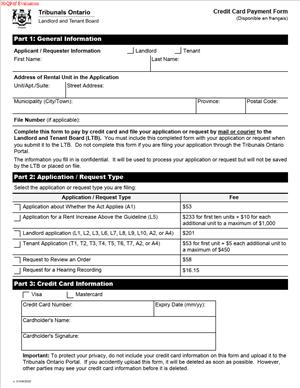
Credit Card Payment Form
Fill out nowJurisdiction: Country: Canada | Province or State: Ontario
What is a Credit Card Payment Form?
A Credit Card Payment Form lets you authorize a one-time fee payment by card. Here, the Landlord and Tenant Board uses it to collect required fees. You complete the form, sign it, and permit a charge to your card. The payment is then linked to your application or request.
This form is not the application itself. It does not set hearing dates. It does not decide your case. It only enables payment. The Board uses it to match your payment to the right file. Your filing is not complete until the fee is paid.
Who typically uses this form?
Landlords, tenants, property managers, and legal representatives use it. A business or a family member can also pay for you. The cardholder can be different from the applicant. The Board accepts payment from any authorized cardholder.
You would need this form when you want to pay by credit card. You might not have a cheque or money order available. You might be filing outside office hours. You may be a representative paying on a client’s behalf. The form provides a simple written authorization to charge a specific amount.
Typical usage scenarios
You are filing a new application and must pay the filing fee. You are asking the Board to review an order and must pay the review fee. You are requesting a copy of a recording or a certified document that requires a fee. The Board contacts you for a balance or a shortfall. You need to top up a fee because the filing was underpaid. You use the form to authorize that additional payment.
The form captures core payment information. It records your file details, applicant names, and the fee type. It collects your card number, expiry date, and security code. It includes the cardholder’s name, contact information, and signature. It sets out the amount authorized and the date. It gives the Board clear permission to process the charge.
You can submit the form with your filing package. You can also submit it on its own to pay a fee later. If the Board directs you to pay after a phone call or letter, use the form. Always follow the Board’s filing instructions for where and how to send it. Do not email card details. Email is not secure for payment data.
When Would You Use a Credit Card Payment Form?
You use this form whenever a Board fee is due, and you want to pay by card. It supports a one-time charge for a specific purpose. It is suitable for both first filings and later requests.
Here are practical situations you may face. You are a landlord filing an application that requires a fee. You include the form with your package to authorize payment. You are a tenant filing an application. You attach the form so the Board can charge your card. You are a property manager filing multiple applications the same day. You complete one form per file to keep charges separate. You are a paralegal representing clients. You collect authorization from your client or use your firm card. You complete the form and sign as the cardholder.
You may also use the form when you need to pay after filing. For example, the Board writes to you about a fee shortfall. Your earlier payment did not cover the full amount. You complete and submit the form to pay the balance. Or you request a review or a reopening, and a fee is required. You complete the form to authorize that specific charge.
You might need a certified copy or a recording for another process. The Board tells you the fee. You submit the form with the request, so payment happens promptly. You may also use it when the Board issues an invoice. An invoice can arise if an earlier payment failed or expired. The form allows you to settle that invoice by card.
If you plan to apply for a fee waiver, do not use this form yet. Submit your fee waiver request first. Wait for the decision. If your waiver is not granted, you can then pay by card. That way, you do not authorize a charge that may be unnecessary.
The form is useful when time matters. Card payments can be processed quickly. That said, your filing is accepted only when the Board confirms payment. If your card declines, your filing may be delayed. You should confirm limits with your card issuer before authorizing a large amount. This helps prevent surprises and missed timelines.
If you are a third-party payer, this form is essential. The Board needs the cardholder’s direct authorization. A lawyer or agent cannot authorize a client’s card without consent. If your firm pays, the signing officer should sign. Use the correct firm billing address. This reduces the risk of card verification problems.
Legal Characteristics of the Credit Card Payment Form
This form is a payment authorization. It is a binding instruction from the cardholder to the Board. It permits a one-time charge for a specific amount and purpose. When you sign and submit it, you consent to the charge as described. The Board can rely on your signed authorization to process payment.
Enforceability rests on clear consent and clear terms. The form identifies the payer and the fee. It specifies the amount in Canadian dollars. It matches the payment to a file or request. It requires a signature and a date. These elements show an informed and specific authorization. That is why the form is binding for the authorized charge.
The form does not create ongoing billing rights. It does not set up recurring charges. It does not authorize charges beyond the amount written. If a later fee arises, the Board will require a new authorization. The Board cannot charge more than the amount you state. If you want to allow a maximum amount, you must write that maximum. If you do not write an amount, the Board should not process the form.
Security and privacy are integral. The Board limits the use of your card information to processing your payment. Staff use secure methods to handle card data. To support security, provide only the fields requested. Do not add extra card details. Do not email the form or postcard details publicly. Use the submission channels that the Board accepts for payment forms.
If the Board cannot read or verify the form, it will not process it. Missing signatures, missing amounts, or unclear card numbers will cause delays. A declined card does not satisfy the fee requirement. Your filing may be treated as incomplete until payment clears. This can affect timelines and hearing dates.
You can usually cancel the authorization before the Board charges the card. To do that, you must contact the Board promptly. Once processed, any refund will follow Board policies. Refunds, if allowed, are typically sent back to the same card. If you dispute a charge with your card issuer, the Board may treat the filing as unpaid. Your matter can be placed on hold or not scheduled until the fees are resolved.
If someone pays on your behalf, they accept the charge by signing. You still remain responsible for the required fees in your case. If the payer later reverses the payment, your filing may be affected. Make sure any third-party payer understands that risk and consents in writing.
If you act for a business or corporation, you must have the authority to sign. The signing officer should provide their name and title. The billing address must match the card issuer’s records. Mismatched data can cause declines. If the address differs from your mailing address, list both clearly. This helps with identity verification and receipt delivery.
Keep your copy of the signed form. It is proof of your authorization and the amount. You can mask the card number on your copy for safety. Keep confirmation of delivery if you send the form separately. This helps resolve any later questions about timing and payment.
How to Fill Out a Credit Card Payment Form
Follow these steps to complete the form accurately and avoid delays.
1) Get the current form
- Obtain the latest version from the Board.
- Use a clean, legible copy.
- Do not reuse an old or altered form.
2) Read the form instructions
- Review any notes on page one.
- Confirm accepted card types.
- Confirm how and where to submit the form.
3) Gather your file and fee details
- Identify the exact fee you must pay.
- Confirm the amount in Canadian dollars.
- If you have a file number, keep it ready.
4) Complete the applicant information section
- Enter the full legal name of the applicant.
- If there are multiple applicants, list each one.
- Provide a mailing address, email, and phone number.
5) Identify the respondent if requested
- Some versions ask for both parties.
- List the respondent’s name if the form requires it.
- Use the names as they appear in your filing.
6) Link the payment to a file or request
- If you already have a file number, write it.
- If you are filing a new application, leave it blank if asked.
- Describe the purpose, such as the application or request name.
7) State the amount you authorize
- Write the amount clearly in numbers.
- Use two decimals for cents.
- Do not leave the amount line blank.
8) Confirm the currency
- Amounts should be in Canadian dollars.
- Do not add tax unless the fee list shows tax.
- Match the fee schedule amount exactly.
9) Provide cardholder identity details
- Enter the cardholder’s full name as shown on the card.
- Provide the cardholder’s phone and email.
- If the cardholder is a company, add the company name.
10) Provide the billing address
- Enter the billing address linked to the card.
- Include unit number, city, province, and postal code.
- This address must match the card issuer’s records.
11) Enter the card information
- Select the card type if the form provides options.
- Write the full card number clearly.
- Enter the expiry date in the format shown on the form.
12) Enter the card security code
- Provide the security code from the card.
- Use the three- or four-digit code on the card.
- Do not write the PIN. Only write the security code.
13) Review the authorization language
- Read the clause allowing a one-time charge.
- Confirm the amount and purpose match your intent.
- Make sure no fields are left ambiguous.
14) Sign and date the authorization
- The cardholder must sign the form.
- Use a handwritten signature if submitting a paper form.
- Enter the date in the format shown on the form.
15) Include signing authority details if needed
- If a company card, print the signer’s name and title.
- If an agent signs for the cardholder, include written authority.
- Attach any required proof of authority if the Board asks.
16) Add contact preferences
- Some forms ask for contact permission about payment issues.
- Check the box if you agree to phone or email contact.
- This can help resolve declines quickly.
17) Avoid errors and corrections
- If you make a mistake, start a new form.
- If you must correct, cross out and initial changes.
- Do not use white-out or tape over numbers.
18) Keep a copy for your records
- Copy the completed and signed form before submitting.
- For safety, mask the card number on your copy.
- Note the date and amount authorized.
19) Submit the form with your filing
- Attach the form to your application or request.
- If paying later, send the form as the Board instructs.
- Do not email credit card details.
20) Confirm delivery and timing
- If you have a deadline, submit early.
- Use a trackable method if you mail the form.
- Keep proof of delivery for your file.
21) Watch for receipt or confirmation
- The Board will issue a receipt once processed.
- Attach the receipt to your file records.
- If you do not receive confirmation, follow up.
22) If the card declines
- The Board may contact the cardholder.
- Resolve the issue with your card issuer if needed.
- Resubmit payment promptly to avoid delays.
23) If you need to change the amount
- You must complete a new form for any change.
- The Board cannot charge more than you authorize.
- Never leave the amount line open for later entry.
24) If multiple files need payment
- Complete one form per file for clarity.
- If the Board accepts one form for several files, list each file.
- Write the amount for each file and the total.
25) If a third party pays for you
- The cardholder must sign the authorization.
- Add the relationship to the applicant, such as “agent” or “family.”
- Ensure the billing address matches the cardholder’s address.
26) If you request a refund later
- Refunds follow Board policy and limits.
- If approved, refunds usually go back to the same card.
- Keep your receipt to support refund processing.
27) If you plan to seek a fee waiver
- Do not authorize a charge yet.
- Submit the waiver request first.
- Pay only if the waiver is not granted.
28) Protect your card details
- Share card data only on the form.
- Do not write card details on other documents.
- Do not send card data by email or text.
29) Provide only what is requested
- Do not add a photocopy of the card unless required.
- Do not include the card PIN.
- Keep your identification documents secure.
30) Final check before submission
- Confirm names, amounts, and file references.
- Confirm that the signature and date are present.
- Confirm that every required field is complete and legible.
What happens next? The Board processes your payment. If approved, your application or request moves ahead. If the card declines or the form is incomplete, the Board will contact you. Your filing remains pending until you resolve the payment. Prompt, accurate completion prevents delays and protects your timelines.
Legal Terms You Might Encounter
- Cardholder means the person whose name appears on the credit card. On this form, the cardholder must authorize the charge and sign. If you pay for someone else, the cardholder’s name and signature must match the card.
- Authorization is your permission to charge a specific fee to a specific card. The form captures that consent with your signature, date, and the exact dollar amount. Without clear authorization, your payment will not be processed.
- Application fee is the amount charged to file or request a service. The form asks you to write the fee total. If the fee is wrong, the payment can be delayed or refused.
- File number is the number the Board assigns to your application. If you already have one, include it so the payment is linked to the right file. If you do not have one yet, write the application type and address so the payment can be matched when a file number is created.
- Applicant is the person filing the application or request. The form will ask for the applicant’s name and contact details so staff can match the payment to the right paperwork.
- Respondent is the other party named in the application. If you include the respondent’s name and the rental unit address, it helps staff confirm they are applying the payment to the right matter.
- CVV or CVC is the three-digit security code on the back of a Visa or Mastercard. The form asks for this to verify the card. If the code is missing or wrong, the payment will be declined.
- Expiry date is the month and year when the credit card expires. You must list it as it appears on the card. If the expiry has passed, the payment cannot be processed.
- Chargeback is when a card issuer reverses a payment after it is processed. If that happens, your filing may be put on hold until you pay again. A chargeback can delay scheduling or decisions.
- Privacy notice explains how your payment and contact details are collected and used. By signing the form, you consent to the processing of the payment for your file. Do not include more information than requested on the form.
- Refund is money returned after overpayment or when a fee should not have been charged. If you are eligible, refunds usually go back to the original card. Processing time depends on the banking systems.
- Third‑party payer is someone who pays for the applicant, such as a representative or organization. If you are a third-party payer, ensure the payer’s details are complete, and the cardholder signs the authorization.
FAQs
Do you have to be the cardholder to sign?
Yes. The cardholder must sign the authorization and date it. If you are paying for someone else, the cardholder’s name must be printed clearly and match the signature on the card. If the cardholder does not sign, the payment will be declined.
Do you have to pay the full fee on one card?
Yes. Pay the full fee listed for your filing. Split payments on multiple cards are often rejected because the form authorizes one specific charge to one card. If you need to use more than one card, you typically need separate authorizations. Check the form instructions before splitting.
Can you pay with debit or e‑transfer instead?
This form is only for credit cards. If you want to use other methods, follow the filing instructions for your application. Those instructions describe whether debit, money order, or other methods are available for your filing channel. Do not write debit details on this form.
What happens if your card is declined?
Your application is not paid until the charge goes through. A decline can delay filing or scheduling. Correct the issue and resubmit the payment details. Common fixes include entering the correct CVV, using a card with available credit, or updating the expiry date.
Will you receive a receipt?
Yes, you can receive a receipt for a successful payment. Provide a valid email address on the form to receive it faster. If you need a duplicate receipt later, contact the office that processed your filing and provide your file number or filing details.
Can you pay after you submit your application?
If you filed without payment, you usually need to pay promptly, or your filing may be incomplete. Use the form to authorize the fee and include your file number so staff can match it. Your request will not move forward until the fee is received.
How do you correct the amount if the fee changed?
Cross out the wrong amount, write the correct fee, and initial the change next to the amount. If you already submitted the form, send an updated, signed authorization with the correct fee. Staff will not process a charge for a higher or lower amount than you authorized.
Can you withdraw the payment after submitting the form?
You can request to cancel a payment before processing. If the charge has already gone through, you must request a refund and explain why. Refunds are not guaranteed and depend on the rules for your application type. If approved, funds usually return to the original card.
Checklist: Before, During, and After the Credit Card Payment Form
Before signing
- Verify the correct fee for your application or request.
- Confirm accepted cards. Most forms accept Visa or Mastercard. If you want to use another card type, check the current instructions printed on the form.
- Gather the file number, if already issued.
- Have the rental unit address and party names exactly as on the application.
- Ensure the cardholder is available to sign and date the form.
- Check the card details: card number, expiry, CVV, and billing address.
- Confirm the card has sufficient credit for the full fee.
- Decide how you want to receive the receipt (email or mail).
- If you cannot afford the fee, review whether you plan to submit a fee waiver request instead of this form.
During signing
- Print the cardholder’s full name exactly as on the card.
- Write the card number clearly. Avoid spaces or stray marks.
- Enter the expiry date in the format shown on the form.
- Enter the correct CVV/CVC security code.
- Write the exact fee amount you authorize. Do not leave it blank.
- Add the file number, if known, and match it to the application type.
- List the applicant’s name, the respondent’s name, and the rental unit address.
- Provide a current phone number and email in case staff need to reach you.
- Date the form and sign in ink. The cardholder must sign.
- Review every field for legibility and completeness.
- Initial any corrected figures next to the correction.
After signing
- Attach the form to your application package if filing together.
- If paying for an existing file, include the file number on all pages.
- Keep a copy of the completed form for your records.
- Submit the form through the same channel as your filing, unless you are instructed to send it to a payment office.
- If you emailed or uploaded the form, confirm it was received and is readable.
- Monitor your card account for the posted charge.
- Save your receipt and note the date and amount.
- If you see no charge within the expected timeframe, follow up with the office that handles your file.
- Store the copy of the form in a secure place. Do not share your card details with anyone not involved in processing the payment.
Common Mistakes to Avoid
Leaving the amount blank
- Consequence: Staff cannot process an open-ended charge. Your payment will be rejected.
- Tip: Write the exact fee and check it against the current fee schedule.
Using an expired or soon‑to‑expire card
- Consequence: The transaction will fail or be reversed. Your filing may be delayed.
- Tip: Confirm the expiry date and use a valid card with enough credit.
Missing CVV or wrong number
- Consequence: The payment will decline during processing.
- Tip: Enter the three-digit code from the back of the card. Do not guess.
Illegible handwriting
- Consequence: Numbers can be misread, causing declines or misapplied payments.
- Tip: Print clearly in block letters. Avoid writing over corrections.
The cardholder did not sign
- Consequence: The authorization is invalid. Processing stops until it is signed.
- Tip: Don’t forget the signature and date. Only the cardholder can sign.
Wrong or missing file number and address
- Consequence: The payment may not match your file, causing delays.
- Tip: Include the file number, applicant name, and rental unit address consistently.
What to Do After Filling Out the Form
- Attach the payment form to your application if you are filing now. Place it immediately behind your main application so it is easy to find. If you are paying for an existing file, include a cover page that lists the file number, applicant name, and rental unit address. That helps staff match the payment quickly.
- File the form through the same channel as your application unless instructed otherwise. For example, if you submit your application online or by email, include a clear scanned copy of the signed payment form. If you file by mail or courier, place the original signed form in the package. If counter service is available, bring the signed form with the government-issued ID for the cardholder if you are asked to verify identity.
- Confirm receipt and processing. Watch for a confirmation email or receipt. If you do not receive confirmation within the typical processing window, contact the office that handles your application. Have the file number, applicant name, payment amount, and the last four digits of the card ready.
- Monitor the card account. Look for the posted charge for the exact amount you authorized. Keep in mind that posting can take a few business days. If you do not see the charge or you see a different amount, follow up promptly.
- Handle errors or declines. If the payment is declined, correct the issue and resubmit the form. Common fixes include using a different card, updating the expiry or CVV, or adjusting the fee amount if you wrote it incorrectly. Do not send photos of cards. Always use the official form.
- Update information if needed. If your contact details change after submission, notify the office responsible for your file so receipts and notices reach you. If you authorized the wrong amount, send a revised, signed authorization. The Board will not charge more than you authorized.
- Keep records. Store a copy of the signed payment form and the receipt in a secure file. Do not email or share your card details except to the official filing address or portal. Destroy drafts that show full card numbers.
- Consider alternatives if your circumstances change. If you become eligible for a fee waiver before the charge is processed, ask how to proceed. You may need to withdraw the payment authorization and file the waiver request instead. If a refund might be due, ask about the steps and timelines. Refunds, if approved, usually go back to the original card.
- Plan for future filings. If you expect multiple applications, do not reuse a copy of a signed form. Complete and sign a new form each time with the correct amount and file details. Reusing a signature page can cause processing errors.
Disclaimer: This guide is provided for informational purposes only and is not intended as legal advice. You should consult a legal professional.