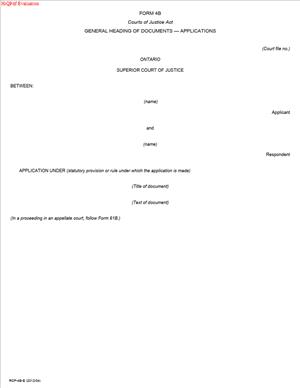
Form 4B – General Heading of Documents – Applications
Fill out nowJurisdiction: Country: Canada | Province or State: Ontario
What is a Form 4B – General Heading of Documents – Applications?
Form 4B is the standard “top section” that sits on the first page of every document you file or serve in an application in the Ontario Superior Court of Justice. It identifies the court, the court file number, the location, the parties, their roles, and the title of the document. It is not the substance of your case. It is the uniform heading that ties each document to the correct application.
Think of it as the court’s filing label for application proceedings. The court relies on it to route, track, and store your materials. Opposing parties rely on it to know what case the document relates to and who is involved. You use it on your Notice of Application, affidavits, factums, application records, motion materials within the application, draft orders, and most other filed or served documents across the life of the application.
Who typically uses this form?
Lawyers, law clerks, legal assistants, and self‑represented litigants are preparing documents for an application in the Superior Court of Justice. If your matter is an application rather than an action, you use Applicant and Respondent labels. Form 4B for applications ensures the right party roles appear at the top of your documents.
Why would you need this form?
The Rules of Civil Procedure require a general heading at the start of court documents. Using the correct heading for applications avoids filing delays, misfiling, or confusion. It also supports a valid service. When everyone uses the same heading format, the record stays clean and reliable.
Typical usage scenarios
- You are starting an application for directions in an estate matter. Your Notice of Application must carry the application heading.
- You are a condominium corporation seeking a compliance order by application. Your affidavits and application record use the same heading.
- You are a shareholder bringing an oppression remedy by application. Your factum and book of authorities include the application heading.
- You need a short motion within the application, such as to extend time. Your motion record still uses the application heading, because it sits within the same proceeding.
In each case, Form 4B sets out the style of cause and the court details, so every document clearly belongs to your application file.
When Would You Use a Form 4B – General Heading of Documents – Applications?
You use Form 4B whenever you prepare a document for an application in the Superior Court of Justice. This includes both initial and later-stage materials. The first time you use it is on your Notice of Application. You continue to use it on every document you file or serve in that application.
Here are common situations. You are an estate trustee seeking to pass accounts or to obtain advice and directions. Your Notice of Application, affidavits of service, supporting affidavits, compendium, and draft order each start with the application heading. You are a condo corporation applying for an order that an owner comply with the declaration. Your material, including reply affidavits and costs outlines, uses the application heading. You are a business owner seeking relief available by application. Your case record, factum, and motion to abridge time each carry the same general heading.
Self‑represented litigants use it for the same reasons. If you are bringing a guardianship application, you place the Form 4B heading on your Notice of Application and on each supporting document. If you are responding to an application, your responding record carries the same heading. Documents for a motion within an application still use the application style. The moving party label appears in the title of the document itself, but the general heading remains the application heading.
If your matter goes to the Divisional Court as an application, you still use this general heading, with the court name adjusted to reflect the correct branch. The core elements are the same. You identify the court, the court office, the parties as Applicant and Respondent, and the document title.
Legal Characteristics of the Form 4B – General Heading of Documents – Applications
Form 4B is a prescribed procedural format under the Rules of Civil Procedure. It is not a contract. It does not, by itself, create obligations or rights. It is, however, mandatory. The court expects your documents to display the proper general heading that matches your proceeding type. For applications, you must identify parties as Applicant(s) and Respondent(s). Using Plaintiff/Defendant labels in an application is incorrect.
Is it legally binding?
The heading itself is not a promise or agreement. It is binding in the sense that it is required by the court’s procedural framework. If your documents lack the proper heading, the registrar may refuse to accept them for filing. Even if accepted, improper headings can confuse service, delay scheduling, or increase costs. In extreme cases, persistent non‑compliance can attract cost consequences.
What ensures enforceability?
Clear, consistent headings ensure that orders and endorsements relate to the correct file. They support a valid service. They also reduce the risk of misidentification of parties, which can undermine enforcement. When you seek relief, the court and opposing parties must know exactly who seeks what, in which file, against whom. The heading anchors that clarity.
Key legal considerations include:
- Accuracy of party names and roles. Use full legal names and correct capacities. If a party sues as an estate trustee, reflect that capacity in the heading. If a corporate party uses a numbered name, use the full corporate style.
- Consistency across documents. The style of the cause should remain the same throughout. If the court orders a change of party, update the heading in all new documents and the draft order.
- Correct court and location. The court office and city must match where the file sits. If your application is in Toronto, do not list another city’s court office.
- Correct file number. After the registrar assigns a number, it must appear identically on all documents. Before assignment, leave the number blank or mark “Court File No.: ” with space for the registrar to fill in.
- Privacy and capacity. For minors and persons under disability, use the proper litigation guardian format. Avoid including personal identifiers that are not needed.
When you get these points right, your application record remains coherent and enforceable. Orders reflect the correct parties. Service is clear. The registry can process your materials without delay.
How to Fill Out a Form 4B – General Heading of Documents – Applications
You will place this heading at the top of page one of each document. The layout is consistent. Follow these steps for accuracy and speed.
Step 1: Confirm you are in an application
Check that your proceeding is an application, not an action. Applications use Applicant and Respondent labels. Actions use Plaintiff and Defendant. Many statutes and the Rules allow or require applications for specific remedies. If you started with a Notice of Application, you are in an application. Use the application heading on every document in that file.
Step 2: Identify the correct court and location
At the top, centre, the court name:
- “ONTARIO SUPERIOR COURT OF JUSTICE”
- If your application belongs in the Divisional Court, write “ONTARIO SUPERIOR COURT OF JUSTICE – DIVISIONAL COURT.”
Below or to the side, include the court office location. Use the city where the file is or will be issued. Include the court office address if space permits. The location governs where the registrar processes your filing and where hearings occur unless moved.
Tip: Keep the location consistent. Do not switch locations unless the court transfers the proceeding. If it is transferred, update to the new location on future documents.
Step 3: Insert the court file number
Place “Court File No.” aligned to the right margin. If you are filing the first document and do not yet have a number, leave it blank. The registrar will assign it when the file is issued. After you receive the number, add it to all documents exactly as assigned.
Common formats include a prefix indicating civil (often “CV”), the year, and a sequence. Use the exact formatting the registrar provides. Do not guess. Do not alter spacing or hyphens once assigned.
Step 4: Set out the style of the cause
The style of cause identifies the parties and their roles. Use this format:
BETWEEN:
- Full legal name(s) of the Applicant(s)
- The word “Applicant” or “Applicants”
AND:
- Full legal name(s) of the Respondent(s)
- The word “Respondent” or “Respondents”
Use full legal names. For individuals, list their names as they appear on legal documents. For corporations, use the exact corporate name, including punctuation and legal ending. If a party appears in a specific role, state the capacity after the name, for example:
- “Jane Doe, as Estate Trustee of the Estate of John Doe”
- “ABC Condominium Corporation No. 123”
- “XYZ Inc., carrying on business as ‘XYZ Services’”
For minors or persons under disability, identify the litigation guardian in the style, for example:
- “A.B., a minor, by her Litigation Guardian, C.D.”
If there are many parties, list each on its own line. Order Applicants first, then Respondents. If parties consent to a style change, or the court orders one, update the style of the cause in all future documents.
Step 5: Add the document title
Below the style of cause, centre the document title. Keep it specific and accurate. Use common titles such as:
- “NOTICE OF APPLICATION”
- “AFFIDAVIT OF [NAME]”
- “RESPONDING FACTUM OF THE RESPONDENT”
- “APPLICATION RECORD OF THE APPLICANT”
- “MOTION RECORD (SHORT MOTION) OF THE APPLICANT”
- “DRAFT ORDER”
If the document relates to a motion within the application, reflect that in the title. For example, “Notice of Motion” or “Motion Record of the Respondent.” The general heading remains the same application style. The moving party appears in the document title, not in the general heading.
Step 6: Provide lawyer or party information block
At the bottom of the first page or on a back page, include the address for service. List:
- Name of the lawyer or the self‑represented party
- Firm name (if any)
- Address for service
- Email and telephone number
- Lawyer’s LSO number (if a lawyer)
- Role (e.g., “Lawyers for the Applicant” or “Respondent, self‑represented”)
Also include a “TO:” section that identifies the opposing party’s lawyer or address for service. This helps with proof of service and avoids confusion.
Keep the service list current. If counsel changes, update the block on new filings. If a party adds counsel, reflect that change promptly.
Step 7: Maintain formatting and consistency
Use the same format, font, and spacing across documents. Keep margins readable. Use clear headings and page numbering in the body of the document. A consistent presentation helps the judge, the registrar, and the other side.
Do not switch between “Applicant” and “Plaintiff.” Do not abbreviate party names in the heading. Use abbreviations only within the body, and only if defined.
Step 8: Check special points for accuracy
- If there are related files that have been consolidated, use the consolidated style and the primary file number as directed by the court.
- If a party is added or removed by order, reflect the change in all future headings. Do not alter past filings.
- If the court orders a change of venue, update the court office location going forward.
Step 9: Understand signatures with this heading
The Form 4B heading itself does not include a signature block. Signatures belong to the document you are filing. For example:
- A Notice of Application is signed by the Applicant or their lawyer.
- An affidavit includes the deponent’s signature and the commissioner’s jurat.
- A factum is signed by the lawyer or by the party if self‑represented.
- A draft order does not need a signature at filing, but once issued, it bears the registrar’s endorsement or a judge’s signature as applicable.
Place signatures where the specific document requires them. The general heading remains at the top, unchanged.
Step 10: Attach schedules or exhibits correctly
When your document includes schedules or exhibits, the Form 4B heading still appears only on the first page of the main document. For large records or books, you may add a cover page that repeats the general heading and document title for clarity. Exhibits to affidavits do not need the general heading on each exhibit page. They should be labeled and tabbed. If you insert a divider or cover sheet within a record, you may repeat the style of cause and file number for easy navigation.
Ensure that each bound volume clearly shows the file number and style of cause on the cover and spine, if applicable. In electronic filings, include the style of cause and document type in the PDF file name when possible. The registrar and the judge can then identify the document quickly.
Practical examples
- Estate application: You file a Notice of Application to pass accounts. Your Form 4B heading lists “ONTARIO SUPERIOR COURT OF JUSTICE,” the court file number once assigned, the estate trustee as Applicant, and named beneficiaries as Respondents. Your affidavits, factum, and application record repeat the same heading.
- Condominium compliance: You apply for an order under the Condominium Act. The condo corporation is the Applicant. The unit owners are Respondents. Your supporting affidavit and draft order carry the same Form 4B application heading.
- Corporate dispute: You bring an oppression application. Your business is the Applicant. The opposing shareholders or the corporation are the Respondents. Your motion to abridge time shows the same application heading, with “Motion Record of the Applicant” as the document title.
Common mistakes to avoid
- Using Plaintiff/Defendant in an application. Use Applicant/Respondent.
- Listing the wrong court location. Confirm the issuing office and use it consistently.
- Misspelling names or using the wrong corporate style. Verify official names before filing.
- Changing party names midstream without an order. Secure the order first, then update.
- Leaving off the file number after assignment. Add it to all later documents.
- Mixing roles in a motion title and the general heading. Keep roles in the general heading as Applicant/Respondent. Identify the moving party in the document title.
Quality control checklist before filing
- Court name and location are correct and consistent.
- The court file number is present and matches the registry record.
- Style of cause lists all parties with correct names and capacities.
- Roles are correct: Applicant(s) first, Respondent(s) second.
- Document title is clear and precise.
- Service information blocks list current counsel and addresses.
- Formatting is clean and uniform across the document.
By following these steps, you create a precise and compliant general heading for applications. You reduce the risk of filing issues. You also help the judge and the opposing side understand your materials at a glance. The result is a clearer record and a smoother path to a hearing.
Legal Terms You Might Encounter
- Form 4B uses standard court language. You will see these terms often. Understanding them helps you fill the heading correctly.
- Application means a court process started without a statement of claim. You ask a judge for an order based on affidavits and written materials. Form 4B is the heading used for applications, not actions. If you are bringing an application, you use Applicant and Respondent.
- Applicant is the party starting the application. Your name appears first in the style of cause. Use your full legal name. If you are a corporation, include the legal suffix. The heading shows Applicant beside your name.
- Respondent is the party or parties you name in the application. Their full legal names go under yours. The heading shows Respondent beside each name. Do not use initials, nicknames, or short forms.
- Style of the cause is the formal title of your case. It sets out the parties and their roles. On Form 4B, the style uses Applicant and Respondent labels. Keep the style identical on every document in the case. Consistency links your documents to the correct file.
- Court file number is the unique number for your case. You receive it when the court issues your first document. Before issuance, you may not have a number. Leave that line blank until the court assigns it. Then add it to the heading on all documents.
- Court office or court location is the specific courthouse handling your file. The heading must show the correct court name and location. Use the same location across all documents. If the file moves to a new location, update the heading for future filings.
- General heading or caption means the top block of text on each document. It includes the court name, file number, and style of cause. Form 4B provides the approved format for applications. Use that format as your template.
- Issuing or issued refers to when the court accepts your starting document. The clerk stamps it and assigns a file number. After issuance, update the heading on any draft documents. Add the court file number and keep the style of cause the same.
- Service means delivering your filed documents to the other parties. Your certificate of service should repeat the full style of cause. A clear heading helps the court and parties track your materials. It reduces the risk of misfiling or delay.
- Amended style means an updated heading after changes. This happens when a party’s name changes or a new party is added. It can also follow a court order. When your style changes, update the heading on all future documents. Label amended documents clearly, if required.
FAQs
Do you use Form 4B for actions or applications?
Use Form 4B for applications. It is not for actions. Actions use a different general heading. If you filed a statement of claim, you are in an action. Use the correct heading for your process type.
Do you list every party in the style of cause?
Yes. List each Applicant and each Respondent by full legal name. Avoid “et al.” and short forms. Ensure the order matches your first filed document. If a court adds or removes parties, update your heading.
Do you include the court file number on your first draft?
If you are starting a case, you will not have a number yet. File your starting document with the Form 4B heading. The court assigns a number on issuance. Add it to the heading on all future documents. If your case already has a number, include it on every document.
Do you include the correct court location in the heading?
Yes. Use the location where you intend to file. That is the court office handling your case. If the court transfers your file, update the location line next time you file.
Do you need to sign Form 4B?
No. Form 4B is not a standalone document you sign. It is a format for the top of each document. Your documents may require signatures. The heading itself does not.
Do you use “Applicant” and “Respondent” even if a company is involved?
Yes. Status labels do not change. Use full legal names and labels. For companies, include the legal suffix. Keep spelling consistent across all documents.
Do you include “IN THE MATTER OF” wording in the heading?
Many applications include that wording before listing parties. Use it when your application concerns a statute, instrument, or specific subject. Follow the layout shown on the form. Do not add extra text not shown on the form.
Do you need to change the heading after a court order?
Yes, if the order changes the parties or location. Update the style of the cause and location line as needed. Use the updated heading on all future documents. Keep your earlier filings as they were when filed.
Checklist: Before, During, and After the Form 4B – General Heading of Documents – Applications
Before signing
- Confirm your process is an application.
- Gather full legal names for all parties.
- Confirm party roles: Applicant or Respondent.
- Verify the correct court location for filing.
- Prepare your starting document for the application.
- Check if the case already has a court file number.
- Confirm corporate names and legal suffixes.
- Check for any court orders that affect party names.
- Decide on consistent capitalization and spacing.
- Set your document margins and page layout for readability.
During signing
- Check that the court name line is exact and complete.
- Confirm the court location appears correctly.
- If you have a court file number, add it now.
- If not, leave that line blank for now.
- Enter the Applicant’s full legal name.
- Enter each Respondent’s full legal name.
- Add the proper labels: Applicant and Respondent.
- If your application includes “IN THE MATTER OF,” place it properly.
- Do not mix “Plaintiff” or “Defendant” into an application heading.
- Remove extra wording that is not in the form.
- Ensure the style of the cause matches your starting document.
- Keep consistent spacing and formatting across pages.
- Confirm the heading appears on the first page of every document.
- Review for spelling, initials, and accents in names.
After signing
- File your starting document with the Form 4B heading.
- Receive the court file number on issuance.
- Update the heading on all draft documents with the file number.
- Serve issued documents on every Respondent.
- Keep proof of filing and proof of service.
- Save a master Form 4B heading template with the file number.
- Use the same heading on affidavits, factums, and records.
- If a party changes, update the heading for future filings.
- If the file location changes, update the location line.
- Store final PDFs and Word versions in a labeled folder.
Common Mistakes to Avoid
Using the wrong form type
- Don’t use the action heading for an application. Mixing 4A and 4B causes rejection. Clerks may refuse the filing, and you lose time.
Omitting or misplacing the court file number
- Don’t forget the number once the court issues your file. Missing numbers lead to misfiled materials or delays. Add it to every document after issuance.
Misspelling party names or using short forms
- Do not shorten names or skip legal suffixes. Wrong names can cause confusion and enforcement issues. You may need to amend and refile.
Listing the wrong court location
- Avoid using a courthouse other than your filing site. Wrong locations slow intake and can lead to returns. Confirm the office before filing.
Mixing party labels from actions and applications
- Don’t use Plaintiff or Defendant on Form 4B. Use Applicant and Respondent only. Wrong labels suggest the wrong process and create delays.
Leaving out “IN THE MATTER OF” when required
- If your application sets out a subject matter first, include that line. Missing opening lines can make your documents unclear. Follow the form layout.
Inconsistent headings across documents
Do not change capitalization, spacing, or name order. Inconsistency risks misfiling and confusion. Copy the same heading into every document.
What to Do After Filling Out the Form
File your starting document
- Finalize your notice or other starting document.
- Ensure the Form 4B heading appears correctly.
- File it with the court office.
- Pay the filing fee if required.
- Wait for issuance. The court assigns a file number.
Update your heading
- Add the court file number to your heading after issuance.
- Use the updated heading on all future documents.
- Keep the party order and names identical.
- Save a master heading template for reuse.
Serve the other parties
- Serve issued documents on each Respondent.
- Use the same style of cause on your service materials.
- Keep proof of service for the court record.
Prepare supporting materials
- Draft and file affidavits using the same heading.
- Prepare your application record or other required materials.
- Keep the heading identical across every document.
- Include the court file number on each first page.
Manage changes promptly
- If a court order changes a party, update the heading.
- If the court transfers the file, update the location line.
- Use the updated heading on your next filings.
- Keep a note in your file about the change.
Distribute and store consistently
- Send copies with the correct heading to all parties.
- Label electronic files with the court file number.
- Store PDFs and editable versions in one place.
- Keep a version history when making updates.
Prepare for the hearing
- Use the same heading on your factum and briefs.
- Confirm the hearing date appears in the body, not the heading.
- Check every document for the correct file number and location.
- Bring copies that show the consistent heading.
Handle amendments cleanly
- If you amend a document, keep the heading consistent.
- Mark amendments as needed within the document.
- Do not change the style of the cause unless required.
- File and serve the amended version if needed.
Maintain a quality control step
- Assign one person to check headings before filing.
- Use a checklist to verify court name, location, and file number.
- Compare against the first issued document for accuracy.
- Correct errors before uploading or delivering to the court.
Keep communication clear
- When emailing or delivering materials, include the full style of the cause.
- Put the court file number in the subject line and filename.
- This helps the court and counsel place your materials quickly.
Stay consistent through to disposition
- Continue using the same heading until the case ends.
- If an appeal or related step begins, follow that process’s heading.
- Archive your final heading template with your closing file.
Disclaimer: This guide is provided for informational purposes only and is not intended as legal advice. You should consult a legal professional.