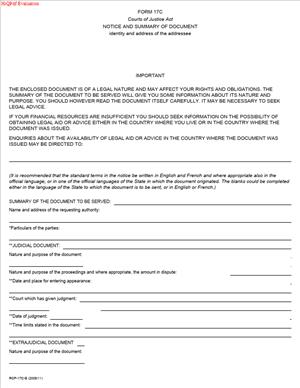
Form 17C – Notice and Summary of Document
Fill out nowJurisdiction: Canada — Ontario
What is a Form 17C – Notice and Summary of Document?
Form 17C is a standard notice you serve and file with a document in an Ontario civil case. It alerts the other parties that you are delivering a document. It also provides a concise summary of what the document is and why it matters. You use it to support motions, applications, conferences, or trial steps in the Ontario Court of Justice under the Rules of Civil Procedure.
Think of it as a clear cover sheet with legal effect. The form tells recipients what you are sending and what you want the court to do with it. It reduces surprise. It clarifies deadlines. It helps the court manage the record.
You attach (or identify) the document. You explain the document’s purpose and key points in plain language. You confirm how and when you served it. You give the other side enough detail to respond.
Who uses this form?
Lawyers, licensed paralegals, and self-represented parties. Plaintiffs and defendants. Applicants and respondents. Corporations and public bodies. Anyone who needs to formally give notice and a document summary in a civil step.
Why would you need this form?
Because many court steps require clear notice, courts expect you to explain what you are filing and why. Some evidence rules require notice before a document can be used. The form helps you comply with those rules. It supports fairness and efficiency.
Typical usage scenarios
- You serve a motion record with affidavits and exhibits. You use Form 17C to flag the record and summarize the affidavits.
- You deliver an expert report. You use the form to summarize the expert’s qualifications and opinions. You state how you will rely on it.
- You serve a lengthy contract or set of emails. You use the form to explain relevance and identify key passages.
- You file business records that you plan to rely on at a hearing. You use the form to provide notice and a summary of the records.
- You produce third-party records obtained by summons. You use the form to explain the scope and any redactions.
Form 17C improves clarity. It sets expectations. It supports procedural fairness. You save time at the hearing because the court sees the point of the material.
When Would You Use a Form 17C – Notice and Summary of Document?
You use Form 17C whenever a rule, order, or practice requires a notice with a document. You also use it when clarity will help the court and the other parties.
Here are practical examples:
- You are the plaintiff moving for summary judgment. You serve a motion record with affidavits and exhibits. You file Form 17C with the record. In the summary, you list the main affidavits, attach a short explanation of the key evidence, and point to the relief you seek.
- You are the defendant delivering an expert report. You serve the report by the deadline. You attach Form 17C. You summarize the expert’s opinions, the issues addressed, and the portions you will rely on at the hearing.
- You are bringing a procedural motion on short notice. You serve a brief supporting affidavit. You include Form 17C to explain urgency, what order you ask for, and the precise documents attached.
- You are producing business records obtained from a third party. You serve the records and use Form 17C to summarize the source, date range, and relevance. You also flag any redactions for privilege.
- You are responding to a motion. You serve a responding affidavit and case materials. You file Form 17C with a short summary of your evidence and how it answers each point raised.
- You are filing a conference brief that attaches key documents. You include Form 17C to identify the documents and highlight the issues that need a ruling.
- You are an intervenor or a non-party delivering records under a summons or order. You use Form 17C to identify what you produced, any limits on use, and any confidentiality concerns.
- Typical users include businesses, municipalities, insurers, landlords, tenants, contractors, and individuals. Self-represented litigants use it to keep proceedings organized and fair. The court benefits from a clear, short summary of the material connected to each step.
Legal Characteristics of the Form 17C – Notice and Summary of Document
Form 17C is a procedural notice with real legal effect. It is not evidence itself. It is part of your service and filing package that helps you meet notice and disclosure duties under the Rules of Civil Procedure.
Is it legally binding? Yes, in the sense that it gives formal notice. Proper notice can trigger response timelines set by the rules or an order. It anchors the purpose of the served document. If a rule requires notice before a document can be used, Form 17C helps meet that requirement. If you skip notice where it is required, you risk exclusion of the document, an adjournment, or costs.
What ensures enforceability?
Compliance with the Rules of Civil Procedure. That includes:
- Clear identification of the court file, the parties, and the step.
- Accurate description of the document served and its purpose.
- Proper service on every party entitled to notice.
- Proof of service where the rules require it.
- Compliance with timelines, page limits, and formatting standards.
- Attachment or availability of the document as described in the notice.
The form improves procedural fairness. It reduces ambush and surprise. The court expects you to explain what you are filing and why. When you deliver a clear summary, the other side can respond properly. If you fail to use proper notice, the court may impose remedies. Those remedies include refusing to consider the document, adjournments, or costs.
General legal considerations:
- The form does not cure an underlying admissibility problem. For example, hearsay rules still apply. Privilege still applies.
- The form should not reveal privileged content. If you must refer to sensitive material, identify the claim of privilege and explain the basis in general terms only.
- Use plain language. Avoid arguments in the summary. State relevance and use, not advocacy.
- If an order restricts access to the document, the form must reflect those limits. Use a confidentiality schedule if needed.
- If the document is voluminous, the form should explain how to access it. Identify specific excerpts you rely on.
Courts value clarity and timeliness. Proper use of Form 17C supports both. It signals that you take the rules seriously and respect the process.
How to Fill Out a Form 17C – Notice and Summary of Document
Follow these steps. Keep sentences short. Be precise. Use the same title of proceeding as on your existing court documents. Number pages. Proofread for accuracy.
1) Caption and Court File Details
- Court name: Ontario Court of Justice.
- Jurisdiction: Ontario.
- Court file number: Copy it exactly from your existing case file.
- Title of proceeding: Use the same party names and order as on your originating document.
- Location: State the court location where your case is filed.
2) Party Information
- Your name and role: Plaintiff/Defendant, Applicant/Respondent, or other role.
- Opposing parties: List full legal names and roles as they appear on the court record.
- Counsel details: Include names, firm names, addresses, emails, and phone numbers. If you are self-represented, include your address, email, and phone.
3) Hearing or Procedural Step
- Identify the step the document relates to. For example, “Motion for summary judgment” or “Application returnable on [date].”
- Provide the return date and time if known. If no date is set, state “No date fixed.”
- State any timetable or scheduling order relevant to the document.
4) Name of the Document
- Use the exact name. Examples: “Affidavit of Jane Smith sworn [date], with exhibits.” “Expert report of Dr. Ahmed dated [date].”
- If there are multiple documents, list each document separately or use a Schedule “A.”
5) Notice Statement
- State that you are serving and filing the document.
- State how you will ask the court to use the document. For example, “To be read on the motion for [relief].”
- If the rules require notice for this type of document, cite the requirement briefly. Do not argue. Example: “Notice provided as required for the use of [type of record] at the hearing.”
6) Summary of the Document
Keep the summary concise. Aim for one to two short paragraphs per document. Include:
- What the document is. Example: “This is a 15-page contract dated [date] between [parties].”
- Who authored it and when? Example: “Authored by [name], [title], on [date].”
- The key points you rely on. Example: “Clauses 4 and 9 set out termination rights.”
- Why it matters. Example: “It establishes the agreed delivery schedule and price adjustments.”
- Where in the document do the key points appear? Example: “See pages 3-4, 7, and Schedule B.”
- Any limitations or redactions. Example: “Pages 10-12 redacted for solicitor-client privilege.”
Avoid argument. Do not exaggerate. Give a fair, neutral summary. The judge and the other side should understand the essence without reading the full document.
7) Relevance and Issues
- Link the document to the issues the court must decide.
- Use clear, issue-based statements. Example: “Relevance: Establishes that the defendant accepted delivery on [date], addressing limitation and breach.”
8) Attachments and Access
- Attach a copy of the document unless volume or an order prevents attachment.
- If the document is too large, attach key excerpts. Explain how to access the full version. Example: “Full version available on a secure link upon request” or “Available for inspection by appointment.”
- If you rely on audio, video, or native electronic files, explain the format and how to access them. State any playback requirements.
9) Confidentiality and Redactions
- If a confidentiality order applies, identify it. Example: “Filed under confidentiality order dated [date].”
- Use a separate confidential schedule for sensitive content. Mark it clearly.
- Redact personal identifiers not needed for the issue. Examples: SIN, account numbers, full birth dates. State that you redacted to protect privacy.
10) Service Details
- State how you served each party. Example: “Served by email to counsel at [email address] on [date] at [time].”
- If a rule or order requires personal service, state that it was done and by whom.
- If you used a courier or mail, state the delivery details and tracking, if available.
- If the service was consented to by email, state that consent exists.
11) Response or Objection Timelines
- If a rule sets a deadline to respond or object to the use of the document, state it. Example: “Any objection to the use of this record must be delivered by [date].”
- If a scheduling order sets deadlines, mirror that language and timing.
12) Relief Sought (if tied to a motion or application)
- Briefly restate the specific orders you will seek that rely on this document. Example: “An order dismissing the action against the defendant with costs.”
13) Signature and Contact
- Sign and date the form.
- Print your name. Include your role and contact info.
- If counsel signs, include firm name, address, email, and phone.
14) Schedules
- Schedule A: List of documents. Include document titles, dates, and page counts.
- Schedule B: Confidential documents or redacted portions, if any.
- Schedule C: Access instructions for large files or electronic media.
Label each schedule clearly. Cross-reference schedules in the main form.
15) Filing
- File the form and the document with the court as required for the step.
- Use the correct method: electronic filing platform, in-person filing, or as directed by a case management order.
- Pay any filing fees if applicable to the step.
16) Proof of Service
- Prepare and keep proof of service. If an affidavit of service is required, arrange it. Reference the proof of service in the form if helpful. Example: “See Affidavit of Service sworn [date].”
17) Formatting Tips
- Use readable fonts and proper margins.
- Number pages and paragraphs where possible.
- Use descriptive headings in the summary for clarity.
- Ensure exhibits are legible and complete. Avoid blurry scans.
- Bookmark PDFs for large records.
18) Common Mistakes to Avoid
- Vague summaries that do not state relevance.
- Misstated party names or file numbers.
- Missing service details or wrong email addresses.
- Attaching privileged content without redaction.
- Serving late without addressing the timetable impacts.
- Over-arguing in the summary. Keep it factual.
19) Practical Examples
Example 1: Contract Dispute
- Document: Master Services Agreement, 35 pages, dated March 12, 2022.
- Summary: Identifies pricing, change-order process, and termination clause. You rely on clause 9(c) to show valid termination. You cite pages 5, 7-9, and Schedule 2.
- Use: To support summary judgment on liability. You state that no disputes were raised under the change-order process.
Example 2: Expert Report
- Document: Engineering report by Dr. Lee, dated January 15, 2024.
- Summary: Qualifications, methodology, opinions on causation, and standard of care. You cite sections 3, 5, and Appendix C for testing results.
- Use: To support the defence of causation at trial. You state that Dr. Lee will testify.
Example 3: Business Records
- Document: Sales ledger and delivery logs, January–June 2023.
- Summary: Source, date range, and entries linking invoices to deliveries. You identify entries on March 20, April 3, and May 8 as key.
- Use: To prove delivery and acceptance. You state that the records were kept in the ordinary course.
Example 4: Email Chain
- Document: Emails between project managers, April 1–10, 2023.
- Summary: Sequence of approvals for a change order and notice of delay. You identified emails on April 3 at 10:12 a.m. and April 8 at 4:45 p.m.
- Use: To address waiver and notice issues on damages.
20) Final Checks Before Serving
- Confirm the correct version of the document is attached.
- Confirm redactions and confidentiality labels.
- Confirm dates, times, and hearing details.
- Confirm service method complies with any order or rule.
- Ensure your summary is neutral, accurate, and concise.
Use Form 17C to keep the record clean and usable. You give clear notice. You explain your document. You put the court and the other parties in a position to respond. That is how you meet your obligations and move your case forward.
Legal Terms You Might Encounter
- Service means how you deliver legal documents to the other side. Form 17C – Notice and Summary of Document goes with the document you serve. It tells the recipient what you sent, why it matters, and what to do next.
- Personal service is hand-delivery to the person or a permitted representative. If you use personal service, say so clearly on Form 17C. This helps the recipient understand the urgency and confirms proper delivery.
- Alternative service is a court-approved method when personal service is not possible. It might include email, mail, or leaving documents at a location. If you used an alternative service, explain it on Form 17C so the recipient sees how and when you served them.
- Court file number is the unique number for your lawsuit. You put it at the top of Form 17C. This links your notice to the correct case and helps the court and recipient track it.
- Issuing party is the person or organization sending the document. On Form 17C, you identify yourself as the sender. You also include your address for service, so the other side knows how to respond.
- Recipient is the person or organization you are serving. Form 17C names the recipient and explains what the recipient must do. It also states any deadlines that apply to the recipient.
- Endorsement is a short written note by a judicial official about your case. If your notice relates to a prior endorsement, reference it in Form 17C. That gives context and shows why the enclosed document matters.
- Deadline is the last day the recipient must act. State it in calendar days or business days, as the rules require. On Form 17C, write the deadline in clear, plain language to avoid confusion.
- Affidavit of service is a sworn statement confirming how you served the documents. It is separate from Form 17C. Your affidavit should match the service details you described in Form 17C.
- Redaction means removing or blocking private details before sharing a document. If you have redacted parts of the enclosed document, say that on Form 17C. This signals that content was withheld for privacy or legal reasons.
FAQs
Do you need to attach the full document to Form 17C – Notice and Summary of Document?
Yes. Attach the complete document you are summarizing, unless a rule says otherwise. Form 17C is a notice and summary, not a substitute. The recipient needs the full content to respond properly.
Do you send Form 17C before or with the main document?
Serve it with the main document. The notice explains what the recipient is getting and what to do. Sending them together avoids confusion and disputes about service.
Do you have to use personal service for Form 17C?
Use the service method that the rules require for the underlying document. If the enclosed document needs personal service, serve Form 17C the same way. Match the method to the strictest requirement in the package.
Do you need to file Form 17C with the court?
File it if the rules for the underlying step require you to file proof of service or a notice. Many steps require filing an affidavit of service. Some also expect a copy of the notice you used. Keep a copy of the served Form 17C in your records.
Do you include a hearing date or deadline on Form 17C?
Include any hearing date, return date, or response deadline that applies. If no date is set, say that and explain the next step. Clarity helps the recipient plan their response.
Do you have to list every document in the package on Form 17C?
Yes. List each enclosed document by title and date. If you include exhibits, schedules, or appendices, name them. This confirms a complete package and reduces disputes about missing pages.
Do you need to serve Form 17C on every party in the case?
Serve every party that must receive the underlying document. If the document must go to all parties, send Form 17C to all of them. Use each party’s correct address for service.
Do you need a signature on Form 17C?
Yes. Sign and date the notice. Include your name, role, and contact details. If you are a representative, identify your client. A clear signature block confirms who sent the notice.
Checklist: Before, During, and After the Form 17C – Notice and Summary of Document
Before signing:
- Confirm the correct court file number and court location.
- Confirm the correct legal names of all parties.
- Identify the specific document you are serving, and its date.
- Check if the document requires a specific method of service.
- Note any hearing date, return date, or response deadline.
- Gather the recipient’s current address for service.
- Prepare the full set of enclosures, including exhibits and schedules.
- Decide if any part needs redaction for privacy or legal limits.
- Prepare a draft affidavit of service with the intended method and date.
- Confirm whether you must also serve counsel or agents for a party.
During signing:
- Review the summary for accuracy and plain language.
- Ensure the notice states what the recipient must do next.
- Confirm the response deadline and how to calculate it.
- Verify dates, names, and signatures.
- Add your full contact details and address for service.
- List every item enclosed, including page counts if helpful.
- Confirm the service method you will use and state it clearly.
- If a hearing is scheduled, include the date, time, and place.
- If no date is set, explain the next expected step.
- Make sure the notice is dated the day you sign it.
After signing:
- Serve the package using the correct service method.
- Record the date, time, place, and method of service.
- Complete and swear or affirm your affidavit of service, if required.
- File the required documents with the court within the set timelines.
- Send courtesy copies if the practice calls for them.
- Calendar all next steps and deadlines.
- Store a complete copy of everything you served and filed.
- Monitor for responses and endorsements from the court.
- Prepare for the hearing or next procedural step.
- If you need to amend, prepare a revised notice and re-serve as required.
Common Mistakes to Avoid Form 17C – Notice and Summary of Document
- Missing or wrong court file number. Consequence: Your notice may not link to the right case. Don’t forget to copy the file number exactly as it appears on prior filings.
- Not listing all enclosures. Consequence: The recipient may challenge the service, claiming they did not receive everything. Don’t forget to itemize each document and attachment.
- Vague or missing deadline. Consequence: The recipient may delay or avoid responding. Don’t forget to state a clear deadline and the required action.
- Using the wrong service method. Consequence: Service could be invalid, and your step may be set aside. Don’t forget to match the method to the strictest document in the package.
- Unclear sender information. Consequence: The recipient cannot respond properly or may serve the wrong address. Don’t forget to include your full contact details and role.
What to Do After Filling Out the Form 17C – Notice and Summary of Document
- Serve the documents. Use the service method the rules require for your document. Include Form 17C in the same package.
- Confirm delivery details. Note the date, time, method, and recipient. Keep any receipts or delivery confirmations.
- Prepare your affidavit of service. Swear or affirm it with the final service details. Make sure it matches what Form 17C says.
- File what you must file. File the affidavit of service and any documents the rules require. Include a copy of the notice if the practice expects it.
- Notify all required parties. If multiple parties must receive the notice, serve each one. Use their correct addresses for service.
- Track deadlines and hearing dates. Put response dates and hearing dates on your calendar. Build in lead time to prepare.
- Review any response. When you receive a response, check if it addresses the document you served. Prepare your reply or next step.
- Amend if needed. If you made an error, correct it and re-serve as needed. Use a revised notice so the recipient sees the changes.
- Organize your file. Keep clean copies of the served notice, enclosures, affidavit of service, and any filings. Store them in order with dates.
- Prepare for the next step. If a hearing is set, prepare your materials. If a deadline applies, get your response ready early.
Disclaimer: This guide is provided for informational purposes only and is not intended as legal advice. You should consult a legal professional.