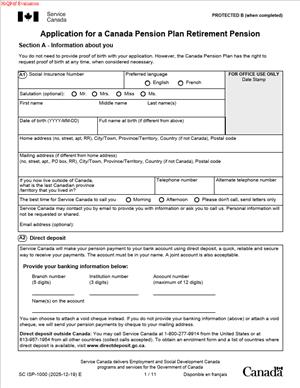
SC ISP-1000E – Application for a Canada Pension Plan Retirement Pension
Fill out nowJurisdiction: Country: Canada | Province or State: Federal
The SC ISP-1000E – Application for a Canada Pension Plan Retirement Pension is the form you use to apply for monthly retirement benefits under the Canada Pension Plan (CPP). It is a federal government document used across Canada.
If you are nearing retirement or have already stopped working, this form is how you formally request your CPP retirement pension. Your payments do not start automatically. You must complete and submit this application.
This document gathers key details about you, your work history, and when you want your pension to begin. The information you provide affects how much you receive and when payments start.
If you are about to fill it out, you likely want clear answers. What information do you need? When should you apply? What could delay approval? This guide walks you through what matters most before and during completion of the form.
What is SC ISP-1000E – Application for a Canada Pension Plan Retirement Pension?
Clear definition
The SC ISP-1000E – Application for a Canada Pension Plan Retirement Pension is a federal application used to request monthly retirement income under the Canada Pension Plan. It is not a contract between you and another person. It is a formal request for benefits based on your past contributions.
The form collects identifying details, your Social Insurance Number, your preferred pension start date, and information about your banking details for direct deposit. It may also ask about other benefits related to CPP, depending on your situation.
When you submit this document, the government reviews your contribution record. Your retirement pension amount is calculated using your years of contributions and earnings history.
Who typically uses this form?
You use this form if you have made contributions to the Canada Pension Plan during your working years and now want to begin receiving your retirement pension.
Most applicants are between the ages of 60 and 70. You can apply as early as age 60 with a reduced pension or delay up to age 70 for a higher monthly amount. People who continue working while receiving CPP also use this form.
If you worked in Canada and had CPP deductions taken from your pay, this form is generally the way you access that retirement income.
Why might you need this form?
You need this form when you decide it is time to start your CPP retirement pension. Payments do not begin automatically at age 60, 65, or 70. You must apply.
You might be planning to retire fully and need a steady monthly income. You might be reducing your work hours and want to supplement your earnings. Or you may have already stopped working and are now ready to receive benefits you contributed toward.
The timing you choose can affect your long-term income. The form allows you to select your preferred start month, within permitted limits.
Typical real-life scenarios
- You are 65 and planning to retire at the end of the year. You want your CPP retirement pension to begin the month after your last paycheck. You complete the application to align your pension start date with your retirement.
- You are 60 and recently lost your job. You are not ready for full retirement, but you need income while you look for part-time work. You apply to start CPP early, knowing the monthly amount will be lower.
- You are 67 and still working. You decide to delay CPP to increase your future monthly payment. Now that you are ready to start receiving it, you complete the form and choose a recent start date.
- You worked in Canada for many years but spent some time abroad. As you approach retirement, you apply for CPP benefits to receive the portion you earned during your Canadian employment.
When would you use SC ISP-1000E – Application for a Canada Pension Plan Retirement Pension?
You use the SC ISP-1000E – Application for a Canada Pension Plan Retirement Pension when you want to begin receiving your CPP retirement pension. This usually happens close to your chosen retirement age.
Many people apply a few months before they want payments to start. This allows time for processing and avoids gaps in income. Others apply after they have already stopped working and want benefits to begin as soon as possible.
You may also use this form if you previously delayed CPP and are now ready to activate it. The document allows you to select a start month, subject to age limits and retroactive payment rules.
If you are coordinating multiple income sources, such as workplace pensions or personal savings, this application helps you time your CPP payments to fit your broader retirement plan.
Even if you are unsure about the exact amount you will receive, the application process confirms your eligibility and calculated benefit. That makes it an important step in finalizing your retirement income picture.
Legal characteristics of SC ISP-1000E – Application for a Canada Pension Plan Retirement Pension
The SC ISP-1000E – Application for a Canada Pension Plan Retirement Pension is an official federal government application. It must be completed accurately and signed to be processed.
For the form to be effective, it must include correct personal information and a valid Social Insurance Number. Incomplete sections, missing signatures, or inconsistent information can delay processing.
Your chosen start date must fall within the permitted age range. Generally, you cannot start before age 60 or after age 70. If you request a date outside allowable limits, the application may be adjusted or returned.
The form operates under federal legislation. The rules are consistent across provinces and territories because CPP is a federal program. However, related benefits such as provincial supplements may have separate requirements.
This document does not automatically qualify you for other government programs. It applies only to the Canada Pension Plan retirement pension. Other benefits require separate applications.
Providing false or misleading information can lead to delays, overpayments, or repayment obligations. Accuracy matters because your pension amount is calculated using your earnings record and the date you choose.
Is it legally binding?
Yes, in the sense that it is a formal legal application for a statutory benefit. When you sign and submit it, you are declaring that the information you provided is true and complete.
Your signature confirms your chosen pension start date. Once payments begin, changes to that date may be limited. In some situations, you may be allowed to cancel within a specific time frame, but conditions typically apply.
The government relies on the information in the form to calculate your entitlement. If errors are discovered later, adjustments may be made. This can result in back payments or recovery of overpayments.
The form does not create a private contract. Instead, it triggers your rights and obligations under federal pension legislation. Your eligibility and payment amount are determined by law and your contribution history.
How to fill out SC ISP-1000E – Application for a Canada Pension Plan Retirement Pension
Step 1 – Gather your personal and work information
Before you start the form, collect your Social Insurance Number, banking details for direct deposit, and basic personal identification information. You may also want access to your employment history and contribution records if available. Having this ready helps you complete the application without interruptions.
Step 2 – Provide your personal details
Enter your full legal name, date of birth, and contact information exactly as they appear on official records. If your name has changed, include any former names if requested. Accurate details ensure your application matches your contribution record.
Step 3 – Confirm your Social Insurance Number
Carefully enter your Social Insurance Number in the space provided. This number connects your application to your CPP contributions. A single digit error can delay processing, so double-check before moving on.
Step 4 – Choose your pension start date
Select the month and year you want your CPP retirement pension to begin. Review the age rules and consider how your start date affects your monthly amount. Early start dates typically reduce payments, while later dates may increase them.
Step 5 – Review questions about other benefits or situations
Answer any additional questions about your circumstances. This may include whether you are receiving or have applied for other CPP-related benefits. Read each question carefully and respond fully to avoid follow-up requests for information.
Step 6 – Provide direct deposit information
If you want payments deposited directly into your bank account, enter your financial institution details as requested. Ensure the account number and transit information are correct. Incorrect banking information can delay your first payment.
Step 7 – Read the declaration section
Carefully read the declaration before signing. This section confirms that the information you provided is true and complete. It may also outline your responsibility to report changes in your situation.
Step 8 – Sign and date the application
Sign and date the form in the designated area. Unsigned applications are typically not processed. If someone is legally authorized to act on your behalf, they must complete the appropriate sections and provide the required documentation.
Step 9 – Submit the completed form
Follow the submission instructions provided with the application. Ensure all required sections are complete and that you have included any supporting documents if requested. Keep a copy of the completed form for your records.
Legal terms you might encounter in SC ISP-1000E – Application for a Canada Pension Plan Retirement Pension
- Contributor: A contributor is a person who has made valid contributions to the Canada Pension Plan during their working years. This form asks about your work history because your eligibility and payment amount depend on those contributions. If you worked and paid into the plan through payroll deductions or self-employment, you are considered a contributor.
- Contributory Period: This is the span of time from when you turned 18 until you start receiving your retirement pension, with certain exceptions. The form relies on this period to calculate your benefit amount. Some months may be excluded from the calculation, such as periods of low or no earnings.
- Effective Date: The effective date is the month your pension payments begin. You choose this date on the form, subject to eligibility rules. Your selection directly affects how much you receive each month.
- Retroactive Payment: A retroactive payment is money paid to cover months before your application was processed, if you qualify. The form allows you to request a start date in the past, within permitted limits. This can result in a lump-sum payment covering missed months.
- Early Retirement Reduction: If you start your pension before age 65, your monthly amount is permanently reduced. The form asks for your chosen start date because this reduction is calculated based on your age at that time. The reduction applies for life.
- Post-Retirement Increase: If you delay starting your pension past age 65, your monthly amount increases for each month of delay, up to a maximum age. The form captures your intended start date, so this increase can be applied correctly. This increase is also permanent.
- Direct Deposit Authorization: This is your consent to have your pension deposited directly into your bank account. The form includes a section where you enter your financial institution details. Accurate numbers are critical to avoid payment delays.
- Declaration: The declaration is the statement you sign to confirm that the information you provided is true and complete. By signing, you accept responsibility for the accuracy of your answers. This statement has legal significance.
- Representative: A representative is someone authorized to act on your behalf, such as under a power of attorney. If someone else completes or signs the form for you, their authority must be clear. The form may require additional documentation in that case.
- Marital Status: Your current marital status can affect related benefits, such as survivor or pension-sharing options. The form asks for this information to maintain accurate records. You must report your status as of the date you sign the application.
FAQs
Can I choose any start date I want on this form?
You can choose a start month, but it must fall within the allowed timeframe. The earliest and latest dates depend on your age and when you apply. Your choice affects the amount you receive each month, so review your age at the selected start month before you enter it. Make sure the date you write is clear and matches the month and year format requested.
What happens if I leave a section blank?
Blank sections can delay processing. If a question does not apply to you, follow the instructions in that section, which often ask you to write “not applicable.” Do not assume that skipping a question is acceptable. Review each page before submitting to confirm every required field is completed.
Do I need to send proof of my birth or identity with this document?
In many cases, identity details are verified through existing records linked to your Social Insurance Number. However, if your name or birth information does not match official records, you may be asked for supporting documents. Make sure the name and date of birth you enter on this form exactly match your official identification to avoid follow-up requests.
Can someone else complete and sign SC ISP-1000E – Application for a Canada Pension Plan Retirement Pension for me?
Yes, but only if they have the proper authority to act for you. If a representative signs, the form must clearly indicate their role and may require proof of authority. The signature must match the name given in the representative section. Incomplete representative details can result in the application being returned.
How do I know if my application was received?
After you submit this form, you should receive a confirmation or acknowledgment that it has been received and is being processed. Processing times vary. Keep a copy of your completed application so you can refer to the exact information you provided if you need to follow up.
Can I change my start date after I submit the application?
You may be able to request a change, but timing is important. If your payments have already begun, changes may be limited or not allowed. If you realize you made an error in the start date, contact the appropriate office as soon as possible and have your application details ready.
What if my name has changed since I started working?
Enter your current legal name on the form. If you previously worked under a different name, make sure your records reflect that change. If there is a mismatch between the name on this document and the name associated with your Social Insurance Number, you may be asked to provide proof of the name change.
Will filing this form change any public record?
This document updates your status as a retirement pension recipient in government records. It does not create a public registry entry like a property or corporate filing. However, the information you provide becomes part of your official pension file and is used to calculate and issue payments.
Checklist: Before, During, and After SC ISP-1000E – Application for a Canada Pension Plan Retirement Pension
Before
- Confirm your age and decide the month you want your pension to start.
- Gather your Social Insurance Number and personal identification details.
- Review your work history and contribution record if available.
- Decide whether you want early, standard, or delayed retirement payments.
- Collect your banking information for direct deposit.
- Check whether you need documents to support a name change.
- Determine if a representative will complete or sign the form for you.
During
- Enter your full legal name exactly as it appears on official records.
- Double-check your Social Insurance Number for accuracy.
- Clearly write the month and year you want payments to begin.
- Answer every question, marking “not applicable” where required.
- Provide complete and accurate direct deposit details.
- Read the declaration carefully before signing.
- Ensure the correct person signs and dates the form.
- Review all pages to confirm nothing is missing.
After
- Make a full copy of the completed and signed form.
- Submit the application using the accepted submission method.
- Note the date you submitted the form.
- Watch for confirmation that your application was received.
- Respond promptly if additional information is requested.
- Record your expected start month and estimated payment amount.
- Keep all correspondence related to your application in one place.
- Review your first payment to ensure it matches your selected start date.
Common mistakes to avoid with SC ISP-1000E – Application for a Canada Pension Plan Retirement Pension
- Mistake: Choosing a start date without understanding early reduction or delay increases, which happens when you focus only on stopping work, leading to permanently lower or higher payments than expected, so do not forget to calculate how your age at the start month affects your lifetime amount.
- Mistake: Entering an incorrect Social Insurance Number because you rely on memory, which can delay processing or misdirect your record, so do not forget to verify the number against an official document before submitting.
- Mistake: Leaving required sections blank because you think they do not apply, which often results in the form being returned, so do not forget to write “not applicable” where instructed.
- Mistake: Providing incomplete banking details due to copying errors, which can cause payment delays or rejected deposits, so do not forget to double-check every digit of your account information.
- Mistake: Forgetting to sign and date the declaration, which makes the application invalid, so do not forget that an unsigned form cannot be processed.
- Mistake: Using a nickname or informal name instead of your legal name, which creates mismatches with official records, so do not forget to match the name exactly to your identification.
- Mistake: Failing to keep a copy of the submitted form because you assume processing will be smooth, which leaves you without a reference if questions arise, so do not forget to retain a complete copy for your records.
- Mistake: Waiting too long to apply while expecting automatic payments, which happens due to confusion about eligibility, leading to missed months of income, so do not forget that you must actively apply to start receiving benefits.
What to do after filling out SC ISP-1000E – Application for a Canada Pension Plan Retirement Pension
Once you complete the form, pause before sending it. Review every page carefully. Small errors can slow down processing and delay your payments.
Make sure your chosen start month is clearly written and consistent wherever it appears. Confirm your personal details match your identification and contribution records. If someone signed on your behalf, confirm their authority documentation is ready if requested.
- Step 1: Make a complete copy of the signed application for your records.
- Step 2: Submit the form using the approved submission method available to you.
- Step 3: Record the exact date you submitted it and how you sent it.
- Step 4: Monitor for an acknowledgment or confirmation of receipt.
- Step 5: Check your mail or account messages regularly for follow-up requests.
- Step 6: Respond quickly if additional documents or clarifications are requested.
- Step 7: Note the expected processing timeframe and mark a reminder to follow up if needed.
- Step 8: Review your first payment carefully to confirm the amount and the start month are correct.
- Step 9: Keep all letters, confirmations, and payment statements together in a dedicated file.
- Step 10: Update your personal financial records to reflect your new retirement income.
After approval, your pension becomes part of your regular income stream. You should factor it into your monthly budget and tax planning. If your circumstances change, such as a change of address or banking details, update your information promptly to avoid interruptions.
Staying organized will help you manage your retirement income with confidence. Treat your completed application and related correspondence as important long-term records.
Disclaimer: This guide is provided for informational purposes only and is not intended as legal advice. You should consult a legal professional.