Authority to Release Personal Information to a Designated Individual (IMM 5475)
Fill out nowJurisdiction: Country: Canada | Province or State: Federal
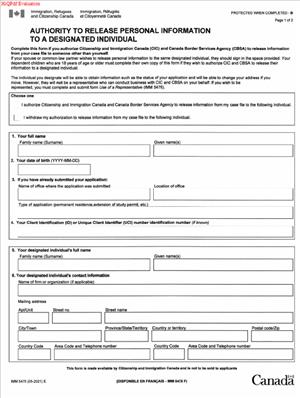
The Authority to Release Personal Information to a Designated Individual (IMM 5475) is a federal immigration form used in Canada. It allows you to give written permission for someone else to receive information about your immigration file. This form does not transfer control of your application. It only authorizes the release of personal information.
You may need this document if you want a trusted person to speak with immigration officials about your case. That person could be a family member, friend, or another individual you choose. Without this form, officials generally will not share details about your file with anyone else.
This form matters because immigration files contain private information. Government departments are required to protect your personal data. The Authority to Release Personal Information to a Designated Individual (IMM 5475) creates a clear record of your consent.
If you are preparing to complete this form, you likely want to understand exactly what you are authorizing. You may also want to know how it affects your application and what it does not allow the other person to do. This guide walks you through those points in plain language.
What is Authority to Release Personal Information to a Designated Individual (IMM 5475)?
Clear definition
The Authority to Release Personal Information to a Designated Individual (IMM 5475) is a written consent form used in federal immigration processes in Canada. By signing it, you allow immigration authorities to share details from your file with a specific person you name in the document.
It is not a representation form. It does not appoint someone as your official representative. It simply allows information to be disclosed to that person.
The form usually includes your identifying details and the full name and contact information of the designated individual. Once signed and submitted, it becomes part of your immigration record.
Who typically uses this form?
This form is commonly used by applicants in immigration, refugee, citizenship, or permanent residence processes. It is also used by people sponsoring family members or responding to requests from immigration authorities.
Parents may use it when helping adult children with immigration matters. Adult children may use it to allow a parent to receive updates. Spouses and partners often use it when one person is handling most of the paperwork.
It is also used by applicants who are outside Canada and rely on someone inside Canada to communicate with immigration officials. In these cases, the designated individual acts as a point of contact for receiving updates.
Why might you need this form?
You may need this form if you want someone else to ask questions about your file on your behalf. Immigration authorities will usually refuse to release personal information without written consent.
You might also need it if you are not comfortable communicating in English or French. A trusted person can receive information and explain it to you.
In some cases, you may be unavailable due to travel, work schedules, or time zone differences. This form allows another person to receive information without delaying your file.
If your immigration matter involves sensitive or urgent issues, having someone authorized to access updates can help you stay informed.
Typical real-life scenarios
- You submitted an application for permanent residence and later moved to another country. Your sibling in Canada is helping you manage paperwork. You sign the form so immigration officials can share updates directly with your sibling.
- You are sponsoring your spouse. Your spouse lives abroad and wants you to receive detailed information about their application. They complete and sign the form to allow you to access that information.
- You applied for citizenship and expect to be away for several months due to work. You authorize a trusted friend to receive information in case immigration authorities contact them about scheduling or documents.
- You are helping your parent with a complex immigration process. Your parent signs the form so you can communicate with officials and understand what documents are required next.
- In each of these situations, the form allows information sharing. It does not shift responsibility for the application itself.
When would you use Authority to Release Personal Information to a Designated Individual (IMM 5475)?
You would typically use this form when you want someone who is not your authorized representative to receive information about your file. It is often submitted at the same time as your main immigration application. It can also be submitted later if circumstances change.
For example, you might begin your application handling everything yourself. Later, you decide you want your spouse to follow up with immigration authorities. At that point, you can complete and submit the form to add that permission.
You might also use it if immigration officials request clarification and you want another person to help you respond. By having this consent on file, officials can speak openly with the designated individual about your case status.
In some cases, applicants use both a representative form and this consent form for different purposes. The key distinction is that this document focuses on releasing personal information. It does not automatically allow the other person to sign documents for you or make decisions on your behalf.
You may also use the form when you want to limit access. For example, you might choose one specific person to receive information instead of allowing multiple people to inquire about your file. The form creates a clear boundary around who can access your details.
Timing can matter. If you submit the form after your application has already been processed, it may have no practical effect. It is generally used while your file is active.
Legal Characteristics of Authority to Release Personal Information to a Designated Individual (IMM 5475)
This form is based on written consent. For it to be effective, it usually must be completed clearly, signed by the applicant, and include accurate identifying information. Immigration authorities rely on the details you provide to confirm your identity and the identity of the designated individual.
An incomplete form can cause delays. Missing signatures, incorrect file numbers, or unclear names may result in the form not being accepted. If the information does not match the existing immigration file, officials may be unable to connect the consent to the correct application.
The form generally authorizes the release of personal information only. It does not grant decision-making power. It does not allow the designated individual to change your address, withdraw your application, or sign new forms on your behalf unless separate authorization exists.
Because this is a federal immigration form, it applies across Canada. The rules for handling personal information are governed at the federal level. The form is used consistently in immigration-related matters rather than being tailored to a specific province.
Another important characteristic is that the consent can typically be withdrawn. If you no longer want the designated individual to receive information, you may submit updated instructions. Until such changes are recorded, officials may continue to share information according to the most recent valid consent on file.
You remain responsible for your application. Even if someone else receives information, you are still accountable for deadlines, accuracy, and responding to requests.
Is it legally binding?
Yes, in the sense that it creates a formal authorization for the release of personal information. Once properly signed and accepted, it allows immigration authorities to share information with the named individual.
It is binding as a consent document. Officials rely on your signature as proof that you have agreed to the disclosure. If a dispute arises about whether information was properly shared, the signed form serves as evidence of your authorization.
However, it does not create a broader legal relationship. It does not make the designated individual your legal representative. It does not impose contractual duties on that person. Its legal effect is limited to permitting the release of information described in the document.
Its validity generally depends on proper completion, identity matching, and an active immigration file. If any of those elements are missing, the form may not function as intended.
How to fill out Authority to Release Personal Information to a Designated Individual (IMM 5475)
Step 1 – Review the entire form before writing
Read through the full document from start to finish. Pay attention to who must sign and what information is required. This helps you avoid missing fields or making inconsistent entries.
Step 2 – Provide your personal details
Enter your full legal name exactly as it appears on your immigration application. Include any required identifiers, such as your date of birth and client or application number if requested. Make sure the details match your existing file to avoid processing issues.
Step 3 – Identify the designated individual clearly
Write the full name of the person you are authorizing. Include their contact information as requested on the form. Ensure spelling is accurate, since officials will rely on these details when sharing information.
Step 4 – Confirm the scope of authorization
Read the consent language carefully. By signing, you are allowing immigration authorities to release personal information from your file to the named person. Make sure you understand that this does not appoint them as your representative unless you have completed a separate form for that purpose.
Step 5 – Sign and date the form
Sign the form in the space provided. Use your usual signature. Enter the correct date of signing. If the form requires signatures from multiple applicants, each person must sign where indicated.
Step 6 – Check for completeness before submission
Review every section to confirm nothing is missing. Verify that names, numbers, and dates are accurate and legible. An incomplete or unsigned form may not be processed.
Step 7 – Submit the form with your application or as an update
Attach the completed form to your immigration application if you are submitting it at the same time. If your file is already in process, follow the instructions provided in your immigration correspondence to submit it as an update to your existing file.
Legal terms you might encounter in Authority to Release Personal Information to a Designated Individual (IMM 5475)
- Designated Individual: This is the person you name on the form to receive your personal information. They are not automatically your representative. They simply have permission to obtain information about your file from the department handling your application.
- Personal Information: This refers to details about you that are protected by privacy laws. It can include your immigration file status, correspondence, identification numbers, and decisions made on your application. The form allows limited sharing of this information with the person you choose.
- Consent: Consent means you are giving clear permission for your information to be shared. On this form, your signature confirms that you understand what information may be released and to whom. Without your signed consent, no information will be shared.
- Client Identifier (UCI): This is your unique client identifier number. It connects your authorization to your specific immigration file. If you provide the wrong number, your authorization may not be linked properly.
- Application Number: This number identifies the specific application or file. Including it ensures the authorization applies to the correct case. If you have more than one application, you must be clear about which one is covered.
- Signature: Your signature confirms that the information you provided is accurate and that you agree to the release. An unsigned form is not valid. In some cases, electronic signatures are accepted if submitted through an approved system.
- Minor Child: If the authorization relates to a child under the age of majority, a parent or legal guardian must sign. The person signing must have legal authority to act for the child.
- Revocation: Revocation means cancelling the authorization. You can withdraw your consent at any time by submitting a written request. Once revoked, the department will stop sharing information with the designated individual.
- Privacy Legislation: Government departments must follow privacy laws when handling personal information. This form operates within those laws and does not allow unlimited disclosure. Only information related to your file is shared.
FAQs
Does Authority to Release Personal Information to a Designated Individual (IMM 5475) make someone my legal representative?
No. This document only allows the named person to receive information about your file. It does not give them authority to act on your behalf, submit documents, make decisions, or sign forms for you. If you want someone to represent you, you must complete a separate representative authorization form.
When does this form take effect?
It takes effect once the department receives and accepts it. That means the form must be complete, signed, and properly submitted. Information will not be shared until it is attached to your file and processed.
Do I need to include my UCI or application number?
Yes. You should include your UCI and, if available, your application number so the authorization is matched to the correct file. If you leave these blank or enter the wrong numbers, the department may not connect this form to your case, which can delay communication.
Can I authorize more than one person?
This document is designed to list one designated individual per form. If you want to authorize more than one person, you may need to complete separate forms for each individual so each authorization is clear and properly recorded.
What if my name on this form does not exactly match my application?
Your name should match the name used on your application and official records. If it does not match, the department may not attach the authorization to your file. If your name has changed, ensure the change is already updated in your records before submitting this document.
Can I limit what information is shared?
This form generally authorizes the release of information related to your application. It does not allow you to select specific pieces of information to share while excluding others. If you are concerned about scope, read the consent section carefully before signing.
How do I cancel this authorization later?
You can cancel it by sending a written request that clearly states you are withdrawing your consent. Include your identifying details so your request can be matched to your file. Once processed, the department will stop releasing information to the designated person.
Does this form change anything in my public record?
No. This document does not change your immigration status, your application details, or any public record. It only allows information about your file to be shared with the person you named. Your underlying application remains the same.
Checklist: Before, During, and After Authority to Release Personal Information to a Designated Individual (IMM 5475)
Before
- Confirm why you need to authorize someone to receive your information.
- Decide exactly who you trust to receive updates about your file.
- Verify the correct spelling of the designated individual’s full legal name.
- Gather your UCI and application number.
- Make sure your own name matches your application records.
- Check whether you are authorizing information for yourself or a minor child.
- Review whether you also need a separate representative form.
- Read the consent section so you understand the scope of release.
During
- Print clearly or type your information accurately.
- Enter your UCI and application number without transposing digits.
- Provide complete contact details for the designated individual.
- Confirm the designated individual’s email and mailing address are correct.
- Review each field before signing.
- Sign and date the form in the correct section.
- Ensure a parent or legal guardian signs if the authorization is for a minor.
- Double-check that no required fields are left blank.
After
- Make a copy of the signed form for your records.
- Submit the form using the same method as your application or as instructed.
- Confirm that the form was successfully uploaded or received.
- Inform the designated individual that the authorization has been submitted.
- Monitor your file to ensure communication flows as expected.
- Keep a record of the submission date.
- Update the department if your designated individual’s contact details change.
- Submit a revocation in writing if you later decide to cancel the authorization.
Common mistakes to avoid with Authority to Release Personal Information to a Designated Individual (IMM 5475)
- Mistake: Naming someone informally (such as using a nickname), which happens when people rush, leading to mismatched records and delays, so do not forget to use the person’s full legal name.
- Mistake: Leaving out your UCI or application number because you assume your name is enough, which can prevent the form from being matched to your file, so do not forget to include all identifiers.
- Mistake: Forgetting to sign and date the form, often due to completing it electronically and overlooking the signature section, which makes the form invalid, so do not forget to review the final page.
- Mistake: Believing this form appoints a representative, which happens due to confusion between authorization and representation, causing missed filings, so do not forget that separate authority is required for representation.
- Mistake: Submitting the form through the wrong channel, which can occur when you do not check submission instructions, resulting in processing delays, so do not forget to follow the correct submission method.
- Mistake: Failing to update or revoke the authorization when circumstances change, which may allow continued access to your information, so do not forget to send a written cancellation if needed.
- Mistake: Providing incorrect contact details for the designated person, which often happens from typing errors and leads to failed communication, so do not forget to verify email and mailing addresses.
- Mistake: Assuming the authorization applies to all future applications automatically, which can create gaps in communication, so do not forget to confirm whether a new form is required for new files.
What to do after filling out Authority to Release Personal Information to a Designated Individual (IMM 5475)
Once you complete the form, your job is not finished. You need to make sure it is properly submitted, connected to your file, and working as intended.
Start by reviewing the entire document one more time. Check names, numbers, and signatures. Small errors can cause delays.
- Step 1: Make a clear copy of the signed form for your personal records.
- Step 2: Submit the form using the same channel as your active application, if applicable.
- Step 3: If submitting electronically, confirm the upload was successful and save the confirmation screen.
- Step 4: If submitting by mail, keep proof of delivery or tracking details.
- Step 5: Notify the designated individual that the authorization has been sent so they know when they can start making inquiries.
- Step 6: Monitor your email or application account for confirmation that the form was received or attached to your file.
- Step 7: Allow reasonable processing time before expecting the department to release information to the designated person.
- Step 8: Keep all related documents together in a dedicated folder, including submission confirmations.
- Step 9: If your contact details or the designated individual’s contact details change, submit updated information promptly.
- Step 10: If you decide to cancel the authorization, send a written revocation with your identifying details and keep a copy for your records.
Stay organized. Keep dates and copies. Clear records protect you if questions arise later. When properly completed and submitted, this form ensures that the right person can receive updates about your file without confusion or delay.
Disclaimer: This guide is provided for informational purposes only and is not intended as legal advice. You should consult a legal professional.