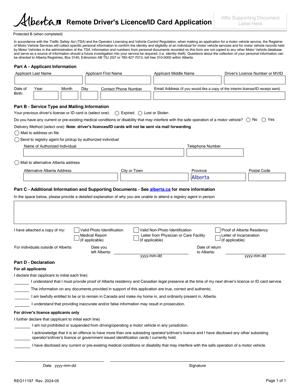
REG11197 – Remote Driver’s Licence or ID Card Application
Fill out nowJurisdiction: Country: Canada | Province or State: Alberta
The REG11197 – Remote Driver’s Licence or ID Card Application is a government form used in Alberta to apply for certain driver’s licence or identification card services without attending in person. It is designed for situations where you cannot visit a registry office but still need to complete a licence or ID transaction.
This form allows you to request services such as renewing, replacing, or updating your Alberta driver’s licence or identification card remotely. It helps maintain valid identification when travel, health, work, or other circumstances prevent you from appearing at a service counter.
If you are about to complete this document, you need to understand what information it asks for, how your identity is confirmed, and what makes the submission acceptable. Small errors can delay processing or cause your application to be rejected.
Because this document is processed through Alberta Registry Services, accuracy and completeness matter. Every section is reviewed before your licence or ID card is issued or updated. Understanding the purpose of each section makes the completion process smoother.
What is REG11197 – Remote Driver’s Licence or ID Card Application?
Clear definition
REG11197 – Remote Driver’s Licence or ID Card Application is an official Alberta registry form used to request specific driver’s licence or provincial ID card services from a distance. Instead of attending in person, you provide the required personal details, confirm your identity, and authorize the requested service through this document.
It functions as a formal request and declaration. When you sign it, you confirm that the information you provided is accurate and complete. The registry uses the information to verify your eligibility and process your licence or ID card transaction.
The form does not create a new type of licence. It simply allows certain services to be handled remotely when permitted under registry rules.
Who typically uses this form?
This form is commonly used by Alberta residents who cannot attend a registry agent’s office in person. You might be temporarily outside your community, in another province, or dealing with mobility or health issues.
It may also be used by individuals who need to renew an expiring driver’s licence or identification card but are unable to attend during regular business hours. Some people use it when working in remote locations or when travel is limited.
Parents or guardians may encounter this form when assisting eligible family members, depending on the type of licence or ID service requested. The exact eligibility depends on the specific transaction and registry requirements.
Why might you need this form?
You might need this form if your driver’s licence or ID card is close to expiring and you cannot visit a registry office. Driving with an expired licence can create complications, and having expired identification can affect everyday activities.
You may also need it if your licence or ID card has been lost, stolen, or damaged while you are away from your home community. A replacement may be requested through remote processes when allowed.
Another reason is updating certain personal information linked to your licence or ID record. Some changes can be handled remotely, depending on the nature of the update and the documentation provided.
This form provides a structured way to request these services while ensuring your identity and eligibility are properly reviewed.
Typical real-life scenarios
- You are working temporarily in a remote area of Alberta, and your driver’s licence is about to expire. You cannot return home before the expiry date. A remote application allows you to request renewal without attending in person.
- You are studying outside your hometown and realize your provincial ID card has been lost. You need valid identification for banking or travel. The remote application process may allow you to request a replacement.
- You are caring for a family member and cannot leave your residence easily. Your identification card needs renewal. This form provides a way to submit your request without visiting a registry counter.
- You have recently moved within Alberta and need to update certain details associated with your licence. If the change qualifies for remote processing, this form may be used to initiate that update.
When would you use REG11197 – Remote Driver’s Licence or ID Card Application?
You would use REG11197 – Remote Driver’s Licence or ID Card Application when an in-person visit to an Alberta registry agent is not practical or possible, and the specific licence or ID service you require is eligible for remote handling.
This often applies to renewals of non-commercial driver’s licences where no testing is required. If your renewal does not involve medical reviews, vision testing, or other in-person assessments, remote processing may be available.
It may also apply when requesting a replacement for a lost, stolen, or damaged licence or ID card. In these cases, identity confirmation becomes central to the process.
You might use this form if you are temporarily outside Alberta but still maintain residency and need to keep your licence valid. The registry may review your residency status as part of processing.
Certain updates, such as minor corrections to personal details, can sometimes be addressed remotely. However, changes involving legal name updates or complex status changes may require additional documentation or in-person verification.
The form is not used for every licence-related transaction. For example, applying for a brand-new driver’s licence for the first time or completing a road test generally requires attendance in person. The remote application is limited to specific services that meet registry criteria.
Legal characteristics of REG11197 – Remote Driver’s Licence or ID Card Application
This document is an official government form used within Alberta’s registry system. Its effectiveness depends on accurate completion, proper identity verification, and compliance with registry policies.
For the form to be accepted, all required sections must be completed clearly. Missing signatures, incomplete personal details, or inconsistent information can delay processing. If identity documents do not meet registry standards, the application may not proceed.
Your declaration on the form is significant. You confirm that the information is true and correct. Providing false or misleading information can lead to refusal of the application and other consequences under applicable laws.
The registry reviews eligibility before issuing or renewing a licence or ID card. Even if you submit the form correctly, approval depends on meeting all program requirements. For example, outstanding suspensions, unpaid fines, or medical restrictions may affect processing.
Requirements can vary slightly depending on the type of licence class involved. Commercial driver’s licences often have stricter renewal conditions than non-commercial licences. Remote options may be more limited for higher-risk licence classes.
This form does not override other legal obligations. It does not reinstate a suspended licence by itself. It does not grant driving privileges if you are currently prohibited from driving. It also does not replace the need for required testing where applicable.
Is it legally binding?
The form is legally significant because it includes a declaration that the information you provide is accurate. When you sign it, you are making a formal statement to a government authority.
It is not a contract between you and another private party. Instead, it is an official application submitted to a public registry system. Your signature confirms your consent to the processing of your personal information for the stated purpose.
If the information is false or incomplete, the registry can refuse the application. In serious cases, providing false information may have legal consequences. The binding nature comes from your declaration and the regulatory framework governing driver licensing in Alberta.
How to fill out REG11197 – Remote Driver’s Licence or ID Card Application
Step 1 – Identify the service you are requesting
Begin by reviewing the form to determine which type of service applies to you. Indicate clearly whether you are requesting a renewal, replacement, or update to your driver’s licence or identification card. Selecting the correct service ensures your application is routed properly for review.
Step 2 – Provide your personal identification details
Enter your full legal name exactly as it appears on your current driver’s licence or ID card. Include your date of birth, licence or ID number, and current residential address. Ensure spelling and numbers are accurate, as errors can delay processing.
Step 3 – Confirm your residency and contact information
Provide your current Alberta residential address if required, along with mailing details if different. Include a reliable phone number or email address so registry staff can contact you if clarification is needed. Incomplete contact information may slow down your application.
Step 4 – Disclose required eligibility information
Answer all questions related to your driving status, medical conditions, or other eligibility factors if they appear on the form. Read each question carefully before responding. If a question does not apply, follow the form’s instructions for indicating that response rather than leaving it blank.
Step 5 – Attach required supporting documentation
Include copies of any documents required to verify your identity or support your request. This may involve identification documents or proof related to your transaction. Ensure copies are clear and legible so registry staff can confirm details without difficulty.
Step 6 – Review all information for accuracy
Before signing, read through every section of the completed form. Check names, numbers, dates, and contact information. Confirm that you have answered all mandatory questions and included all required documents.
Step 7 – Sign and date the declaration
Sign the form in the space provided using your usual legal signature. Enter the date of signing. By signing, you confirm that the information in the REG11197 – Remote Driver’s Licence or ID Card Application is complete and accurate to the best of your knowledge.
Step 8 – Submit the completed application
Submit the form and supporting documents according to the instructions provided with the application. Ensure all pages are included in your submission. Once submitted, the registry will review your application and process the request if all requirements are met.
Legal terms you might encounter in REG11197 – Remote Driver’s Licence or ID Card Application
- Applicant: This is you—the person requesting the remote service. The form uses this term when referring to your personal details, declarations, and signature. Make sure every section referring to the applicant matches your official identification exactly.
- Declaration: This is a formal statement that the information you provided is true and complete. When you sign the declaration section, you confirm that everything on the form and in your attachments is accurate. False or misleading information can lead to the refusal of your application or the cancellation of your card.
- Proof of Identity: These are documents that confirm who you are. The form may require copies of specific types of identification. You must provide clear, valid copies that meet the stated requirements, or your application may be rejected.
- Proof of Residency: This confirms that you live in the province and are eligible for the service. The document you provide must show your current residential address, not just a mailing address. The address must match what you write on the form.
- Remote Application: This refers to applying without attending a registry office in person. It means you submit your information and documents through an approved remote process. Extra verification steps may apply because you are not appearing in person.
- Replacement Card: This is a request for a new driver’s licence or ID card because the original was lost, stolen, damaged, or destroyed. If you select this option, you may need to explain what happened to the previous card.
- Renewal: This means extending the validity of your existing driver’s licence or ID card. The form may require you to confirm that your personal details have not changed since your last card was issued.
- Change of Particulars: This refers to updating specific information, such as your name or address. You must provide supporting documents that legally support the change, such as a legal name change document.
- Eligibility: This means you meet the legal requirements to receive the card or service. You confirm your eligibility by answering questions about your status, residency, or licence conditions.
- Signature Verification: Because you are applying remotely, your signature may be compared against existing records. The signature you provide must be consistent with your official identification to avoid delays.
FAQs
Can I use this form if my driver’s licence has already expired?
It depends on how long it has been expired and whether you meet renewal eligibility. This document is generally used for remote services, including renewals, but if your licence has expired beyond a certain period, you may need to attend in person. Check the expiry date on your current card and confirm whether remote renewal is permitted before submitting.
What documents do I need to attach to this form?
You need clear copies of the required identification and residency documents listed in the instructions. The name and date of birth on your documents must match what you enter on the form. If you are requesting a name change or replacement, include any supporting legal documents that explain the change or loss.
Do I need to send original identification documents?
In most cases, you submit copies, not originals. However, the copies must be clear, complete, and readable. If the copy cuts off important details such as your document number or expiry date, your application may be delayed or rejected.
What happens if my signature does not match previous records?
Your application may be flagged for further review. Signature verification is used to confirm identity in remote applications. If there is a noticeable difference, you may be contacted for clarification or asked to complete the process in person.
Can I use REG11197 – Remote Driver’s Licence or ID Card Application to change my address?
Yes, if the form allows for a change of particulars and you provide acceptable proof of your new residential address. Make sure the address you enter is your physical residence, not just a mailing address. The supporting document must show the same address you list.
How do I know if my application has been accepted?
After submission, you should receive confirmation that your application was received and processed. This may come as a receipt, reference number, or direct communication. If you do not receive confirmation within a reasonable time, follow up using the contact method provided in the submission instructions.
What should I do if I made a mistake after submitting this form?
If you notice an error, contact the registry authority as soon as possible. Minor errors may be corrected before processing is complete. If the card has already been issued, you may need to submit a new application and pay any applicable fees again.
Will my old card remain valid after I submit REG11197 – Remote Driver’s Licence or ID Card Application?
If you are renewing before the expiry date, your current card typically remains valid until its expiry. If you are replacing a lost or stolen card, the previous card may be cancelled once the replacement is issued. You should not use a card that has been reported lost or replaced.
Checklist: Before, During, and After REG11197 – Remote Driver’s Licence or ID Card Application
Before
- Confirm the type of request: renewal, replacement, or update.
- Check the expiry date on your current driver’s licence or ID card.
- Gather all required identification and residency documents.
- Ensure your name and address match across all documents.
- Make clear, legible copies of each supporting document.
- Review eligibility requirements for remote applications.
- Verify that your contact information is current.
- Prepare payment if a fee is required.
During
- Write your full legal name exactly as it appears on your identification.
- Enter your date of birth and licence or ID number accurately.
- Select the correct service option on the form.
- Provide your current residential address, not a mailing-only address.
- Answer all eligibility and declaration questions truthfully.
- Double-check every number and spelling before moving on.
- Attach all required supporting documents.
- Sign and date the declaration in the correct place.
After
- Keep a complete copy of the signed form and attachments.
- Save proof of submission or confirmation receipt.
- Monitor your email or mail for follow-up communication.
- Respond promptly if additional documents are requested.
- Track expected processing timelines.
- Securely store your documents after submission.
- Destroy any draft copies containing personal information.
- Update your records once your new card arrives.
Common mistakes to avoid with REG11197 – Remote Driver’s Licence or ID Card Application
- Mistake: Entering a nickname or shortened name because it feels familiar, which happens when people rush, leading to mismatched records and delays—do not forget to use your full legal name exactly as shown on your identification.
- Mistake: Providing blurry or cropped document copies due to scanning quickly, which can cause rejection for incomplete verification—do not forget to check that every detail is readable and visible.
- Mistake: Listing a mailing address instead of a residential address because they receive mail elsewhere, which may affect eligibility—do not forget to enter your physical home address if required.
- Mistake: Forgetting to sign and date the declaration, often overlooked at the end, which makes the application invalid—do not forget to complete the signature section before submission.
- Mistake: Selecting the wrong service type, such as renewal instead of replacement, due to misunderstanding the options, which can delay processing—do not forget to confirm the exact reason for your request.
- Mistake: Submitting outdated proof of residency because it is convenient, which may not meet current requirements—do not forget to check that your supporting documents are current and valid.
- Mistake: Ignoring follow-up requests for additional information, assuming the process is complete, which can result in cancellation—do not forget to monitor your contact method after submission.
- Mistake: Reporting a card as lost and then continuing to use it if found, which can create compliance issues—do not forget that a reported card may no longer be valid once replaced.
What to do after filling out REG11197 – Remote Driver’s Licence or ID Card Application
Once you complete the form, pause before sending it. A careful final review can prevent weeks of delay. Check every field against your identification documents. Make sure names, numbers, and dates match exactly.
Create a complete copy of everything. That includes the signed form and all attachments. Store the copy in a secure place. You may need it if there is a processing issue or if you are asked to confirm what you submitted.
Submit the application using the approved remote method. Follow the instructions exactly. Incomplete submissions may not be processed.
- Step 1: Make a digital and, if possible, a paper copy of the signed form and all supporting documents.
- Step 2: Submit the application through the authorized remote channel and note the date of submission.
- Step 3: Save or print any confirmation number, receipt, or acknowledgment you receive.
- Step 4: Mark your calendar with an estimated processing timeframe.
- Step 5: Monitor your email, phone messages, or mail for communication about your application.
- Step 6: Respond quickly if additional documents or clarification are requested.
- Step 7: Once approved, check your new card immediately upon receipt for accuracy.
- Step 8: If there is an error on the issued card, report it promptly using the instructions provided.
- Step 9: Safely dispose of any temporary documents once your permanent card is in hand.
- Step 10: Update your personal records to reflect the new expiry date or updated information.
If you requested a replacement because your card was lost or stolen, remain cautious about identity misuse. Monitor your records and report any suspicious activity. Keep documentation showing that you reported and replaced the card.
If you completed a renewal, note the new expiry date right away. This helps you avoid future lapses. Set a reminder well before the next expiry so you can plan ahead.
Careful follow-through protects you from delays, repeat fees, and compliance issues. Treat the process as complete only when you have your new or updated card and have confirmed all details are correct.
Disclaimer: This guide is provided for informational purposes only and is not intended as legal advice. You should consult a legal professional.