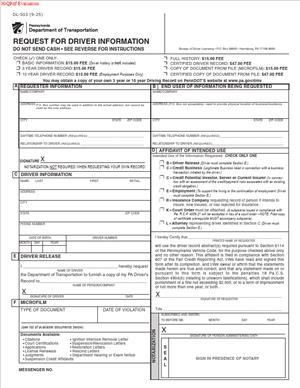
DL-503 – Request for Driver Information
Fill out nowJurisdiction: Country: United States | Province or State: Pennsylvania
If you are looking for driving record details in Pennsylvania, the DL-503 – Request for Driver Information is the form used to ask for them. This document allows you to request official driver information maintained by the state.
You might be completing this form for yourself, for an employer, or for another authorized purpose. The information provided through this request can affect employment, insurance, or legal matters. That makes accuracy important.
Before you start filling it out, it helps to understand what the form actually does and what it does not do. It is not a license application. It is a formal request for existing driver record information.
Knowing how the form works can save you time and prevent delays. Small mistakes can lead to rejection or incomplete results. The sections below walk you through what to expect and how to approach it with confidence.
What is DL-503 – Request for Driver Information?
Clear definition
DL-503 – Request for Driver Information is a Pennsylvania form used to request access to a person’s official driver record. The driver record may include details such as license status, traffic violations, suspensions, and other driving-related entries.
The form acts as a written request to the state’s motor vehicle authority. It identifies the driver and explains who is asking for the information and why. Once processed, the state provides the requested driver information based on what is legally available.
This document is part of a formal record system. The information released is drawn from official state records, not from private databases.
Who typically uses this form?
Individuals often use this form to obtain their own driving record. You may want to review your record for accuracy or provide it to someone else.
Employers may use the form when screening job applicants for positions that involve driving. In these cases, the employer typically needs written consent from the driver before requesting the record.
Insurance companies and attorneys may also request driver information in connection with claims, accidents, or court matters. In each case, the requester must meet eligibility requirements and follow the stated process.
Why might you need this form?
You may need this form if you are applying for a job that requires a clean or specific type of driving history. Many employers require official documentation rather than a self-reported record.
You might also need it to verify your license status. If you are unsure whether your license is active, suspended, or restored, an official record provides clarity.
In legal disputes, such as traffic cases or civil claims involving vehicle accidents, a certified driver record can be relevant. It can show prior violations, points, or suspension history.
Some people request their records simply to check for errors. Mistakes can happen in any system. Reviewing your official record allows you to identify issues early.
Typical real-life scenarios
- You apply for a delivery job that requires proof of a valid driver’s license and a clean record. The employer asks for an official copy of your driving history. You complete the request form to obtain it.
- You were involved in a minor accident and want to confirm that no unexpected violations were added to your record. You request your driver’s information to see exactly what appears.
- Your license was previously suspended, and you believe the suspension period has ended. You use the form to confirm your current status before driving again.
- You are an employer hiring a school bus driver. Because safety is critical, you request the applicant’s official driver record after receiving written authorization.
- You are working with an attorney on a traffic matter. The attorney needs a certified copy of your driving history to prepare for a hearing. The form is used to obtain that certified record.
When would you use DL-503 – Request for Driver Information?
You would use this form any time you need an official copy of a Pennsylvania driver record. The keyword is official. If an employer, court, or agency requires documentation directly from the state, this is the type of request that makes it possible.
You might use it before applying for certain professional licenses that involve vehicle operation. Some industries require proof of a safe driving history as part of their screening process.
Businesses that manage vehicle fleets may also use it periodically. They may check records of employees who drive company vehicles to manage risk and ensure compliance with internal policies.
Attorneys often use this type of form when handling cases related to traffic offenses or vehicle accidents. The official record can clarify dates, violations, and license status.
Insurance matters are another common reason. If there is a dispute about past violations or points, an official record can provide documentation of what is recorded in the state system.
Legal characteristics of DL-503 – Request for Driver Information
This form is an administrative request. Its effectiveness depends on accurate identification of the driver and proper completion of required fields. Missing information can delay processing or result in rejection.
Typically, the form requires specific identifying details such as the driver’s full legal name, date of birth, and driver’s license number. These details help ensure that the correct record is located.
If you are requesting information about someone else, authorization is usually required. Without proper consent or a legally recognized reason, access may be limited. Privacy laws generally restrict who can obtain driver information and for what purposes.
Common issues that cause problems include incomplete signatures, incorrect payment amounts, mismatched personal details, or failure to indicate the purpose of the request. Any inconsistency between the form and state records may slow down the process.
The form does not create, change, or remove entries on a driving record. It only requests access to information that already exists in the state system. If you need to correct an error, that usually involves a separate process.
In some situations, you may request a certified copy of the driver’s record. A certified copy typically carries an official seal or certification statement. This can matter if the document is being submitted to a court or government agency.
Processing times and specific procedures can vary. The form itself does not guarantee immediate access. It begins the formal request and review process.
Is it legally binding?
The DL-503 – Request for Driver Information is not a contract between private parties. It does not create obligations like an agreement would. However, it is a formal submission to a government agency.
When you sign the form, you are generally certifying that the information you provide is accurate and that your request is authorized. Providing false information on a government document can carry consequences.
If you are requesting someone else’s record, the authorization component can carry legal significance. The driver’s signature, where required, may serve as formal consent for the release of information.
The record you receive may be used in legal or employment contexts. In that sense, the document produced as a result of the request can have legal weight, especially if it is certified.
How to fill out DL-503 – Request for Driver Information
Step 1 – Review the form and instructions
Start by reading the entire form from top to bottom. Take note of any instructions about eligibility, fees, and acceptable purposes for requesting driver information. Understanding the structure before writing anything reduces mistakes.
Step 2 – Enter the driver’s full legal name
Write the driver’s name exactly as it appears on the driver’s license or state records. Include middle name or initial if required. Even small spelling differences can prevent the record from being located.
Step 3 – Provide identifying information
Enter the requested details, such as date of birth and driver’s license number. Double-check each number before moving on. Accuracy here is critical to matching the correct record.
Step 4 – Indicate the type of record requested
If the form offers options, select the type of driver information you need. This may include a standard record or a certified copy. Choose the option that matches your intended use.
Step 5 – State the purpose of the request
If required, clearly indicate why the information is being requested. Some requests are limited to specific purposes. Make sure your stated purpose matches the actual reason for the submission.
Step 6 – Complete requester information
If you are requesting the record, fill in your name, address, and contact details in the requester section. If you are requesting your own record, this may overlap with the driver information section. Ensure all fields are complete.
Step 7 – Obtain required authorization or signature
Sign the form where indicated. If you are requesting another person’s record, confirm that the driver has signed any required consent section. Unsigned forms are commonly rejected.
Step 8 – Prepare payment
Review the stated fee and prepare payment in the accepted form. Make sure the amount matches the type of record requested. Incorrect payment can delay processing.
Step 9 – Review the entire form before submission
Go back through each section. Check names, numbers, signatures, and payment details. Confirm that all required fields are filled in and legible. Once everything is complete, the form is ready for submission according to the listed instructions.
Legal terms you might encounter in DL-503 – Request for Driver Information
- Driver Record Abstract: This is a summary of a person’s driving history as maintained by the state. It may include license status, traffic violations, points, suspensions, and restorations. On this form, you usually select the type of driver record abstract you want to receive.
- Certified Copy: A certified copy is an official record issued with a seal or certification statement verifying that it is true and correct. You may need a certified copy for court, employment, or insurance purposes. The form typically allows you to indicate whether you want a certified or non-certified version.
- Requester: The requester is the person or entity asking for the driver’s information. This could be you, an employer, an attorney, or another authorized party. The form requires the requester’s full name, address, and contact information.
- Subject Driver: The subject driver is the individual whose driving record is being requested. This may be you or someone else. The form requires accurate identifying details for the subject driver to avoid releasing the wrong record.
- Authorization: Authorization is the written permission allowing the release of a driver’s record to someone else. If you are requesting another person’s information, the form may require that person’s signature. Without proper authorization, the request may be denied.
- Purpose of Request: This refers to the reason you are asking for the driver’s information. The form may ask you to indicate whether the record is for employment, insurance, personal review, or legal use. Stating the purpose clearly helps determine whether you are eligible to receive the information.
- Fee Schedule: The fee schedule lists the cost associated with each type of record. Different records may have different fees. You must submit the correct payment amount, or your request may be delayed or rejected.
- Identifying Information: This includes details such as full legal name, date of birth, driver’s license number, and address. The form relies on this information to locate the correct driver record. Even a small error can result in processing delays.
- Release of Information: This term refers to the legal act of disclosing driver data from official records. The form functions as the written request that triggers the release. The agency will only release what the law allows based on your request and authorization.
FAQs
What information do I need to complete this form accurately?
You need the subject driver’s full legal name exactly as it appears on their license, their date of birth, and ideally their driver’s license number. If you are the requester and not the subject driver, you must also provide your own full name, mailing address, and contact details. Double-check spelling and numbers before you submit, because mismatched information can result in a rejected or delayed request.
Can I request someone else’s driving record with DL-503 – Request for Driver Information?
Yes, but only if you are legally allowed to receive it. You may need written authorization from the driver, including their signature. If the form requires authorization and you do not include it, the agency will not release the record, even if you provide payment.
What type of record should I select on this document?
Read each option carefully. Some records show a full history, while others provide a limited summary such as current license status. If you are requesting the record for court, employment, or insurance, confirm which version is required before you check a box, because choosing the wrong type may mean you have to file and pay again.
Do I need a certified copy, or is a regular copy enough?
That depends on who is asking for the record. Courts and some employers often require a certified copy with an official seal. If the record is only for your personal review, a non-certified copy is usually sufficient. Check the instructions given to you by the requesting party before you make your selection.
What happens if the name or date of birth does not exactly match the official record?
If the identifying information does not match what is on file, the agency may not locate the record or may return your request unprocessed. This form relies on exact data. Always compare the information you enter with the driver’s license or official identification to ensure accuracy.
How do I know if my request has been accepted and processed?
After submission, processing typically occurs in the order received. If payment is incorrect or the required information is missing, your request may be returned. You should keep a copy of your completed form and proof of payment so you can follow up if you do not receive the record within a reasonable time.
Can I use this document to correct errors on my driving record?
No. This document is for requesting information, not for disputing or correcting it. If you discover an error after reviewing your record, you will need to follow the separate procedure for record corrections. This form simply provides access to the existing record.
Will requesting my own driver record affect my license status?
No. Submitting DL-503 – Request for Driver Information does not change your license status, points, or driving history. It is only a request to obtain a copy of the information already on file. The act of requesting your record does not create new entries or penalties.
Checklist: Before, During, and After DL-503 – Request for Driver Information
Before
- Confirm why you need the driver record and what version is required.
- Gather the subject driver’s full legal name, date of birth, and license number.
- Verify whether you need written authorization from the driver.
- Review the available record types and certification options.
- Check the current fee amount for the specific record you are requesting.
- Prepare an accepted form of payment in the correct amount.
- Make sure you have a complete mailing address for delivery.
During
- Print clearly or type to avoid misreading of names and numbers.
- Enter the subject driver’s information exactly as it appears on official identification.
- Complete all requester information fields without leaving blanks.
- Select the correct type of record and indicate whether certification is required.
- State the purpose of the request if the form requires it.
- Sign and date the form where indicated.
- Attach any required authorization documents.
- Confirm the payment amount matches the selected record type.
After
- Make a complete copy of the signed form and any attachments.
- Keep a copy or photo of your payment confirmation.
- Submit the form using the approved delivery method.
- Note the date you sent the request.
- Monitor your mail for the returned driver record.
- Review the record carefully once received.
- Store the document in a secure place, especially if it contains sensitive data.
- Begin any follow-up steps if you notice inaccuracies.
Common mistakes to avoid with DL-503 – Request for Driver Information
- Mistake: Entering a nickname or shortened name instead of the full legal name, which happens when people rely on memory; this can prevent the record from being located and cause rejection, so do not forget to match the name exactly to the driver’s license.
- Mistake: Selecting the wrong type of driver record because you did not confirm what was required; this often leads to having to submit a new request and pay another fee, so do not forget to verify the required record format before checking a box.
- Mistake: Forgetting to include required authorization when requesting another person’s record, which happens when you assume payment is enough; this will result in denial, so do not forget to attach signed permission if needed.
- Mistake: Sending incorrect payment or leaving out payment entirely due to not reviewing the fee schedule; this delays processing or causes the request to be returned, so do not forget to confirm the exact amount.
- Mistake: Leaving required fields blank because you think they are optional; incomplete forms are often rejected, so do not forget to review every section before submission.
- Mistake: Failing to sign and date the form, which commonly occurs when completing it quickly; an unsigned form is not valid, so do not forget your signature wherever indicated.
- Mistake: Providing outdated or incorrect mailing information, which can result in the record being sent to the wrong address or returned, so do not forget to double-check the delivery details.
- Mistake: Not keeping a copy of what you submitted, which makes follow-up difficult if there is a delay or dispute; do not forget to retain a complete copy for your records.
What to do after filling out DL-503 – Request for Driver Information
Once you complete the form, pause before sending it. A careful review now can save you weeks of delay. Look at every name, number, and checked box. Confirm that your payment matches the record you selected.
- Step 1: Review the entire form line by line for accuracy and completeness.
- Step 2: Confirm that all required signatures are present, including authorization if you are requesting another person’s record.
- Step 3: Make a full copy of the signed form and all attachments for your records.
- Step 4: Prepare your payment exactly as required and confirm the amount.
- Step 5: Submit the form using the approved submission method.
- Step 6: Record the date of submission and keep any mailing receipt or confirmation.
- Step 7: Allow reasonable processing time before following up.
- Step 8: When you receive the driver record, review it carefully for accuracy.
- Step 9: Store the record securely because it contains personal identifying information.
- Step 10: If you find errors, follow the separate process for disputing or correcting driver record information.
Keep your copy of the request and the received record together. This creates a clear paper trail showing when you requested the information and what you received. If the record is for employment or court use, provide it promptly to the requesting party and confirm whether they need the original certified copy.
If you do not receive a response within the expected timeframe, use your saved documentation to make a follow-up inquiry. Having your submission date and payment details ready will make that process smoother and faster.
Disclaimer: This guide is provided for informational purposes only and is not intended as legal advice. You should consult a legal professional.