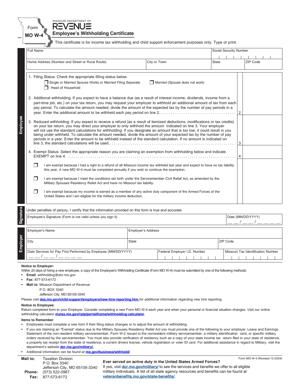
Form MO W-4 – Employee’s Withholding Certificate
Fill out nowJurisdiction: Country: United States | Province or State: Missouri
The Form MO W-4 – Employee’s Withholding Certificate is a Missouri state tax form that tells your employer how much Missouri income tax to withhold from your paycheck. You complete it when you start a job or when your tax situation changes. It works alongside your federal Form W-4 but applies only to Missouri state income tax.
If you are an employee working in Missouri, this form directly affects your take-home pay. The information you provide determines how much state tax is withheld each pay period. Too little withholding can lead to a balance due at tax time. Too much means smaller paychecks and possibly a refund later.
Employers rely on this document to calculate payroll correctly. Without it, they may be required to withhold tax at a default rate. That default may not reflect your actual situation.
Understanding this form before you fill it out can prevent surprises. A few careful entries can make a noticeable difference in your net pay and year-end tax result.
What is Form MO W-4 – Employee’s Withholding Certificate?
Clear definition
Form MO W-4 – Employee’s Withholding Certificate is a state-issued payroll form used in Missouri. It allows you to claim a certain number of allowances and indicate your filing status for state income tax purposes. Your employer uses this information to determine how much Missouri income tax to withhold from your wages.
The form is not a tax return. You do not calculate your total yearly tax on it. Instead, it provides instructions to your employer for ongoing withholding during the year.
It is completed by the employee and kept on file by the employer. In most cases, it is not sent to the state unless specifically requested.
Who typically uses this form?
This form is used by employees who earn wages in Missouri. That includes full-time workers, part-time workers, and many seasonal employees. It also applies to workers who live in Missouri but may work remotely for a company located elsewhere.
New hires are the most common users. Employers generally provide the form during onboarding so payroll can be set up correctly.
Current employees may also use it. If your marital status changes, you have a child, or your financial situation shifts, you may complete a new form to update your withholding.
Employers and payroll departments rely on the completed form to apply the correct withholding tables to your wages.
Why might you need this form?
You need this form when you begin employment in Missouri. It ensures state income tax is withheld from your first paycheck at a rate that reflects your situation.
You may also need it if you want to adjust how much tax is taken out. For example, if you owed state tax last year, you might want more withheld. If you received a large refund, you might decide to reduce your withholding.
Life changes often trigger a new form. Marriage, divorce, the birth or adoption of a child, or a change in the number of dependents can all affect your allowances.
It is also relevant if you qualify for exemption from Missouri withholding. In limited situations, such as when you expect no Missouri tax liability for the year, you may indicate exempt status on the form.
Typical real-life scenarios
- You start your first job after college in St. Louis. During orientation, you receive hiring paperwork that includes this form. You complete it to set your Missouri withholding before your first paycheck is issued.
- You move from another state to Kansas City and begin working for a local employer. Even if you filled out a similar form in your previous state, you must complete Missouri’s version to reflect state-specific rules.
- You get married mid-year. Your combined household income changes your tax picture. You submit a new form to update your filing status and allowances.
- You have a second job in addition to your primary employment. You review your total income and decide to adjust withholding on one of the jobs to avoid underpaying state taxes.
- You previously claimed exempt status because you had no tax liability. This year, your income increases. You complete a new form, so state tax begins to be withheld again.
When would you use Form MO W-4 – Employee’s Withholding Certificate?
You use this form at the start of employment with a Missouri employer. It is typically part of your onboarding documents, along with federal withholding forms and direct deposit information.
You also use it when your personal or financial circumstances change. A change in marital status can affect your filing status. A new dependent can increase your allowances. A dependent aging out may reduce them.
If you change jobs within Missouri, you generally complete a new form for each employer. Withholding instructions do not automatically transfer between employers.
You may use the form when you want to increase or decrease state withholding during the year. This can happen if you receive a raise, start earning additional income, or anticipate deductions or credits that affect your overall tax picture.
Employees in a wide range of roles use this document. Office staff, healthcare workers, retail employees, construction workers, and remote workers located in Missouri all rely on it to set their state withholding.
If you work in Missouri but live in another state, the form may still apply depending on your work location and tax obligations. In those cases, payroll often requires clear withholding instructions to apply the correct state rules.
Legal characteristics of Form MO W-4 – Employee’s Withholding Certificate
Form MO W-4 – Employee’s Withholding Certificate is an official state tax document issued by the Missouri Department of Revenue. It carries legal significance because it directs how much state income tax is withheld from your wages.
For the form to be effective, it must be completed accurately and signed. Missing personal information, such as your name, address, or Social Security number, can delay processing. An unsigned form may be treated as invalid by the employer.
Providing incorrect information can lead to improper withholding. If too little tax is withheld, you may owe money when you file your state tax return. If too much is withheld, your cash flow during the year is reduced.
Employers are required to apply withholding based on the information you provide, subject to state rules. If you fail to submit the form, employers may be required to withhold at a default rate. That rate may assume no allowances, which often results in higher withholding.
Claiming exempt status has specific requirements. If the claim does not meet state conditions, it may be rejected. In some situations, employers may request additional documentation if they believe the form is inaccurate.
This form does not replace your annual Missouri individual income tax return. It does not calculate your final tax liability. It only affects how much is prepaid through payroll during the year.
Missouri’s withholding rules are separate from federal rules. Even though the forms may look similar, allowances and exemptions under state law may differ from federal guidelines. Completing one does not automatically update the other.
Is it legally binding?
The form is legally binding in the sense that it is an official statement of your withholding elections. By signing it, you certify that the information you provide is accurate to the best of your knowledge.
Your employer relies on your signed form to calculate withholding. Once submitted, it remains in effect until you provide a new one. The employer is generally required to follow the most recent valid form on file.
If you intentionally provide false information to reduce withholding, that can have legal consequences. The certification language on the form confirms that you understand your responsibility for accuracy.
At the same time, the form does not create a contract between you and your employer about your total tax liability. It does not settle your tax obligations. Your actual state tax is determined when you file your annual Missouri income tax return.
How to fill out Form MO W-4 – Employee’s Withholding Certificate
Step 1 – Enter your personal information
Start by filling in your full legal name, home address, and Social Security number. Make sure the information matches your payroll and identification records. Errors in this section can delay payroll setup or cause reporting issues.
Step 2 – Select your filing status
Indicate your current filing status as shown on the form. This usually reflects whether you are single, married, or qualify for another listed status. Your selection affects the withholding tables your employer will use.
Choose the status that aligns with how you expect to file your Missouri income tax return for the year. If your marital situation changes later, you can submit a new form.
Step 3 – Claim your allowances
Enter the number of withholding allowances you are claiming. Allowances generally relate to factors such as dependents or eligibility for certain deductions. The more allowances you claim, the less tax is withheld from each paycheck.
Review the instructions provided with the form to understand how allowances are calculated. Enter the total number clearly in the designated box.
Step 4 – Indicate additional withholding, if any
If you want extra Missouri income tax withheld from each paycheck, you can specify an additional dollar amount. This is often used by employees who have other income not subject to withholding.
Write the exact additional amount to be withheld per pay period. This amount is added to the standard withholding based on your allowances and filing status.
Step 5 – Claim exempt status, if applicable
If you qualify for exemption from Missouri withholding, complete the exempt section as instructed on the form. This generally applies if you had no Missouri tax liability in the prior year and expect none in the current year.
Ensure that you meet the criteria stated on the form before claiming exemption. Exempt status typically applies only for a limited period and may need to be renewed annually.
Step 6 – Review your entries
Before signing, read through each section carefully. Confirm that your personal information is correct and that your allowances and any additional withholding reflect your intent.
Check for blank fields that are required. Make sure numbers are legible and placed in the correct boxes.
Step 7 – Sign and date the form
Sign your name in the designated area to certify that the information is accurate. Enter the date of signing. Without your signature, the form is generally not valid for payroll purposes.
Once signed, return the completed document to your employer or payroll department as directed.
Legal terms you might encounter in Form MO W-4 – Employee’s Withholding Certificate
- Withholding Allowances: This refers to the number you claim to adjust how much Missouri income tax your employer withholds from your paycheck. The higher the number, the less tax is withheld. You calculate this based on your personal and financial situation, such as dependents and multiple jobs.
- Filing Status: Your filing status reflects how you expect to file your Missouri income tax return, such as single or married. It directly affects the withholding rate applied to your wages. Choosing the correct status ensures your employer withholds a more accurate amount of tax.
- Additional Withholding: This is an extra dollar amount you ask your employer to withhold from each paycheck. You enter a specific amount on the form. This can help if you expect to owe more tax due to other income sources.
- Exempt Status: Claiming exempt means you assert that no Missouri income tax should be withheld from your wages. To qualify, you generally must have had no tax liability in the prior year and expect none in the current year. If you claim exemption incorrectly, you could owe taxes and penalties later.
- Tax Liability: Tax liability is the total amount of tax you owe to the state for a tax year. Your withholding should approximate this amount over the course of the year. If too little is withheld, you may owe money when you file your return.
- Employer Identification Information: This includes your employer’s name and address, which appear on payroll records tied to this document. While you usually do not fill this section out, it connects your withholding instructions to the correct employer.
- Certification: The certification is the statement you sign declaring that the information you provided is true and correct. By signing, you confirm under penalty of law that your entries are accurate. This gives the document legal effect.
- Effective Date: The effective date is when your employer begins applying the new withholding instructions. Typically, this is tied to the payroll period after your employer processes the form. It is not retroactive unless the employer adjusts prior payroll, which is uncommon.
- Payroll Withholding: Payroll withholding is the process by which your employer deducts state income tax from your wages before you receive your paycheck. The amounts are sent to the state on your behalf. This form controls how much is deducted.
FAQs
When does my new withholding take effect after I submit this document?
Your employer applies the updated withholding instructions starting with the first payroll period they process after receiving them. It does not automatically change prior paychecks. If you need confirmation, ask payroll which pay date will reflect the update, and review that pay stub to ensure the change appears.
Do I give Form MO W-4 – Employee’s Withholding Certificate to the state?
No. You give this document directly to your employer, not to the state tax agency. Your employer keeps it in their payroll records and uses it to calculate how much Missouri income tax to withhold from your wages.
What happens if I do not submit this form to my employer?
If you do not provide this document, your employer will generally withhold tax using a default status, often single with no allowances. That can result in more tax being withheld than necessary. Check your first pay stub to see how you are coded and submit a completed form if you want a different withholding.
Can I change my allowances later in the year?
Yes. You can submit a new version of this form at any time if your situation changes, such as getting married, having a child, or starting a second job. The most recent document you submit replaces the previous one, so make sure it reflects your current information before signing.
How do I know how many allowances to claim?
You review your personal situation, including dependents and other income, and follow the worksheet or instructions provided with the form. If you claim too many allowances, too little tax may be withheld. If you claim too few, you may receive a refund but have less take-home pay during the year.
What if my name on this form does not match my Social Security record?
Your name should match the name associated with your Social Security number in payroll records. If there is a mismatch, payroll systems may flag it and delay processing. Confirm the spelling and format of your name before signing and correct any discrepancies with your employer’s HR department.
Do I need to attach any documents when I submit Form MO W-4 – Employee’s Withholding Certificate?
In most cases, you do not attach supporting documents. You simply complete, sign, and date the form. If you claim exempt status, make sure you qualify and understand that your employer relies on your certification without additional proof.
What changes in the public record when I complete this form?
This document does not create a public filing. It stays in your employer’s internal payroll records. The only practical change is how much Missouri income tax is withheld from your paycheck going forward.
Checklist: Before, During, and After Form MO W-4 – Employee’s Withholding Certificate
Before
- Review your most recent pay stub to see the current Missouri withholding.
- Estimate your expected income for the year from all jobs.
- Consider major life changes such as marriage, divorce, or a new child.
- Gather prior year tax return information for reference.
- Confirm your legal name and Social Security number.
- Decide whether you may need additional withholding.
- Check whether you qualified for exempt status last year.
During
- Print clearly or complete the form electronically if allowed.
- Enter your full legal name and current address.
- Select the correct filing status.
- Calculate and enter the number of allowances you are claiming.
- Write in any additional dollar amount to withhold per paycheck.
- Carefully review the exempt section before claiming it.
- Read the certification statement in full.
- Sign and date the form using your legal signature.
After
- Submit the completed form to your employer’s payroll or HR department.
- Ask when the changes will take effect.
- Keep a copy for your personal records.
- Review your next paycheck to confirm updated withholding.
- Monitor your withholding periodically during the year.
- Submit a new form if your situation changes.
- Store your copy with your annual tax documents.
Common mistakes to avoid with Form MO W-4 – Employee’s Withholding Certificate
- Mistake: Claiming too many allowances because you want a larger paycheck now, which happens when you underestimate your total income, leading to under-withholding and a tax bill later, so do not forget to consider all income sources before choosing a number.
- Mistake: Forgetting to sign and date the form, which often occurs when completing it quickly during onboarding, causing payroll to treat it as invalid and default your withholding, so always check the signature line before submitting.
- Mistake: Claiming exempt without qualifying, usually because of confusion about what tax liability means, resulting in no tax withheld and possible penalties, so do not forget to confirm you have and expect zero state tax liability.
- Mistake: Using outdated personal information, which happens after a name or address change, creating payroll mismatches and delays, so do not forget to verify your current legal name and contact details.
- Mistake: Ignoring additional withholding when you have multiple jobs, which occurs when you assume each job withholds enough on its own, leading to a year-end balance due, so do not forget to account for combined income.
- Mistake: Failing to update the form after a life event, which is common after marriage or a new dependent, resulting in inaccurate withholding for months, so do not forget to submit a revised form promptly.
What to do after filling out Form MO W-4 – Employee’s Withholding Certificate
Once you complete the form, your next steps focus on submission, confirmation, and monitoring.
- Step 1: Make a clear copy or save a digital version for your records before handing it in.
- Step 2: Submit the signed document to your employer’s payroll or human resources department, following their preferred method.
- Step 3: Ask payroll when the updated withholding will first appear in your paycheck.
- Step 4: Mark your calendar for that pay date so you remember to review the pay stub.
- Step 5: Check the Missouri income tax line on your pay stub to confirm the new amount matches your expectations.
- Step 6: Compare the new withholding to your year-to-date totals to see how the change affects your projected annual tax.
- Step 7: Keep your copy of the form with your annual tax records for easy reference when filing your state return.
- Step 8: Revisit your withholding mid-year, especially if your income changes or you experience a major life event.
- Step 9: Submit a revised form if you notice that too much or too little tax is being withheld.
- Step 10: Update any personal budgeting tools to reflect your new take-home pay.
Staying proactive helps you avoid surprises at tax time. Review your pay stubs regularly. Small adjustments during the year are easier to manage than a large balance due later.
Disclaimer: This guide is provided for informational purposes only and is not intended as legal advice. You should consult a legal professional.