Form 8832 – Entity Classification Election
Fill out nowJurisdiction: Country: United States | Province or State: Federal
Form 8832 – Entity Classification Election is a federal tax form used to tell the Internal Revenue Service how your business entity wants to be classified for federal tax purposes. It is often called a “check-the-box” election because you choose how the entity will be treated for tax reporting.
If you are about to complete Form 8832 – Entity Classification Election, you are likely forming a new business or changing how an existing one is taxed. This form does not create your company. It changes how the federal government views it for tax purposes.
Many business owners are surprised to learn that the way a company is formed under state law is not always the same as how it is taxed federally. This form allows certain eligible entities to select their tax classification instead of defaulting to one.
The choice you make can affect how income is reported, how taxes are paid, and who is responsible for them. That is why understanding each section before you fill it out matters.
This guide explains what the form does, who uses it, and how to complete it step by step in clear language.
What is Form 8832 – Entity Classification Election?
Clear definition
Form 8832 – Entity Classification Election is a federal tax document used by certain business entities to choose how they are classified for federal income tax purposes. It allows an eligible entity to elect to be treated as a corporation, partnership, or in some cases, as an entity disregarded from its owner.
By default, the IRS assigns a tax classification based on the type of entity and the number of owners. However, eligible entities can override that default classification by filing this election.
This form does not change your business structure under state law. It only affects how the entity is treated for federal tax reporting and liability.
Who typically uses this form?
Limited liability companies are the most common users of this form. An LLC with one owner is usually treated as a disregarded entity by default. An LLC with more than one owner is usually treated as a partnership. Both types may use this form to elect corporate tax treatment.
Foreign entities that meet eligibility rules may also use this form to choose how they are classified for U.S. tax purposes.
Business owners, managing members, corporate officers, or other authorized representatives typically complete and sign the form on behalf of the entity.
Why might you need this form?
You may need this form if you want your business taxed differently from its default classification. For example, an LLC might want to be taxed as a corporation instead of a partnership.
A change in tax classification can affect how profits are distributed, how self-employment taxes apply, and how earnings are retained within the business.
You might also use this form if your ownership structure changes and you want your tax treatment to reflect that change.
In some cases, businesses file this form when preparing for growth, bringing in investors, or restructuring operations.
Typical real-life scenarios
- You form a new LLC with two partners. By default, it is taxed as a partnership. After reviewing your financial plans, you decide that corporate taxation better fits your long-term goals. You file this form to make that election.
- You operate a single-member LLC that reports income on your personal tax return. As the business grows, you want to separate business income from your individual tax reporting. You use this form to elect corporate treatment.
- You own a foreign entity that is expanding operations in the United States. To align with U.S. tax rules and reporting requirements, you file this form to select a specific classification.
- You previously made an election but your business circumstances have changed. You may file this form again, if permitted, to change the entity’s classification going forward.
When would you use Form 8832 – Entity Classification Election?
You generally use this form when you want to change your entity’s federal tax classification or confirm a classification different from the default.
Timing is important. The form allows you to select an effective date for the election. That date can be prospective or retroactive within certain limits. Many businesses file the form shortly after formation to ensure the desired classification applies from the start.
You might also use it at the beginning of a tax year when changing how income and expenses will be reported. This can simplify accounting and tax filings for the remainder of the year.
If ownership changes significantly, such as adding or removing members, you may review whether the current classification still fits your situation. In some cases, an election is filed as part of a broader restructuring.
Foreign eligible entities may use this form when entering the U.S. market or when their activities create federal tax reporting obligations.
The form is not required for every business. Many entities remain under their default classification and never file it. You use it only if you are eligible and want a different tax treatment than the default.
Legal Characteristics of Form 8832 – Entity Classification Election
Form 8832 – Entity Classification Election is effective when properly completed, signed by an authorized person, and accepted by the Internal Revenue Service. It becomes part of the entity’s federal tax record.
For the election to be valid, the entity must be eligible. Not all entities can choose their classification. Some are automatically treated as corporations under federal tax rules and cannot change that status through this form.
The form must include accurate information, such as the entity’s legal name, address, employer identification number, and ownership details. Errors in identifying information commonly cause delays or rejection.
The election must be signed by someone with authority to act for the entity. This often includes a member of an LLC, a corporate officer, or another person authorized under the entity’s governing documents.
Timing requirements also affect validity. The chosen effective date must fall within the allowed time frames. If the date is outside the permitted window, the election may not be accepted as requested.
Different states may classify entities in specific ways for state tax purposes. This form does not automatically change how a state taxes your entity. Federal and state classifications can differ.
It is also important to understand what this form does not do. It does not create a corporation, partnership, or LLC. It does not register your business with a state. It does not change your operating agreement or bylaws. It only affects federal tax classification.
Is it legally binding?
Yes, once accepted, the election is binding for federal tax purposes. The IRS will treat the entity according to the chosen classification from the effective date forward.
The binding effect means that tax returns must be filed consistently with the elected classification. Income, deductions, and credits must be reported under the rules that apply to that type of entity.
There are limits on how often you can change your classification. In general, after making an election, you may need to wait a specified period before making another one. This prevents frequent switching between tax treatments.
If the form is incomplete, signed by someone without authority, or filed outside the permitted timeframe without meeting exception criteria, the election may not take effect as intended.
How to fill out Form 8832 – Entity Classification Election
Step 1 – Enter the entity’s name and identifying information
At the top of the form, provide the exact legal name of the entity as it appears in formation documents. Include the business address and employer identification number. Make sure the information matches IRS records to avoid processing delays.
Step 2 – Indicate the type of election
In the first section, state whether you are making an initial classification election or changing an existing classification. This clarifies the purpose of your submission and determines how the effective date will apply.
Step 3 – Select the classification being elected
Check the box that corresponds to how you want the entity to be classified for federal tax purposes. The available options depend on the number of owners and whether the entity is domestic or foreign. Read each option carefully before selecting.
Step 4 – Provide information about owners
List the number of owners at the time the election is made. If required, include details about each owner, such as name and identifying number. The number of owners can affect which classification options are available.
Step 5 – Choose the effective date
Enter the date you want the election to take effect. This date must fall within the permitted timeframe relative to the filing date. Consider how this date aligns with your tax year and reporting plans.
Step 6 – Answer additional eligibility questions
Complete any questions related to prior elections or previous changes in classification. These questions determine whether the entity meets timing rules for making a new election.
Step 7 – Sign and date the form
An authorized person must sign and date the form. This confirms that the information is accurate and that the signer has the authority to make the election on behalf of the entity.
Step 8 – Submit the form to the appropriate address
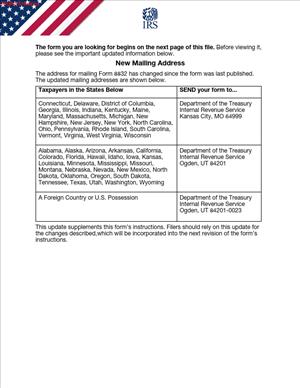
Mail the completed form to the address specified for your location. Ensure all pages are included and that the form is legible. Keep a copy of the signed document for your records.
Legal terms you might encounter in Form 8832 – Entity Classification Election
- Eligible Entity: This refers to a business entity that can choose its federal tax classification. On this form, you confirm that your business meets the definition of an eligible entity. Certain entities, such as corporations automatically classified under federal rules, cannot use this document to change status.
- Default Classification: This is the automatic tax status the IRS assigns to your entity if you do not make an election. The form asks you to acknowledge what your current classification is before you request a change. Understanding your default classification helps you confirm that the election you are making is necessary.
- Effective Date: This is the date your new tax classification will begin. You must enter a specific date on the form. The effective date controls when your tax treatment changes for filing and reporting purposes.
- Owner Consent Statement: In some cases, you must confirm that all owners agree to the election. The form includes a section where you list owners and indicate consent. If required signatures or consent details are missing, your filing may not be accepted.
- Employer Identification Number (EIN): This is the unique number assigned to your business by the Internal Revenue Service. You must enter the EIN exactly as it appears in official records. A mismatch between the EIN and business name can delay processing.
- Foreign Entity: This term applies if your entity was formed outside the United States. The form asks whether the entity is domestic or foreign. The classification options and certain questions differ depending on that status.
- Late Election Relief: If you missed the deadline to file the election on time, you may request relief. The form includes a section to explain why the election is late. You must provide specific details to support your request.
- Single-Member Entity: This refers to a business with only one owner. The form distinguishes between single-owner and multi-owner entities because the available tax classifications differ. You must indicate the number of owners to select the correct option.
- Association Taxable as a Corporation: This phrase appears as one of the possible classifications. By choosing this option, you are electing corporate tax treatment. The form requires you to clearly mark this selection if that is your intent.
- Change in Classification: This describes the act of switching from one federal tax status to another. The form asks whether this is your first election or a change from a previous classification. Prior elections can limit how often you are allowed to make another change.
FAQs
How do I know what effective date to enter?
You must choose a date that reflects when you want the new tax classification to begin. This date must be written clearly in the effective date field. Confirm that it aligns with your accounting records and tax year. If you are filing late, check whether the date falls within the allowable timeframe and whether you need to complete the late election section.
Who is authorized to sign this document?
The signer must have authority to act for the entity. This is usually an owner, member, partner, or corporate officer, depending on your structure. Before signing, confirm that the person’s title and authority match your internal records. The signature must be dated, and unsigned forms are not processed.
Do all owners need to be listed on this form?
You must list ownership information as requested in the owners section. For multi-owner entities, you typically need to include each owner’s name and identifying details. Confirm that ownership percentages or required identifying information are accurate at the time you file. If the form requires consent, make sure the owners have agreed to the election before submission.
What happens if the business name does not match IRS records?
If the name or EIN does not match what is on file, processing can be delayed or rejected. Before sending this form, compare the name and EIN to prior IRS correspondence. Even small differences, such as punctuation or abbreviations, can cause issues. Correct discrepancies before filing whenever possible.
Can I change the election again later?
There are limits on how often you can change your classification after filing Form 8832 – Entity Classification Election. The form asks whether you have made a similar election within a recent period. You must answer truthfully and review your records to confirm past filings. A prior election can restrict your ability to make a new change.
How do I know if my filing was accepted?
After submission, you should receive written confirmation from the Internal Revenue Service. Keep a copy of the filed form and note the date you sent it. If you do not receive confirmation within a reasonable timeframe, follow up using the contact information provided in official IRS instructions. Do not assume approval without confirmation.
What should I attach if I am requesting late election relief?
If you are requesting relief, you must complete the late election section and provide the explanation requested. Be specific about why the election was not filed on time and confirm that you meet the eligibility requirements. Attach any required statements as described in the form instructions. Missing explanations can result in denial.
Does this election change my business’s legal structure with the state?
No. Form 8832 – Entity Classification Election changes how your entity is treated for federal tax purposes only. It does not amend your formation documents or change your status under state law. You should ensure your internal records reflect the tax election, but your legal entity type remains the same unless you file separate documents with state authorities.
Checklist: Before, During, and After Form 8832 – Entity Classification Election
Before
- Confirm your current default federal tax classification.
- Verify your entity’s legal name and EIN from prior IRS documents.
- Review your ownership structure and percentages.
- Decide on the new classification you want to elect.
- Determine the correct effective date for the election.
- Check whether you made a similar election in the past.
- Confirm whether you qualify as an eligible entity.
- Gather the owner information required for the form.
During
- Enter the entity name exactly as registered with the IRS.
- Carefully type or print the EIN without transposing numbers.
- Mark the correct box for the initial election or change in classification.
- Select the correct classification option.
- Provide complete owner details where required.
- Enter a clear and accurate effective date.
- Complete any late election relief section if applicable.
- Ensure the authorized person signs and dates the form.
After
- Make a complete copy of the signed form for your records.
- Note the date and method of submission.
- Track expected confirmation from the IRS.
- Store the confirmation letter with your permanent records.
- Update your accounting system to reflect the new classification.
- Inform your tax preparer or internal accounting team.
- Review future filing requirements based on the new status.
- Keep owner consent documentation with company records.
Common mistakes to avoid with Form 8832 – Entity Classification Election
- Mistake: Entering an incorrect EIN because of a simple typo, which often happens when copying from memory, can delay processing or cause rejection, so do not forget to verify the number directly from an official IRS document.
- Mistake: Choosing the wrong effective date due to a misunderstanding of timing rules, which can lead to unintended tax consequences, so do not forget to align the date with your accounting records and eligibility window.
- Mistake: Failing to obtain proper owner consent because of internal miscommunication, which may invalidate the election, so do not forget to confirm agreement before filing.
- Mistake: Leaving required sections blank because you assume they do not apply, which can result in the form being returned, so do not forget to review every line and confirm completeness.
- Mistake: Assuming the election changes your state-law entity type, which creates confusion in records and contracts, so do not forget that this affects federal tax classification only.
- Mistake: Forgetting to sign and date the form, often due to last-minute filing, which automatically prevents processing, so do not forget to check the signature block before submission.
- Mistake: Ignoring prior classification elections, which can violate timing restrictions, so do not forget to review past filings before marking your answers.
- Mistake: Not keeping proof of submission, which makes follow-up difficult if confirmation is delayed, so do not forget to retain copies and delivery records.
What to do after filling out Form 8832 – Entity Classification Election
Once you complete and sign the form, your job is not finished. You need to manage submission, confirmation, and internal updates carefully. Good recordkeeping now prevents confusion later.
Start by organizing your final signed version. Make sure every page is complete and legible. Double-check that the effective date and classification selection are exactly what you intended.
- Step 1: Make at least one complete copy of the signed form for your permanent records.
- Step 2: Confirm the correct submission address or method listed in the current IRS instructions for your type of entity.
- Step 3: Send the form using a method that provides proof of delivery when available.
- Step 4: Record the date you mailed or submitted the form in your compliance calendar.
- Step 5: Monitor incoming mail for written confirmation from the Internal Revenue Service.
- Step 6: If confirmation does not arrive within the expected processing time, follow up with the IRS and reference your EIN and submission date.
- Step 7: Once approved, store the confirmation letter with your formation documents, prior tax returns, and EIN assignment notice.
- Step 8: Update your accounting system to reflect the new federal tax classification as of the effective date.
- Step 9: Adjust estimated tax payments or filing procedures to match the new status.
- Step 10: Inform owners or stakeholders about how the new classification affects reporting and distributions.
You should also review your internal documents. While this election does not change your legal structure, your operating agreement, partnership agreement, or corporate records may reference tax treatment. Update those references if needed so your records stay consistent.
Finally, coordinate your next tax filing carefully. Your first return under the new classification must match the election you made. Confirm that forms, schedules, and reporting periods align with the effective date you entered. Consistency between this election and your next tax return helps prevent processing delays and follow-up notices.
Disclaimer: This guide is provided for informational purposes only and is not intended as legal advice. You should consult a legal professional.