Understanding the registry record is key when updating or cancelling a BC extraprovincial registration. An extraprovincial company is a company incorporated outside British Columbia that has registered to carry on business in the province. The Business Corporations Act defines it as a foreign entity registered as an extraprovincial company. In practical terms, the company’s legal home is elsewhere, but it has filed to operate in BC. Companies incorporated in BC are not extraprovincial and follow a different regulatory framework. All forms and processes discussed here apply only to foreign companies registered in BC.
The BC corporate registry record is the company’s official public profile in the province. It is relied on for the service of legal documents and the delivery of government notices, and it is treated as authoritative. Under BC law, the attorney for an extraprovincial company is deemed authorized to accept service of process and receive notices on the company’s behalf. This means the attorney’s name and address shown in the registry are the official delivery point. If those details are outdated or incorrect, important documents may never reach the company, creating a real risk of missed deadlines or default judgments.
An attorney for service in BC is not necessarily the company’s external legal counsel. It is the individual or entity recorded in the registry to receive service. Unless the company’s head office is located in BC, the Act requires every extraprovincial company to maintain at least one attorney for service in the province. That attorney must be either a BC-resident individual or a BC-incorporated company, with a physical delivery address in BC.
Looking for the right legal form to update your BC registration? Use RunSensible’s Legal Form Finder to identify exactly what you need based on your situation—no guesswork, no wrong form.
What Is an Extraprovincial Company in British Columbia?
An extraprovincial company is a business that is incorporated outside of British Columbia but is registered to carry on business within the province. This designation includes both Canadian corporations incorporated in other provinces and foreign corporations incorporated outside Canada. Such an entity, whether federally incorporated or internationally formed, must register as an extraprovincial company with B.C. Registry Services before operating in the province.
Before registration, these businesses are referred to as foreign entities. Once properly registered in BC, they are designated as “Extra-pro” (extraprovincial) companies and must comply with ongoing obligations like filing an annual report within two months of their registration anniversary date to confirm that they are still carrying on business in BC.
A company is generally deemed to be carrying on business in BC if it:
- Appears in a BC telephone directory under its own name (or an assumed name) with a local address
- Is featured in advertisements listing a BC address; or
- Maintains a resident agent, office, warehouse, or place of business anywhere in the province.
These rules and filings apply only to extraprovincial registrations—not to companies incorporated under BC law. The obligations, forms, and compliance steps for extraprovincial companies differ significantly from those of BC-incorporated entities. Understanding whether your business falls under this category is the first step toward staying compliant.

What are the BC Registry Record Controls
The BC corporate registry record serves as the official public record for companies operating in the province, including extraprovincial companies. It is the authoritative source used by government agencies, courts, and third parties to deliver legal documents and official correspondence. For extraprovincial companies, the registry maintains the attorney for service address as the designated location for legal and regulatory contact.
The registry plays several roles:
- Service of legal documents: If an extraprovincial company is sued, legal documents are served at the address listed in the registry, usually the attorney for service or the company’s head office. If the company fails to respond within 21 days, the court may issue a default judgment.
- Annual reporting compliance: The registry uses the registered office address to send reminders and forms for the company’s annual report filings. Failure to file annual reports for two consecutive years can result in the company being removed from the registry and losing its legal status in British Columbia.
- Government and regulatory correspondence: Notices from regulatory bodies, provincial agencies, and other official sources are sent to the registered address. An outdated or incorrect address can result in missed filings, penalties, or compliance issues.
This information is treated as the company’s official contact record. If the registry is not updated, the company may not receive time-sensitive legal documents or government notices. That can lead to missed court deadlines, default judgments, or the loss of corporate status. Maintaining accurate registry information is essential to legal and operational continuity.
Attorney for Service in British Columbia
An attorney for service is a designated individual who serves as the official contact for an extraprovincial company operating in British Columbia. This person is responsible for receiving legal documents and official government correspondence on the company’s behalf. The attorney must reside in BC, and the registered address must be a physical location where they can be reached during business hours. Post office boxes are not accepted.
The attorney for the service plays a critical legal role. Any legal notice delivered to the attorney is considered legally delivered to the corporation. This means that deadlines for responding to lawsuits or court orders begin as soon as the attorney receives the document, not when company executives are informed. For this reason, the attorney must be reliable and prompt in communicating any service they receive.
Typical responsibilities of an attorney for service include:
- Receiving and accepting service of legal documents such as lawsuits, motions, or court orders
- Handling government notices and regulatory communications
- Acting as the contact listed in official registry filings
- Forwarding received documents to company leadership without delay
While some corporations appoint a law firm as their attorney for service, this person is not automatically the company’s legal representative in court. The attorney for service receives legal documents but is not responsible for defending the company or providing legal advice. Delayed communication or failure to forward urgent documents, especially where a court deadline is involved, can lead to serious consequences. For example, missing a one or two-day response deadline on a court motion can result in a default order being issued before the corporation even knows a proceeding was filed.
The Process for Updating or Cancelling a BC Extraprovincial Company Registration
To properly update or close your BC extraprovincial company registration, you must follow a clear, step-by-step process. This ensures that the BC corporate registry remains accurate and that your company avoids legal or administrative exposure during the transition.
Step 1: Identify What Has Changed
Begin by clearly identifying the nature of the change that requires an update:
- Has your company ceased carrying on business in British Columbia?
- Is your attorney for service resigning?
- Has your attorney for service changed addresses, but remains the same person or firm?
Each of these scenarios requires a different filing form. Confirming the nature of the change will determine the rest of the process.
Step 2: Confirm You Have the Correct Identifiers
Before completing any form, gather the official information exactly as recorded on the BC corporate registry. This includes:
- The company’s legal name, exactly as it appears in the registry (including punctuation or corporate suffixes)
- The company’s BC registration number
- The current attorney for the service’s name and registered address
Even small errors in this information—such as a missing comma or incorrect postal code—can result in your filing being rejected.
Step 3: Plan Timing to Avoid Gaps
Many registry updates have built-in timing rules that affect when the change becomes legally effective. Plan accordingly:
- If your attorney for service is resigning, their resignation does not take effect immediately. Under BC law, it only takes effect two months after notice is given, or on a later date specified in the filing.
- Make sure there is no gap in service details. For example, do not allow your attorney to resign before you have arranged for a replacement, unless your company’s head office is located in BC.
- If you are ceasing business in BC, double-check that all BC-based operations have truly stopped. Prematurely filing a cease-business notice while still operating could result in penalties or noncompliance.
Before completing your form, make sure you’re using the correct version for your filing. Visit RunSensible’s Forms to download official BC corporate forms and check current requirements in one place.
Step 4: File the Appropriate Form and Keep Proof
Once you have identified the correct path and verified your information, complete and submit the correct form:
- Use Form 42 if your company is no longer carrying on business in BC
- Use Form 41 if your attorney for service is resigning
- Use Form 39 if your attorney’s address has changed, but the same individual or firm remains in place
You will find detailed information on the required forms and documentation in the following section. For now, ensure that you submit the filing using the correct method, either online or by mail, depending on the form, and retain a complete copy of your submission along with any confirmation or receipt provided by the BC Registry.
Step 5: Verify the Update and Maintain Internal Records
After filing, confirm that the change has been processed and appears correctly in the public record. You can do this by reviewing your company’s listing in the BC corporate registry.
In addition, update your internal compliance records. This includes your corporate minute book, internal contact lists, and any calendars or ticklers used to monitor reporting obligations. Ensuring consistency between the public record and internal systems is key to staying organized and compliant.
Forms and Required Information
To make any official change to a BC extraprovincial company registration, you must use the correct form. Each form serves a specific purpose and has legal consequences once filed. Choosing the wrong form or entering incorrect information can lead to delays, rejections, or compliance gaps.
Each form requires exact details as shown in the registry—such as the company name, registration number, and attorney information. The sections below explain what each form does, when to use it, what details to include, and what happens after it is filed.
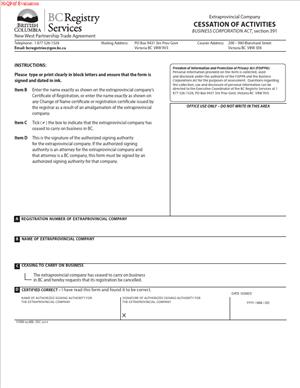
Form 42(MB): Notice of Ceasing to Carry on Business
Use this form to cancel your company’s BC registration after it has fully stopped carrying on business in the province. The form requires the exact legal name and BC registration number, and a checkbox confirming that the company has ceased business in BC. It must be signed by an authorized officer or attorney for service. Once filed, the Registrar will cancel the registration and issue a formal notice.
Note: Filing Form 42 ends only the BC registration. It does not dissolve the company in its home jurisdiction and does not automatically cancel contracts, licenses, or tax obligations. Separate actions may be required.

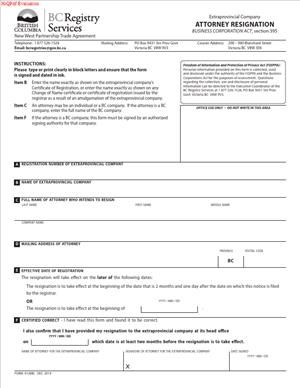
Form 41(MB): Notice of Resignation of Attorney
This form is used when the current attorney for service is resigning. It includes the company’s name and registration number, the attorney’s name and address, and an effective resignation date. If no date is specified, the resignation takes effect two months and one day after the filing date. The attorney must sign the form and confirm that at least two months’ notice was given to the company. If this is the only attorney on file, a new one must be appointed before the resignation takes effect.
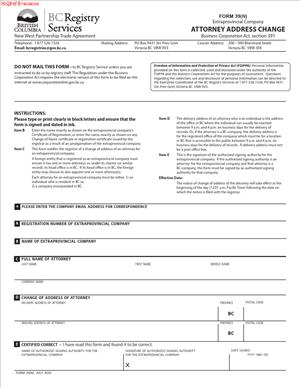
Form 39(MB): Notice of Change of Address of Attorney
Use this form to update the address of the current attorney for service. It requires the company’s legal name, registration number, the attorney’s name as recorded, and the new delivery and mailing addresses. The delivery address must be a physical BC location accessible during business hours; P.O. boxes are not accepted. The form must be signed by an authorized signing officer. Once filed, the new address becomes effective at 12:01 a.m. on the day after registration.
Supporting Documentation
Most filings for extraprovincial companies in BC must be submitted through the Corporate Online portal. This includes Form 42 for ceasing to carry on business and Form 39 for an attorney address change. These forms can be completed and submitted electronically. In contrast, Form 41 for an attorney resignation must be filed on paper, either by mail or by delivering it in person. When submitting a paper form, ensure that signatures are provided in ink and that any required payment is included.
Although these documents are filed with the registry, it is equally important to maintain complete internal records. Recommended documents include a resolution or internal authorization for the filing, a copy of the completed form, and the registry confirmation or receipt. After submission, update your compliance binder with the final filed forms, the name and address of the attorney for service, and any follow-up items needed to keep records current. Keeping internal documentation consistent with your public filings supports clear communication across legal, administrative, and operational teams. It also helps reduce the risk of errors, service failures, or compliance issues later on.
Filing the wrong form can cost you time and compliance. RunSensible’s Legal Forms Tool gives you instant access to the correct, up-to-date BC forms—prestructured for easy, accurate completion. Whether you’re updating an attorney or closing your BC registration, start with the version that’s ready to file.
Legal Implications and Common Hurdles
Even when the correct forms are used, timing and accuracy matter. Filing errors, outdated registry details, or assumptions about what a form does can create legal and administrative risks. This section highlights common issues that arise when companies update or cancel their BC extraprovincial registration and explains how to avoid them. These are not just technical oversights—they can affect the company’s ability to receive legal notices, maintain compliance, or wind down operations properly.
Risk of Outdated Service Information
The name and address of the attorney for service listed in the registry are treated as the company’s official contact for legal service. If these details are incorrect or outdated, legal documents such as lawsuits or statutory demands may never reach the company. This can result in missed deadlines or even default judgments. Keeping the registry current is not just administrative—it is a core part of protecting the company’s legal position.
Resignation Timing and Service Gaps
An attorney’s resignation only takes effect after the required notice period. If filings are not carefully timed, the company may be left without a valid attorney for service on record. For example, if a resignation is filed to take effect on June 1 but no new attorney is appointed until later, the company may be unrepresented in the interim. To avoid this, BC Registry guidance recommends appointing a new attorney (using Form 38) before filing the resignation of the current one. This approach ensures continuous service coverage and avoids compliance issues.
Disputes About Ceasing to Carry on Business
Filing a Notice of Ceasing to Carry on Business (Form 42) requires that the company has fully stopped doing business in BC. This is not always straightforward. Indicators of continued business include maintaining an office or warehouse, employing staff in BC, holding active contracts, or ongoing customer activity. Filing Form 42 while these conditions still exist can lead to regulatory scrutiny or legal risk. The company should confirm that all operations in BC have been fully wound down before proceeding with the filing.
Filing Rejections and Data Mismatches
The Corporate Online system will reject forms that contain incorrect or inconsistent information. Common errors include minor differences in the legal name (such as “Corp.” versus “Corporation”) or incorrect registration numbers. Delivery addresses must be physical BC locations—postal boxes are not accepted. Another frequent mistake is selecting the wrong form. For example, if the attorney for service has changed, you must appoint the new attorney using Form 38. Using Form 39 to change the address would leave the former attorney incorrectly on record. Similarly, do not file a resignation if the attorney is only relocating. Double-check that the form matches the situation and that all information is entered exactly as shown in the registry.
BC Filings Do Not Affect the Home Jurisdiction
BC filings apply only to the company’s registration in British Columbia. Filing Form 42 ends the company’s ability to do business in BC, but it does not dissolve the company in its home province or country. Any dissolution or winding-up must follow the laws of the jurisdiction where the company was incorporated. Likewise, appointing or updating an attorney for service in BC has no effect on service agents in other jurisdictions. Companies should coordinate filings across jurisdictions to ensure full compliance, especially if planning to dissolve or restructure operations more broadly.
Common Company Registration Mistakes to Avoid
Filing errors and mismatched records can lead to delays or even loss of legal standing. Below are key mistakes to watch for and how to prevent them.
Filing Form 42 Before Business Has Fully Ceased
Do not file a Notice of Ceasing to Carry on Business if the company still has any active presence in British Columbia. This includes having clients, employees, leased space, inventory, or open contracts within the province. Filing too early can create legal complications and compliance risks. Only submit this form once all operations in BC have been fully concluded.
Using the Incorrect Form for the Situation
Always select the form that matches the actual change. If the attorney for service has changed their address but remains the same individual or firm, use Form 39 to update the address. If the attorney is leaving their role, use Form 41 to file a resignation. These filings serve different legal functions and cannot be used interchangeably. Submitting the wrong form leaves the registry record incomplete.

Letting an Attorney Resign Without a Replacement
A company must always have either a valid attorney for service in BC or a head office located in the province. If the current attorney is resigning and there is no one in place to replace them, the company is out of compliance. To avoid this, file an appointment for the new attorney before or at the same time as the resignation of the current one.
Inconsistent or Inaccurate Registry Information
Forms will be rejected if there are inconsistencies in the company name or registration number. Minor changes in spelling, punctuation, or corporate suffixes can result in failed submissions. Always copy the name and number exactly as they appear in the BC corporate registry.
Internal Records Not Matching Public Filings
It is essential that internal compliance records and the registry filing reflect the same information. If the public record is updated, update your internal logs and notify relevant teams. If a change is recorded internally, ensure that the appropriate form is also filed with BC Registry Services. Keeping both sets of records aligned helps maintain legal and administrative clarity.
Ready to file? Visit RunSensible Forms to download the form you need and keep your registration up to date. You can also explore pre-filled templates and checklists designed for small businesses and legal teams.
Final Thoughts
Closing or updating a BC extraprovincial company registration is a legal filing process that must be done accurately and completely. Each step protects the company’s standing and reduces the risk of missed notices or noncompliance.
Start by confirming what has changed. If your company has stopped doing business in BC, use Form 42 to cancel the registration, but only once all activity in the province has ended. If the attorney for service is stepping down, file Form 41. If the attorney is staying in place but has a new address, use Form 39. Each form serves a specific purpose and must match the situation.
Make sure the company name, registration number, and attorney details match exactly with what is on file. Even small differences can result in rejection. If the current attorney is resigning, appoint a new one before submitting the resignation to avoid a service gap.
Filing with BC Registry Services does not affect your company’s status in its home jurisdiction. Any dissolution or closure outside BC must be handled separately.
After filing, confirm that the change appears correctly in the public registry. Then update your internal records, including your compliance binder and any tracking systems used for service or reporting. When done properly, these updates ensure that the company remains in good standing or exits cleanly.
FAQs
Does ceasing to carry on business in BC dissolve the company?
No. Filing Form 42 (Notice of Ceasing to Carry on Business) only cancels the company’s registration in British Columbia. It does not dissolve the company in its home province or country. If you intend to close the company entirely, you must complete the separate dissolution process under the laws where it was originally incorporated.
Is the attorney for service the same as the company’s legal counsel?
Not necessarily. The attorney for service is the official contact listed in the BC corporate registry to receive legal documents and government notices. They are not required to be a lawyer, and they are not responsible for representing the company in court. Some companies do appoint a law firm in this role, but the function is administrative and legal service-related, not advisory.
What happens if the company has no attorney for service on record?
If an extraprovincial company does not have a valid attorney for service and does not have its head office located in BC, it is out of compliance with the Business Corporations Act. This creates a serious legal risk and can lead to cancellation of the company’s registration. To avoid a gap, always appoint a new attorney before the current one resigns.
How do I know if my company is still carrying on business in BC?
Common indicators include having a physical presence such as an office or warehouse, employees in the province, active client relationships, or BC-based contracts. If any of these apply, the company is likely still carrying on business and should not file Form 42 until all activities have stopped.
Can I file Form 39 to replace an attorney for service?
No. Form 39 is only used to update the address of an existing attorney for service. If you need to replace the attorney, you must file Form 38 (Appointment of Attorney) and either file Form 40 (Revocation of Appointment) or have the current attorney file Form 41 (Resignation).
What should I do if the form gets rejected by BC Registry Services?
First, review the rejection notice for the specific reason. Common issues include name or registration number mismatches, use of the wrong form, or formatting errors in addresses. Correct the issue and resubmit. Double-check that all information matches the registry record exactly, including punctuation and suffixes.
Do I need to file anything if I update our internal compliance records?
Yes. Updating internal records is not enough. Any change to the attorney for service, their address, or the company’s status in BC must be formally filed with BC Registry Services using the appropriate form. Internal and public records must both be accurate and aligned.
How soon does a filing become effective after submission?
It depends on the form. Form 39 (address change) becomes effective at 12:01 a.m. the day after it is registered. Form 41 (resignation of attorney) takes effect either on the date specified in the form or by default two months and one day after filing. Form 42 (ceasing business) takes effect upon registration. Always plan your filings based on these timing rules to avoid service gaps.
Resources
- Extraprovincial Companies and Foreign Entities from a Designated Province Regulation – BC Laws
https://www.bclaws.gov.bc.ca/civix/document/id/complete/statreg/88_2009 - Business Corporations Act – Part 12 (Extraprovincial Companies) – BC Laws
https://www.bclaws.gov.bc.ca/civix/document/id/complete/statreg/02057_12 - Form 42(MB): Notice of Ceasing to Carry on Business – Government of British Columbia
https://www2.gov.bc.ca/assets/gov/employment-business-and-economic-development/business-management/permits-licences-and-registration/registries-forms/form_42mb_cessation_of_activities.pdf - Form 41(MB): Notice of Resignation of Attorney – Government of British Columbia
https://www2.gov.bc.ca/assets/gov/employment-business-and-economic-development/business-management/permits-licences-and-registration/registries-forms/form_41mb_attorney_resignation.pdf - Form 39(MB): Notice of Change of Address of Attorney (Older Version) – BC Registry Services
http://www.bcregistryservices.gov.bc.ca/local/bcreg/documents/forms/form39.pdf - Form 39(MB): Notice of Change of Address of Attorney (Updated Version) – Government of British Columbia
https://www2.gov.bc.ca/assets/gov/employment-business-and-economic-development/business-management/permits-licences-and-registration/registries-forms/form_39_xco_-_attorney_address_change.pdf - Overview: Changing an Attorney for Service – BC Corporate Online Help
https://www.corporateonline.gov.bc.ca/WebHelp/overview_xp_attorney.htm - Overview: Ceasing to Carry on Business – BC Corporate Online Help
https://www.corporateonline.gov.bc.ca/WebHelp/overview_xp_cease.html
Disclaimer: The content provided on this blog is for informational purposes only and does not constitute legal, financial, or professional advice.
Contents