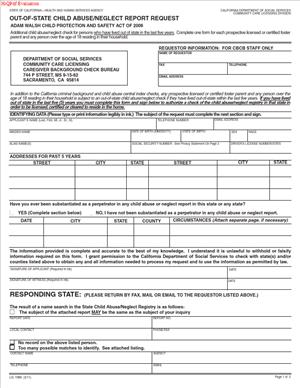
LIC198B – Out-Of-State Child Abuse or Neglect Report Request
Fill out nowJurisdiction: Country: United States | Province or State: California
What is a LIC198B – Out-Of-State Child Abuse/Neglect Report Request?
The LIC198B is a California authorization and request form used to ask another U.S. state to search its child abuse/neglect registry for records related to a specific person. California’s Health and Human Services Agency—through the California Department of Social Services—uses it as part of background screening for people who will have access to, live with, or care for children in licensed or approved settings.
The form does two things:
- Identifies the person who lived outside California and now needs clearance for licensing, employment, or placement.
- Authorizes the out-of-state registry to release any reportable abuse/neglect findings to the California requester for a limited purpose.
This request targets civil or administrative registry data. It is not a criminal history check. Registries record administrative findings (e.g., “founded” or “substantiated”) and operate separately from court or arrest records. A person might have a registry finding with no criminal record, or vice versa, depending on the state’s processes.
Who typically uses the LIC198B?
- Child care center applicants, owners, directors, and administrators.
- Family child care home licensees and adult residents.
- Employees and volunteers in child care or children’s residential programs.
- Foster family agencies, county child welfare departments, and resource family applicants.
- Adult household members in resource family homes.
- Contractors/interns if their duties include child contact and the program requires checks.
Use the form when a subject lived out of state during the program’s look-back period (often five years, sometimes longer for foster/adoptive contexts). Your Licensing Program Analyst (LPA) or approving authority can confirm how far back your program must check.
Typical usage scenarios
- A child care hire who lived in Oregon two years ago.
- A family child care applicant who recently relocated from Nevada.
- A resource family applicant who previously resided in Arizona.
- An adult moving into a licensed child care home after attending college out of state.
The form standardizes the request, the subject’s consent, and the recording of results. It ensures consistent documentation for audits and approvals, supports statutory safety requirements, and helps decision-makers screen for disqualifying histories or issues that require further review.
When Would You Use a LIC198B – Out-Of-State Child Abuse/Neglect Report Request?
Use it whenever an out-of-state residence during a relevant period may affect licensing, employment, or placement decisions. Common triggers:
- Pre-licensing: Before issuing or approving licenses and resource family homes.
- Hiring: During onboarding for roles with child access or supervision.
- Renewals/updates: At relicensing or when adding adults to a licensed/approved household.
- Household changes: When an adult moves into a child care or resource family home.
- Expansion/transfers: When facilities expand or staff transfer and out-of-state residence surfaces.
Settings where requests are common:
- Child care centers and family child care homes.
- Children’s residential programs.
- Foster family agencies, county child welfare departments, and resource family approvals.
- Adoption-related approvals and specialized child-serving programs.
Look-back and repeats:
- Many programs require five years; some require longer for foster/adoptive approvals.
- Submit new requests if undisclosed residences or aliases emerge, or if a role resumes after a break and current results are required.
- Repeat checks at renewal or when adult residents change.
Key clarifications
- Residence vs. travel: Short trips usually do not require a check. Dorms, leased housing, or extended stays typically count as residence.
- Multiple states: File one request per state per subject for each state of residence in the look-back period.
- Multi-person households: Each adult with an out-of-state residence history may require a separate request.
Timing:
- Start early to avoid delays. Response times vary widely.
- Build time for notarization, mailing, fees, and follow-ups to prevent last-minute issues.
Legal Characteristics of the LIC198B – Out-Of-State Child Abuse/Neglect Report Request
The LIC198B is an authorization tool. By signing, the subject consents to disclose confidential registry information to a designated California requester for licensing, employment, or placement decisions. Without a valid consent, many states cannot release records.
Core attributes
- Official authorization: Most states require the subject’s signature before disclosure.
- Regulated use: California programs use registry checks to protect children and meet legal screening requirements.
- Program conditions: Refusal to sign or cooperate can lead to denial or removal from roles requiring clearance.
State-by-state differences
- Notarization: Some states require it. Absence of a proper notarized signature can stall processing.
- Extra materials: A copy of government ID, a state-specific form, or a fee may be required; follow payment and submission rules exactly.
- Authorized recipients: Some states send results only to a government office or specified unit; follow the state’s routing rules.
- Validity windows: Some states consider signatures “stale” after a set time; you may need a new signature if a request ages out.
Confidentiality and use
- Treat results as confidential. Store them in restricted background files with limited access.
- Use results only for authorized decisions. Do not share beyond approved staff.
- For digital storage, ensure encryption, access controls, and compliant retention.
Impact of results
- Substantiated/founded findings often trigger further review and may require supporting documents.
- A “no record” response does not replace other required checks (criminal, in-state, etc.).
- Errors—wrong identity info, unsigned forms, bad routing—cause delays; consistent data reduces mismatches.
How to Fill Out a LIC198B – Out-Of-State Child Abuse/Neglect Report Request
1) Confirm the requesting agency.
- Identify who is legally requesting results (facility, agency, county, central licensing unit).
- Use the exact facility or applicant name on licensing records, plus facility/case number if available.
- Provide a monitored contact person with direct phone and secure email/fax.
- If results must go to a government office first, follow that instruction precisely.
2) Identify the subject.
- Enter full legal name (first, middle, last, suffix). Avoid nicknames.
- List all prior names and aliases (maiden, married, hyphenated, legal changes).
- Include date of birth; add place of birth if requested.
- Provide the last four digits of SSN or full SSN only if requested.
- Add driver’s license/state ID if required.
3) List out-of-state residences.
- Specify each state and the period of residence (month/year ranges if exact dates are unknown).
- Provide addresses if requested; use an attachment if needed.
- Count dorms, military housing, or extended temporary housing as residence.
- Ensure the current California address aligns with your application or facility records.
4) State the reason for the request.
- Indicate use: licensing, employment, residence clearance, or foster/adoptive approval.
- Note the program type (e.g., child care center, family child care, foster care, adoption).
- Identify the subject’s role (applicant, employee, volunteer, adult resident).
- Keep wording concise and consistent across documents.
5) Check each state’s extra requirements.
- Verify if notarization is needed; schedule a wet-ink signing with a notary if so.
- Confirm ID copy requirements; submit a clear, legible copy (front/back if applicable).
- Complete any state-specific release or cover sheet.
- Include any required fee using accepted payment methods; never send cash.
- Follow submission limits (email, fax, portal, or mailed originals only).
6) Complete consent and confidentiality sections.
- Read the disclosure and ensure the subject understands the limited use.
- Obtain a legible signature and date; notarize where required.
- Provide witness or staff signatures if the form calls for them.
- Use an unambiguous date format to prevent confusion.
7) Fill in return information for the requesting agency.
- Provide a secure return address, fax, or email suitable for confidential results.
- List a direct contact for follow-ups who is trained on confidentiality.
- Include facility/license/case numbers to aid matching and routing.
8) Leave the response section blank.
- That portion is for the responding state only.
- Attach any separate response form only if directed by that state.
9) Attach required documents.
- Include ID copies if required; ensure names match the form.
- Add state-specific forms or cover sheets as instructed, in the required order.
- Include the correct fee and payee, using the permitted method.
- Add a simple cover sheet with subject name, destination state, purpose, and return contact info.
10) Send to the correct office.
- Confirm the current address, fax, email, or portal for registry checks.
- Send one packet per subject per state; do not bundle unless specifically allowed.
- Keep proof of submission (tracking, fax confirmation, email receipt) and log the date sent.
11) Track and document results.
- Use a tracking log (subject, state, date sent, expected window, follow-up, date received).
- Follow up politely if the response window passes.
- Route results promptly to the decision-maker and file them in a confidential background file.
12) If results show a finding.
- Notify your LPA or approving authority and share the response.
- Prepare any requested supporting documents (rehabilitation evidence, legal orders, clarifications).
- Do not allow unsupervised child contact until written clearance or direction is received.
13) Keep records up to date.
- Repeat checks on the schedule your program requires (renewals, new adult residents, returns from breaks in service).
- Run new checks if undisclosed residences or aliases emerge.
- Retain and destroy records according to your program’s retention policy.
Tip: Use clear, consistent entries. If handwriting, print in black ink. If you make an error, start a fresh form rather than correcting on the page.
Legal Terms You Might Encounter
- Requesting agency: The entity seeking results (facility, county, FFA, or state unit).
- Subject of check: The person whose out-of-state registry is being searched.
- Authorization/consent: The subject’s signed permission allowing disclosure for a limited purpose.
- Child abuse/neglect registry: A state database of administrative investigation outcomes.
- Substantiated/founded: A determination that maltreatment occurred under that state’s standards.
- Unsubstantiated/unfounded/inconclusive: No administrative finding that maltreatment occurred.
- Confidentiality/limited use: Results must be used only for authorized decisions and stored securely.
- Notarization: Identity verification by a notary; required by some states before release.
- PII: Personally identifiable information used to match records (name, DOB, SSN, ID numbers).
- Adverse action: A negative decision based in whole or in part on the registry results.
- Record retention: How long your program requires keeping records before secure destruction.
- Administrative finding: A non-criminal outcome recorded by a child welfare agency.
- Sealed/expunged: Records that are closed or removed from general access; disclosure rules vary.
- Identity attestation: Additional identity verification that some states require.
- Match/possible match: A preliminary identity match that may need verification.
FAQs
Do you need a separate LIC198B for each state you lived in?
Yes. Submit one per state and per person. Each state conducts its own search and has unique routing rules.
Do you need to include your full Social Security number?
Only provide what is requested. If the form asks for the last four digits or a full number, follow that instruction precisely.
Do you have to get the form notarized?
Some states require notarization; others do not. Confirm the destination state’s rule in advance.
Do you send the LIC198B to your analyst or directly to the other state?
Follow your program’s routing method. Some require sending to the out-of-state registry; others route through a county or state licensing unit.
Do you pay any fees with the form?
Some states charge a fee. Include the exact amount using accepted payment methods and any required cover sheet.
Do you need this check if you only traveled or vacationed out of state?
No. The check is for residence history, not short-term travel.
Do you have to redo the check at renewal or when adding a new adult to the home?
Often yes. Renewals and new adult residents commonly trigger fresh checks.
How long do results usually take?
Timeframes vary. Plan for several weeks and track submissions with follow-ups as needed.
What if you’re unsure whether a time period counts as “residence”?
If the person established housing (dorm, lease, long-term assignment), include it. When unsure, consult your program contact.
Who signs the authorization?
The subject signs. If notarization is required, arrange for in-person or compliant remote notarization per the destination state’s rules.
Can a minor be a subject of this check?
Program rules vary. Many checks focus on adults, but ask your program contact if a minor resident needs any screening.
What if the subject changed their name?
List the current legal name and all prior names used. Provide documentation if requested.
Can you submit the form electronically?
Some states accept email or portals; others require hard-copy originals. Follow the destination state’s instructions.
What if the state has its own registry form?
Complete it and attach it with the LIC198B if required. Some states accept only their own form.
Will the results show criminal convictions?
No. Registry checks report administrative findings, not criminal history. Criminal checks are separate.
What if the subject does not have a government ID?
If the state requires ID, help the subject obtain one or confirm acceptable alternatives before submitting.
Do you have to check U.S. territories or tribal jurisdictions?
Mostly you’ll check U.S. states and D.C. If your program requires other jurisdictions, follow program guidance.
What if the results are sent to the wrong place?
Contact the responding office to request a corrected transmission. You may need to verify the authorized return address.
What if you previously completed a check for the same state?
Unless your program accepts prior results within a defined window, submit a new request for current results.
Can you expedite the process?
Generally no. Minimize delays by submitting a complete, accurate packet the first time.
What if the subject refuses to sign?
Without consent, results are typically unavailable. Refusal may result in denial or disqualification for roles requiring clearance.
Will the subject receive a copy of the results directly?
Results usually go to the requester or licensing unit. If the subject wants a copy, follow your program’s sharing rules.
What if the results appear inaccurate?
Notify your LPA or approving authority. The subject may need to dispute the record with the responding state. Follow program procedures before taking final action.
How long are results valid?
Validity is program-specific. Confirm timelines with your program contact.
What if the fee check is lost or the request is returned?
Resubmit promptly with the corrected fee or documents. Track payment instruments and keep copies.
Are digital signatures accepted?
Only if the destination state accepts them. Many states still require wet-ink signatures.
Does the LIC198B cover multiple roles?
It authorizes a registry search for the stated purpose. If the role changes or your program requires updated documentation, submit a new request.
Checklist: Before, During, and After the LIC198B – Out-Of-State Child Abuse/Neglect Report Request
Before signing
- Gather identity details: full legal name, prior names/aliases, DOB, and consistent contact info.
- Compile residence history: each out-of-state residence with month/year ranges and addresses if known.
- Collect ID and any supporting documents (e.g., name change proof).
- Confirm notarization, state forms, fees, and acceptable payment types.
- Verify routing and return instructions, including authorized recipients.
- Set up a tracking log for submissions and follow-ups.
During signing
- Enter requesting agency info exactly as on licensing records.
- Ensure identity entries and identifiers match across all documents.
- Sign within any validity window; notarize if required.
- Assemble attachments: ID copy, state forms, fee, concise cover sheet.
- Review legibility; use black ink and avoid corrections if handwritten.
After signing
- Submit via the state’s required method (mail, fax, email, portal), one packet per subject per state.
- Log date sent, method, destination, and tracking/confirmation.
- Notify your program contact or LPA if required.
- Store copies in a confidential background file.
- Calendar follow-up based on typical processing times and route results promptly when received.
Common Mistakes to Avoid LIC198B – Out-Of-State Child Abuse/Neglect Report Request
- Omitting prior names: Missing maiden or former names can lead to mismatches or false “no record” results.
- Incorrect return details: Wrong or incomplete return info can delay or misdirect results.
- Ignoring state extras: Missing notarization, state-specific forms, ID copies, or fees leads to rejection.
- Writing in the response area: Leave sections for the responding agency blank.
- Inconsistent dates: Conflicting residence periods trigger extra verification.
- Illegible entries: Hard-to-read forms cause data errors and delays.
- Wrong fee or payee: Verify amounts and payment method before sending.
- Sending to the wrong office: Use the correct registry unit and address.
- Oversharing PII: Provide only the data requested to reduce privacy risk.
- No tracking: Without a log, follow-ups are missed, and timelines slip.
What to Do After Filling Out the Form LIC198B – Out-Of-State Child Abuse/Neglect Report Request
Submit the packet through the destination state’s required channel and keep proof of submission. If you discover an error after sending, prepare a corrected packet and ask the destination office whether to resend immediately or await their instruction.
Maintain a simple tracking system. Record:
- Subject’s name and role (applicant, employee, adult resident).
- Destination state and the exact address/fax/email/portal used.
- Date sent, method, and tracking or confirmation numbers.
- Expected response window, follow-up dates, and the date received.
If the responding state requests more information:
- Respond promptly with exactly what is requested (clearer ID copy, notarized signature, corrected dates).
- Update your tracking log with the supplemental submission and new timelines.
- Store all correspondence in the confidential background file.
When results arrive:
- Review immediately and route to the authorized decision-maker or central licensing unit.
- Keep results restricted to authorized personnel. File securely in the background check record.
- Log the date received and summarize the outcome (e.g., “no record” or “record exists—sent for analyst review”). Note any instructions from your LPA.
If results show a finding or need clarification:
- Pause unsupervised child contact for the individual as applicable until you receive written direction.
- Notify your LPA or approving authority and provide the requested documentation.
- Cooperate with any additional review steps or requests for context.
Finalize workflow:
- Mark the out-of-state registry check complete on your internal checklist.
- Schedule rechecks for renewals or when new adult residents join.
- Reconcile your tracking log to ensure every out-of-state residence period has a corresponding submission and result on file.
Disclaimer: This guide is provided for informational purposes only and is not intended as legal advice. You should consult a legal professional.