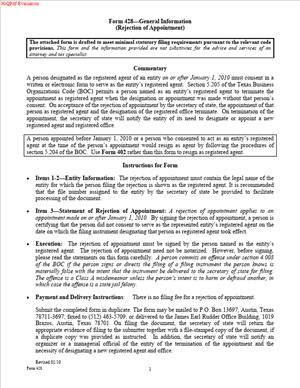
Form 428 – Rejection of Appointment
Fill out nowJurisdiction: Country: United States | Province or State: Texas
What is a Form 428 – Rejection of Appointment?
Form 428 is a Texas Secretary of State filing. You use it to reject being named as a registered agent for a Texas entity. It is the official way to say, “I did not agree to serve.” It removes you from the record as the entity’s registered agent.
A registered agent receives legal papers for a business. This includes lawsuits and government notices. Texas law requires the agent’s consent. Sometimes, a business names someone without consent. Sometimes, the wrong person or company gets listed. Form 428 addresses those situations.
Who uses this form?
Individuals and organizations who were named as a registered agent without consent. That includes office managers, attorneys, firm administrators, commercial registered agent companies, and mail center operators. It also includes anyone whose personal name or business name appears as an agent without approval.
You need this form if your name or company is listed as the registered agent without your consent. You also need it if your address appears as the registered office without your consent, and your name was used as an agent. It protects you from unwanted legal obligations. It also clears the public record.
Typical usage scenarios
You receive a lawsuit addressed to an unknown company at your office. You research the filing and see that you are listed as the registered agent. You never agreed to serve. You file Form 428 to reject the appointment. Another example: A commercial registered agent finds that dozens of entities listed its name without a contract. The company files separate rejections for each entity. Another case: A landlord learns that a tenant used the landlord as the registered agent. The landlord files a rejection to stop future service.
Form 428 is not for resigning from an accepted appointment. If you previously consented or have been serving, rejection is not the right tool. Use the registered agent resignation process instead. Rejection targets appointments made without your consent. It stops liability and removes your name from the record.
When Would You Use a Form 428 – Rejection of Appointment?
You use this form as soon as you discover you were appointed without consent. Common triggers include receiving service of process for a company you do not represent. You may also receive state notices or mail that reference you as the registered agent for a company you do not know. If you search the public record and see your name or company listed as agent, you can file a rejection.
Law firm managers often file this form when a client or third party names the firm as an agent without approval. Solo attorneys may file it if a former client listed them after the engagement ended. Commercial registered agent providers use it when their brand or address appears without a signed engagement. Office building managers and coworking operators use it if a tenant misuses the office address and the manager’s name.
You would also use this form if a filing placed your home address as the registered office and named you personally. This happens with mistaken identity or keyboard errors. It also happens when people copy a contact from a prior filing. If you did not agree to serve, you reject the appointment.
Do not use Form 428 to swap agents or update an address for your own company. The company must file a change of registered agent or office for that. Also, do not use this form to end a role you previously accepted. If you consented, rejection will not cure the record. You must file a resignation instead. That difference matters. Rejection addresses the lack of consent. Resignation ends a role you took on.
Timing also matters. File quickly once you know. Until the record updates, you may still receive legal papers. You want the record to reflect that you are not the agent. Filing gives clear notice and protects you going forward.
Legal Characteristics of the Form 428 – Rejection of Appointment
Form 428 is a statutory filing. It is legally binding because Texas law requires a registered agent’s consent. The Secretary of State relies on this form to correct the public record. When accepted, the filing confirms you did not consent and are not the agent.
Enforceability rests on clear statutory authority. A registered agent must consent. Without consent, the appointment is not valid. Filing a rejection puts the state and the public on notice. After acceptance, you have no duty to receive service as that entity’s agent. Process served on you for that entity should not be effective after the filing’s effectiveness.
The filing protects you from future obligations tied to the agent role. It does not eliminate mail already sent or lawsuits served before its effectiveness. It also does not excuse the entity from maintaining a valid registered agent and office. The entity must appoint a new agent. If it fails to do so, alternative service rules may apply. That is the entity’s risk, not yours.
The form must be signed by the person or organization named as the agent. Signature authority matters. If the agent is an organization, an authorized officer or manager must sign. If the agent is an individual, that person signs. Accuracy is important. The entity name and file number must match the public record. The record is updated based on the details you provide.
The filing becomes effective as specified on the form. If you do not set a delayed date, it takes effect on filing. Some filers choose a delayed date to manage the transition. Most rejection filings need immediate effectiveness. Keep your choice simple and practical.
You should keep proof of filing. A file-stamped copy is best. It confirms the effective date. You can rely on it if you continue to receive papers in error. It also helps you resolve disputes over service or notice.
If you already accepted the appointment, do not use this form. An accepted appointment requires a resignation filing. Using a rejection when you previously consented will not be effective. It can create confusion. It can also lead to improper service if the public record stays wrong.
How to Fill Out a Form 428 – Rejection of Appointment
Follow these steps in order. Work from the public record to your signature. Keep your entries exact and legible.
Step 1: Confirm that you are the named agent.
- Search the public record for the entity. Confirm that it lists you or your organization as the registered agent. Verify the exact spelling of the entity name. Note the Texas file number. Confirm the registered office address on record. Make sure you are the named agent. If only your address appears, but someone else is the agent, you cannot use this form.
Step 2: Gather key identifiers.
- Write down the entity’s exact legal name as on record. Record the Texas file number. If it is a foreign entity, note its home jurisdiction. Gather the registered office address shown on record. These items ensure the filing attaches to the correct entity.
Step 3: Identify yourself as the rejecting agent.
- If you are an individual, use your legal name as shown on the record. If you are an organization, use your full legal name. Match the name listed as the registered agent. If the record shows a slight variation, include the correct legal name and mention the variation in an attachment if needed. Keep it simple and consistent.
Step 4: Complete the rejection statement.
- State that you reject the appointment as registered agent. Affirm that you did not consent to serve as the registered agent for the named entity. Keep the statement direct and factual. Avoid extra commentary. If the form provides a specific checkbox or line, use that language.
Step 5: Provide the registered office address, if requested.
- Enter the registered office address as it appears on the record. This helps the state match your rejection to the correct filing. If the record lists an old or wrong address, still use the address from the record. The goal is to link your rejection to the listed appointment.
Step 6: Select the effective date.
- You can choose effectiveness on filing. This is the most common choice. If the form permits, you may set a delayed date. Use a delayed date only if you need a brief time to transition. Do not set a date in the past.
Step 7: Sign the form.
- If you are an individual agent, sign your name. Print your name below the signature line. Date the form. If the agent is an organization, an authorized person must sign. Include the signer’s title, such as “Manager,” “Member,” “Officer,” or “Authorized Representative.” By signing, you certify that the facts are true.
Step 8: Provide contact information for filing questions.
- Enter a phone number or email for filing issues. This contact does not become the agent for the entity. It enables the filing office to reach you if needed. It also helps avoid rejection due to minor defects.
Step 9: Prepare any attachment, if allowed and necessary.
- Use an attachment only if the form permits and you need one. For example, you may include a brief statement clarifying a name variation. Keep attachments short and specific. Do not attach a list of multiple entities. File a separate Form 428 for each entity.
Step 10: Pay the state filing fee.
- Include the required filing fee. Use a check, card authorization, or other accepted method. If you want faster processing, request expedited service and pay the additional fee, if available. Ensure the payment matches the name on the form to avoid delays.
Step 11: File the form with the Texas Secretary of State.
- You can file by mail, in person, or electronically, if available. Use a method that gives you proof of submission. Keep copies of everything you send. If you fax or e-file, retain the confirmation.
Step 12: Obtain confirmation and update your records.
- After acceptance, keep the file-stamped copy. Store it with your registered agent records. If you continue to receive service or mail for the entity, reference your filing date. Return items that arrive after your effective date.
Practical drafting tips
- Match names exactly. The entity name must be identical to the public record. Avoid abbreviations not used by the entity on file. Use the full legal name for both you and the entity.
- Be clear and concise. The form does not require reasons beyond a lack of consent. Do not argue or attach correspondence.
- Use one entity per filing. Do not include a schedule of entities. Each rejection applies to one appointment only.
- Keep your claim narrow. Reject only the appointments that name you. Do not attempt to reject on behalf of someone else. Do not reject an appointment you previously accepted.
- Coordinate internally. If you are an organization, confirm that no one consented on your behalf. Centralize filings through your legal or compliance team.
Real-world examples
- You manage a law firm. A startup filed a formation and listed your firm as the registered agent without an engagement. You complete Form 428 using your firm’s name as the rejecting agent. You list the startup’s exact entity name and file number. You check effectiveness upon filing. A partner signs as an authorized officer. You file and keep the stamped copy. You notify the startup that it must appoint a new agent.
- You operate a coworking space. A member listed you personally as the registered agent without consent. You file Form 428 as an individual. You include the coworking address as it appears on record. You sign and file. After acceptance, you return any future service addressed to you for that entity.
- You run a commercial registered agent service. Your brand shows up as an agent for businesses that are not your clients. You file separate rejections for each entity. Your compliance manager signs each form. You request expedited processing. You maintain a log of filings and confirmations.
What happens after filing
- The public record updates to remove your appointment. You are no longer responsible for accepting service for that entity. You may still receive stray mail, but you have no legal duty as an agent. The entity must appoint a new agent and office. If it delays, it risks issues with service and compliance.
Common mistakes to avoid
- Filing a rejection when you previously gave consent. Use a resignation instead. Rejection will not fix an accepted appointment. It may get rejected or cause confusion.
- Using the wrong entity name or file number. This can misdirect your filing. Always verify on the public record first.
- Attempting to reject for multiple entities in one filing. Texas requires one filing per entity.
- Omitting the signature capacity when the agent is an organization. The Secretary of State needs a human signer with authority.
Final checks before submission
- Confirm the entity name and file number.
- Confirm that you, and not someone else, are the named agent.
- Confirm your signature and title, if applicable.
- Confirm your effective date choice.
- Confirm payment is included and correct.
By following these steps, you complete Form 428 correctly. You remove yourself from an unwanted registered agent appointment. You protect your organization and keep the public record accurate.
Legal Terms You Might Encounter
- Registered agent. This is the person or business authorized to receive legal documents for an entity. Form 428 lets you reject that role if you never agreed to serve.
- Service of process. These are official legal papers, like lawsuits or subpoenas. If you are not the agent, you should not receive them for that entity. By filing Form 428, you signal that you are not the point of contact.
- Appointment. This is the act of naming you as an agent in an entity’s filing. The form rejects that appointment, usually because you did not consent.
- Consent or acceptance. Texas requires the agent’s consent to serve. If you did not consent, Form 428 documents your refusal and helps correct the record.
- Entity. This is the company that named you as an agent. It could be a corporation, LLC, partnership, or another recognized business type. You will list the entity’s name on the form.
- Filing number. The Secretary of State assigns each entity a unique file number. You use that number on Form 428 to identify the correct entity you are rejecting.
- Governing person or governing authority. These are the individuals or groups in charge of the entity, like managers, members, or directors. They usually make or approve the agent appointment. Your rejection notifies them to select a different agent.
- Effective date. This is when your rejection takes effect on the public record. It generally occurs when the filing is processed, unless you specify a permissible delayed date.
- Execution. This is the signing of the form. You sign the form to certify that you did not consent to the appointment and that you reject it.
- Delivery instructions. This refers to where the state returns evidence of filing. On the form, you can set a mailing or email preference for your confirmation.
FAQs
Do you need to be the appointed person to file Form 428?
Yes. You should be the individual or organization that the entity named as its registered agent. The form is your way to reject that appointment if you never agreed.
Do you need to give a reason for rejecting the appointment?
No. You do not need to explain why. You only confirm that you did not consent and that you reject the appointment.
Do you need the entity’s file number to reject the appointment?
Yes. You should include the entity’s exact legal name and file number. This ensures the state applies your rejection to the right entity. If you lack the file number, gather it before filing to avoid misidentification.
Do you need to notify the entity directly after you file?
It is a best practice to notify the entity. Send notice to its last known address or its governing person. This speeds up the entity’s replacement of the agent and reduces the risk of misdirected legal papers.
Do you need to notarize your signature?
No. The form does not require notarization. You must sign the form and provide contact information for confirmation.
What if you already accepted the appointment earlier?
If you already consented and served as an agent, Form 428 is not the right form. You usually submit a resignation of a registered agent to step down. A rejection is used when you were never accepted in the first place.
Can you reject appointments for multiple entities on one form?
No. File a separate Form 428 for each entity that incorrectly named you. Use the correct name and file number for each filing.
What happens if the entity has no agent after your rejection?
The entity must appoint a new agent to stay in good standing. Until that happens, it may face delays in receiving legal papers. Your rejection helps the record reflect that you are not responsible for the service.
How long does processing take?
Processing times vary. Standard processing usually occurs within a reasonable period after the form is received. If you have pressing deadlines, submit promptly and retain proof of delivery.
Can you withdraw your rejection after filing?
If you filed in error, contact the entity and submit a corrective filing as soon as possible. You may need to accept an appointment through a new consent if you intend to serve. Keep written records of any corrections.
What address appears on the public record after your rejection?
Your address should not be listed as the agent address for that entity once the rejection takes effect. The entity must appoint a new agent and address to appear on the record.
Checklist: Before, During, and After the Form 428 – Rejection of Appointment
Before signing
- Confirm identity. Verify you are the person or organization named as the agent.
- Gather entity information. Get the exact legal name and file number.
- Confirm lack of consent. Check your records to ensure you never agreed to serve.
- Identify appointment date. If you know when the entity named you, note it.
- Decide on the delivery method. Choose how you want to receive filing confirmation.
- Confirm your contact details. Ensure your mailing and email details are current.
- Prepare a cover instruction. If mailing, include clear contact and return instructions.
- Calendar follow-up. Plan to verify the filing status after submission.
During signing
- Verify the entity name. Match spelling, punctuation, and suffix.
- Verify the file number. Confirm the exact number to avoid misfiling.
- Check the agent name. Ensure your legal name or legal business name is correct.
- Confirm the rejection statement. Ensure the form clearly states you did not consent and reject the appointment.
- Sign the form. Use a legible signature by the authorized person for the agent.
- Date the form. Add the correct signing date.
- Include delivery instructions. Provide your preferred email or mailing address for confirmation.
- Review for completeness. Confirm every required field is filled.
- Make copies. Keep a signed copy for your records before filing.
After signing
- File the form with the state. Submit by your chosen method and retain proof.
- Monitor for confirmation. Watch for acknowledgment of filing.
- Notify the entity. Send notice to the governing persons that you rejected the appointment.
- Update internal records. Record the filing date and any confirmation number.
- Track the service of process mail. If you still receive papers for that entity, return them and direct the sender to the entity.
- Confirm the public record. After processing, check that you are no longer listed as an agent.
- Archive documents. Store the signed form, proof of submission, and confirmation with your compliance records.
- Calendar a status check. Recheck the state record if confirmation is delayed.
Common Mistakes to Avoid
Using the wrong entity file number.
- Consequence: Your rejection may attach to the wrong entity or be rejected. Don’t guess. Confirm the number before filing.
Failing to sign with the correct capacity.
- Consequence: The state may reject the filing. If the agent is an organization, an authorized individual must sign for it.
Waiting too long to file.
- Consequence: You may continue to receive legal papers meant for the entity. File as soon as you learn of the appointment.
Assuming one filing covers multiple entities.
- Consequence: Other entities may still show you as an agent. File a separate form for each entity that names you.
Not notifying the entity.
- Consequence: The entity may not replace you promptly. Send direct notice to speed up correction and reduce misdirected mail.
What to Do After Filling Out the Form
- File the form promptly. Choose a submission method that provides proof of delivery. Keep a copy of everything you send.
- Monitor your confirmation. Watch for the acknowledgment. If you do not see confirmation within a reasonable period, follow up. Keep emails and letters showing the date and method of filing.
- Notify the entity. Send a short notice that you rejected the appointment and that it must name a new agent. Include the filing date and, if available, the confirmation details. Keep proof of your notice.
- Handle any misdirected legal papers. If you still receive papers for the entity, return them to the sender and note that you are not the agent. Direct the sender to the entity’s principal office or governing person if known.
- Verify the public record. After processing, confirm that your name and address no longer appear as the agent for that entity. If you still appear, contact the appropriate office and provide your filing proof.
- Coordinate internal records. Update your compliance logs. Note the filing date, effective date, and any reference numbers. Store the executed form and confirmation with your corporate records.
- If you filed in error, act quickly. Notify the entity and submit a corrective filing. If you intend to serve, coordinate a proper acceptance of the appointment. Keep a paper trail of all corrections.
- Plan prevention. If you are an organization, clarify internal rules for accepting agent appointments. Require written consent before anyone agrees to serve. This reduces future misappointments.
- Evaluate mail handling. If you operate at an address that attracts misdirected process, tighten intake procedures. Train staff to identify service of process and route it correctly. Document returns of misdirected mail.
- Follow up if no replacement occurs. If the entity fails to appoint a new agent, note the risk of continued misdirected papers. Keep your rejection proof handy. You do not serve as an agent once the rejection is effective, but documentation helps resolve disputes.
- Maintain consistent contact details. If your mailing or email address changes, update your files. This ensures you can receive any follow-up correspondence tied to your filing.
- Set a reminder to recheck. Revisit the public record after a short interval. Confirm that the entity has appointed a new agent. This helps close the loop and prevents recurring issues.
Disclaimer: This guide is provided for informational purposes only and is not intended as legal advice. You should consult a legal professional.