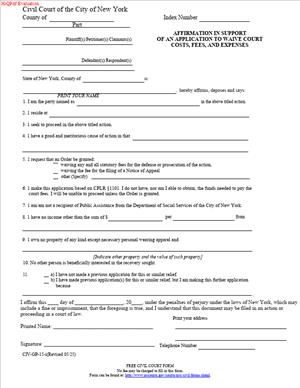
CIV-GP-15 – Affirmation in Support of an Application to Waive Court Costs, Fees, and Expenses
Fill out nowJurisdiction: Country: United States | Province or State: New York
What is a CIV-GP-15 – Affirmation in Support of an Application to Waive Court Costs, Fees, and Expenses?
CIV-GP-15 is a sworn statement you file with the Civil Court of the City of New York. You use it to ask the court to waive court costs, fees, and certain expenses. You are telling the court you cannot afford them. You also explain your income, expenses, and assets. The court uses this to decide your request.
This form supports an application often called a “poor person” or “fee waiver” application. It does not grant the waiver by itself. A judge reviews your affirmation and attachments. The judge then decides whether to waive some or all costs. If the judge grants relief, the court issues an order. That order instructs the clerk and officers on what fees to waive.
Who typically uses this form?
Self-represented litigants use it often. So do attorneys on behalf of clients with limited means. Tenants, consumers, workers, veterans, and seniors use it. Small business owners with low cash flow use it too. Anyone facing court costs they cannot pay should consider it.
Why would you need this form?
Court fees can be a real barrier. You may need to file a case, answer one, or bring a motion. You may need to demand a jury. You may need a transcript, a subpoena, or Marshal service. Each step often carries a fee. If you cannot pay, your case can stall. CIV-GP-15 helps you ask the court to remove that barrier.
Typical usage scenarios
You are sued on a consumer debt and need to file an Answer. You cannot afford the filing fee. You file CIV-GP-15 with your Answer. You are a tenant appealing a judgment and need a transcript to perfect the appeal. You cannot pay for it. You file CIV-GP-15 seeking transcript relief. You need Marshal service to enforce an order. You cannot pay the service fee. You file CIV-GP-15 to seek a waiver. You want a jury but cannot afford the demand fee. You file CIV-GP-15 with your request.
This form belongs to the Civil Court of the City of New York. The court uses it in civil matters under its jurisdiction. That includes many consumer, property damage, contract, and some housing-related matters. The court will review your finances and the case needs. It may grant full or partial relief. The order, if granted, applies to the case identified on your form.
When Would You Use a CIV-GP-15 – Affirmation in Support of an Application to Waive Court Costs, Fees, and Expenses?
You use CIV-GP-15 any time court fees stand in your way. You might be trying to start a case, but you cannot afford the index fee. You might be trying to file a motion, but you cannot pay the motion fee. You might be seeking a jury, but the demand fee is out of reach. You might need a transcript for a motion or appeal, and the cost is too high. You might need service by a Marshal or Sheriff, but cannot afford the service fee. In each of those situations, CIV-GP-15 is the tool to request relief.
Typical users include tenants facing nonpayment or holdover proceedings. You might need to file responsive papers or ask for more time. Consumers who sued on a credit card or medical debt can use it to file an Answer or motion. Workers seeking wages or deposit disputes use it in small civil cases. Small business owners defending a claim may need a jury but cannot pay the fee. People seeking to vacate a default might need an Order to Show Cause. Fees can apply. If you cannot pay the fee, the CIV-GP-15 request is how you ask the judge to waive it.
You also use it mid-case. You may have paid to start the case, but cannot afford the later costs. You might need a trial transcript to support a post-trial motion. You might need to subpoena records to prepare for trial. Witness fees and copy costs can add up. The court can waive many court-controlled costs. It can also order payment of certain expenses from public funds in limited cases. The judge decides based on your income, expenses, and the needs of the case.
You may need it for appeals. If you want to appeal a Civil Court judgment, costs can rise. You may need transcripts, copies, and fees for filings. CIV-GP-15 can support a request to waive those costs at the Civil Court level. The judge can also direct how you access records without cost. If your appeal goes higher, you may need additional steps. But the starting point in Civil Court is still CIV-GP-15.
You can also use it when your financial situation changes. You may have started with enough funds. Then you lost a job or had a medical setback. You now need relief for the next steps. You can file CIV-GP-15 at that point. The court reviews current facts. It can grant relief going forward.
Legal Characteristics of the CIV-GP-15 – Affirmation in Support of an Application to Waive Court Costs, Fees, and Expenses
CIV-GP-15 is a sworn statement. It is legally significant. You sign it under penalty of perjury. You attest that your financial facts are true and complete to the best of your knowledge. If you are an attorney, you affirm under the applicable rule for affirmations. If you are self-represented, you usually sign before a notary. The form supports your application. The court relies on it to make findings.
Is it legally binding?
The affirmation itself is not an order. It does not, by itself, waive any fees. But it binds you to the truth of the statements you make. False statements can carry penalties. The legal effect comes when a judge issues an order based on your affirmation. That order is binding on the clerk and court officers. It instructs them to waive fees as described.
What ensures enforceability?
Your oath, the court’s review, and the written order. The court tests your request against the law and court rules. You must provide details on income, assets, and expenses. You must show need. The judge can grant full, partial, or no relief. If granted, the court’s order authorizes the fee waiver. Clerks and Marshals then follow the order.
General legal considerations matter. This relief is discretionary. The judge looks at your whole situation. Income alone does not decide it. The court considers rent, utilities, child care, and other necessary expenses. The court considers dependents and debts. The court also looks at the case’s needs. For example, a transcript may be necessary to seek appellate relief. The court may then grant transcript assistance.
The waiver usually covers court-controlled fees. That includes many filing fees, jury fees, and some service fees. It can include transcript costs if ordered. It does not cover attorney’s fees. It does not cover fines or penalties imposed by law. It does not erase a judgment against you. It does not cover private costs outside court control. The order will state what is covered.
The order applies to the specific case identified. It does not automatically apply to other cases. It can be modified if your finances change. The court can revoke relief if it finds false statements. You must keep the court updated if your finances improve. If your application is denied, you can reapply if circumstances change. You can also pay and proceed if you can manage the fees later.
How to Fill Out a CIV-GP-15 – Affirmation in Support of an Application to Waive Court Costs, Fees, and Expenses
Use this checklist to complete the form thoroughly and correctly.
1) Confirm you are in the right court.
- This form is for the Civil Court of the City of New York.
- Make sure your case is in that court.
- If you are unsure, read your case caption or ask the clerk.
2) Gather documents before you start.
- Pay stubs from the last four to eight weeks, if you have wages.
- Benefit letters for SNAP, SSI, SSDI, public assistance, or veterans’ benefits.
- Your most recent tax return, if filed.
- Bank statements for the last two to three months.
- Proof of rent or mortgage and utilities.
- Proof of child support paid or received.
- Any medical bills or insurance statements showing current obligations.
Having these documents ready makes your application stronger.
3) Complete the case caption.
- At the top, write the full case title as it appears on court papers.
- Include the index or docket number if assigned.
- If you are starting a new case, leave the number blank if none exists.
- Check that the county and courthouse are correct.
4) Identify your role.
- State whether you are the Plaintiff, Defendant, Petitioner, or Respondent.
- If you are an attorney, include your client’s role.
- Include your mailing address, phone, and email.
- Keep contact details current to receive the court’s decision.
5) State what you are asking the court to waive.
- List the specific fees you cannot pay today.
- Examples include filing fees, motion fees, jury demand fees, and service fees.
- If you need a transcript, say so and explain why.
- If you need subpoena-related fees, identify them.
- Be clear and specific. Vague requests are often denied.
6) Explain your case step that requires the fee.
- Give a short reason tied to your litigation step.
- For example: “I need to file an Answer by [date].”
- Or: “I must request a jury within the time limit.”
- Or: “I need a transcript to support an appeal.”
- Show the court the deadline or necessity.
7) Provide your income information.
- State each source of income and the amounts.
- Include wages, self-employment, benefits, pensions, and support.
- If you receive public benefits, list them and amounts.
- If someone helps pay your bills, say who and how much.
- If your spouse or partner contributes to household costs, state it.
- If you have zero income, say how you are meeting basic needs.
8) Provide your household information.
- List the number of people in your household.
- State their relationship to you and their dependence on you.
- List any child support or alimony obligations.
- Household size helps the court assess your expenses.
9) List your monthly necessary expenses.
- Rent or mortgage, utilities, food, transportation, and medical costs.
- Child care, phone, and internet needed for work or school.
- Debt minimums you must pay to avoid default.
- Only list necessary and ongoing expenses.
- Give realistic and accurate numbers.
10) Disclose your assets.
- Cash on hand, bank balances, vehicles, and real property.
- Retirement accounts and life insurance cash value if accessible.
- Tools of trade or other property of value.
- Explain access limits, penalties, or restrictions on funds.
- If an asset is co-owned, note your share.
11) Explain recent changes in your finances.
- Note job loss, reduced hours, illness, or new dependents.
- Provide dates and attach proof if you have it.
- If your expenses increased suddenly, explain why.
12) Add any special circumstances.
- Ongoing medical treatment or disability-related costs.
- Emergency repairs or disaster impacts.
- Risks of eviction or utility shutoff.
- These facts give context to your request.
13) Attach supporting documents.
- Attach copies, not originals, unless the court asks.
- Redact account numbers, leaving last four digits.
- Label attachments clearly (for example, “Exhibit A: Pay Stubs”).
- Refer to exhibits in your affirmation paragraphs.
14) Complete the affirmation or affidavit section.
- If you are an attorney, complete the attorney affirmation section.
- If you are self-represented, sign before a notary if required.
- The form often includes a notary block for non-attorneys.
- Sign and date. Print your name beneath your signature.
- Do not sign earlier than the date of submission. Keep it current.
15) Prepare a proposed order if needed.
- Some parts require a proposed order for the judge to sign.
- Use the standard order form if provided by the court.
- Fill in your name, case caption, and requested relief in plain terms.
- Leave the signature line for the judge.
16) Review for completeness and consistency.
- Check that income and expenses are consistent with attachments.
- Verify math. Ensure totals make sense.
- Make sure your contact info and case number are correct.
- Ensure exhibits are legible and labeled.
17) File your application properly.
- If you are starting a case, file it with your commencement papers.
- If your case is open, file it as a motion or application.
- Ask the clerk about any local steps or parts requirements.
- Keep a file-stamped copy for your records.
18) Serve the application if required.
- Some requests are decided on papers without service.
- Others must be served on the other side.
- If service is required, follow the rules for service method and timing.
- Use proof of service and file it.
19) Track the decision and next steps.
- The court will issue a written order granting or denying relief.
- Read the order closely. It lists which fees are waived.
- If granted, present the order when you take the next step.
- If the clerk has the order on file, they may not need a copy.
- If denied, consider reapplying with more detail, or pay the fee if possible.
20) Use the order as directed.
- If service fees were waived, give the order to the Marshal’s office.
- If the filing fee was waived, the clerk will process without payment.
- If a transcript was authorized, follow the order’s instructions.
- If relief is partial, pay the balance on time.
21) Update the court if your situation changes.
- If your finances improve, and the order requires notice, inform the court.
- If they worsen, you can seek additional relief.
- Keep the court informed to avoid problems.
Practical tips that make a difference
Be specific about which fees block you are using today. Judges respond to concrete asks.
- Do not inflate expenses. Keep them realistic and necessary.
- If you receive public benefits, include current award notices.
- If you have zero income, explain how you are meeting daily needs.
- If you are seeking a transcript, explain why it is necessary now.
- If you are requesting jury fee relief, confirm your demand deadline.
Common pitfalls to avoid
- Missing attachments that prove income or benefits.
- Leaving out assets, even small bank balances.
- Asking for a blanket waiver without listing particular fees.
- Using vague statements like “I cannot pay” without details.
- Forgetting to sign before a notary if you are not an attorney.
What the order may cover
- Filing fees to start or continue your case.
- Motion or order to show cause fees.
- Jury demand fees in Civil Court.
- Service fees for Marshals or Sheriff, if the order specifies.
- Transcript costs if the court finds them necessary.
- Copy fees for court records in some cases.
What the order will not cover
- Attorney’s fees.
- Fines, sanctions, or penalties.
- Opposing party’s costs or fees unless the court orders otherwise.
- Private investigator or private process server costs, unless specified.
How the court evaluates your request
- Your income compared to necessary living expenses.
- The size and needs of your household.
- Your assets and access to funds.
- The importance of the requested step to your case.
- The credibility and completeness of your paperwork.
Final reminder
Be truthful, specific, and organized. Use CIV-GP-15 to explain your situation clearly. Attach proof. Ask for the exact relief you need. This approach helps the court grant the right relief at the right time.
Legal Terms You Might Encounter
Affirmation: This is your sworn statement. You confirm that everything in the form is true. You sign under penalty of perjury. This form uses an affirmation instead of a notarized affidavit. Follow the signature instructions on the form.
Application: This is your request to the court. Here, you ask the court to waive costs, fees, and expenses. Your affirmation supports that request.
Waiver: A waiver means the court excuses payment of certain court costs. It does not decide your case. It only covers fees the court specifies in its order.
Court Costs, Fees, and Expenses: These are charges for using the court. Examples include filing fees, motion fees, and copies. The waiver can cover some or all of these. The court order will say which items are covered.
Poor Person Relief: This is another way to describe a waiver of court fees due to financial hardship. Your affirmation aims to show you qualify based on income, assets, and expenses. The court uses your facts to make a decision.
Household Income: This includes money received by you and, in many cases, others who live with you and share expenses. Report wages, benefits, support, and any other recurring money. The court uses this to judge financial need.
Assets: Assets are things you own that have value. List bank balances, cars, real estate, and cash. The court looks at assets when weighing your ability to pay fees.
Necessary Expenses: These are basic living costs you must pay. List rent, food, utilities, medical costs, and child care. The court compares your expenses to your income to assess hardship.
Docket or Index Number: his is your case number. If you already have one, include it. If you do not have one yet, say so and follow the court’s filing steps.
Order: An order is the judge’s written decision. The order will grant, deny, or partially grant your waiver request. Read it carefully and follow every instruction.
Service: Service means giving the required papers to the other side. In some cases, a judge may require service of your application or the order. Follow any service instructions the court gives you.
Proof of Public Benefits: These are letters or notices that show you receive benefits. Examples include SNAP or disability benefits letters. Attach copies if the form asks for them to support your request.
Partial Waiver: A partial waiver covers some, not all, fees. The court may waive the filing fee but not other costs. Read the order to see the scope.
Clerk: The clerk receives your papers and helps with the filing steps. The clerk cannot give legal advice. They can explain filing procedures and where to submit the form.
FAQs
Do you qualify if you receive public benefits?
You likely do. Courts often treat current benefits as evidence of need. Attach current proof of those benefits. Include any award letters or recent notices. Still complete all income and expense sections.
Do you need to pay the filing fee first and get reimbursed?
No. A waiver, if granted, excuses payment. You usually do not pay first. If you already paid a fee, fee refunds are uncommon. Ask the clerk how your case will proceed if payment has been made.
Do you need a notary for this form?
This form is an affirmation. You sign it under penalty of perjury. Follow the signature instructions on the form. Do not notarize unless the form says you must.
Do you need to attach tax returns or pay stubs?
Attach what the form asks for. If you have recent pay stubs, include them. If you file taxes, a recent return can help. If you receive benefits, include proof. More documentation can speed review.
How long does the court take to decide?
Timelines vary. Many courts decide within days to a few weeks. Ask the clerk for typical timing. If you have a deadline, note it in your papers. You can also ask the clerk about urgent processing.
What fees are covered if the waiver is granted?
That depends on the order. It may cover the filing fee and some court costs. It may not cover service fees or transcripts. Read the order to see the list. Ask the clerk about any unclear items.
Do you need to reapply for each new case?
Yes. Each case is different. File a new affirmation with each new case. Update your information every time. The court decides based on current facts.
What if your income changes after you file?
Update the court if your finances change in a meaningful way. File an amended affirmation if asked. If your waiver was granted and your income increases, follow the order’s instructions. Do not ignore changes that affect eligibility.
Can you appeal if the court denies your application?
You can ask the clerk about next steps. You may submit more information or correct errors. You can also reapply if your situation changes. If you must pay fees by a deadline, do not miss it while you decide.
Do you need to serve the other side with your application?
Follow any court instruction about service. Some judges require it; some do not. If you must serve, use the approved method and keep proof. Ask the clerk how to show proof of service.
Does a fee waiver affect your case outcome?
No. It only affects fees. It does not help or hurt your claims or defenses. The judge reviews your financial need, not your legal position.
Can you get a partial waiver or a payment plan?
Yes. The court can grant a partial waiver. In some cases, the court may allow installment payments. Read your order carefully. Follow any payment schedule exactly.
Checklist: Before, During, and After the CIV-GP-15 – Affirmation in Support of an Application to Waive Court Costs, Fees, and Expenses
Before signing: Gather information and documents
- Your full legal name, mailing address, phone, and email.
- Case caption and docket or index number, if issued.
- Names of all parties.
- A short note on what the case is about.
- Proof of income: recent pay stubs, benefit letters, or award notices.
- Most recent tax return, if filed.
- Bank balances from checking and savings accounts.
- Proof of recurring expenses: rent, utilities, child care, insurance, transportation.
- Out-of-pocket medical or disability-related costs.
- List of assets: car, real estate, cash, and other valuables.
- Household size and ages of dependents.
- Any court deadlines that make your request time-sensitive.
- A pen with dark ink for signing, or a way to sign electronically if allowed.
- A calendar to track filing and decision dates.
During signing: Review sections for accuracy
- Caption and case number: confirm spelling and numbers match your case.
- Personal information: check address, phone, and email for accuracy.
- Income: include all sources, even small or irregular amounts.
- Public benefits: list all programs and attach current proof.
- Assets: disclose bank balances, vehicles, and any property interests.
- Expenses: list monthly amounts and be realistic and consistent.
- Totals: confirm your math for income and expenses.
- Explanations: add a brief note for unusual items or fluctuations.
- Signature block: follow the form’s signature instructions exactly.
- Date and location: add both if the form provides those fields.
- Attachments: label them and reference them in the form where noted.
- Perjury warning: pause and recheck. Ensure everything is true and complete.
After signing: File, notify, and store
- Make at least two copies of the signed form and attachments.
- File the original with the clerk in the correct office.
- Ask the clerk how you will receive the decision.
- If the court requires service, serve the other side as instructed.
- Keep a file with stamped copies and proof of service, if any.
- Calendar follow-up dates and any deadlines in order.
- If the court grants a partial waiver, note what is still due.
- If you paid any fees after filing, ask the clerk how to proceed.
- If denied, ask how to correct issues or reapply.
- Store your file in a safe place and back it up digitally if possible.
Common Mistakes to Avoid
Leaving blanks or vague answers
- Don’t leave sections empty. Write “none” or “$0” when appropriate. Incomplete forms cause delay or denial.
Hiding small income or assets
- Don’t omit gig income, cash jobs, or small balances. The court can compare records. Omission can harm your credibility.
Forgetting attachments
- Don’t forget proof of benefits, pay stubs, or key bills. Missing documents slow decisions or lead to denial.
Using rough guesses without context
- Don’t rely on estimates with no explanation. If amounts vary, give an average and explain. Inconsistencies raise concerns.
Missing the signature requirements
- Don’t sign in the wrong place or miss the date. Follow the form’s signature instruction. Errors can void the application.
Ignoring a partial waiver order
- Don’t assume all costs are covered. Read the order line by line. Missing required payments can stall your case.
What to Do After Filling Out the Form
File the form promptly
- Submit the signed form and attachments to the clerk. Use the correct location for your case. Ask for a stamped copy for your records.
Track the decision
- Ask how and when you will be notified. Some decisions arrive by mail or at the next appearance. Note the expected timeline on your calendar.
Respond to any court request
- If the court asks for more information, act fast. Provide the requested documents or clarification. Keep copies of everything you submit.
Follow any service steps
- If the judge requires service, follow the directions. Serve the application or order on the other side. File proof of service if required.
Read the order carefully
- If granted, see which fees are waived and for how long. Note any limits, such as transcript fees or service costs. Confirm what you still must pay.
Handle partial waivers or conditions
- If the order is partial, pay any balance by the stated deadline. If installments are allowed, follow the schedule exactly. Keep receipts.
If denied, choose a path
- You can correct errors and reapply with more details. You can pay the fee by the deadline to keep your case moving. You can ask the clerk about other available options.
Update the court if things change
- If your income or expenses change, notify the court. Ask if you should file an amended affirmation. Keep your information current.
Keep proof and stay organized
- Maintain a clean file with the application, order, and receipts. Store digital copies. Bring this file to every court date.
Plan your next filings
- If the waiver is granted, proceed with your case filings. Use the order to cover the specified fees. Present the order when the clerk asks for payment.
Avoid assumptions about refunds
- Courts rarely refund fees already paid. If you paid before approval, ask the clerk what applies. Do not assume repayment unless you see it in writing.
Know when to reapply
- For new cases, file a new application. For major financial changes, consider an update. Always supply current facts.
If you discover an error
- Fix it quickly. Prepare a corrected affirmation with a short explanation. File it and, if needed, serve it as the court instructs.
If deadlines approach
- Tell the clerk about any urgent deadlines tied to your case. Ask if the court can review your request sooner. File on time and keep proof of filing.
Document communication
- Write down any instructions you receive from the clerk. Note dates, names, and what was said. This helps prevent missed steps.
Disclaimer: This guide is provided for informational purposes only and is not intended as legal advice. You should consult a legal professional.