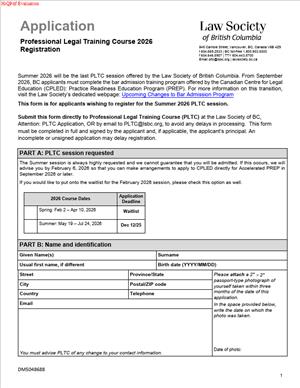
DM5048688 – Application for Professional Legal Training Course Registration 2026
Fill out nowJurisdiction: Canada | British Columbia
What is a DM5048688 – Application for Professional Legal Training Course Registration 2026?
The DM5048688 is the official application to register for the Professional Legal Training Course for the 2026 calendar year. The course is a mandatory component of the bar admission process in British Columbia. It teaches core practice skills, procedures, and professional responsibilities. The application links you, your articling plan, and your training timeline to a specific PLTC intake. It collects your personal information, education history, eligibility status, and your choice of session. It also sets your commitments to course policies, assessments, and conduct standards.
You use this form if you plan to practice law in British Columbia and need to complete PLTC. Most applicants are articled students about to start, already started, or finishing articles. Some applicants come through the national certification process for internationally trained candidates. Others transfer from another Canadian jurisdiction and must meet local training requirements. In every case, this form secures your seat in a 2026 session and connects your training to your bar call plan.
You need this form because PLTC has limited seats and fixed schedules. The regulator requires advance registration, fees, and accurate disclosures. Your employer may also rely on your registration date to plan your file load, client work, and supervision. Without a confirmed seat, your call date could slip. The form also anchors your record for assessments, accommodations, and exam logistics. It helps the regulator manage attendance, invigilation, and results for your cohort.
Typical usage scenarios
You receive your articles, then register for the next available PLTC session that fits your start date. Or you secure a conditional offer of articles and lock in a spring session to finish before your articling peak. If you are an internationally trained candidate with a certificate of qualification, you register after you obtain student status with the regulator. If you transfer from another province and need the local practice course, you use this application to enroll. If you failed a previous assessment and must re-attend part of the course, the form captures your re-registration and any remedial plan. If you deferred a seat for health or compassionate reasons, this form confirms your new 2026 intake.
The form is also practical. It aligns your personal details with your formal training name. It captures any past names to avoid transcript mismatches. It confirms your contact details for course notices and exam alerts. It identifies your principal, firm, or placement, so the regulator can verify your student status. It records your acceptance of course rules, attendance requirements, and deadlines. It authorizes the handling of your information for program delivery and assessment.
When Would You Use a DM5048688 – Application for Professional Legal Training Course Registration 2026?
You use this application once you are eligible to join the bar admission program and you are ready to select a 2026 PLTC session. Many applicants complete it soon after they sign articles. Others register when they receive final law school results and know their start window. Some candidates choose a later session to match trial rotations or firm needs. In each case, you complete the form as soon as you can. Seats fill, and session changes are not guaranteed.
You would also use this application if you need to change your earlier registration to a 2026 intake. For example, you deferred from a 2025 session because of illness. You update your details and select a 2026 start. Or your principal moved firms and asked you to adjust your course dates. You submit a new application to secure a session that aligns with the new plan. If you have not yet become a registered student, you still complete the form and submit your supporting documents promptly. The regulator can hold your seat only once your eligibility is confirmed.
Typical users include law school graduates who have a conferred degree. Many apply during their final term, knowing the graduation date. Internationally educated candidates apply after they receive their qualifying certificate. Transfer applicants who need the local course also use this form. If your employer sponsors multiple students, the firm may coordinate dates and payment, but you complete the declarations. If you are repeating the course or a specific assessment, you register and identify your prior session, results, and any conditions.
You also use this form when you require accommodations. You identify the need and submit supporting documentation within the timelines shown on the form. You do not need to disclose diagnoses in detail. You provide the documentation the course requires to arrange fair testing conditions. The same process applies for religious observances that conflict with scheduled assessments. You use the application to flag the conflict and request an adjustment.
You should submit as early as possible. Plan backward from your expected call date. If you need PLTC before you appear in court on student matters, choose an early session. If your articles start in late spring, a summer session may be better. If you are in a smaller community, consider travel time and housing. If a virtual option is offered, check the technology requirements before you commit.
Legal Characteristics of the DM5048688 – Application for Professional Legal Training Course Registration 2026
This application is a formal instrument within the bar admission program. It becomes legally significant when you sign the declarations and submit the fee. You attest that the information you provide is true and complete. You agree to follow course rules, assessment protocols, and academic integrity standards. You acknowledge the consequences of dishonesty, misconduct, or breach of exam security. These undertakings create enforceable obligations within the regulator’s authority.
The form is not a contract for employment or a guarantee of call. It is a registration request for a specific training program. Acceptance depends on your eligibility, seat availability, and compliance with deadlines. The regulator may refuse or cancel registration if you do not meet the criteria. The regulator may also withdraw you for non-payment, non-attendance, or misconduct. You are responsible for understanding the refund terms, deferral rules, and re-attendance conditions set out in the form.
Enforceability flows from the regulator’s statutory mandate to admit and train future lawyers. When you sign, you consent to the use of your personal information to administer the course and assessments. You consent to communication with your principal or employer about attendance or results where needed. You agree that exam materials and course content are confidential and protected. You agree to sit assessments under supervised conditions and to comply with identification checks. You accept that breaches may result in failure, suspension, or referral to a conduct process.
General legal considerations arise in three areas. First, accuracy. False or incomplete information can harm your admission prospects. If anything changes after you apply, you must update the regulator promptly. This includes criminal charges, academic discipline, or material employment issues. Second, accessibility. You have the right to reasonable accommodations. You must give enough notice and the required documentation. Late requests may limit options. Third, privacy. The regulator collects only what it needs for training and assessment. It retains records under its retention policies. You can request access to your own record. You should use professional judgment about including only relevant details in free-text fields.
The payment section is also important. When you authorize payment, you accept the associated fee schedule and timelines. If a third party pays, you remain responsible for any unpaid balance. If you withdraw after a deadline, you may forfeit part or all of the fee. If the regulator cancels a session, you may receive a transfer or a refund under the stated terms. Read those terms before you sign. Keep a copy of your application and receipt.
How to Fill Out a DM5048688 – Application for Professional Legal Training Course Registration 2026
Follow these steps to complete the form accurately and on time. Gather your documents first, then work through the form in order. Use your legal name as it appears on your government ID and your degree documents. Type clearly if the form is fillable. If you must print, write in block letters.
1) Identify the parties
- Applicant details: Enter your full legal name. Include all given names and your surname. Provide any former names you have used in academic or legal contexts. Add your date of birth, preferred name (if different), and current mailing address. Provide a reliable email and mobile number you check daily. This is how you will receive course notices and exam updates.
- Regulator: The form will declare the legal regulator as the receiving authority. You do not need to fill this field. Ensure you send the form to the listed address or portal.
- Employer/principal: Provide your articling principal’s full name, firm or organization, address, and contact details. Include your articling start date and expected end date. If you have not started, indicate the planned start and state “conditional on student status,” if applicable. If you are not articling, indicate your pathway (for example, transfer candidate) and the relevant details.
- Third-party payer: If a firm will pay your fees, supply the billing contact and any purchase order number the firm requires. Confirm whether the firm pays now or upon invoice. Make sure the correspondence email is correct.
2) Confirm eligibility
- Education: List your law degree, institution, and conferral date. If your degree is pending, state the expected date. Attach an official transcript or a registrar’s letter confirming completion if the form allows. If you are internationally trained, provide your certificate of qualification details. Include your file number if one is assigned.
- Student status: Indicate whether you have already been approved as a student in the bar admission program. If approval is pending, note the submission date of your student application. Your PLTC seat remains conditional until your status is confirmed. Update the regulator if your status changes.
- Good character disclosures: Answer all conduct questions truthfully. Disclose any charges, convictions, academic discipline, or professional investigations. Provide brief, factual descriptions. Attach supporting documents as required. If an incident is pending, say so. Do not omit resolved matters that the question covers.
3) Choose your session
- Session selection: Select your preferred 2026 intake by start date and location or delivery format, as offered. Check your articling calendar and major commitments. Plan for full-time attendance. The course is intensive and has mandatory components. You should not schedule vacations or heavy trial work during the course.
- Alternate choices: Provide at least one alternate session. If your first choice is full, you may be placed in your second choice. Indicate whether you consent to placement in any session if both choices are full. If you cannot relocate, note your constraints.
- Waitlist consent: If applicable, check the box to join a waitlist. Understand that waitlist movement can be short notice. Keep your availability flexible near session start dates.
4) Request accommodations (if needed)
- Type of accommodation: Identify the functional need, such as extra time, a quiet room, assistive technology, ergonomic furniture, or scheduling adjustments for religious observance. Keep the description focused on what you need to perform at your best.
- Documentation: Attach supporting documentation from a qualified professional, dated and specific to your needs. Ensure it addresses the requested accommodations in a testing or learning context. Follow the timelines on the form. Late submissions may delay confirmation.
- Confidentiality: Your request will be handled confidentially. Only staff who need to know will see it. If you need to update the request later, do so in writing with updated support.
5) Provide identification and name evidence
- ID: Provide a legible copy of government-issued photo ID. Ensure your name and birthdate are clear and match your application.
- Name changes: If your current legal name differs from your degree documents, attach name change proof. Acceptable proof includes a legal change of name certificate or marriage certificate. Be consistent across documents to avoid delays.
6) Add prior PLTC or assessment history (if any)
- Previous attendance: State the session, location, and outcome if you attended before. If you are re-attending under direction, attach the letter setting out conditions. Identify which assessments you need to complete.
- Deferrals: If you deferred a previous seat, state the session and reason. Attach any approval correspondence.
7) Review conduct and confidentiality undertakings
- Academic integrity: Read the clause about exam rules, materials security, and misconduct consequences. You agree not to share questions or content. You agree to follow invigilator directions and to present identification as required.
- Attendance: Confirm you understand the attendance standard. Note any mandatory sessions that cannot be missed. If illness or emergency occurs, you will notify the program promptly and provide documentation.
- Technology: If the course uses online platforms or e-exams, confirm you will meet the technical requirements. You are responsible for a stable connection, compatible hardware, and secure test conditions.
8) Consent to communications and privacy
- Collection and use: Read the privacy statement. You consent to the collection and use of your information to run the course, schedule assessments, and report results. You also consent to limited disclosure to your principal or employer for attendance and results when necessary.
- Records: Acknowledge that your records will be retained under the regulator’s policies. You may request access to your own record. Provide contact preferences for routine notices.
9) Payment authorization
- Fees: Confirm the registration fee and any additional charges listed on the form. Check whether taxes apply. Note the refund and deferral rules. They often change close to session start dates.
- Method: Select the payment method. Options may include credit card, electronic transfer, or firm cheque. Provide billing details that match the payer’s records. If a firm pays, ensure the firm contact is ready to authorize payment on submission. Incomplete payment delays your seat.
- Receipts: Request a receipt in your name and, if needed, in the firm’s name. Keep a copy for your records and for tuition or professional expense tracking.
10) Attach required documents
- Checklist: Use the form’s checklist to ensure completeness. Typical items include ID, degree proof or qualification certificate, transcript or registrar letter, articling agreement or principal confirmation, accommodations documentation (if any), and any conduct-related documents.
- File naming: If you submit online, use clear file names with your last name and document type. Combine multi-page documents into single PDFs where possible. Make sure scans are legible and complete.
11) Sign and date
- Signature: Read the declaration carefully. Sign and date where indicated. If the form permits digital signatures, use the provided method. Your signature confirms you understand your obligations and that your information is true.
- Principal confirmation: Some forms require your principal to sign or provide a separate confirmation. Coordinate early. Do not wait until the deadline to chase signatures.
- Third-party authorization: If someone else may inquire on your behalf, complete the authorization. Specify the scope and duration of consent.
12) Submit and confirm
- Submission: Send the application through the required channel. If by portal, upload each document to the correct field. If by email or mail, use the address listed on the form and track delivery.
- Confirmation: Watch for an acknowledgment. If you do not receive confirmation within the timeframe stated on the form, follow up. Keep all emails and receipts. Add course dates and deadlines to your calendar immediately.
13) After you apply
- Seat assignment: You will receive a seat confirmation with session dates, location or platform details, and pre-course requirements. Read all instructions. Note any preparatory materials or orientation sessions.
- Changes: If your circumstances change, notify the program in writing. This includes employment changes, contact details, or eligibility updates. If you need to defer, use the deferral process on the form. Do not assume automatic approval.
- Preparation: Arrange time off with your employer for the full duration. Secure housing or travel if needed. Test your technology early if any portion is online. Plan study time for assessments.
Common pitfalls are avoidable with care. Do not submit before you verify name consistency across ID and education documents. Do not omit former names that appear on transcripts. Do not assume your firm has paid the fee; confirm payment status. Do not leave accommodation requests to the last minute. Do not overlook the requirement to disclose pending matters. If you discover an error after submission, email a corrected page with a brief cover note. Keep all communications professional and factual.
If you are unsure about eligibility timing, plan conservatively. Choose a session that gives you buffer time for delays in transcripts, status approvals, or personal matters. If your employer prefers a specific session for training cycles, align early. If you are a transfer candidate, confirm whether you must attend the entire course or only specific modules. The form’s notes will guide you.
In summary, treat the DM5048688 as both a registration and a set of commitments. Provide accurate information, choose your session wisely, and meet every deadline. Keep copies of everything you submit. Communicate early if anything changes. You will protect your seat, keep your call on track, and reduce stress during a demanding stage of your career.
Legal Terms You Might Encounter
- Bold, clear terms can remove guesswork as you complete DM5048688 – Application for Professional Legal Training Course Registration 2026. Here are the ones you are most likely to see and how they affect your form.
- Attestation means you confirm the truth of what you have written. When you sign the DM5048688 form, you attest that your statements are accurate and complete. If something is uncertain, add a short explanation rather than guess.
- Good character refers to your honesty, integrity, and reliability. If the form asks about conduct, discipline, or past charges, answer fully. If you disclose something, give context and attach documents. The form uses these answers to assess your suitability for the course environment.
- Fitness to practise relates to your ability to meet professional standards. If the form asks about health or capacity, it is focused on safe and competent participation. If accommodations can address any limits, say so and attach a request. You do not need to share private details beyond what is necessary.
- Statutory declaration is a formal statement of facts you swear or affirm as true. If the form includes a declaration or asks for one, you may need a witness such as a commissioner. Do not sign a declaration until you are with the witness, and follow the form’s signing instructions.
- Consent to disclose allows the course provider to contact third parties to verify your information. On DM5048688, this can cover your education, enrolment status, or prior training. If you do not grant consent, your registration may be delayed while staff seek proof from you directly.
- Accommodation means adjustments that help you participate fully in the course. The form may ask if you need accommodations and what you need. Provide only practical details (for example, extra time or a specific tool) and attach supporting documentation if requested.
- Deferral is a request to move your seat to a later session. On this form, you may be able to indicate a deferral preference or learn how to request one later. Be aware that deferrals are not guaranteed and can be time-limited.
- Withdrawal means you are leaving the course or giving up your seat. If you withdraw after submitting DM5048688, the timing can affect any refund or seat availability. Follow the withdrawal steps exactly and keep proof of the date.
- Waitlist is a queue for full sessions. DM5048688 may allow you to rank preferred sessions and accept a waitlist spot. If a seat opens, you must confirm quickly. Keep your contact details current to avoid missing an offer.
- Supporting documentation includes the records you attach to prove statements in your form. Typical examples are name-change certificates, transcripts, enrolment letters, and identification. Label each file clearly and refer to the attachment in your answer so staff can match it easily.
FAQs
Do you need to have an articling position before applying?
You can often apply before your placement starts, but you should disclose your status honestly. If you have secured a placement, provide the details, including supervisor contact information and expected start and end dates. If you are still seeking a placement, say so. The course provider uses this information to coordinate timing and eligibility. If your status changes after submission, update your form details right away.
Do you choose your course session on the form?
Yes. The form typically asks you to select preferred session dates. Choose carefully, because changes later may be limited by space. If you have a hard deadline due to your placement, pick dates that align with that plan. If your first choice is full, the form may place you on a waitlist and confirm your next choice.
Do you need a criminal record check or to disclose past issues?
If the form asks about conduct or records, answer every question. Some applications do not need a separate check, but rely on your attestation and disclosures. If a check is required, the form will tell you how and when to provide it. If you have a past issue, disclose it, explain what happened, and attach related documents. Omissions cause delays and can affect your eligibility.
Do you qualify for accommodations, and how do you request them?
If you need accommodations, you can indicate this on the form and attach supporting materials if asked. Keep the request practical and narrow to what you need to participate. If you are not sure which option fits, state the challenge you face and propose a solution that has worked for you. The provider may follow up for more details. Request early to allow time for arrangements.
Do you need to pay when you submit, and what if payment fails?
Most applications require payment on submission to hold your seat. If the form offers multiple payment methods, follow the specific instructions for the one you choose. If payment fails or you pay the wrong amount, your registration may be incomplete and you risk losing your seat. Watch for a confirmation receipt. If you do not see one, contact the office listed on the form and confirm your status.
Do you want to defer or switch sessions after submitting?
Session changes depend on availability and timing. If you need a change, send a written request as soon as possible with your preferred new dates. If a deferral policy applies, follow those steps. Keep in mind that changing sessions can affect course sequencing and any required placement timeline. Wait for written confirmation before you make travel or work changes.
Do you need to update your name or contact details after submission?
Yes. Update your legal name, preferred name, address, phone, or email as soon as they change. Use the same identifier you used on the form (such as the application number) when you request an update. If your name changes, attach proof, such as a marriage certificate or legal change document. Accurate contact details prevent missed notices and avoid a lost seat.
Do you get a refund if you withdraw?
Refunds, if any, depend on timing. Many providers use cut-off dates and may retain an administrative portion. If you withdraw after materials are issued or after the start date, refunds may be reduced or unavailable. Submit your withdrawal in writing and keep a copy. If you believe you have special circumstances, explain them and include proof.
Checklist: Before, During, and After the DM5048688 – Application for Professional Legal Training Course Registration 2026
Before you sign
- Confirm your eligibility. Check that you meet education and enrolment requirements for the 2026 intake.
- Gather identification. Have government-issued ID that matches the legal name you will use on the form.
- Collect education documents. Have transcripts or confirmation of degree, if requested.
- Prepare placement details. Gather your supervisor’s name, contact, and placement dates if secured.
- Secure your student or membership number. Use the same unique number you have used with the regulator or provider, if applicable.
- Prepare disclosure materials. Draft brief explanations for any conduct or fitness disclosures and collect supporting documents.
- Draft an accommodation request. Write a short, practical description of what you need and why, with documentation if asked.
- Confirm session preferences. Pick primary and backup dates that align with your placement and personal schedule.
- Confirm payment method and amount. Have funds ready and verify any taxes or additional charges listed on the form.
- Line up a commissioner or witness if needed. If the form includes a statutory declaration, arrange a signing appointment.
- Create a digital folder. Save scans of all documents and rename files with your full name and document type.
During signing and completion
- Verify your legal name. Match it to your ID and your previous records with the provider.
- Check preferred name usage. If you list a preferred name, ensure it appears only where allowed.
- Confirm birthdate and identifiers. Double-check numbers, including your application number and any membership number.
- Review contact details. Use an email and phone you monitor. Spelling errors cause missed notices.
- Verify placement information. Confirm employer name, supervisor, address, and dates. If unknown, write “to be confirmed” and explain.
- Select sessions carefully. Rank choices in order. Accept waitlist placement only if you can act on short notice.
- Answer character and fitness questions fully. If “yes,” include a short explanation and label attachments clearly.
- Complete consent sections. Authorize verification so processing is not delayed.
- Confirm accommodation request. List what you need in precise, practical terms.
- Review privacy and data-use statements. Make sure you understand how your information will be used.
- Attach documents. Cross-check each required attachment against the form’s checklist.
- Sign and date. Use the correct signature type and date format. If witnessing is required, sign in front of the witness.
After signing
- Submit the form as instructed. Use the specified portal, email, or mail method shown on the form.
- Pay the fee. Confirm your payment went through and save the receipt with your application number.
- Save a full copy. Keep a complete PDF of your submission, including attachments and proof of delivery.
- Watch for confirmation. Look for a seat confirmation or waitlist notice. Check spam folders.
- Add session dates to your calendar. Block travel and study time. Share dates with your supervisor.
- Order or download materials when invited. Confirm you can access required platforms, logins, or software.
- Arrange accommodations. Respond to any follow-up on your request and confirm details in writing.
- Plan logistics. Book travel and housing if needed. Check daily start times and location details once available.
- Notify your employer or supervisor. Share your session dates and any time away from the office.
- Update changes promptly. If your contact info, placement, or name changes, notify the provider in writing and keep proof.
Common Mistakes to Avoid DM5048688 – Application for Professional Legal Training Course Registration 2026
- Don’t forget to match your legal name across all documents. A mismatch between your ID, transcripts, and the form can trigger a hold. The result is a processing delay and possible loss of your seat if a deadline passes.
- Don’t skip explanations for “yes” answers. If you indicate a conduct or fitness issue but provide no context, staff must follow up. That slows processing and may require extra documentation at short notice.
- Don’t choose session dates you cannot attend. Picking dates that conflict with your placement or personal obligations often leads to a deferral request. Seats are limited, so you may face a waitlist or additional administrative steps.
- Don’t omit required attachments. Missing proof of degree, identification, or name change documents causes your application to be incomplete. Incomplete files often fall behind complete ones in sequencing.
- Don’t sign a statutory declaration without a proper witness. If witnessing is required and you sign alone, you must redo the declaration. That can push you past a deadline and affect your registration.
What to Do After Filling Out the Form DM5048688 – Application for Professional Legal Training Course Registration 2026
- Submit the form using the method specified on the document. If the instructions direct you to an online portal, upload all files in the requested format and naming convention. If email is permitted, include your application number in the subject line and attach a single, clearly labeled PDF package. For mail or courier, use the address on the form and track delivery.
- Pay the required fee at the same time you submit. If the form allows more than one payment method, pick one and follow those steps exactly. Save proof of payment with your application number. If the payment fails or you pay the wrong amount, correct it immediately and confirm your status.
- Watch for a confirmation notice. You should receive either a seat confirmation for a specific session or a waitlist notification. If you do not receive anything within the timeline stated on the form, follow up and include your application number, full name, and date of submission.
- Prepare for the course. When you receive seat confirmation, review pre-course requirements. This can include reading lists, orientation, or technology checks. Confirm you can access any online platforms. Update your calendar with all session dates, exams, and deadlines.
- Coordinate with your employer or supervisor. Share your confirmed session dates and any time away from the office. If your placement requires coverage during your course, arrange it early. Provide your supervisor with contact details for course-related notices if needed.
- Confirm accommodations. If you requested accommodations, look for a written confirmation of the plan. If the provider needs more information, respond promptly. Do a quick test run of any approved tools or settings before your first day.
- Arrange travel and housing. If your session is in person and not near you, book transportation and lodging early. Plan to arrive with time to settle. Confirm the venue location, start times, and check-in procedures as soon as they become available.
- Keep your records organized. Save the full application, confirmation, payment receipt, and any email approvals. Keep these in a secure folder, both digital and printed if possible. You may need them later for licensing steps.
- Handle changes right away. If your contact details, legal name, or placement dates change, send a written update and any required proof. If you need to switch sessions or defer, follow the process in the form or confirmation email. Wait for written approval before changing travel or work plans.
- Know how to withdraw, if needed. If you must withdraw, check the timing rules and any refund policy on your confirmation. Submit your withdrawal in writing. Ask for written acknowledgment and keep a copy for your records.
- Plan for next steps after the course. Keep your completion letter, transcript, or certificate once issued. Store it with your original DM5048688 submission and approvals. You may need these documents for future licensing or employment steps.
Disclaimer: This guide is provided for informational purposes only and is not intended as legal advice. You should consult a legal professional.