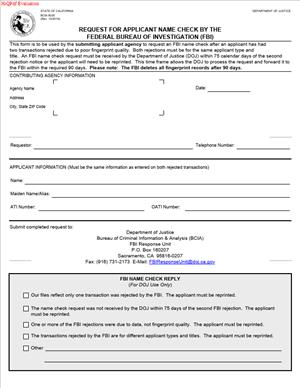
BCIA-8020 – Request For Applicant Name Check by the Federal Bureau of Investigation (FBI)
Fill out nowJurisdiction: Country: United States | Province or State: California
What is a BCIA-8020 – Request For Applicant Name Check by the Federal Bureau of Investigation (FBI)?
This form asks the FBI to run a name-based criminal history search. It is a California Department of Justice general form. It supports authorized background checks for licensing or employment. It is used only when fingerprint-based checks cannot be completed.
You will not use this form for casual screening. It exists for narrow cases. The agency, not you, usually submits it. You supply your personal details and any needed signatures. The agency certifies legal authority to receive the results.
Name-based checks are an exception. Fingerprints are the norm. Name checks help when fingerprints are not available or not usable. Two failed fingerprint attempts is the common trigger. A documented permanent condition can also qualify. That includes missing fingers or severely worn ridges.
Who typically uses this form?
Authorized applicant agencies. Examples include state licensing boards, school districts, and healthcare employers. City and county departments also use it. Some private employers use it if state law authorizes access. Volunteer programs sometimes qualify when law requires FBI results.
Why would you need this form?
You need it when your fingerprints cannot clear FBI processing. That can happen when quality is too low. It also happens when certain medical conditions prevent capture. The name check allows your licensing or hiring process to move forward. It helps agencies meet legal screening requirements.
Typical usage scenarios include licensure or employment where both state and federal checks are required. You completed Live Scan twice and both sets were rejected. Your agency must still obtain an FBI result. The form allows a name search to substitute. Another scenario involves a documented permanent loss of fingers. A technician cannot capture prints. The agency requests the name search with medical support.
This form is not a general record review request. It is not for personal curiosity. It does not replace standard fingerprint submissions when those are possible. It does not grant broad disclosure rights. It delivers a specific response for a specific statutory purpose.
In practice, you complete personal identifier fields. The agency completes authorization fields. The agency attaches proof that fingerprinting failed. Or it attaches documentation of permanent inability to fingerprint. The request then goes to the California Department of Justice. The Department routes the request to the FBI for a name search. Results return to the agency only.
When Would You Use a BCIA-8020 – Request For Applicant Name Check by the Federal Bureau of Investigation (FBI)?
You use this form when fingerprints have failed twice. That means two separate submission rejections. The rejections must be documented. Each rejection must show low ridge detail or poor quality. The agency then qualifies for the name-based alternative.
You also use it when fingerprints are impossible to capture. That must be a permanent physical condition. Examples include amputations, severe scarring, or permanent dermatological conditions. A temporary condition does not qualify. Ink cards or special techniques must be tried first when feasible.
Typical users include licensing analysts and HR coordinators. Public school HR units use it for educators or aides. Healthcare compliance teams use it for nurses and caregivers. Financial regulators use it for applicants in sensitive roles. City hiring teams use it for public safety or trust positions. Nonprofits use it for volunteers when the law requires FBI checks.
Here are practical examples. A teacher applicant tries Live Scan twice. The FBI rejects both sets due to worn ridges. The district HR team prepares the form and attaches both rejection notices. A home care aide applicant has permanent finger loss. The employer obtains documentation and prepares the form. A real estate license applicant had two fingerprint rejections. The licensing board uses the form to obtain a name check. A foster parent candidate has a condition preventing prints. The county agency documents it and submits the name request.
The form also helps when an applicant is abroad, and prints are not feasible. That scenario is rare. Agencies should first attempt ink cards through a consulate or other channels. Name checks are not a shortcut. They are a last resort. Use the form only when fingerprint options are exhausted or impossible.
Legal Characteristics of the BCIA-8020 – Request For Applicant Name Check by the Federal Bureau of Investigation (FBI)
This form is not a contract. It is a formal law enforcement request. It triggers a criminal history search with legal consequences. It sits within state and federal background check rules. The agency’s authorization must be valid. The purpose must match a statute that permits FBI access.
It is legally binding in effect. An authorized official certifies that the agency has the right to request the check. The official certifies that the fingerprint submission failed or is impossible. False statements can lead to penalties. Submitting without proper authority can lead to sanctions. Misuse of results can cause administrative or civil exposure.
Enforceability flows from process controls. The form requires the applicant agency’s unique identifiers. These include an agency code and other routing fields. The Department verifies the authorization before processing. The FBI will not release results to an unauthorized recipient. The agency must retain proof of fingerprint rejections or the inability to print. The Department may audit the documentation.
Privacy safeguards apply. Criminal history is confidential. The agency must restrict use to the stated purpose. Sharing is limited to those with a need to know. Public disclosure is not allowed. The agency must store records securely. The agency must follow record retention and destruction policies.
Applicants retain rights. You can review and challenge your record through established procedures. You can seek correction of inaccurate information. You may request a copy when law or policy allows. You are entitled to notice that a background check will occur. You must receive any required privacy notices.
Equal employment rules still apply. If results affect employment, a fair process is required. You should receive notice of a potential adverse action. You must have an opportunity to explain or dispute accuracy. The agency must follow any applicable stand‑alone authorization rules. The agency must ensure the decision aligns with job‑related criteria.
The form’s narrow scope is important. It does not expand agency authority. It does not waive privacy laws. It does not change eligibility standards. It only substitutes a name‑based query for a fingerprint search when permitted.
How to Fill Out a BCIA-8020 – Request For Applicant Name Check by the Federal Bureau of Investigation (FBI)
Follow these steps to complete the form accurately. The applicant agency leads the process. You, as the applicant, supply personal data and sign if required.
Step 1: Confirm you qualify for a name check.
- Verify two separate fingerprint rejections. Keep both rejection notices.
- Or confirm a permanent inability to fingerprint. Gather documentation.
- Do not proceed if prints are still feasible. Try alternate capture methods first.
Step 2: Gather agency authorization details.
- Locate your agency’s identifying numbers. These include an agency code and a mail code.
- Confirm the statutory authority for the background check. Confirm the purpose category.
- Confirm the billing number if required. Confirm the contact person who will receive results.
Step 3: Gather applicant identifiers.
- Collect full legal name, including middle name.
- List all other names used. Include maiden names and hyphenated names.
- Record date of birth and place of birth. Include the state or country.
- Record sex, height, weight, eye color, and hair color.
- Record race or ethnicity if the form requires it.
- Record Social Security number if the form requests it. If optional, decide whether to include it. It helps match records.
- If known, include any State or FBI identification numbers.
Step 4: Complete the Requesting Agency section.
- Enter the full agency name and mailing address.
- Enter the agency code (ORI or similar). Enter the mail code if assigned.
- Enter the billing code if applicable. Enter the agency case number if used.
- Identify the position or license type. Use the correct purpose wording.
- Cite the statutory authority authorizing FBI results.
- Provide the contact name, phone, and email for status or clarifications.
Step 5: Complete the Applicant Identification section.
- Enter the full legal name exactly as shown on your ID.
- Enter all other names used. Add separate lines if needed.
- Enter date of birth and place of birth.
- Enter physical descriptors exactly as requested.
- Enter Social Security number if provided. Check digits carefully.
- Enter any known identification numbers.
- Review for accuracy and consistency across all fields.
Step 6: Document the basis for the name check.
- Select “Two fingerprint rejections” if applicable.
- Attach copies of both rejection notices. Include dates and tracking numbers.
- Or select “Physically unable to fingerprint.”
- Attach medical documentation or an agency memo describing the permanent condition.
- If partial prints were taken, note which fingers were missing or damaged.
Step 7: Provide required notices to the applicant.
- Give the privacy notice and use limitations to the applicant.
- Inform the applicant of rights to review and challenge records.
- If your policy permits, advise how an applicant can request a copy.
- Keep a record that the notices were provided.
Step 8: Obtain signatures.
- Have the authorized agency official sign and date the certification.
- Include printed name and title. Verify signature authority on file.
- If the form includes an applicant signature block, obtain the signature and date.
- Use blue or black ink if paper is used. Ensure legibility.
Step 9: Review for completeness and consistency.
- Check that the agency codes are correct and current.
- Verify that the purpose matches your statutory authority.
- Confirm that all required attachments are included.
- Check that names and dates match across all sections and attachments.
- Confirm that no fields are left blank without explanation.
Step 10: Submit the form through approved channels.
- Use the standard submission method your agency uses.
- Some agencies submit by mail with attachments. Others use secure channels.
- Do not email criminal justice forms through unsecured systems.
- Retain copies in your case file. Follow your retention schedule.
Step 11: Track and receive results.
- Use any available tracking number for status checks.
- Be prepared to respond to requests for clarification.
- Results will return to the agency, not the applicant.
- Store the results securely. Limit access to need‑to‑know personnel.
Step 12: Act on the results within legal limits.
- If the result is “no record,” continue your process.
- If a record appears, review relevance to the role or license.
- Follow pre‑adverse action procedures if employment is affected.
- Offer the applicant a chance to correct or explain.
- Document your decision and rationale.
Practical tips to avoid delays
- Use consistent names across all documents. Include all known aliases.
- Double‑check date of birth formats. Avoid transposed numbers.
- Include both fingerprint rejection notices when required. Do not include only one.
- Provide detailed documentation for permanent conditions. Vague notes cause delays.
- Use clear, legible printing if completing by hand. Illegible forms are returned.
- Ensure the agency code and mail code match your agency profile.
- Align the stated purpose with your legal authority. Avoid generic labels.
Common errors and how to fix them
- Missing agency codes. Retrieve the correct codes before resubmission.
- No proof of fingerprint rejection. Attach both notices and resubmit.
- Mismatched names across sections. Correct to match the legal name.
- Missing signatures. Have the authorized official sign and date.
- Wrong statutory citation. Verify the correct authority and amend the form.
- Submitting on behalf of an unauthorized unit. Route through the authorized unit.
Special cases
- Out‑of‑state or remote applicants. Attempt ink card submissions first when feasible.
- Partial amputations. Capture any available prints and document missing digits.
- Elderly applicants with ridge loss. Attempt multiple capture methods before name check.
- Volunteers. Verify that your program qualifies for FBI access before using the form.
- Conditional hires. If allowed, proceed with the onboarding steps that do not require clearance yet.
Recordkeeping and privacy
- Keep a copy of the form and all attachments in your file.
- Log who accessed results and when.
- Do not forward results outside your authorized team.
- Follow your destruction schedule when the retention period ends.
- If the applicant requests a copy under your policy, follow your internal process.
Processing expectations
- Name checks can take longer than standard checks.
- Workload and completeness of the submission affect timing.
- Complex name histories may require additional review.
- Plan your hiring or licensing timeline accordingly.
If a name check returns potential matches, you may need more information. The agency may request clarifying identifiers. Examples include past addresses or prior names. The goal is to confirm identity and avoid false matches. Respond promptly to requests to keep the process moving.
If the name check cannot be concluded due to insufficient data, the agency must reassess options. Consider whether improved fingerprint capture is now possible. Consider whether additional documentation can resolve identity issues. Consult your internal policies for next steps.
Final checklist before submission
- Two fingerprint rejection notices, or medical documentation.
- Accurate agency authorization details and codes.
- Complete applicant identifiers and all known aliases.
- Proper signatures and dates.
- Clear statement of purpose and statutory authority.
- Secure submission channel identified.
Use this form only when the criteria are met. Resist the urge to shortcut the fingerprint process. The name check exists to solve specific problems, not to replace the standard method. When used correctly, it helps you meet legal requirements and keep your process on track.
Legal Terms You Might Encounter
- Applicant: You are the applicant. You are the person whose name will be checked against FBI records. The form collects your identifiers so the search can run.
- Applicant Agency: This is the organization asking for your background check. It could be a licensing board, employer, or government office. The agency’s details on the form direct where the results go and why the check is needed.
- Authorized Purpose: This is the legal reason for the record search. It limits how results may be used and shared. Make sure the purpose matches what the agency told you. The wrong purpose can delay or invalidate the request.
- Name-Based Check: This is a search using your name and other identifiers, not fingerprints. It compares your information to existing records. It is faster to complete, but it can find possible matches for similar names.
- Alias/AKA: These are other names you have used. Include legal name changes, nicknames used as legal identities, hyphenations, maiden names, and transliterations. Missing an alias can cause incomplete results or mismatches.
- Criminal History Record Information (CHRI): This is the confidential record of arrests, charges, and outcomes tied to an identity. The FBI name check looks for CHRI linked to your provided identifiers. Access and use are restricted.
- Disposition: This is the outcome of an arrest or charge, such as dismissed, convicted, or not guilty. If a record appears, its disposition shows the result. Dispositions matter to agencies evaluating your eligibility.
- ORI/OCA: ORI is an Originating Agency Identifier. OCA is an agency case or control number. The agency fills these so your request routes correctly. Wrong codes can misdirect results to the wrong office.
- Billing Code/Mail Code: Some agencies use a billing or mail code to pay fees and receive results. Enter these exactly as given by the agency. Errors can cause rejection or unprocessed requests.
- Custodian of Record: This person at the applicant agency oversees record access and security. Their information on the form authorizes the receipt of results. The custodian ensures results remain confidential and are properly used.
FAQs
Do you need fingerprints for this form?
No. This form requests an FBI name-based check. It uses your names and other identifiers. The requesting agency will tell you if a fingerprint check is required instead. Some purposes allow a name check. Others require fingerprints.
Do you need to list all prior names?
Yes. List every legal name you have used. Include hyphenations, maiden names, name changes, and transliterations. If a name was used on government ID or legal records, include it. Missing aliases can cause an incomplete search or mismatched results.
Do you need to include your Social Security Number?
Only if the form or agency requires it. If it is optional, you may leave it blank. Including it can improve match accuracy. If you provide it, make sure the number is correct and legible.
Do you receive the results directly?
Usually, no. Results typically go to the applicant agency named on the form. That agency reviews the results for its authorized purpose. Ask the agency if and how you may receive a copy.
Do you need a notarized signature?
Not typically. You must sign and date the consent and certification sections. Follow the agency’s instructions on how to sign. Some agencies accept electronic signatures. Others require a wet signature.
Do you pay a fee for the name check?
Often, yes. The amount and payment method depend on the agency’s setup. Some agencies bill through a code. Others require you to submit a payment with the form. Confirm the fee and payment instructions before you submit.
How long does the process take?
Processing times vary. Name checks can be faster than fingerprint checks. Timelines depend on volume, accuracy of your identifiers, and agency procedures. Ask the agency for its current turnaround time.
Can you correct the form after submission?
If you spot an error, contact the agency right away. You may need to submit a corrected form or a new request. If results returned with errors, ask about the dispute process and whether a new search is required.
Checklist: Before, During, and After the BCIA-8020 – Request For Applicant Name Check by the Federal Bureau of Investigation (FBI)
Before signing
- Confirm you are using the correct form for a name-based FBI check.
- Get the agency’s exact instructions. Confirm the authorized purpose, required identifiers, and where results go.
- Collect all names you have used. Include spelling variants, accents, hyphenations, and transliterations.
- Verify your current legal name as shown on your government ID.
Gather your identifiers:
- Date of birth and place of birth.
- Sex, race or ethnicity, where requested, height, weight, eye and hair color.
- Driver’s license or ID number and issuing state.
- Social Security Number if required or helpful.
- Contact information: mailing address, phone, and email.
Ask the agency for required codes:
- ORI, OCA, or case number, billing code, and mail code.
- Agency name and Custodian of Record contact if required.
- Confirm fee amount, who pays, and how to pay.
- Check whether electronic submission is allowed or if a paper form is required.
- If handwriting, use black or blue ink and print clearly in block letters.
During signing
- Match your legal name exactly to your ID.
- Enter all aliases/AKAs. Do not abbreviate legal names.
- Use consistent formats for dates and numbers.
- Fill each required field. If a field does not apply, follow the form’s instruction (leave blank or enter “N/A” if allowed).
- Confirm the authorized purpose is accurate and current.
- Enter ORI/OCA and any billing or mail codes exactly as provided by the agency.
- Review your identifiers for accuracy: birth date, driver’s license, SSN (if used), and physical descriptors.
- Sign and date in the correct place. Use your current legal signature.
- If the form requests consent language, read it and sign where required.
- If a preparer helped, include their details only if the form asks.
After signing
- Make a clear copy for your records. Keep the copy secure.
Submit the form using the agency’s method:
- Mail, in-person delivery, or secure electronic transmission.
- Include any required payment or proof of payment.
- If mailing, use a trackable method. Keep the receipt.
- If submitting electronically, confirm you receive a submission confirmation.
- Tell the agency if your contact information changes while the request is pending.
- Note the expected turnaround time on your calendar.
- If results are delayed, follow up with the agency using your submission details.
- When results are available, ask how you may review them if needed.
- Store results and copies securely. Do not share them beyond the authorized purpose.
Common Mistakes to Avoid
- Don’t forget aliases. Missing a former name can cause a false mismatch or an incomplete search. This can result in delays or a repeat submission.
- Don’t mistype your date of birth or government ID numbers. A single digit off can route results to the wrong person. This can trigger a recheck or denial by the agency.
- Don’t use nicknames in place of legal names. Use the exact names from your IDs and legal documents. Nicknames can produce poor matches or an inconclusive search.
- Don’t guess at agency codes. Incorrect ORI, OCA, billing, or mail codes can send results to the wrong office. This wastes time and may require a new request and fee.
- Don’t skip the signature or date. An unsigned or undated form will be rejected. You will need to re-sign and resubmit, extending the processing time.
What to Do After Filling Out the Form
- File the form with the applicant agency’s required method. Include payment if you are responsible for the fee. If the agency pays, verify that the billing or mail code appears and is readable.
- Confirm receipt. If you mailed the form, track delivery. If electronic, save the confirmation. Note any reference or control numbers you receive. Keep them for follow-up.
- Monitor timelines. Ask the agency for an estimated processing time. Plan around that window. If a deadline applies to your license or employment, tell the agency early.
- Respond to requests quickly. If the agency needs more information, reply in writing. Provide corrected identifiers, added aliases, or an updated address as requested. Do not submit multiple forms unless instructed.
- Review outcomes. The agency may share the result or a decision based on it. If you may view the record, confirm the names, dates, and dispositions match your history. If something seems wrong, ask about dispute procedures.
- Request corrections if needed. If the result reflects another person with a similar name, ask for guidance on resolving the mismatch. You may need to provide additional identifiers or submit a new request.
- Update the form if your information changes before processing. Changes to your legal name, address, or contact details should be reported to the agency. Ask whether you need to submit an amended form.
- Retain records securely. Keep copies of the form, proof of submission, and any result notices in a safe place. Limit access to authorized people only. Follow the agency’s retention guidance.
- Plan your next step. If the name check is part of a larger process, complete the remaining steps. That may include submitting other forms, completing training, or providing additional documentation requested by the agency.
- If a new name or alias becomes relevant later, tell the agency. The agency will advise whether a new check is required. Keep your records consistent across all applications.
Disclaimer: This guide is provided for informational purposes only and is not intended as legal advice. You should consult a legal professional.