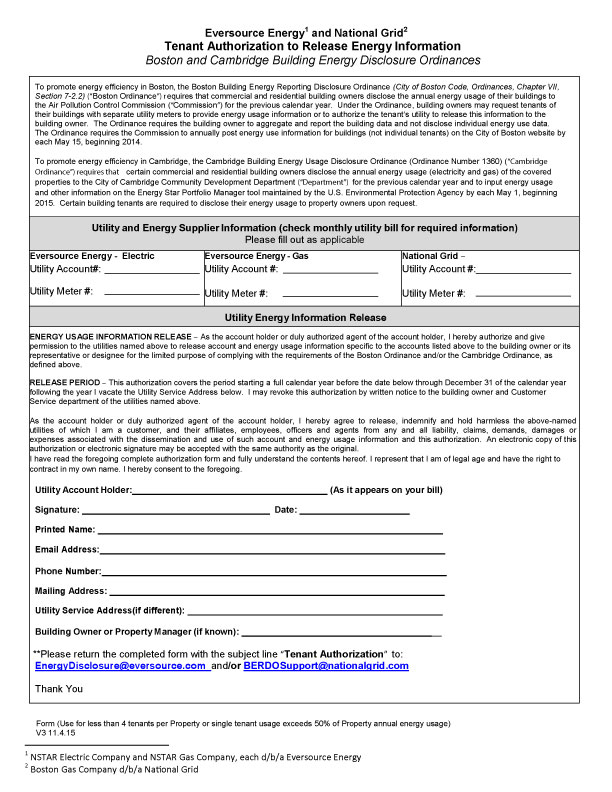
Eversource Energy and National Grid – Tenant Authorization to Release Energy Information
Fill out nowJurisdiction: United States | Massachusetts
What is an Eversource Energy and National Grid – Tenant Authorization to Release Energy Information?
This form is a written consent from a tenant who is the customer of record on a utility account. By signing it, you allow Eversource or National Grid to release your energy use and billing details to a named third party. That third party is usually a building owner, property manager, or a consultant working for them. The release covers defined types of data and a set time period. It does not let anyone change your service, rates, or account settings.
In Massachusetts, utilities protect customer usage data. They will not share account-specific information without permission. This form gives that permission. It tells the utility exactly what to share, with whom, for how long, and for what accounts. It can cover electric service, gas service, or both, depending on who serves your address.
Building owners in Boston and Cambridge often use this form to meet local energy disclosure rules. Those rules require whole-building energy reporting each year. Owners cannot complete accurate reporting if tenants hold their own individual utility accounts. Tenant consent unlocks the data needed to compile a complete building profile.
You would use this form if you are a tenant and your landlord asks for your energy data. You might also use it if you want your own consultant to collect your data from the utility. Owners and managers use it to gather tenant data for compliance, benchmarking, audits, or financing. Energy service providers use it when they need direct data feeds from the utility to support projects.
Typical scenarios include multi-tenant office buildings, retail centers, life science properties, and mixed-use buildings. In these buildings, many suites have separate meters and separate bills. The owner needs all tenant usage to calculate the total building consumption. A tenant in a triple-net lease may sign to support compliance and to track their own efficiency. A new owner may seek releases from current tenants to analyze past use patterns. A tenant may also sign to allow an auditor or engineer to pull interval data to diagnose demand spikes.
The form is narrow in scope. It authorizes data release only. It does not waive privacy rights beyond the stated scope. It does not assign any charges to the owner. It does not change who pays the bill. It is a consent tool to share data for legitimate business and compliance needs.
When Would You Use an Eversource Energy and National Grid – Tenant Authorization to Release Energy Information?
You use this form when you need access to utility data that belongs to a tenant account. If you are a building owner in Boston or Cambridge, you may need it before your annual energy report. Owners must report whole-building usage. If a building has tenant-paid meters, you will not see that usage on any owner bill. You either obtain tenant consent or request aggregated data that meets privacy rules. If aggregation is not available, you need this form from each tenant.
If you are a tenant, you use this form when your landlord requests your consent. Your data helps satisfy local disclosure laws. It also helps your building team spot savings and improve performance. You may also sign if you want to share data with your own advisor. For example, an energy consultant can use your interval data to design load controls. A financing provider may request historical usage to underwrite an efficiency loan. A sustainability team may need it to track targets.
If you are a property manager, you use this form during onboarding. You collect one from each tenant with a separate utility account. You also use it when you change benchmarking vendors. The new vendor will need authorization to retrieve data on your behalf. If your building has only a few tenant meters, the utility may not release aggregated data. Privacy rules often require a minimum number of accounts. In that case, individual tenant releases solve the gap.
If you are a tenant in a short-term lease, you may limit the release to your lease term. If you are a long-term tenant, you may allow ongoing monthly data transfers. If you are leaving a space, you may still authorize release for a past period. Owners often request a lookback period, such as the last 24 months, to support trending.
If you are a condo association or a cooperative, you may use this form to collect usage for common reporting. Each unit holder may have a separate account. Collecting authorizations allows your manager to assemble building totals. If you own a restaurant or lab space, your usage may drive building demand charges. Owners may request your consent to analyze those peaks and pursue shared solutions.
If your space is submetered by the owner, you may not need this form. In that case, the owner already has your usage from their submetering system. But if the utility bills you directly, the owner will not see your data. The authorization closes that gap.
Legal Characteristics of the Eversource Energy and National Grid – Tenant Authorization to Release Energy Information
This authorization is legally binding because it is a written consent by the account holder. Utilities in Massachusetts must protect customer-specific data. They only release it to third parties with documented permission. The form documents your permission clearly and specifically. It identifies the account, the recipient, the data types, and the time period. It includes your signature and the date. These elements create a valid consent and guide what the utility can share.
Enforceability rests on several factors. The signer must be the customer of record or a person with authority to act. For a business account, that may be a manager or officer with proper authority. The form must describe the scope of data, such as usage, demand, or billing amounts. It must name the recipient or agent and provide contact details. It must state a duration or an expiration. Utilities also rely on account numbers, service addresses, and meter identifiers. This information ensures they pull the correct records.
Massachusetts recognizes electronic signatures for most business documents. Utilities may accept electronic signatures if they can verify them. Many accept typed or digital signatures submitted through approved channels. If you sign on paper, make sure the signature is legible and dated. If you sign on behalf of a company, include your title.
The authorization can be ongoing or limited. An ongoing release allows monthly data flows for a set term. A limited release allows only a one-time historical transfer. Most forms permit revocation at any time with written notice to the utility. Revocation stops future transfers. It does not claw back data already released under the prior consent.
The form does not grant control over your account. It does not authorize the recipient to switch suppliers, change rates, or close your account. It also does not authorize the recipient to see your payment methods or bank details unless you opt in. Most owners request usage and demand only. This covers kWh, kW, and therms, and the bill start and end dates. Many also request billed costs to support budgeting and forecasting. You can limit or expand the scope based on need.
Privacy rules may affect how much data the utility will share. If there are very few tenants on a meter group, the utility may require individual releases from each. If there are many tenants, the utility may release aggregated totals without individual names. The signed authorization permits the release of your specific account data to the named party. The utility will still withhold any data not covered by the consent.
For compliance in Boston and Cambridge, owners must compile full building totals. If tenant consents are not obtained, owners may face data gaps. Aggregated releases can help if they meet privacy thresholds. If they do not, the tenant authorization is the cleanest path. Lease clauses may require tenants to cooperate with energy reporting. That lease duty is separate from this utility consent. The form itself remains a voluntary consent under utility privacy rules. You should align your consent with your lease obligations.
Keep records of signed forms. Many owners retain them for several years to cover audit cycles. If you change managers or consultants, get updated forms that name the new agent. Expired forms should be replaced. Revoked forms should be flagged and removed from data feeds.
How to Fill Out an Eversource Energy and National Grid – Tenant Authorization to Release Energy Information
1) Confirm you need the form.
If you are the tenant and you hold the utility account, you are the customer of record. The utility will not release your data without your consent. If the owner already receives aggregated totals that meet privacy rules, your consent may not be needed. Ask the owner which meters they still cannot access. If your account is on that list, proceed.
2) Identify the utility and service type.
Confirm who serves your space for electric and gas. Some buildings have one utility for electricity and another for gas. You may need a separate authorization for each utility. If your building is served only by one utility, note that on the form. If you have both electric and gas, prepare to list each account.
3) Gather your account details.
Pull your latest utility bill. Copy your customer name exactly as it appears. Include suffixes, punctuation, and any middle initials. Record the full service address, including unit or suite. Note the account number and, if listed, the meter number. If you have multiple meters, gather each meter identifier. This ensures the utility can match your request to the right accounts.
4) Identify the recipient and purpose.
Write the legal name of the building owner, or their agent, as the recipient. If a property manager or consultant will receive the data, name that company. Include a contact person, phone, and email. State the purpose in plain terms, such as “energy benchmarking and reporting” or “energy audit and performance tracking.” A clear purpose helps the utility process the request.
5) Select the data types to be released.
Choose the specific data you authorize. Common selections include monthly usage, demand, bill start and end dates, and billed costs. If the owner requests interval data, confirm the meter supports it. If you prefer to limit scope, select usage and demand only. Do not authorize payment information unless there is a clear need.
6) Set the time period.
Decide on a historical lookback and any ongoing access. A typical lookback covers the last 24 months. This provides enough history for benchmarking and trend analysis. For ongoing access, set a reasonable term, such as one to three years. If you prefer a one-time release, check that option and leave ongoing access unchecked.
7) Define delivery method and frequency.
Choose how the utility should deliver the data. Options often include email to the recipient, secure file transfer, or a utility-approved data link. If ongoing access is requested, choose monthly delivery. If the form requests a platform identifier for automated transfer, include it. If you do not use a platform, specify email delivery.
8) Name any authorized agents.
If the owner uses a consultant, list the consultant as an additional authorized party. Include the company name, contact person, and email. This lets the utility send data to both the owner and the agent. If you do not want agents to receive data, name only the owner as the recipient.
9) Review scope and limits.
Confirm that the accounts, data types, and time period are correct. Make sure the form does not authorize rate changes or supplier changes. Ensure that the release is limited to the recipient listed. If the form includes a blanket authorization, edit it to match your intent. If you want the consent to expire on a set date, enter that date.
10) Sign and date.
Sign the form as the customer of record. For a company, sign with your corporate title. Print your name and include your phone and email. Date the signature. If the form includes a certification box, check it. This affirms your authority and consent.
11) Attach supporting documents if needed.
Some utilities may request proof of identity or authority. If your company name recently changed, include a note. If your account number changed due to a move within the building, explain that. Attach a copy of a recent bill to reduce processing issues.
12) Send the form to the utility.
Submit through the utility’s preferred channel. That may be an online portal, email, or mail. If the owner collected the form from you, they might submit it on your behalf. Confirm submission and note the date sent. Keep a copy for your records.
13) Track confirmation and timing.
Utilities need time to verify and process requests. Ask for an expected timeline. If you requested ongoing monthly data, confirm the start date. If your annual reporting deadline is approaching, plan ahead. Submit early to avoid delays.
14) Verify data receipt.
Once processed, confirm that the recipient received the correct files. Check that the accounts and months match the request. If anything is missing, contact the utility with details. Have the account numbers and the submission date ready.
15) Maintain and renew.
Calendar the authorization expiration date. Renew it in advance if ongoing access is needed. If you change tenants, collect new authorizations from new account holders. If you revoke consent, notify the utility and the recipient in writing. Keep records of revocations and replacements.
16) Special cases: multiple meters and shared spaces.
If your space has multiple meters or both electric and gas, list each account. You can submit one form per account if required. For shared spaces billed to several tenants, each tenant may need to sign. If the utility offers an aggregated path, the owner may use that instead. If privacy thresholds block aggregation, individual forms are necessary.
17) Special cases: new ownership or management.
If the building changes ownership, data releases do not always carry over. Update forms to name the new owner and any new agents. If the manager changes, update the recipient details. This avoids delivery to the wrong party.
18) Align with lease terms.
Many leases require tenants to support energy reporting. If your lease has such a clause, match the authorization to that duty. For example, allow the time period and data types needed for compliance. If the lease sets limits, stay within those limits.
19) Keep communications clear.
If you are the owner, explain why you need the data. State the ordinance requirement and how the data will be used. Share how you will protect tenant information. Offer to limit the scope to usage and demand if costs are sensitive. Clear communication speeds consent and builds trust.
20) Avoid common errors.
Do not misspell the customer’s name. Do not omit the account number. Do not leave the time period blank. Do not forget your signature date. Do not request data types you do not need. Clean, complete forms process faster and reduce back-and-forth.
By following these steps, you can complete the authorization correctly the first time. This protects tenant privacy while enabling accurate building reporting. It also supports energy management, audits, and planning. Done right, the process is smooth, predictable, and respectful of everyone’s time.
Legal Terms You Might Encounter
- Authorization means you give the utility permission to share your data. On this form, you allow Eversource Energy or National Grid to release your account’s energy information to the owner or their agent. Your signature activates that permission.
- Customer of record is the person or entity named on the utility account. That is you if the bill comes in your name. Only the customer of record can sign this authorization for that account. If your company holds the account, an authorized officer must sign.
- Account number and service address identify the exact account to release. The form needs the account number and the full service address tied to that account. Both details ensure the utility pulls the right data for the right space.
- Meter and service period define what data gets released. A meter tracks energy used in your space. The service period sets the time range to release, often past 12–36 months, and ongoing. You may list multiple meters or attach an addendum if needed.
- Usage data versus billing data describes two types of information. Usage shows how much energy you used by month. Billing adds costs, charges, and fees. The form may ask if you consent to release usage only or usage plus costs. Choose what you are comfortable sharing, unless building rules require both.
- Aggregated data means the utility combines multiple accounts into one total. This protects privacy while enabling whole-building reporting. If the utility cannot aggregate due to too few accounts, your signed authorization lets them share your individual data with the owner or agent.
- Third-party recipient is the person or firm that receives your data. This is often the building owner, property manager, or a consultant. You list their name, company, and contact details on the form. The utility releases data only to the named recipient.
- Scope and duration set the limits of your consent. The scope covers which accounts, which meters, what data types, and what time frames. The duration sets how long the authorization remains valid. Some forms ask for ongoing releases until revoked. Others set an end date.
- Revocation explains how you can end permission later. You can withdraw your consent at any time. You do that by sending a written notice to the utility and the recipient. Revocation stops future releases. It does not pull back data already shared.
- Attestation confirms you understand and approve the release. When you sign, you attest that the information is correct and that you have the authority to sign. You accept that the utility will rely on your attestation to share data as instructed.
- Privacy notice explains how your data is handled. The form states that the utility will release only what you authorize. It also explains that once shared with the recipient, the utility cannot control further disclosures. You should know how the recipient will use and store your data.
FAQs
Do you need separate authorizations for electric and gas accounts?
Yes. Electric and gas accounts are separate. If you have both services, complete one authorization for each utility. That ensures each utility can release the right data on time.
Do you need to include every meter in your space?
Include every meter that serves your leased space. If you have multiple meters under one account, list them or attach a schedule. If you are unsure, ask your utility or review a recent bill.
Do you have to share costs or only usage?
You can often choose. Usage is usually required for compliance reporting. Some owners request cost data to support benchmarking and budgeting. If the form offers a choice, select what you agree to share.
What if you don’t know your account number?
Look at your latest bill. It shows your account number and service address. If you use online billing, you can find the number in your account profile. If you still cannot find it, call the utility with your service address.
How long does it take to process your authorization?
Processing can take a few business days. It may take longer during compliance season. Submit early to avoid delays. Ask your owner or agent for their internal deadline and work back from that date.
Can you set an end date for your consent?
Yes. Many forms allow an end date. If you do not set one, the authorization may continue until you revoke it. Use an end date if you prefer a defined term.
Can you revoke the authorization later?
Yes. You can revoke at any time. Send a written notice to the utility and to the recipient listed on the form. The utility will stop releasing data going forward.
What if you move out or change the account holder?
Update or revoke your authorization. If a new tenant takes over the account, your authorization no longer applies to their data. Tell the owner and the utility about the change as soon as possible.
What happens if the building has too few tenant accounts for aggregation?
The utility may need individual tenant consent. Your signed authorization allows the utility to share your data even when aggregation thresholds are not met. This supports whole-building reporting.
Do you need to sign if you are a subtenant?
If the utility account is in your name, you must sign. If the prime tenant holds the account, they must sign. If an owner pays for utilities directly, they will handle it. Ask your landlord who holds each account.
Checklist: Before, During, and After the Eversource Energy and National Grid – Tenant Authorization to Release Energy Information
Before signing
- Confirm which ordinance applies to your building.
- Ask your owner or agent which accounts they need.
- Gather each account number and service address.
- List all meters serving your space.
- Pull your latest bill for each account.
- Confirm the requested data: usage only, or usage plus costs.
- Confirm the time range: past data and ongoing releases.
- Get the recipient’s name, company, email, and phone.
- Identify the building name and full property address.
- Check the compliance deadline and internal submission date.
- Confirm if digital signatures are accepted.
- If you have many meters, prepare a meter schedule.
During signing
- Verify your name matches the customer of record.
- Confirm the legal entity name if your company holds the account.
- Enter each account number exactly as shown on the bill.
- Confirm the service address matches the account.
- List all meters and service periods.
- Select the data type you authorize: usage and/or costs.
- Specify the term: one-time release, ongoing, or end date.
- Enter the recipient’s contact information correctly.
- Read the attestation and privacy language.
- Sign and date where required.
- If needed, initial or check boxes that define the scope.
- Attach any addenda or schedules you reference.
After signing
- Send the form as instructed by the owner or utility.
- Keep a copy for your records.
- Confirm receipt with the owner or agent.
- Watch for utility confirmation or follow-up questions.
- Respond quickly if the utility asks for verification.
- Track the compliance deadline until you get confirmation.
- Calendar the authorization end date or annual check-in.
- Update the form if your account details change.
- Revoke or amend if you move or change meters.
- Store the final form and confirmation with your lease records.
Common Mistakes to Avoid
Leaving out a meter that serves your space.
- Consequence: Missing data can block whole-building reporting. Don’t forget to list every meter. Check your bills for sub-meters and shared meters.
Entering the wrong account number or service address.
- Consequence: The utility may release data for the wrong space or reject the form. Verify numbers and addresses against your latest bill.
Selecting the wrong data scope.
- Consequence: The recipient may receive less data than needed or more than you intended. Review the checkbox or wording that defines usage versus costs.
Choosing a duration that ends before reporting closes.
- Consequence: Data may stop flowing during the reporting cycle. If unsure, allow ongoing release through the reporting period.
Missing a required signature or authority.
- Consequence: The utility will not process the request. Ensure the customer of record signs, or an officer with authority, signs for the company.
Sending the form to the wrong recipient.
- Consequence: Delays and repeated requests. Confirm delivery instructions with your owner or agent. Use the correct email or upload portal if required.
What to Do After Filling Out the Form
- Submit the form using the owner’s instructions. Some owners collect forms and submit them in bulk. Others ask you to send the form directly to the utility. Clarify the process before you send.
- Confirm that the utility received and accepted the authorization. Ask for confirmation from the owner or agent within a few business days. If you do not hear back, follow up. Keep the compliance deadline in view.
- Check that the released data matches your scope. If you authorized usage only, verify no cost data was sent. If you approved both, confirm that the months and totals are complete. Report any gaps quickly.
- Coordinate fixes if the utility flags an issue. The utility may need additional details. They may ask you to correct an account number or add meter information. Respond promptly to avoid delays.
- Manage changes to your account. If you add or remove meters, amend the authorization. If your company changes names or merges, update the customer of record and sign again if required.
- Revoke or renew on your terms. If you set an end date, decide whether to renew. If you no longer want ongoing releases, send a written revocation to the utility and the recipient.
- Store your records. Keep a copy of the signed form, any addenda, and confirmations. File them with your lease and energy bills. This helps resolve questions quickly.
- Plan for move-out or space changes. If you move or downsize, alert the owner early. Revoke the old authorization and, if needed, sign a new one for the new space. Avoid gaps that could disrupt reporting.
- Coordinate with subtenants if applicable. If you bill a subtenant for utilities and hold the account, you must sign. Let subtenants know that data will be shared for compliance. Keep your internal records aligned.
- Ask about future automation. Some buildings set up ongoing data feeds for benchmarking. If you expect to stay, consider authorizing ongoing releases. It reduces the need for repeat forms each year.
Disclaimer: This guide is provided for informational purposes only and is not intended as legal advice. You should consult a legal professional.