Notice of Entry of Judgment
Fill out nowJurisdiction: Country: United States | Province or State: North Dakota
What is a Notice of Entry of Judgment?
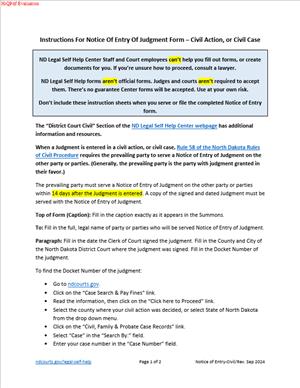
A Notice of Entry of Judgment is a short court document. It tells the other parties that the court has entered a judgment in your case. It identifies the case, states the date the judgment was entered, and attaches a copy of the judgment. You then serve it on all other parties and file it with the court.
In North Dakota civil cases, this notice does important work. It starts with key deadlines. It triggers the time to appeal. It triggers deadlines for post-judgment motions. It fixes a clear point when the judgment becomes final for many purposes. Without the service of this notice, those clocks often do not start.
Who typically uses this form?
The prevailing party usually prepares and serves it. That might be a plaintiff who won a money judgment. It might be a defendant who won dismissal. It might be a spouse who received a divorce decree. Attorneys use this form in almost every civil practice area. Self-represented litigants use it as well.
You may need this form if you won and want the case to move forward. You want clear deadlines for any appeal. You want certainty around post-judgment motions. You want to start the collection steps with a clean record. The notice also protects you from claims that the other side did not know the judgment was entered.
You may also need it if you did not prevail. Either side can serve the notice. If the other party does not serve it, you can. By serving, you start the appeal deadline for yourself. That can be helpful when you plan to appeal. It removes doubt about timing and avoids later disputes.
Typical usage scenarios
A personal injury case after trial. A contract dispute after summary judgment. A quiet title action after findings and conclusions. A divorce judgment and decree. An eviction judgment. A small claims judgment. In each case, the court issues a signed judgment. Your notice informs the other parties that the clerk has entered that judgment on the docket.
Think of the notice as a procedural trigger. It does not change the judgment. It does not add new terms. It simply documents that the judgment entry occurred and when. That date matters for almost every next step.
When Would You Use a Notice of Entry of Judgment?
You use this notice after the court enters the judgment. That is the date the clerk enters the judgment in the court record. Do not send the notice before entry. If you do, you risk confusion and deadline fights. Confirm the entry date in the case docket first.
Here are practical examples. You obtain summary judgment on liability and damages. The judge signs a judgment for $85,000. The clerk enters it on Monday. On Tuesday, you prepare and serve a Notice of Entry of Judgment with the judgment attached. The clock to appeal begins that day.
You defend a case, and the court dismisses it with prejudice. The clerk enters the judgment. The plaintiff did not send a notice. You want certainty. You serve the Notice of Entry of Judgment yourself. Your service starts the appeal period for the plaintiff and for you.
You receive a divorce Judgment and Decree. Property division, spousal support, and custody are resolved. You serve a Notice of Entry of Judgment with the conformed judgment attached. The time to move for a new trial or amend findings begins. The appeal deadline begins as well.
You are a landlord who wins an eviction judgment. You serve the notice right away. The tenant’s appeal time starts. You can then plan the next steps with clear dates.
You are a small business that won a default judgment. You want to collect. You serve the notice to start the time for the debtor to seek relief. You also create a record that you provided actual notice of entry.
Tenants, landlords, consumers, insurers, contractors, and government entities all use this step. It is routine in civil litigation. It is also common after the entry of amended judgments. If the court later issues an amended judgment, you serve a new notice. That new notice starts the clock for an appeal of the amended parts.
Legal Characteristics of the Notice of Entry of Judgment
The Notice of Entry of Judgment is not the judgment itself. It does not grant or deny relief. It is a procedural document with legal effect. Its effect lies in timing. In North Dakota, many deadlines run from service of the notice. The most important thing is the deadline to appeal. In most civil cases, a party must file a notice of appeal within 60 days after service of the notice. Several post-judgment motions also use the service date. For example, a motion for a new trial or to alter or amend may have a 28-day limit from service.
Is it legally binding?
Yes, in the sense that it triggers those deadlines. It is binding when properly served. The enforceability comes from the rules that attach deadlines to the service date. If the service is defective, the deadlines may not start. That is why accurate service and a complete certificate of service matter.
The notice also supports finality. Courts rely on it to resolve disputes about timing. The document provides a simple record of the entry date, service date, and recipients. It reduces motion practice about whether an appeal was timely. It reduces uncertainty for collection. It helps ensure due process because it gives clear notice to all parties.
General legal considerations apply. Serve all parties of record. If a party has an attorney, serve the attorney. Use a permitted method of service. E-service works for lawyers and for unrepresented parties who have opted in. If a party is not on the e-service system, serve by mail or personal service. Keep proof of mailing or delivery. File the notice and your certificate of service with the court.
Use the correct entry date. The entry date is the date the clerk entered the judgment, not the date the judge signed it. Pull the date from the docket if needed. Attach the correct judgment. Use a conformed copy that shows filing or entry information. If the court issues a corrected or amended judgment, use that new document and date.
Understand how the notice intersects with enforcement. You can pursue collection after entry and docketing. The notice is not required to levy or garnish. Still, serving the notice is smart practice. It shows fairness and may head off claims of surprise. It may also start deadlines for certain relief requests from the debtor.
Finally, treat the notice as a clean record. Avoid including sensitive personal data. Redact account numbers and full Social Security numbers if they appear in attachments. Use only the last four digits where required. Protect minors’ information in family cases, as the rules require.
How to Fill Out a Notice of Entry of Judgment
Follow these steps to prepare, serve, and file your Notice of Entry of Judgment in the North Dakota District Court.
1) Confirm that judgment has been entered.
- Check the case docket. Look for the judgment entry. Note the entry date. Do not rely only on the judge’s signature date.
2) Gather the correct judgment document.
- Download a conformed copy from the court record. Ensure it shows the case number and filing mark. If there is an amended judgment, use that version.
3) Set up the caption.
Use the standard district court caption. Include:
- State of North Dakota, District Court.
- The county and judicial district.
- The case title with party names, exactly as on the judgment.
- The case number (for example, 09-2024-CV-01234).
- The judge’s name, if the local format includes it.
4) Title the document.
- Use “Notice of Entry of Judgment.” Do not mix with “Order.” If you also need to notice an order, use a separate “Notice of Entry of Order.”
5) Identify yourself and your role.
- At the top, list your name, address, phone, and email. If you are an attorney, list your State Bar ID and firm. If you self-represent, state “Self-Represented.”
6) Draft the body text.
Keep it simple and exact. Include:
- A statement that judgment has been entered.
- The exact entry date.
- A description of the judgment (for example, “Judgment and Decree,” “Amended Judgment”).
- A note that a copy is attached.
- Example wording:
- “Please take notice that the Judgment and Decree in this matter was entered by the Clerk of Court on March 3, 2025. A true and correct copy of the Judgment and Decree is attached.”
7) Verify the entry date and description again.
- Compare your draft to the docket. Confirm the title of the judgment matches the docket entry. Confirm the date matches exactly.
8) Attach the judgment.
- Attach a complete copy. If exhibits are attached to the judgment, include them unless they are sealed. If parts are sealed, follow the sealing rules. Label the attachment as “Exhibit A.”
9) Prepare the service list.
- List each party or counsel of record with the service method. Use the addresses on file. If a party has counsel, you serve the counsel. If a party is self-represented and not on e-service, plan to serve by mail or personal delivery.
10) Decide on the service method.
- If everyone is registered for e-service, use the court’s e-filing service function. If not, serve by mail or personal service. Certified mail is optional but adds proof. If time is tight, consider hand delivery with a signed receipt.
11) Complete the certificate of service.
Create a separate page titled “Certificate of Service.” State:
- Your name.
- The document served (“Notice of Entry of Judgment” with attached judgment).
- The date of service.
- The method of service for each recipient (e-service, mail, hand delivery).
- The name and address or email of each recipient.
- Your signature and date.
Example wording:
- “I certify that on March 4, 2025, I served the foregoing Notice of Entry of Judgment with attached Judgment and Decree by depositing it in the U.S. Mail, postage paid, addressed to: [Name and address], and by e-service on registered users in this case.”
12) Sign and date the notice and the certificate.
- Use your handwritten signature if filing paper. If filing electronically, use the acceptable electronic signature format. Include the date.
13) File the notice with the court.
- E-file the notice and attachment as a single PDF with the certificate attached. Use the correct filing code for “Notice of Entry of Judgment.” If you file on paper, take two copies to the clerk. Ask the clerk to file-stamp your copy.
14) Serve the notice.
- If you used e-filing with e-service, the service occurs on submission. Save the e-service confirmation. If you serve by mail, mail the notice and attachment the same day you sign the certificate. Keep mailing receipts. If you hand deliver, obtain a signed receipt or prepare an affidavit of personal service.
15) Calendar all deadlines.
- Count the appeal deadline from the service date. Count deadlines for post-judgment motions from the same date. If a deadline falls on a weekend or holiday, move to the next business day. Do not assume extensions apply. Build in a margin for safety.
16) Check for special case types.
- Family cases may have sensitive data. Confirm redactions in the judgment attachment. Protection order matters may involve confidential addresses. Follow any protective orders when serving.
17) Address multiple parties and counsel.
- If there are many parties, make sure each is listed on the certificate. Use separate lines for clarity. Avoid “et al.” in service lists. Name each recipient.
18) Correct any errors promptly.
- If you discover an incorrect date or a missing attachment, file and serve an amended notice. Label it “Amended Notice of Entry of Judgment.” Serve it the same way. The amended notice will control deadlines if the first notice was defective.
19) Keep your records.
- Save the filed notice, the stamped copy, and the certificate of service. Save your mailing receipts and e-service confirmation. You may need them if timing is challenged.
20) Plan enforcement steps.
- After judgment entry, you can move to collect. Consider a transcript of judgment for a lien. Consider discovery in aid of execution. The notice helps set a clean timeline. It also gives the other side fair warning.
Practical tips
- Use the exact case caption as it appears on the judgment. Even small differences can cause confusion.
- Do not rely on the judge’s signature date. Always use the clerk’s entry date.
- When in doubt, over-serve. If party representation is unclear, serve both the party and any known counsel.
- If the court later issues an amended judgment, serve a new notice with that amended judgment. The appeal clock restarts for the amended parts.
Common mistakes to avoid
- Serving before the clerk enters the judgment. This does not start deadlines.
- Failing to attach the judgment. The notice must include the judgment you are noticing.
- Using the wrong case number. Double-check the docket number formatting.
- Leaving someone off the service list. Serve everyone who appeared in the case.
- Vague certificates of service. State the method and list each recipient by name and address or email.
If your judgment includes money amounts, consider interest and costs. Post-judgment interest accrues by rule. You may file a statement of costs if allowed. The notice does not add costs. But it marks a clear date for interest calculations. That can help with settlement or payment plans.
If you self-represent, keep the document plain and clear. The court does not expect complex language. It expects accuracy and proper service. Use short sentences. Stick to facts. Keep copies of everything.
If you are an attorney, align your notice with your appellate strategy. Decide whether to serve immediately or wait briefly. Think about any post-judgment motions. Serving the notice starts those motion deadlines. Coordinate with your client before service if you need time to assess next steps.
In sum, the Notice of Entry of Judgment is simple but important. It is the switch that turns on the deadline machinery. Prepare it carefully. Serve it correctly. File it with proof. Then move forward with confidence in your timeline.
Legal Terms You Might Encounter
- Judgment. This is the court’s final decision on the claims. Your notice tells others that the court entered that decision in the record.
- Notice of Entry of Judgment. This is the form you prepare and serve. It states the entry date and identifies the judgment so deadlines start.
- Clerk of Court. The clerk keeps the official record. Entry occurs when the clerk signs and records the judgment in the docket.
- Case caption. This is the heading that lists the court, parties, and case number. Match your caption exactly to the judgment’s caption.
- Docket or case number. This number tracks your case in the court’s system. Use the exact number shown on the judgment.
- Entry date. This is the date the clerk entered the judgment on the docket. Your notice must show this date, not the signing date.
- Service. This is how you deliver the notice to each party. Acceptable methods follow court rules and any prior service orders.
- Certificate of service. This is your signed statement of how and when you served the notice. File it with the court to prove service.
- Appeal period. This is the time to appeal after entry of judgment. The clock generally starts when proper notice of entry is served.
- Post-judgment motion. This is a request filed after judgment, to amend or for relief. Your notice can trigger deadlines for these motions.
- Partial or final judgment. A partial judgment decides fewer than all claims. A final judgment resolves all claims for all parties.
- Stay of enforcement. This pauses the collection or other enforcement. A stay can arise by rule, order, or posted security, depending on your case.
- Post-judgment interest. This is interest that accrues on a money judgment. The entry date often affects when interest starts to run.
- Electronic filing or service. These are digital methods authorized by the court. Follow local practices if your case allows e-filing or e-service.
FAQs
Do you file the Notice of Entry of Judgment, or does the court?
You prepare and file the notice. You also serve it to all other parties. The clerk enters the judgment, but you give official notice of entry.
Do you attach the judgment to the notice?
Yes, attach a complete copy of the entered judgment. Use the version that shows the file stamp or other entry indicator. This avoids confusion.
Does the appeal clock start when the judge signs the judgment?
No. It generally starts after the entry and proper service of the notice. The entry date is set by the clerk’s docket entry, not the judge’s signature.
Can you email the notice to the other side?
You can only email if the rules or a prior agreement allow it. If not, serve by an accepted method like mail, personal service, or e-service.
What if the other side says they never got the notice?
Your certificate of service is key. If the service was defective, you may need to re-serve. Keep mailing receipts and returned envelopes as proof.
Can you serve the notice yourself if you are a party?
Often, yes. Many courts allow a party to mail the notice. If personal service is required, use someone eligible under the rules to serve.
Do you need separate notices for each party?
You can use one notice, but you must serve each party. Your certificate must list each name, address, method, and date of service.
What if you list the wrong entry date on the notice?
File an amended notice and re-serve it. The corrected notice should clearly show the actual entry date. Update your certificate of service.
Does the notice apply to partial judgments or orders?
Yes, if the court entered a partial judgment. Use a separate notice for each entered judgment. Make the title and description very clear.
How many copies do you need?
Keep one for your records. File one with the court. Serve a copy to each party. Print extras for returned mail or corrections.
Can you combine the notice with a post-judgment motion?
Keep them separate. The notice tells parties about entry. A motion requests relief. File and serve each with proper certificates.
Checklist: Before, During, and After the Notice of Entry of Judgment
Before you sign
- Get a filed copy of the judgment that shows the entry details.
- Confirm the case caption and case number match the judgment.
- Identify the exact entry date from the docket.
- List every party that must receive the notice.
- Verify each party’s current service address or authorized e-service.
- Review any court orders about service methods.
- Decide your service method for each party.
- Check whether any party has counsel who must be served instead.
- Prepare enough copies for filing and service.
- Set calendar reminders for post-judgment deadlines.
- Plan how you will prove service (mail receipt, delivery tracking, or affidavit).
- Confirm any required fees for filing.
- Identify who will sign the certificate of service.
During signing and completion
- Fill the case caption exactly as it appears in the judgment.
- Insert the correct case number with no extra dashes or digits.
- State the exact entry date from the docket.
- Identify the judgment by title and date signed.
- Attach a full copy of the entered judgment.
- Complete the certificate of service fully and clearly.
- List each person served, with complete addresses.
- State the service method and service date for each person.
- Sign and date the notice and the certificate.
- Use your printed name, address, email, and phone in the signature block.
- If using e-filing, follow the system’s naming and format rules.
- Review every line for typos or missing information.
After signing
- File the notice with the clerk.
- File the certificate of service with the notice or immediately after.
- Serve all parties on the same day you file, if possible.
- Track mailings and delivery confirmations.
- Check the docket to confirm that the court recorded your filing.
- Save stamped copies for your records.
- Note the date of service to calculate any deadlines.
- If the mail is returned, re-serve promptly and update the certificate.
- Notify the court if a service address changes, if required.
- Store the notice, judgment, and certificates in your case file.
- Update your calendar with enforcement and appeal timelines.
- Communicate next steps to clients or decision-makers.
Common Mistakes to Avoid
Using the signing date instead of the entry date.
- The entry date starts the deadlines. Using the wrong date can cause disputes. Don’t forget to confirm it on the docket.
Serving the wrong party or address.
- Wrong service can delay deadlines or void notice. Verify current counsel and addresses before mailing or delivery.
Forgetting the certificate of service.
- Without proof of service, the court may not consider notice complete. Your deadlines may not run. File the certificate with specifics.
Not attaching the entered judgment.
- Parties need the full judgment to understand the ruling and deadlines. Missing attachments invite confusion and challenges.
Mismatched caption or case number.
- Clerks may reject filings that do not match the case. Cross-check every line against the judgment before filing.
Illegible or incomplete signatures.
- Unsigned or unreadable forms can be invalid. Print clearly, and sign with your full name and date.
Assuming e-mail counts as service.
- Email works only if allowed. If unsure, use mail or personal service. Confirm any consent to e-service in writing.
What to Do After Filling Out the Form
1) File the notice.
- Submit the notice to the clerk. Include the certificate of service or plan to file it immediately after service.
2) Serve all parties.
- Serve each party or their counsel using an allowed method. Do it the same day as filing, if you can.
3) File the certificate of service.
- If you served after filing the notice, file your certificate once service is complete. Include names, addresses, dates, and methods.
4) Verify the docket.
- Check the court record a few days after filing. Confirm that the certificate appears with the correct dates.
5) Track deadlines.
- Calculate appeal and post-judgment motion deadlines from the service date. Set multiple reminders to avoid slipping.
6) Handle returned mail.
- If the mail comes back, investigate and re-serve. Update the certificate with the corrected address and new date.
7) Correct errors quickly.
- If you discover a wrong date, name, or number, file an amended notice. Re-serve all parties and update your records.
8) Coordinate next steps.
- If you won, plan enforcement or collection is allowed. If you lose, consider your options within the deadlines.
9) Keep a clean record.
- Maintain a copy of the notice, judgment, mailing receipts, and delivery proofs. This file protects you if a dispute arises.
10) Communicate with stakeholders.
- Update clients, partners, or leadership on timelines and risks. Confirm decisions on appeal or settlement quickly.
11) Monitor compliance.
- If the judgment orders action, track performance. Document compliance or noncompliance and calendar follow-ups.
12) Close out or escalate.
- If no further action is needed, archive the file securely. If action is needed, prepare motions or agreements as required.
Disclaimer: This guide is provided for informational purposes only and is not intended as legal advice. You should consult a legal professional.