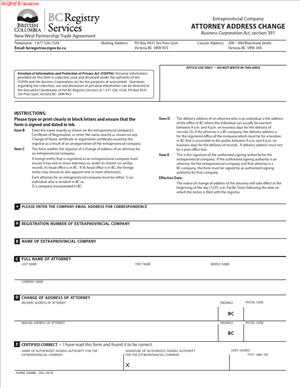
Form 39(MB) – Attorney Address Change
Fill out nowJurisdiction: Country: Canada | Province or State: British Columbia
What is a Form 39(MB) – Attorney Address Change?
Form 39(MB) – Attorney Address Change is a British Columbia Registry Service filing used to update the official address of your appointed attorney for service on the public record. In this context, “attorney” does not mean a lawyer acting as counsel. It means the person or firm authorized to accept legal documents on your behalf in British Columbia. If your attorney for service changes their delivery address or mailing address, you use this form to keep the registry’s record current.
You typically use this form if you are an extra‑provincial company, society, cooperative association, or other out‑of‑province entity that is registered to carry on business in British Columbia and that must maintain an attorney for service in the province. Local entities that are not required to appoint an attorney for service usually do not file this form. The most common filers are corporate secretaries, in‑house legal teams, external law firms, corporate agents, or the attorney for service themselves, acting with the company’s authority. In small businesses, the owner or director often handles it directly.
You would need this form to protect your organization from misdirected legal notices and to stay compliant. Legal documents, government notices, and court papers are served on the address of the attorney for service that appears in the registry. If that address is wrong, you may not receive time‑sensitive materials. You could miss a deadline and face default decisions or penalties. Updating the address ensures you can respond to regulatory requests and lawsuits on time. It also reduces return‑to‑sender delays and keeps your registration in good standing.
Typical usage scenarios include a professional services firm moving offices, a suite renumbering in a downtown tower, consolidation after a merger, or a shift from a physical mailbox to a staffed office. It also includes separating the delivery and mailing addresses, such as when your attorney prefers in‑person deliveries at a street address but wants mail sent to a different location. You might also use the form to correct an earlier mistake in a postal code or unit number. If you are keeping the same attorney but their address has changed for any reason, this is the form you file.
When Would You Use a Form 39(MB) – Attorney Address Change?
You use the form as soon as you learn your attorney’s address has changed or will change. Do not wait for the move to happen. If you have a confirmed effective date, you can prepare the filing so the new address appears on record in time. The goal is to avoid any period where service might go to the wrong location. For example, if your attorney’s office is moving from Burnaby to Vancouver at the end of the month, file the address change to be effective on the move date. That way, a notice served the next day will reach the right address.
You also use the form when the delivery address changes but the mailing address does not, or vice versa. The delivery address is for in‑person service and must be a physical location in British Columbia that is open during normal business hours. Mailing address can be a P.O. Box or mail drop. If your attorney starts using a P.O. Box for mail while keeping the same street address for deliveries, you still file this change to add the new mailing address. If the office adds a new suite number, you also file the form, even if the building and street remain the same. Small details matter for process servers.
Typical users include extra‑provincial companies with an appointed attorney for service, foreign parent companies with a Canadian subsidiary registered as an extra‑provincial company, and out‑of‑province societies or cooperatives operating in British Columbia. Their appointed attorney for service is often a corporate services firm, a law firm, or a trusted senior employee who resides in British Columbia. If that attorney relocates, retires to a different city, or changes where they receive legal mail, an address change filing is required to keep your registry record accurate.
You also use the form to correct errors discovered after an appointment. For example, if your team entered “1000-999 West Street” instead of “1000-999 West 10th Avenue,” fix it with this filing. If a service attempt failed because the building lobby refused to accept documents for unlisted units, formalize the corrected unit details here. The form is not the right tool if you are replacing the attorney altogether. Appointment of a new attorney or resignation of the current attorney requires a different filing. Use this form when the attorney remains the same person or firm, but their address details change.
Legal Characteristics of the Form 39(MB) – Attorney Address Change
This filing is legally significant because it updates the official address for service of an extra‑provincial registrant. Statutes that govern registration and service of documents treat the address on the registry record as the place where service is effective. Once the registry accepts your filing, third parties and public authorities can rely on that address to deliver legal notices. If a claim is served there, it is considered served, even if the attorney has not forwarded it to you yet. This is why accuracy and prompt updates matter.
The filing is legally binding once the registry accepts it and updates the record. Your submission includes a certification by an authorized person that the information is true and complete. That certification is what gives the filing weight. False, misleading, or incomplete information can lead to rejection, administrative penalties, or further legal consequences. In some cases, knowingly filing incorrect information may expose the certifying individual or the registrant to regulatory action. Treat the form as an official representation to a public office.
Enforceability rests on a few core requirements. First, the delivery address must be a physical location in British Columbia where documents can actually be delivered during normal business hours. A P.O. Box is not acceptable for delivery. Second, the attorney must be properly appointed and still in office. An address change does not cure a defective appointment. Third, the submission must be authorized. The registry expects a director, authorized signing officer, corporate agent, or the attorney for service (if permitted) to sign. If the registry offers online filing, it may require a secure login, an electronic signature, and payment of a filing fee. Paper filings typically require a wet signature and clear printing of names and titles.
There are broader legal considerations as well. If you fail to update the attorney’s address, service may still be valid at the old address on file. That can put you at risk in litigation because you can miss deadlines without a chance to respond. Prolonged non‑compliance can also affect your registration status. If the mail is repeatedly undeliverable, the registry may flag your record for review. If you discover a problem after the fact, file the change immediately and keep evidence of acceptance. Then assess whether you need to take steps in any active proceedings where service may have been attempted.
Privacy is another consideration. The address for service appears on the public record. If the attorney is an individual who works from home, that home address will become publicly visible unless you use a different delivery address that meets the service requirements. Discuss this with your attorney for service before filing. If they prefer not to list a residence, consider appointing a professional services firm with a staffed office.
Finally, timing matters. The address change generally takes effect on acceptance by the registry. You cannot backdate service addresses to cure past problems. Plan your filings to minimize gaps, especially around office moves and holiday closures. Confirm who will accept deliveries during transition periods. Post clear signage at the new premises, so process servers can reach a person quickly.
How to Fill Out a Form 39(MB) – Attorney Address Change
Follow these steps to complete and file the form accurately:
1) Confirm you are using the right filing
- Use this filing only to change the address of an existing attorney for service already on record.
- Do not use it to appoint a new attorney or remove an attorney. Those are different filings.
- Check your organization’s current registry profile to see the attorney’s name and address exactly as recorded.
2) Gather core information
- Your BC registration or incorporation number and legal name exactly as they appear on the registry.
- The full legal name of the attorney for service as it appears on the registry. Include middle names and punctuation.
- The new delivery address is in British Columbia. This must be a physical location, with a unit or suite number if any.
- The new mailing address, if different. A P.O. Box is acceptable for mailing, but not for delivery.
- An effective date, if the form permits specifying one. Choose a date that aligns with the move.
3) Prepare the delivery address correctly
- Use a street address within British Columbia. Include building name, unit, floor, and access notes if relevant.
- Ensure the address is staffed during business hours. Couriers and process servers must be able to hand documents to a person.
- Avoid care‑of notations for delivery unless the attorney actually operates from that location.
- Verify the postal code and city spelling. Small errors can cause misdelivery or rejection.
4) Prepare the mailing address
- If the attorney wants mail at a different location, enter that address as the mailing address.
- A P.O. Box is fine for mail. Confirm the box number and postal code.
- If mailing and delivery are the same, repeat the street address or indicate “same as delivery” if the form allows.
5) Identify the attorney for service
- Enter the attorney’s name exactly as recorded. If the attorney is a firm, use the legal business name.
- If the attorney’s legal name changed, complete the appropriate name‑change filing separately. Do not try to fix a name change through an address change form.
- If there are multiple attorneys on record, complete a separate section or form for each, depending on the form’s layout. Do not combine multiple attorneys into one block unless the form explicitly provides for it.
6) Confirm authority and obtain consent
- Ensure the attorney for service is aware of the change and consents to receive service at the new address.
- If the form requires the attorney’s signature, obtain it. Some filings allow the registrant’s authorized signatory to certify on behalf of the entity without the attorney’s signature; others require both.
- Keep internal records of the attorney’s consent and any related instructions.
7) Complete the certifier section
- Provide the name, title, phone number, and email of the person certifying the filing.
- The certifier should be a director, officer, authorized agent, corporate secretary, or the attorney for service if permitted.
- Read the certification statement carefully. You are declaring the information is true and complete. Only sign if you are authorized.
8) Check for delivery standards and accessibility
- Confirm the address allows in‑person delivery Monday to Friday during typical business hours.
- If a building has strict security, arrange for the front desk or mailroom to accept service properly. Post any required authorization with building management.
- If the office is in a shared workspace, ensure the reception can accept legal documents for the attorney. If they cannot, use a different address.
9) Review for common errors
- Do not list a P.O. Box as the delivery address.
- Do not use out‑of‑province addresses.
- Confirm the attorney’s name matches the registry record. Even small differences can cause processing delays.
- Include unit numbers. Service can fail if the process server cannot reach the correct suite.
- Avoid abbreviations that may confuse couriers (for example, use “Avenue” rather than “Av” if space allows).
10) Attach any required schedules or additional pages
- If the form includes a schedule for multiple attorneys, attach it if needed and cross‑reference it on the main page.
- If you must explain special delivery instructions, use the space provided or attach a cover page only if the form invites it. Most registry forms do not accept narrative attachments, so follow the form’s format strictly.
11) Sign and date
- Sign in the correct signature block. Print your name and title clearly beneath the signature.
- Date the form if the form allows an effective date later than the signature date; complete that field as well.
- For electronic filings, follow the system’s signature and submission steps. Keep the submission confirmation.
12) Pay the filing fee
- A filing fee applies. Have your payment method ready.
- If filing electronically, complete the payment steps during submission. If filing by mail or in person, include the required payment with the form.
13) Submit the form
- File through your usual registry account or submit the paper form as permitted.
- If mailing, use a secure trackable courier and keep proof of delivery.
- If filing in person, request a stamped copy or receipt as proof of submission.
14) Monitor status and confirm acceptance
- Watch for acceptance, rejection, or a request for correction.
- If the filing is rejected, fix the noted issues promptly and resubmit.
- After acceptance, pull a fresh registry summary to verify the new address is shown correctly.
15) Update your internal records and stakeholders
- Update your corporate minute book and statutory registers to reflect the new address for service.
- Notify your litigation counsel, regulatory contacts, and any internal teams that rely on service instructions.
- If your attorney for service is a third party, confirm their internal records reflect the change.
16) Plan for transitions
- If the attorney’s office is moving, post signs at the new address on day one.
- For the first week, ensure someone is available during business hours to accept legal documents without delay.
- If you expect a high‑volume mailing during the move, consider overlapping mail forwarding or using both addresses temporarily, while ensuring the registry record shows the definitive delivery address.
17) Keep evidence
- Retain the filed form, acceptance confirmation, and any correspondence with the registry.
- Keep a copy of the attorney’s written consent and any service arrangements with building management or reception.
Real‑world examples help this process feel concrete. If your attorney for service is a law firm that is consolidating locations, complete the address change as soon as the firm announces the new premises and possession date. If the firm’s delivery access requires elevator credentials, arrange front desk acceptance and note it in internal instructions, even though the registry will only record the address. If your attorney’s mailroom uses a separate postal code from the building floors, list that code precisely in the mailing address. If your attorney works from a home office and plans to move, consider switching to a professional services address that can reliably accept couriers, and then file this form to capture the new delivery location.
Above all, treat the address for service as a front door to your legal obligations. Keep it current, precise, and staffed. This single filing helps ensure you receive what you must see, when you must see it.
Legal Terms You Might Encounter
- Attorney. In this form, “attorney” means the person appointed to act for a business or individual. This could be an attorney for service for an extra‑provincial entity, or someone named under a power of attorney. You are updating the official address where that attorney can be reached.
- Attorney for service. This is the local person authorized to accept legal documents for a business. If your organization operates from outside the province, you often appoint an attorney for service. This form updates their address so legal notices reach the right place.
- Registrant. The registrant is the business or individual who appointed the attorney. When you complete the form, you identify the registrant by its legal name and registration details. This links the address change to the correct file.
- Registration or file number. This is the unique number assigned to the registrant’s file. You include it so the registry updates the right record. If you enter the wrong number, the change might attach to the wrong entity.
- Service address. This is the address where legal documents can be delivered to the attorney. It must be complete and usable for delivery. Some registries require a physical address for service, not a post office box. Use the format the form requests.
- Mailing address. Some forms separate a mailing address from the service address. The mailing address is for regular correspondence. The service address is for legal notices. If the form asks for both, complete both fields clearly.
- Effective date. This is the date you want the new address to take effect. If the form allows future dating, the change becomes active on that date. If not, the change takes effect once the registry accepts the filing.
- Execution. Execution means signing the form with authority. The signer confirms the information is correct. The form may require the attorney, or an authorized person for the registrant, to sign and date.
- Authorized signatory. This is the person who has legal authority to sign for the registrant or the attorney. Their name and role should be clear. If the wrong person signs, the registry may reject the filing.
- Notice of change. This is the formal update to the registry about the new address. Filing this form creates an official public record of the change. It allows others to serve documents to the correct location.
FAQs
Do you need to file the form if only your mailing address changed?
Yes, if the form distinguishes between service and mailing addresses. Update both to keep records consistent. If the form only captures a service address, you must still file when that address changes.
Do you need a physical address, or can you use a post office box?
Many filings require a physical service address where someone can accept delivery. A post office box may be acceptable for mailing, but not for service. Check the form fields. If the form has separate lines for physical and mailing, complete both as instructed.
Do you need the attorney’s consent to file the change?
Yes. You should have the attorney’s consent and the correct address. The signer certifies that the information is true. Submitting without consent can cause disputes, delays, or withdrawal of the filing.
Do you need to notify anyone else after filing?
Usually yes. Update your internal records and notify anyone who relies on serving the attorney, such as counterparties or agents. If you use standard legal templates, revise the service address.
Do you need to attach proof of the attorney’s appointment?
Not generally for an address change, unless the form asks. You typically need the registrant’s details, the attorney’s current and new addresses, and the authorized signature. Keep your appointment documents on file.
Do you have to file the change within a specific time?
Most regimes expect prompt updates after a change. File as soon as the address changes to avoid misdirected service. Late filings can cause missed notices and compliance issues.
Do you need the old address as well as the new one?
Many address change forms ask for the old address. It helps confirm the correct record. If you do not have the old address, use the exact address currently on record, if available.
Can you correct an error after you file?
Yes. If you spot an error, file a corrected address change as soon as possible. Some registries allow you to withdraw or replace a filing. Keep a clear paper trail for the correction.
Can you change multiple attorneys’ addresses at once?
Most forms update one attorney at a time. If you have multiple attorneys, you may need separate forms for each. Review each form’s instructions before consolidating changes.
Will the registry confirm acceptance?
You usually receive a confirmation or acknowledgment once accepted. Save it. If you do not receive confirmation, follow up using your receipt or transaction details.
Checklist: Before, During, and After the Form 39(MB) – Attorney Address Change
Before signing
- Confirm the exact legal name of the registrant.
- Locate the registrant’s registration or file number.
- Verify the attorney’s full legal name.
- Confirm the attorney’s current address on record.
- Obtain the complete new service address, including unit number and postal code.
- Determine if a separate mailing address applies.
- Check if a physical service address is required.
- Confirm the effective date for the new address, if allowed.
- Identify who has the authority to sign the form.
- Collect contact information for the signer and the attorney.
- Review the form’s signature and date requirements.
- Plan how you will file and pay any fees, if applicable.
- Prepare a short cover note or internal memo for your records.
- Set a reminder to check for acceptance.
During signing
- Verify the registrant name exactly matches the registry record.
- Confirm the registration or file number before entering it.
- Enter the old address exactly as it appears on record, if required.
- Enter the new service address in full. Avoid abbreviations that cause confusion.
- Add a separate mailing address only if the form asks for one.
- Use the correct effective date format (day/month/year or year/month/day).
- Confirm the signer’s title and authority. Include printed name.
- Sign in ink if filing on paper, or use the approved e‑signature method online.
- Date the form on the day of execution. Do not pre‑date or post‑date unless allowed.
- Review the certification language. Ensure you can truthfully affirm it.
- Check any boxes confirming consent or accuracy.
- Proofread names, addresses, and postal codes.
- If the form requires a witness or certification, complete that section fully.
After signing
- File the form using your chosen method.
- Save the receipt or transaction number.
- Calendar a follow‑up date to confirm acceptance.
- Once accepted, distribute the new address to your team.
- Update letterhead, templates, and service instructions.
- Notify counterparties who send legal notices to the attorney.
- Update internal registers and compliance checklists.
- Store the filed form and confirmation with corporate records.
- Note the effective date in your entity management system.
- If the filing is rejected, fix the issue and resubmit promptly.
Common Mistakes to Avoid
- Using a post office box as the service address. If a physical address is required, a post office box can trigger rejection. Don’t forget to provide a full street address for service.
- Mismatching the registrant name or file number. Even small differences can misdirect the change. Double‑check the exact legal name and number before you sign.
- Leaving out the unit or suite number. Missing details can cause the failure of delivery of legal documents. Include unit numbers and correct postal codes to avoid misdirected service.
- Having the wrong person sign. An unauthorized signature can delay or void the filing. Ensure the signer has authority and prints their name and title.
- Backdating the effective date without support. If the registry does not allow backdating, your filing may be rejected. Use the actual execution date unless the form permits a future effective date.
What to Do After Filling Out the Form
- File the completed form. Submit it using the accepted method. Keep the proof of submission.
- Monitor for acceptance. Watch for an acknowledgment that confirms the address change is on record. If you do not receive confirmation within the expected time, follow up with your filing details.
- Update internal records. Change the attorney’s address in your entity management system. Update compliance calendars and any reference lists used by your team.
- Notify stakeholders. Send the new address to anyone who serves documents on your business or client. This may include counterparties, agents, and professional advisers. Use clear language that the address is for service on the attorney.
- Refresh templates. Review standard contracts, notices, and forms that include the attorney’s service address. Replace the old address and save the updated versions for future use.
- Align mailing vs. service addresses. If you provided both, verify each system reflects the right one. Ensure invoices and general mail go to the mailing address, and legal notices go to the service address.
- Retain records. Store the signed form, proof of filing, and acceptance confirmation with your permanent records. Keep copies of any internal approvals and the attorney’s consent.
- Plan for future changes. Note the process and timing in a simple playbook. Include contacts, required fields, and common pitfalls. This will help you complete the next change faster and with fewer errors.
- Correct errors quickly. If you find a typo or wrong address, file a correction as soon as possible. Document what changed and why. Keep both versions and the correction receipt.
- Confirm downstream updates. After a week or two, check that the new address appears in public records, if applicable. Verify mail and notices are reaching the attorney at the new location.
Disclaimer: This guide is provided for informational purposes only and is not intended as legal advice. You should consult a legal professional.