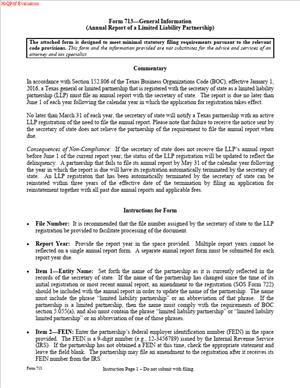
Form 713 – Annual Report of a Limited Liability Partnership
Fill out nowJurisdiction: United States — Texas
What is a Form 713 – Annual Report of a Limited Liability Partnership?
Form 713 is the annual report for a Texas limited liability partnership. You use it to keep your LLP registration active with the Texas Secretary of State. Think of it as your yearly renewal. It confirms key information about your partnership and updates the state record. It also includes the annual fee tied to your current partner count.
This report is required for any LLP that is registered in Texas. That includes domestic Texas partnerships and foreign partnerships authorized to do business in Texas. Filing this report preserves your liability shield under Texas law. If you skip it, your LLP status can lapse. That lapse risks partner liability for new obligations.
Who typically uses this form?
A managing partner often does. So do firm administrators, legal operations managers, or outside filing services. In small partnerships, a partner or office manager may handle it. In larger firms, finance or compliance teams may take the lead. The signer must be a partner or an authorized person.
You need this form if you run a partnership that elected LLP status in Texas. LLP status requires active registration. The annual report keeps that registration in force. You also need this form if your foreign LLP operates in Texas. If you stop filing, your right to use “LLP” in Texas can end. The report protects that right.
Typical usage scenarios
You registered your new law partnership last year. Your first renewal is coming due. You file Form 713 and pay the fee based on your current number of partners. Or your multi-state accounting partnership is authorized in Texas. You must file the Texas annual report each year to maintain authority. Another scenario: your architecture LLP added partners this year. You file the renewal and pay the fee based on the new partner count. One more example: your firm changed its principal office address. You confirm the change in the annual report so the public record stays accurate.
An annual report is not the same as tax filings. It is separate from any tax report or franchise filing. It is also not the form to change your registered agent. That requires a different filing. Use the annual report to renew your LLP registration and confirm core information.
The filing becomes part of the public record. Clients, vendors, and courts check that record. A clean, current record supports credibility. It also avoids service issues and delays when you need certified copies.
When Would You Use a Form 713 – Annual Report of a Limited Liability Partnership?
You use this form each year your LLP remains active in Texas. The report covers the next one-year term of your LLP registration. File it before your current registration expires. Do not wait until the last day. Processing times can vary. Build in a cushion.
Here are practical examples. You formed a Texas LLP in the spring. Your registration period is approaching renewal. You file Form 713 to extend your LLP status for another year. Or you are a foreign LLP that opened a Texas office. You file the annual report every year to keep your Texas authority current.
You also use this form when your partner count has changed. The annual fee is tied to the number of partners. If you added partners, your fee rises. If partners leave, your fee drops. You report the current count in the annual renewal.
You use this form if you have moved your principal office. The annual report is an efficient time to align the official record. You also file if your contact person has changed. Keeping a current contact helps avoid missed notices.
You do not use this form to bring a terminated LLP back to life. If your LLP status has lapsed, an annual report will not reinstate it. You would need to file a new registration to regain LLP status. You also do not use this form to withdraw from Texas. If you are leaving Texas, file a withdrawal. Until you withdraw, you must keep filing the annual report.
Day-to-day business changes do not delay the report. Mergers, conversions, or name changes each use different filings. If any of those are pending, keep your annual report current until the change takes effect. When in doubt, file the annual report on time. You avoid a gap in your liability shield.
Typical users include partners at law firms, accounting firms, and design firms. They also include professional service partnerships in other fields. Operations staff and in-house counsel also handle this filing. If you are the person who tracks entity compliance calendars, Form 713 is on your list.
Legal Characteristics of the Form 713 – Annual Report of a Limited Liability Partnership
This filing is a statutory requirement for LLPs in Texas. It maintains the legal status that limits partner liability. Without an active LLP registration, your partnership functions as a general partnership. In a general partnership, partners can be personally liable for new obligations. The annual report is therefore critical. It ties directly to your liability protection.
Is it legally binding?
Yes. You certify that the information is true and correct. You sign under penalties imposed by law for false statements. The state relies on your certification to extend the LLP registration. The filing becomes part of the official record. That record is used to determine your standing and authority.
What ensures enforceability?
Several elements do. First, the form content follows the statute. Second, the signer must have authority. A partner or authorized representative must sign. Third, you must pay the required fee. The fee is calculated by the current number of partners. Finally, the state must accept the filing. Once accepted, your registration is renewed for the next period.
There are general legal considerations to keep in mind. Use your exact legal name as it appears on state records. The name must include the proper LLP indicator. Keep your registered agent and registered office up to date. Service of process depends on accurate agent details. If you need to change the agent, use the correct change filing. Do not assume the annual report will update the agent.
If the report is not filed on time, your LLP status can terminate. Termination ends the shield for obligations arising after the termination date. Using “LLP” after termination can violate state law. If termination occurs, you may have to re-register. That is more costly and creates exposure for the gap period.
Foreign LLPs must also stay in good standing in their home jurisdiction. If your home status lapses, your Texas authority can be at risk. The annual report does not cure issues in another state. It only maintains your Texas registration.
The report does not substitute for tax compliance. You must handle tax filings separately. Late tax filings do not replace the annual report, and vice versa. Keep both calendars in sync. Build reminders well ahead of each due date.
How to Fill Out a Form 713 – Annual Report of a Limited Liability Partnership
Follow these steps to complete and file the Texas Form 713. Set aside a short block of time. Gather your information before you start. You can complete the report in one sitting.
Step 1: Gather required information
- Your Texas file number. You will find it on your prior approval letter.
- The exact legal name of your LLP. Use the name on the state record.
- Your jurisdiction of formation. For domestic entities, that is Texas.
- Your principal office street address. Use a physical address, not a P.O. Box.
- Your registered agent name and registered office. Confirm this has not changed.
- The current number of partners. Count partners as of the filing date.
- A contact person’s name, phone, and email. This is for filing questions.
- Payment method. Prepare the fee based on your partner count.
- Authorized signer’s information. A partner or authorized person must sign.
Step 2: Identify your LLP
- Enter your Texas file number.
- Enter your exact legal name, including “LLP” or similar indicator.
- State your jurisdiction of formation. If foreign, list your home state.
- If the form asks for the date of Texas registration, add that date.
Step 3: Provide your principal office
- Enter your principal office street address.
- Include city, state, and ZIP code.
- If your mailing address differs, include it if the form provides space.
Step 4: Confirm your registered agent and office
- The annual report confirms the agent on file.
- If the agent or office changed, do not use this form to change it.
- File the proper change form to update your agent or registered office.
- If no change is needed, affirm that the agent and office remain the same.
Step 5: Report your partner count
- Enter the number of partners as of the filing date.
- Count all partners of the partnership based on your current structure.
- If the form requests the name of at least one partner, list it.
- Ensure the count is accurate. Your fee is based on this number.
Step 6: Describe your business (if requested)
- Some versions ask for a brief business description.
- Use a short phrase. For example: “Law practice” or “Architecture services.”
- Avoid jargon. Keep it accurate and simple.
Step 7: Provide a contact person
- List a person authorized to answer questions about the filing.
- Include phone number and email address.
- This speeds resolution if the state has a question.
Step 8: Select the report year or period
- If the form asks for the period covered, enter the appropriate year.
- If it requests an effective date, use the default unless you have a reason.
- Most annual reports are effective upon filing.
Step 9: Calculate and prepare the fee
- The fee equals a fixed amount per partner.
- Multiply your current partner count by the per-partner amount.
- Prepare a check or payment authorization for the total.
- If you want a faster review, include any expedited fee if available.
Step 10: Review and sign
- Confirm all names and addresses are correct.
- Ensure your entity name matches the state record exactly.
- Confirm the partner count and fee calculation.
- A partner or authorized person must sign the form.
- Print the signer’s name and title (for example, “Partner”).
- Date the form. Unsigned filings will be rejected.
Step 11: File the report
- Submit the report with payment.
- You can file electronically or by mail.
- If you mail, use trackable delivery. Keep a copy for your records.
- If you file electronically, save the confirmation receipt.
Step 12: Confirm acceptance
- Watch for a confirmation or stamped copy.
- If you receive a rejection, fix the issue promptly.
- Common issues include wrong fee, wrong file number, or missing signature.
Step 13: Update your internal records
- Save the accepted copy and any receipt.
- Update your entity compliance log.
- Notify your accounting and operations teams.
- Calendar next year’s deadline now.
Step 14: Avoid common mistakes
- Do not undercount partners. The fee depends on the correct count.
- Do not try to change your registered agent with this form.
- Do not use a trade name in place of your legal name.
- Do not let your renewal date pass. File early to avoid lapses.
- Do not assume tax filings replace this report. They do not.
Step 15: If you plan changes, sequence them
- If you will merge, convert, or withdraw, plan the order.
- Keep your annual report current until the change is effective.
- If you will cease Texas operations, file a withdrawal.
- Until then, the annual report remains due each year.
Practical example: You manage a 12-partner law firm in Texas. Your renewal window opens. You verify the partner count is 12. You confirm your principal office address. You check that your registered agent remains the same. You complete the form and pay the fee based on 12 partners. You file three weeks before the due date. You receive acceptance and the calendar for next year’s window.
Another example: You are a foreign engineering LLP. You maintain a Texas office. You filed last year for your authority. This year, you filed the annual report to keep that authority active. You confirm your home jurisdiction information and your Texas file number. You pay based on your current partner count. Your Texas authority continues without interruption.
Final checklists before you submit
- Exact name matches state record.
- Texas file number is correct.
- Principal office address is accurate.
- Registered agent details are current or updated separately.
- Partner count is correct as of the filing date.
- Fee calculation is correct, and payment is included.
- A partner or authorized person signed and dated the form.
- You kept a copy of the full filing package.
What to do after filing
- Confirm the state shows your status as active.
- Update marketing materials if needed.
- Ensure “LLP” appears in your firm name where required.
- Train staff to use the correct legal name in contracts and invoices.
- Review your compliance calendar for next year’s filing window.
If your LLP status lapses despite your efforts, act quickly. Determine whether the lapse is due to nonpayment, missing information, or a missed deadline. A late annual report will not retroactively restore protection. You may need to file a new registration to regain LLP status. Avoid this by filing early and confirming acceptance.
You can keep the process simple. Build a repeatable checklist. Assign a single owner for the filing. Verify the partner count with finance. Prepare payment early. File well ahead of the deadline. With a clean process, this filing becomes routine and low risk.
Legal Terms You Might Encounter
- Limited liability partnership: An LLP is a partnership that registers for limited liability. Partners keep personal assets shielded from most firm debts. Form 713 keeps that registration current each year.
- Partner: A partner owns and runs the partnership. The form may ask for the number of partners or a confirming statement. The signer must be a partner or someone a partner authorizes.
- Authorized partner: This is the partner who signs the form. They have the authority to bind the partnership. Use a signer who can certify that the report is true and complete.
- Registered agent: This person or company accepts legal papers for the partnership. The report confirms the current agent’s name and contact details. Keep this information accurate year‑round.
- Registered office: This is the physical street address where the registered agent is located. It must be a deliverable street address. The annual report confirms it. Avoid using a P.O. Box if the form bars it.
- Principal office: This is the main business address of the partnership. It can be inside or outside the state. The report often asks for this address for public records and notices.
- Foreign LLP: A foreign LLP forms in another state but registers to do business here. If you are registered in this state, you file this annual report to keep that registration active.
- Assumed name: This is any trade name that differs from the legal partnership name. If the form asks, disclose any assumed name you use in the state. List it exactly as registered.
- Effective date: This is the date the report takes effect on the public record. Most filings take effect when filed. Some allow a specific effective date if stated on the form.
- Service of process: These are legal papers delivered when someone sues the partnership. The registered agent and office are used for service. Accurate agent data on the report protects your response rights.
- Public record: Information on the report becomes part of the state’s public record. Anyone can view it. Do not include sensitive data that the form does not require.
FAQs
Do you need to file the annual report if nothing has changed this year?
Yes. You failed to keep the LLP registration active. The report confirms your status and key details. Even if no details changed, you still submit the report and fee, if a fee applies.
Do you have to list every partner on the form?
Usually, you confirm the number of partners or provide specific details that the form requests. Many annual reports do not require listing every partner by name. Follow the exact prompts on the form.
Do you need to file if your LLP had no revenue?
Yes. Reporting obligations do not depend on revenue. You file based on your registered status. If you remain registered as an LLP, you submit the annual report.
Do you file if your LLP converted or ceased?
If the LLP no longer exists or the registration has ended, you typically do not file this annual report. You file any required termination or withdrawal paperwork instead. If you are unsure of your status, review your last filed action and the state’s records before you proceed.
Can you change your registered agent or registered office on this report?
Some changes require a separate change form. Check the fields on Form 713. If it allows an update, you can make the change here. If not, file the proper change form and then keep both filings consistent.
Who can sign Form 713?
A partner or an authorized representative can sign. The signer certifies that the information is true and correct. Use a signer who knows the firm’s details and can answer follow‑up questions.
Can you file by mail or electronically?
Many filings can be mailed, delivered in person, or submitted electronically. Confirm the submission options shown on Form 713. Use the method that best matches your timeline and recordkeeping needs.
What happens if you miss the deadline?
Your LLP registration can lapse if you miss a required annual report. A lapse can affect your liability shield and your right to transact business in the state. File as soon as possible to reduce the risk of penalties or status loss.
How do you fix a mistake after filing?
You can submit a correction if the error is material. Use a correction or amendment filing as allowed. Act quickly if the error affects your registered agent, office, or legal name.
Do you need to include tax IDs or Social Security numbers?
The annual report does not ask for Social Security numbers. It may ask for an EIN for identification purposes. Only provide the identifiers the form requests.
Checklist: Before, During, and After the Form 713 – Annual Report of a Limited Liability Partnership
Before you sign
- Legal name of the LLP as currently on file.
- State file number for the LLP.
- Jurisdiction of formation, if formed outside the state.
- Principal office street address and mailing address, if different.
- Registered agent’s full legal name and current contact details.
- Registered office street address (use a physical address).
- Any assumed name you use in the state, if requested.
- Count of partners or required partner details per the form.
- EIN, if the form requires it for identification.
- Email and phone for correspondence, if requested.
- Signature authority for the signer.
- Payment method and current filing fee amount.
- If you need it, a certificate of fact or prior filings for reference.
During signing and completion
- Verify the LLP legal name matches the state’s records character‑for‑character.
- Enter the correct state file number with no transposed digits.
- Confirm the registered agent’s name is current and eligible to serve.
- Use a deliverable street address for the registered office.
- Check principal office details for accuracy and completeness.
- List any assumed name exactly as registered, if the form asks.
- Provide the partner information the form requires. Do not add extra data.
- Use the correct effective date if the form allows one.
- Review any checkboxes for domestic versus foreign status.
- Confirm email and phone fields. These aid fast issue resolution.
- Sign in the correct capacity as a partner or authorized representative.
- Date the form. Use black or dark blue ink for paper filings.
- Attach any required addenda or supplements if the form calls for them.
- Prepare payment exactly as the instructions require.
After you sign
- Make a clean copy of the signed form for your files.
- Submit the report using your chosen method. Include payment.
- Obtain proof of submission, such as a receipt or tracking number.
- Calendar a follow‑up to confirm acceptance and filing date.
- If you get a notice of rejection, fix the issue and resubmit quickly.
- Save the stamped or filed copy with your governance records.
- Update your compliance calendar with the next due date.
- Notify partners and finance of the filing and any fee paid.
- Update internal systems with any changed addresses or agent data.
- If you changed public details, update your website and stationery.
Common Mistakes to Avoid
- Using the wrong legal name or file number. This can cause rejection or misapplied filings. Don’t rely on an old document. Pull the name and file number from the most recent state record.
- Listing a P.O. Box as the registered office. Many forms require a physical street address. A P.O. Box can trigger rejection. Don’t forget to use a deliverable street address for the registered office.
- Letting an ineligible registered agent remain on record. If your agent resigns or is not available, you can miss service of process. That risk can lead to default judgments. Don’t wait. Update the agent promptly using the proper filing.
- Missing the partner’s signature or wrong signer capacity. An unsigned report or a signature by a person without authority delays acceptance. Don’t forget to sign as a partner or authorized representative.
- Skipping the report because “nothing changed.” The annual report maintains your LLP registration. Missing it can result in a lapse and penalties. Don’t assume silence equals compliance. File each year.
- Paying the wrong fee or using the wrong payment method. Incorrect fees or payment details can stall processing. Don’t guess. Verify the current fee and acceptable payment methods on the form.
What to Do After Filling Out the Form
- File the report with the state filing office. Use one submission method. Avoid duplicate filings unless the office requests a resubmission. Include the correct fee and any required addenda.
- Track processing. Keep your submission receipt or tracking number. Set a reminder to check for acceptance within the expected timeline. If processing exceeds a reasonable period, prepare to follow up with your proof of submission.
- Respond to notices. If the office issues a rejection or inquiry, act fast. Correct the specific item cited and resubmit. Send only what the office asks for. Keep your response concise and complete.
- Confirm public record accuracy. After acceptance, verify that the public record shows the right registered agent, registered office, principal office, and assumed name, if applicable. Save screenshots or a copy of the filed record for your files.
- Update internal and external records. Notify your finance team of any fees paid and the filing date. Inform partners of the completed filing. If your contact details have changed, update client notices, engagement letters, website, and marketing materials.
- Plan for amendments. If you later change your legal name, registered agent, or registered office, you will likely need a separate filing. Use the correct amendment or change form rather than waiting for the next annual report.
- Maintain your compliance calendar. Record the next annual report due date. Add reminders 60, 30, and 10 days in advance. Assign a backup person in case the primary contact is unavailable.
- Preserve records. Keep the signed report, proof of filing, and acceptance confirmation with your governing documents. Store them in a secure, searchable location. Retain payment proofs for reconciliation and audit.
- Review your entity structure. An annual report is a good checkpoint. Confirm your partner roster, ownership percentages, compensation terms, and indemnification provisions. Align these with current operations. If you changed your structure, make any required state filings promptly.
- Coordinate with tax advisors. Ensure the information on the report aligns with tax filings. Mismatched addresses or names can cause confusion. Share the filed report with your tax preparer to avoid inconsistencies.
- Prepare next year’s draft. Keep a pre‑filled template with static data. Document the steps, signers, and payment method. This reduces last‑minute rush and lowers error risk.
Disclaimer: This guide is provided for informational purposes only and is not intended as legal advice. You should consult a legal professional.