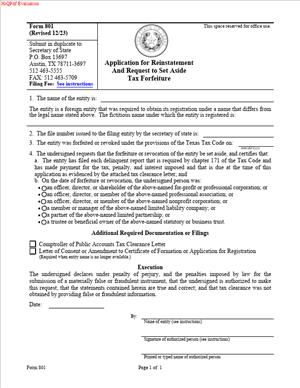
Form 801 – Application for Reinstatement And Request to Set Aside Tax Forfeiture
Fill out nowJurisdiction: Country: United States | Province or State: Texas
What is a Form 801 – Application for Reinstatement and Request to Set Aside Tax Forfeiture?
Form 801 is the Texas Secretary of State’s application you use to restore a company’s legal status after the State forfeited it for franchise tax reasons. In plain terms, if your domestic Texas entity’s existence was terminated, or your foreign entity’s Texas registration was revoked because franchise tax reports weren’t filed or taxes weren’t paid, this is the form you file to bring the entity back to life and clear the tax forfeiture.
You use Form 801 when the forfeiture was tied to franchise tax obligations. The process has two parts that work together. First, you resolve all franchise tax issues with the Texas Comptroller. Then, you file Form 801 with the Secretary of State to request that the tax forfeiture be set aside and that the entity be reinstated. Once accepted, your entity’s legal status is reinstated as if the forfeiture did not occur, subject to any rights that arose during the forfeiture period.
Who typically uses this form?
Owners and managers of LLCs, corporations (including professional corporations), limited partnerships, and other filing entities formed in Texas, as well as out-of-state (foreign) entities that had their Texas authority revoked for franchise tax noncompliance. Lawyers, accountants, or compliance managers often prepare and submit the filing on behalf of the business.
You would need this form if you want to legally resume business in Texas under the same entity that was forfeited. This includes restoring the entity’s capacity to enter contracts, maintain lawsuits, own property in the entity name, and conduct ordinary business. Reinstatement also helps cure the elevated personal liability risks that attach when an entity’s privileges or existence are forfeited for franchise tax reasons.
Typical usage scenarios include a small Texas LLC that missed one or more franchise tax reports during a leadership change, a multi-state corporation that overlooked Texas franchise tax filings after a merger, or a foreign Delaware corporation that lost its Texas registration due to unpaid franchise tax. In each case, the solution is the same: bring franchise tax filings current with the Comptroller and then file Form 801 to restore the entity’s status with the Secretary of State.
When Would You Use a Form 801 – Application for Reinstatement and Request to Set Aside Tax Forfeiture?
You would use Form 801 after franchise tax noncompliance led to the forfeiture of your entity’s existence or revocation of your foreign registration. Practical examples are common. You might have closed a Texas office and inadvertently missed Comptroller notices, resulting in forfeiture. Your bookkeeper could have left, and no one filed the last franchise tax report. Your foreign entity might have assumed the Texas franchise tax didn’t apply because revenue was small, but reports were still required and went unfiled. In all of these cases, once you correct the tax issues with the Comptroller, Form 801 is the vehicle to reinstate your company.
Typical users are owners, managing members, managers, officers, directors, or general partners. In a small LLC, the managing member may handle the filing personally. In a closely held corporation, the CFO or an outside CPA often coordinates the Comptroller tax clearance and then prepares Form 801. For a foreign company, the in‑house legal or compliance team usually works with a Texas-registered agent or local counsel to submit Form 801.
You also use Form 801 if you discover the forfeiture happened years ago and you now need to transact business, sell assets, or sign a contract in the company’s name. Lenders and buyers often require proof that the entity is active and in good standing. Reinstatement via Form 801 provides that proof. The form is not used for other types of administrative terminations unrelated to franchise tax. If your entity was terminated for non-tax reasons (like failure to maintain a registered agent or file a periodic report, where applicable), a different process applies. Use Form 801 specifically when franchise tax forfeiture is the root cause of the termination or revocation.
Legal Characteristics of the Form 801 – Application for Reinstatement and Request to Set Aside Tax Forfeiture
Form 801 is legally significant because it is the Secretary of State’s prescribed filing to reverse a tax‑based forfeiture and reinstate your entity’s legal capacity. It is legally binding because state law authorizes the Secretary of State to terminate or revoke entities for franchise tax noncompliance and, correspondingly, to set aside that forfeiture and reinstate the entity when the Comptroller confirms the tax issues are resolved. When the Secretary of State accepts a properly completed Form 801 and receives tax clearance from the Comptroller, reinstatement is effective.
What ensures enforceability?
A combination of statutory authority, agency processes, and required certifications. The Comptroller’s certification that all franchise tax reports and amounts due are satisfied is a core condition. Without that tax clearance, the Secretary of State will not set aside the forfeiture. The signed application also carries an attestation that the information is true and correct. False statements can expose the signer and the entity to penalties, which encourages accuracy and compliance.
The legal effect of reinstatement is powerful. In general, reinstatement relates back, meaning your entity’s existence or registration is treated as if it had continued without interruption. That helps validate contracts and actions taken during the forfeiture period, although it doesn’t erase rights that third parties acquired while your entity was forfeited. Reinstatement also restores limited liability protections and corporate privileges that were suspended or lost.
Considerations to keep in mind include name availability and registered agent continuity. If another entity took your old name during the forfeiture period, you may need to change the name as part of reinstatement. If your registered agent resigned or your registered office changed, you need to update that information. The Secretary of State will not complete reinstatement if mandatory elements like name and registered agent cannot be validly maintained.
Finally, fees apply to this filing, and the Secretary of State will process the application only after all conditions are met, including tax clearance. While most filings do not require notarization, the application must be signed by a person with authority, such as an officer, director, manager, managing member, general partner, or other authorized representative, and submitted with the required filing fee.
How to Fill Out a Form 801 – Application for Reinstatement and Request to Set Aside Tax Forfeiture
Before you start, confirm two things: your franchise tax status and your readiness to sign. First, work with the Comptroller to bring all franchise tax reports current and pay any taxes, penalties, and interest. You will need the Comptroller’s clearance for reinstatement. Second, decide who will sign the form. Choose a person with authority to act for the entity, such as an officer, director, manager, managing member, general partner, or an authorized agent or attorney‑in‑fact.
Step 1: Identify the entity exactly as on file.
On the application, enter the full legal name of your entity as it appears in the Secretary of State’s records at the time of forfeiture. Do not abbreviate or alter the name. Include the proper ending (such as LLC, L.L.C., Inc., Incorporated, Company, Co., LP, L.P., or Professional Corporation) exactly as recorded.
Step 2: Provide the Texas SOS file number.
Enter the Secretary of State file number assigned to your entity. This number uniquely identifies your record and speeds review. If you do not have it handy, locate it from prior filings or internal records before you begin.
Step 3: Indicate the type and jurisdiction of the entity.
Specify whether the entity is domestic (formed in Texas) or foreign (formed in another state or country) and the entity type (LLC, corporation, professional corporation, limited partnership, etc.). For foreign entities, list the home jurisdiction of formation. Accuracy here helps the Secretary of State match the correct file and confirm the appropriate reinstatement.
Step 4: State the relief you are requesting.
Form 801 asks you to request reinstatement and to set aside the tax forfeiture. Ensure you check or state both parts of the relief if the form prompts you to do so. The goal is not only to reactivate the entity but also to clear the forfeiture status from your record.
Step 5: Address name availability if your old name is taken.
If your entity’s original name is no longer available in Texas because another filing now uses it, you must adopt an available name as part of reinstatement. Prepare and include an amendment to change the name as appropriate for your entity type. Confirm the new name meets Texas naming rules and is distinguishable. If the original name is still available, no name change is required.
Step 6: Update the registered agent and registered office if needed.
If your registered agent resigned during the forfeiture period, or your registered office changed, appoint a new registered agent and update the registered office address. You can include a change of registered agent/office with your reinstatement. Be sure your agent has consented to serve and that the address is a physical street address in Texas (not a P.O. Box).
Step 7: Provide a mailing address and contact information for correspondence.
Enter a current mailing address for the entity and a contact name, phone number, and email for filing questions. This helps the Secretary of State resolve issues promptly and return evidence of filing to the correct person.
Step 8: Confirm Comptroller tax clearance.
Form 801 hinges on franchise tax clearance from the Comptroller. In many cases, the Secretary of State can obtain clearance electronically once you have satisfied all tax obligations. If you have a tax clearance letter or certificate of account status for reinstatement, include it if the form instructions allow or request it. Without Comptroller clearance, the Secretary of State cannot reinstate the entity.
Step 9: Review any additional compliance updates to include with your filing.
If your principal office, governing persons, or other public information has changed and your entity type permits or requires updates via accompanying filings, include them now. Align your registration with your current organizational reality so you start fresh with accurate records.
Step 10: Sign the application.
The signature must be from a person with authority to act for the entity. For a corporation, an officer or director may sign. For an LLC, a manager of a manager‑managed LLC or a managing member of a member‑managed LLC may sign. For a limited partnership, the general partner signs. An authorized representative or attorney‑in‑fact may sign if properly authorized. Print the signer’s name and title, and date the application. Texas does not generally require notarization for this filing.
Step 11: Prepare payment of the filing fee.
Include the required fee for reinstatement. You can pay by acceptable methods such as check, money order, or approved card options, depending on your submission method. If timing is critical, consider expedited processing for an additional fee.
Step 12: Submit the application to the Secretary of State.
You can file by mail, deliver in person, or use available electronic submission channels. If you submit electronically, follow the file format and payment instructions. Keep copies of everything you submit and proof of delivery.
What to include with Form 801
- The completed and signed application.
- The filing fee.
- Any name change amendment if the original name is unavailable.
- Any registered agent/office update if needed.
- Any other compliance updates relevant to your entity type.
- Comptroller tax clearance evidence if requested or if it speeds processing.
Who are the parties, and what are you “agreeing” to?
The parties involved are you (the entity seeking reinstatement), the Texas Comptroller (who certifies tax compliance), and the Texas Secretary of State (who sets aside the forfeiture and reinstates the entity). Form 801 is your formal request and attestation that you have satisfied all franchise tax obligations and that reinstatement is proper. By signing, you represent that the information is true and correct, you acknowledge the state’s authority to rely on the Comptroller’s certification, and you request legal restoration of your entity’s status.
Key statements and clauses you will encounter
- A statement that the entity seeks reinstatement and a set‑aside of the tax forfeiture.
- Identification of the entity by name, file number, entity type, and jurisdiction.
- An attestation by the signer that they are authorized and that the information is accurate.
- An acknowledgment that reinstatement is contingent on Comptroller tax clearance.
Common pitfalls and how to avoid them
- Submitting before franchise tax clearance is available. Resolve everything with the Comptroller first.
- Using a name that is no longer available. Confirm availability; if needed, include a name change.
- Omitting a registered agent update. Ensure your registered agent and registered office are valid today.
- Having the wrong person sign. Use an officer, director, manager, managing member, general partner, or authorized agent with documented authority.
- Missing the fee or submitting an incorrect payment method. Verify the current fee and accepted payment types.
- Expecting reinstatement for non‑tax forfeitures through Form 801. Use this form only for franchise tax forfeiture cases.
After you file
If the Secretary of State accepts your application and the Comptroller confirms tax compliance, the forfeiture is set aside and your entity is reinstated. You will receive evidence of filing, often in the form of a certificate or stamped copy. The reinstatement generally relates back, so your entity is treated as continuously existing during the forfeiture period, subject to any rights that accrued to others during that time. You can then resume normal operations, open bank accounts, enter contracts, and, if needed, order a certificate of status to show lenders, vendors, and counterparties that your entity is active.
If there’s a name conflict or missing information, the Secretary of State will notify your contact person. Respond promptly to avoid delays. If the Comptroller cannot clear your tax status, work with them to resolve the remaining issues and then proceed with reinstatement.
Real‑world examples
- A Texas LLC missed two franchise tax reports after its controller resigned. The Comptroller forfeited corporate privileges, and later the Secretary of State terminated the entity. The LLC filed all missing reports, paid taxes and penalties, obtained clearance, and submitted Form 801 with a registered agent update. The Secretary of State set aside the forfeiture and reinstated the LLC.
- A Delaware corporation doing business in Texas had its Texas registration revoked for franchise tax noncompliance. After resolving taxes with the Comptroller, the company filed Form 801. The Secretary of State reinstated its Texas authority. Contracts signed during the forfeiture period were validated by the relation‑back effect of reinstatement.
- A professional corporation’s original name was taken during forfeiture. The company included a name change with its Form 801 and appointed a new registered agent. The Secretary of State approved the new name and reinstated the entity.
Practical tips to streamline your filing
- Clear tax issues first and confirm the Comptroller’s clearance status before submitting.
- Verify your entity’s exact name and file number to avoid mismatches.
- Check name availability early if your forfeiture is older and there’s risk of conflict.
- Line up a registered agent and get their consent before filing.
- Choose a signer whose authority is straightforward, and include their title.
- If timing matters, request expedited service and use a fast submission method.
By following these steps and ensuring tax compliance is complete, you can use Form 801 to restore your business’s legal footing in Texas with minimal friction.
Legal Terms You Might Encounter
- Tax forfeiture means the state ended your entity’s right to do business because of unpaid or unfiled franchise taxes. On Form 801, you ask to set that forfeiture aside. You also request to restore your entity’s legal status.
- Reinstatement is the return of your entity to active status on the state’s records. By filing Form 801, you seek reinstatement so you can resume normal business and rights.
- Entity file number is the unique number the filing office assigned to your company. You use it on Form 801 to ensure they find the correct record. You can locate it in prior filings or certificates.
- Franchise tax is the state tax tied to doing business as a registered entity. If you missed reports or payments, you lost status. You must cure those tax issues before filing Form 801.
- Tax clearance is confirmation from the tax authority that you cured the franchise tax problem. It can be a certificate or similar proof. Reinstatement usually does not move forward without tax clearance.
- Registered agent is the person or company that receives legal papers for your entity. If your agent resigned or your registered office lapsed, you may need to update that information. Form 801 itself does not change the agent; you use a separate filing for that.
- Registered office is the street address on file for service of process. It must be a physical address in the state. A missing or invalid office can block reinstatement until you correct it through the proper change filing.
- Governing person means the individual authorized to act for the entity, such as a manager, member, director, or officer. The signer on Form 801 must hold proper authority. If not, the filing can be rejected.
- Effective date is when reinstatement takes effect. Some states allow a relation back to the forfeiture date. On Form 801, you request reinstatement and the setting aside of forfeiture, which determines the effect on your record.
- Good standing means your entity is current on filings and fees, and the state recognizes it as active. Form 801 is one step in returning to good standing. You may need follow-up filings to stay current after approval.
FAQs
Do you need tax clearance before you submit Form 801?
Yes. You must address all past-due franchise tax reports and payments first. The filing office looks for confirmation from the tax authority. If the tax authority has not cleared the account, the filing office will not approve reinstatement. Resolve the tax issue and secure the state’s confirmation before you send Form 801.
Do you have to file annual or periodic reports before or after reinstatement?
Check your report status. If a periodic or annual report is past due, cure it as part of your tax clearance process. After reinstatement, put the next due date on your calendar. Staying current protects your good standing.
Do you need to change your registered agent on Form 801?
No. Form 801 does not update your registered agent or office. If your agent resigned or the address changed, submit the dedicated agent/office change filing. Do that promptly. A missing or invalid agent can cause future defaults.
How long does reinstatement take?
Processing time varies. It depends on the filing volume and whether your form is complete. If the filing office has to request corrections, your timeline extends. You can reduce delays by ensuring the entity name, file number, signature, and tax clearance are all correct when you file.
Can you use Form 801 if your entity voluntarily terminated?
No. Form 801 addresses tax forfeiture. If you filed a termination or conversion, you need a different process. Review your entity’s history before you proceed. If you are unsure, confirm whether your record shows tax forfeiture or a different status.
What if your entity name is no longer available?
The filing office will not reinstate you under a name that conflicts with another entity. You have two options: reinstate under a distinguishable name you reserve or adopt, or reinstate and then file a name change. Plan for potential name conflicts before you submit Form 801.
Does reinstatement fix contracts you signed during forfeiture?
Reinstatement restores your entity’s status, but it does not rewrite private contracts. Some agreements may have default clauses tied to good standing. Review key contracts and notify lenders, insurers, and counterparties once you are reinstated.
Do you owe penalties or interest in addition to taxes?
Often yes. To get tax clearance, you must satisfy all assessed amounts. That can include penalties and interest. Pay the full balance and file any missing reports. Then submit Form 801 with confidence that clearance is in place.
Checklist: Before, During, and After the Form 801 – Application for Reinstatement and Request to Set Aside Tax Forfeiture
Before signing: Information and documents needed
- Entity name as it appears on state records at the time of forfeiture.
- Entity file number from the filing office.
- Tax clearance or proof that the tax authority has marked your account current.
- Registered agent and registered office on file; confirm they are valid.
- Governing person’s name and title who will sign Form 801.
- Contact information for the filer (email, phone, mailing address).
- Payment method for the state filing fee.
- Any assumed names you use, for later updates if needed.
- Your federal EIN, if required for internal tracking and during tax clearance.
- Any name reservation or plan if your old name is taken.
- A quick review of your entity’s history to confirm status is “forfeited,” not “terminated.”
During signing: Sections to verify
- Entity name: match state records exactly, including punctuation and suffix.
- File number: confirm digits match your entity record.
- Basis for reinstatement: You are requesting to set aside the tax forfeiture and restore active status.
- Governing person’s signature: the signer has authority (manager, member, director, or officer).
- Printed name and title of the signer: do not leave title blank.
- Date of signature: ensure the date is current and legible.
- Contact details: provide an email and phone number you monitor for any state inquiries.
- Delivery instructions: ensure the filing office knows where to send the response.
- Fee payment: attach the correct fee and follow the required payment format.
- Attachments: include any required tax clearance or additional statements if requested.
- Name availability: if there is a known conflict, have a name-change plan ready.
After signing: Filing, notifying, and storing instructions
- File the signed Form 801 with the state filing office using an accepted method.
- Keep proof of submission and fee payment.
- Monitor your filing status. Respond quickly if the state requests corrections.
- Once approved, obtain evidence of reinstatement from the filing office.
- Notify your registered agent and confirm the registered office is current.
- Inform banks, payroll, insurers, and key vendors that you are reinstated.
- Update licenses and permits with agencies that require an active status.
- Reconfirm your tax accounts are open and current for future filings.
- Record the approval in the board or member minutes and your compliance calendar.
- Store a copy of the filed Form 801 and the approval in your corporate records.
- Schedule a reminder for the next franchise tax and periodic report deadlines.
Common Mistakes to Avoid Form 801 – Application for Reinstatement and Request to Set Aside Tax Forfeiture
- Don’t forget tax clearance. Filing Form 801 without curing franchise tax issues leads to rejection. You lose time and may incur more penalties.
- Don’t use the wrong entity name or file number. A mismatch can delay processing or cause misfiling. Cross-check the state’s record before you sign.
- Don’t let the wrong person sign. If the signer lacks authority, the filing office can reject the form. Have a manager, member, director, or officer sign, as applicable.
- Don’t ignore your registered agent status. If the agent resigns or the address is invalid, you can face future notices you never receive. Update the agent and office through the proper filing.
- Don’t assume your old name is available. If another entity took your name during forfeiture, plan a new name or a post-reinstatement amendment. A name conflict can stall approval.
What to Do After Filling Out the Form 801 – Application for Reinstatement and Request to Set Aside Tax Forfeiture
- Submit the form with the required fee to the state filing office. Include tax clearance if the office requires you to attach it. Keep a copy of everything you submit.
- Track the filing. Use your delivery confirmation or account to check the status. If the office sends a correction notice, respond quickly. Fix issues and resubmit to avoid further penalties.
- Address name conflicts. If your original name is unavailable, decide whether to reinstate under a new name or reinstate and then file a name change. You can reserve a new name beforehand if allowed.
- Update your registered agent or office if needed. File the dedicated change form separately. Do this as soon as possible to ensure you receive legal notices.
- Order proof of active status after approval. A certificate showing you are active can help with banks, insurers, and vendors. It also supports licensing renewals and bid submissions.
- Notify stakeholders. Send notice of reinstatement to lenders, landlords, key clients, and suppliers. If contracts required an active status, provide proof to cure any default concerns.
- Refresh compliance calendars. Add due dates for franchise tax, annual or periodic reports, and license renewals. Set internal reminders 30 and 60 days ahead of each deadline.
- Review internal governance. Record the reinstatement in minutes or resolutions. Confirm officers, directors, managers, and signatories. Update banking resolutions if required.
- Check assumed names. If you use assumed names, confirm they are current. Renew or refile if they lapsed during forfeiture.
- Audit operational accounts. Reconnect payroll, sales tax, and unemployment accounts if any were frozen or closed. Confirm that billing and collections systems reflect your active status.
- Maintain records. File the approved Form 801, tax clearance, and the reinstatement evidence in your minute book. Keep payment receipts and any correction notices with the file.
- Plan follow-up filings. If you are reinstated under a temporary name, file the name change when ready. If you need ownership or governance updates, prepare those amendments. If you moved offices, file address updates across all agencies and accounts.
- Evaluate insurance and bonding. Some policies require continuous good standing. Share your reinstatement documents with your broker. Restore any coverage that lapsed and confirm endorsements are current.
- Revisit contracts. Identify clauses affected by forfeiture or good standing. Send reinstatement proof and confirm that reinstatement resolves any default triggers. Document counterparties’ acknowledgments.
- Coordinate with your accountant. Align tax filings and payment schedules. Address any penalties or interest from the forfeiture period. Ensure future filings happen on time.
Disclaimer: This guide is provided for informational purposes only and is not intended as legal advice. You should consult a legal professional.