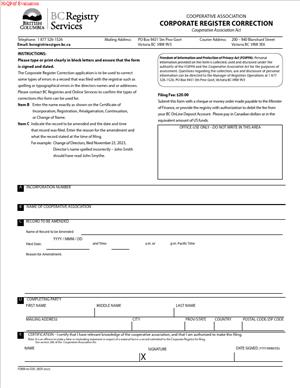
Form 58 COO – Cooperative Corporate Register Correction
Fill out nowJurisdiction: Country: Canada | Province/State: British Columbia
What is a Form 58 COO – Cooperative Corporate Register Correction?
Form 58 COO is a formal request to correct an error on the public register for a cooperative formed in British Columbia. You use it to fix information that was recorded incorrectly in a previous filing. The goal is to make the public record match your cooperative’s true, authorized details.
You submit this form after you spot an error in a filed record. The error might be a clerical mistake, a formatting issue, or a piece of information that was loaded incorrectly. The form identifies the affected filing, describes the error, and supplies the correct information. It also includes your certification that the correction is accurate and authorized.
Who typically uses this form?
Directors, officers, corporate secretaries, in‑house administrators, and paralegals. External advisors use it too. That includes law firms and corporate service providers acting under your authorization. You need a person with signing authority to approve and sign the correction.
You would need this form when the register shows something that is wrong and the wrong detail came from a filing event. For example, your registered office postal code is off by one digit. A director’s last name is misspelled. An appointment date appears one day early because of a data entry error. The form lets you show what is wrong and what should appear instead.
Typical usage scenarios
- You file an annual report and the system saves the wrong year.
- You complete a change of directors filing and the wrong appointment date displays.
- You file an address change and the records office address line appears with a missing unit number.
In each case, Form 58 COO is the tool to correct the official record. It is not a shortcut to make substantive changes. If you need to change directors, move offices, or alter share or membership provisions, you must use the proper change filing instead.
The form sits within the broader set of cooperative filings. It is narrow in scope. You cannot use it to backdate a decision or bypass approvals. You use it to repair the integrity of a filed record. Once accepted, the correction updates the public register so banks, regulators, and counterparties can rely on accurate information.
When Would You Use a Form 58 COO – Cooperative Corporate Register Correction?
Use this form when you discover a factual error in a previously filed cooperative record in British Columbia. The timing often follows a routine review. You might download a copy of your last filing and notice an error. A bank might flag that your registered office does not match your letterhead. A vendor might tell you that your cooperative’s legal name is spelled differently in the registry. If the mismatch traces back to a filed document, this form is the right path.
You also use it after a filing where the public display does not reflect what you submitted. This can happen with date formats, accents in names, or transposed address elements. If the filed document and the public view differ because of a data load issue, a register correction is appropriate. The form lets you point to the error and supply the correct text or value.
Consider the situation of a cooperative with a bilingual name. You file a name change, and the public register drops a hyphen. Your minute book and board resolution show the correct format. A correction brings the register back in line. Another common case is a director’s middle name. If your director’s legal name includes a middle name, but the register shows an initial only, you can request a correction if your original filing carried the full name.
Typical users
- The board chair
- The corporate secretary
- The general manager
- The office administrator
- Paralegals and lawyers acting for the cooperative file on your behalf as well
Auditors and accountants sometimes prompt the correction when preparing year‑end packages. If a lender or government body flags an inconsistency, they may ask you to correct the register before they proceed.
Use this form soon after you identify the error. Prompt action reduces confusion and prevents downstream issues. If the problem is not a simple error, pause. For example, you cannot use a correction to add a new director or move your offices. Those are change filings that carry their own approvals. If you are unsure whether the issue is a correction or a change, review your board resolution and the original filing. If your approved decision is correct, but the record shows it wrong, file a correction. If your decision has changed, file the proper change.
Legal Characteristics of the Form 58 COO – Cooperative Corporate Register Correction
This form has legal effect because it updates the public register for your cooperative. The register is an official record. Third parties rely on it to confirm your legal name, incorporation number, directors, and office locations. When the registrar accepts your correction, the register reflects the corrected information. That makes the corrected record the authoritative source for those details.
What ensures enforceability?
Enforceability flows from the governing statute and regulations for cooperatives in British Columbia. The registrar maintains the public register and sets rules for corrections. When you file a correction, you certify that the information is true and complete. You also confirm you have authority to make the filing. The registrar reviews your submission, checks your attachments, and issues the correction when satisfied. Some corrections require evidence. Proof can include a board resolution, a copy of the original filing, and identification for name corrections.
Not every issue can be solved with a correction. You cannot use this form to create new rights or obligations. You cannot use it to backdate decisions. You cannot use it to avoid approvals required for substantive changes. If your cooperative needs to change directors, move its registered or records office, alter membership provisions, or change its legal name, use the proper filing mechanism. The correction form fixes mistakes. It does not replace decisions.
Accuracy matters. Filing a false or misleading correction can carry consequences. You sign a certification. The registry can reject filings, require evidence, or take action if it finds misstatements. Keep your minute book aligned with the corrected record. That includes updating director registers, address records, and any internal logs that refer to the corrected information. You should also notify parties who rely on the wrong detail. For example, send the updated record to your bank and major suppliers.
Fees may apply. A correction fee is usually modest. In rare cases, the registrar may waive the fee if the error arose from a registry error. If the error came from your filing, expect to pay the published fee. The registrar can also request more information. Respond quickly to avoid delays.
Finally, the effective date is important. A correction takes effect when the registrar records it. If the original filed record displayed an incorrect effective date, the correction will show the intended date, but only as a corrected entry. It does not rewrite your cooperative’s history. Plan for that if you face time‑sensitive requirements from lenders or partners.
How to Fill Out a Form 58 COO – Cooperative Corporate Register Correction
1) Confirm a correction is the right path
- Ask a simple question: are you fixing an error in a filed record, or making a new change?
- If you are fixing a typo, a wrong date, or a mis‑loaded detail, use this form.
- If you are changing directors, offices, or your legal name, use the proper change filing instead.
2) Gather your cooperative’s core details
- Legal name as it appears on the register.
- Incorporation number (for example, CP‑1234567).
- Current registered office address. Include street and mailing addresses if different.
- Current records office address, if different.
- Contact name, email, and phone for questions.
3) Identify the filing you want to correct
- Specify the filing type. Examples include incorporation, annual report, change of directors, address change, name change, or special resolution filing.
- Provide the filing date shown on the public record.
- Include any transaction number or reference number from your filing confirmation, if you have it.
- Attach a copy of the filed document or confirmation page to show the error.
4) Pinpoint the error with precision
- State exactly what is wrong. Quote the incorrect text as it appears on the record.
- Describe where it appears. Name the section or field.
- Explain how the error occurred, if known. Keep it brief.
Example wording
- “The director’s last name is recorded as ‘Thompson.’ The correct spelling is ‘Thomson.’”
- “The registered office postal code is recorded as V6B 1N1. The correct code is V6B 1N7.”
- “The appointment date for Jane Li is recorded as 2024‑03‑01. The correct date is 2024‑03‑11.”
5) Provide the corrected information
- Enter the exact text or values to replace the wrong entry.
- Use full legal names, including middle names if they appear on government ID.
- For addresses, include unit number, civic number, street, city, province, postal code, and mailing address if different.
- For dates, use year‑month‑day format to avoid confusion.
6) Set the effective date, if applicable
- If the original filing shows the wrong effective date, state the intended date.
- Ensure your supporting documents align with that date. For example, your board resolution date should support the intended date.
7) Attach supporting documents
- Attach a copy of the original filed document or receipt showing the error.
- Attach a board resolution, if the correction touches director details or reflects a clarified approval.
- For name corrections, attach government‑issued ID for the individual director or officer, if requested.
- For address corrections, attach proof such as a lease page or utility bill showing the correct address, if requested.
- Combine multiple pages into a single, clearly labeled PDF where possible.
8) Complete the authorization and certification section
- Identify the signing individual. Include name, title, and relationship to the cooperative (e.g., director, officer, authorized agent).
- Read the certification statement carefully. You are confirming the truth and completeness of the correction.
- Sign and date. If the system uses electronic certification, follow the prompts to complete the declaration.
Who can sign?
- A director, an officer, or an authorized agent may sign. If an agent signs, ensure you have a signed authorization on file. Attach it if requested.
9) Provide delivery and contact details
- Enter a reliable email address for correspondence. The registrar may ask follow‑up questions.
- Provide a phone number for time‑sensitive matters.
- Confirm the preferred method to receive the corrected record.
10) Pay the required fee
- Have a payment method ready. Fees are typically applied per correction submission.
- If you believe the error was caused by the registry, you can note that in your explanation. The registrar decides whether a fee applies.
11) Review before submission
- Compare the corrected text against your minute book and resolutions.
- Check spelling, dates, and addresses. One last review saves days of delay.
- Confirm attachments are legible and complete.
12) Submit and track
- Submit the form through the registry’s filing channel.
- Save the confirmation. Note any reference number provided.
- Monitor your email for follow‑up questions or approval.
13) After acceptance, align all records
- Download the corrected record or confirmation and file it in your minute book.
- Update internal registers and contact lists.
- Share the corrected record with your bank, insurer, and key partners.
Special guidance for common corrections
- Director name or address: Match the director’s legal ID. For address updates that are not corrections, file a director change. Use the correction only if the original filing recorded the address wrong.
- Registered office vs. records office: British Columbia uses both. Confirm each address is correct. If you only meant to correct one, say so. For example, “Correct registered office mailing address only; records office unchanged.”
- Effective dates: Many errors involve dates. Align your corrected date with the board document that authorized the filing. If your minutes show March 11, but the filing shows March 1, your correction should point to March 11 and attach the minutes extract or resolution.
- Cooperative name formatting: Punctuation, accents, and spacing matter. If the issue is a minor typographical error and your approval documents show the correct format, a correction works. If you wish to adopt a new name or a different style, file a name change.
What to include in your written explanation
- One to three sentences that identify the wrong entry and the correct entry.
- A short note on how the mistake arose, if known.
- A statement that supporting evidence is attached.
Example explanation
- “On 2024‑04‑05, the change of directors filing recorded the appointment date for Lee Park as 2024‑04‑01. The correct appointment date is 2024‑04‑10, as approved by the board. Attached are the filing receipt and board resolution dated 2024‑04‑10.”
Handling complex or multi‑item corrections
- If the error appears in several places within the same filing, list each location and supply the corrected text for each.
- If multiple filings contain related errors, file one correction per filing. Keep each submission focused to speed review.
Common pitfalls to avoid
- Using the correction to make a change that needs its own filing.
- Leaving out the transaction or filing date, which slows review.
- Submitting blurry or incomplete attachments.
- Forgetting to match the minute book to the corrected public record.
Parties, sections, signatures, schedules
- Parties: Your cooperative (as the entity), the registrar (as the record keeper), and the signing individual (as your authorized filer).
- Sections: Identification of your cooperative, details of the filing to correct, description of the error, the corrected information, and the certification.
- Signatures: One authorized signature is usually sufficient. Use the name and title that match your authority.
- Schedules: Treat attachments as schedules. Label them clearly (e.g., “Schedule A – Copy of Filed Annual Report,” “Schedule B – Board Resolution,” “Schedule C – Proof of Address”). Reference each schedule in your description.
If the registrar requests more information
- Respond promptly and completely. Restate the error and provide any extra proof requested.
- If the registrar advises that a separate change filing is required, switch to that process. Do not insist on a correction if it is not appropriate.
Your goal is simple: make the public record match your cooperative’s true, authorized facts. Use clear, precise language. Provide the proof that supports your correction. Keep your internal records aligned. That approach gets your correction accepted and keeps your cooperative’s standing solid.
Legal Terms You Might Encounter
- Cooperative. A cooperative is a member-owned association that carries on business. Your cooperative has an official record in the corporate register. This form corrects something in that record.
- Corporate register. The corporate register is the government’s database for your cooperative. It lists your legal name, number, office addresses, and key filings. You use this form to fix errors in those entries.
- Correction. A correction fixes information already filed on the record. It does not create a new change. It amends a past filing to show the accurate details as of that time.
- Statement of correction. This is the heart of the form. You state what is wrong and what the correct information should be. You must be precise so the register reflects the true facts.
- Incorporation number. This unique number identifies your cooperative in the register. You include it so the filing office matches your correction to the right record.
- Registered office. The registered office is the official address for legal notices. If the register lists it incorrectly, you can correct the error here. If you are changing it prospectively, use the proper change form instead.
- Records office. The records office is where corporate records are kept for inspection. If the register shows the wrong address due to a past mistake, you correct it with this form.
- Authorized signatory. This is the individual who has authority to sign on behalf of the cooperative. The person certifies the correction is accurate. You should confirm their authority before filing.
- Resolution. A resolution is an internal approval by directors or members. If the correction relates to something they approved, attach the resolution that shows the intended details.
- Effective date. The effective date is the date the corrected information should have applied. This is a past date in most corrections. You must ensure it aligns with your internal records.
- Supporting documentation. These are documents that prove the correct facts. Examples include minutes, consents, or prior filings. Attach only what is needed to explain and verify the correction.
- Certification. Certification is your formal statement that the information is true and complete. It carries consequences if false. Read it carefully before you sign.
FAQs
Do you need to file a correction if the register shows a typo in your name?
Yes. File a correction if the registered name does not match your formation documents. Include the exact correct name, your incorporation number, and any proof that shows the intended spelling. Do not use a name change form unless you are changing the legal name going forward.
Do you need to use this form for an address change today?
No. Use this form to fix past errors that were filed incorrectly. If you are changing your registered or records office address from today onward, use the specific change of address filing. A correction only amends a previous filing to show what should have appeared then.
Do you need a resolution to support the correction?
Often, yes. If the underlying fact required approval (like appointment of directors or office locations), attach the resolution that shows what was approved. If the correction fixes a clerical typo in a filing, a resolution may not be needed, but include any internal note or officer certificate that verifies the error.
Do you need original signatures on the form?
Follow the signature rules on the form. If wet ink is needed, arrange original signatures. If electronic filing allows electronic signatures, ensure the signatory uses the accepted format. Keep the signed copy for your records, even if you file electronically.
Do you pay a fee to file the correction?
A filing fee may apply. Confirm the current fee before you submit. If you mail or deliver the form, include the payment method the filing office accepts. If you file electronically, have a card or account ready.
Do you need to notify members after a correction is filed?
Yes, when the correction relates to member-facing information. Notify members if the correction affects their rights, obligations, or where they can access records. Also inform directors, officers, lenders, your bank, and insurers where the corrected detail matters.
Do you correct an error made by the registry the same way as your own error?
You still file a correction, but note that the error arose in processing if that is the case. Attach supporting material that shows what you submitted originally. Clear documentation helps the filing office assess the correction and process it accurately.
Do you have to update your minute book after filing?
Yes. Keep a copy of the filed Form 58 COO, any stamped confirmation, the resolution, and all supporting documents. Update your registers, minute book, and any internal logs to match the corrected public record.
Checklist: Before, During, and After the Form 58 COO – Cooperative Corporate Register Correction
Before signing: Information and documents you need
- Your cooperative’s exact legal name as on formation documents.
- Incorporation number.
- The specific filing or register item that contains the error.
- A clear statement of what is wrong and what the correct information is.
- The effective date that should apply to the corrected information.
- Supporting documents: resolutions, minutes, officer certificates, or prior filings.
- Current registered office and records office addresses as they should be recorded.
- Correct list of directors and officers if those items require correction.
- Authorized signatory’s name, title, and contact details.
- Your contact email and phone number for filing queries.
- Your chosen submission method and accepted payment method.
During signing: Sections to verify
- Verify the legal name matches your formation documents, character by character.
- Confirm the incorporation number is correct.
- Ensure the statement of correction is complete, specific, and unambiguous.
- Check whether the correction relates to a particular past filing and identify it.
- Confirm addresses use the correct format, including unit and postal codes.
- Use a physical delivery address where required, not a P.O. Box.
- Verify director and officer names are spelled correctly and match internal records.
- Confirm the effective date reflects when the information should have been correct.
- Ensure the authorized signatory has authority to certify the correction.
- Review the certification and any declarations. Make sure they are accurate.
- Attach only relevant supporting documents. Label them clearly.
- Date the form on the actual signing date. Use consistent dating format.
After signing: Filing, notifying, and storing
- File the form by your chosen method. Include the fee, if any, and all attachments.
- Obtain and keep proof of submission: receipt, tracking, or submission ID.
- Calendar a follow-up date to confirm the filing status and outcome.
- When accepted, download or request the confirmation page or stamped copy.
- Compare the updated register details to your correction. Ensure it matches exactly.
- If rejected, review the reasons. Fix the issues and refile promptly.
- Notify stakeholders: directors, officers, members, lenders, bank, and insurers.
- Update internal systems: accounting, payroll, contracts, and letterhead if relevant.
- Update the minute book: file the accepted correction, resolutions, and proofs.
- Record the correction in your internal change log with the effective date.
- Train staff who manage filings to prevent repeat errors.
Common Mistakes to Avoid
Filing a change instead of a correction.
- Do not use this form to make a new change going forward. If you do, the register will still show the wrong historical record, and your change may be refused. Use the proper change filing for new information. Use this form only to fix past errors.
Vague or incomplete correction statements.
- Do not say “address corrected” without stating the exact correct address and the effective date. If you are vague, the filing office may reject your form or misinterpret the fix. Spell out the incorrect item and the precise corrected wording.
Wrong or inconsistent effective dates.
- Do not guess the effective date. If the correction should have applied on a past date, confirm it against minutes or resolutions. A wrong date can cause compliance gaps and misalign contracts or notices tied to that date.
Missing approvals or evidence.
- Do not omit supporting resolutions or officer certificates when the underlying fact required approval. Without proof, the filing office may delay or refuse the correction. Attach only what is needed, but make it clear and legible.
Using a P.O. Box where a physical address is required.
- Do not list a P.O. Box for an office that must receive deliveries. If you do, your filing may be rejected, or service of documents may fail. Use a complete civic address, including unit and postal code, where required.
Incorrect or unauthorized signatures.
- Do not let someone without authority sign. If the certification is invalid, the filing can be rejected and you may need to re-execute. Confirm the signatory’s authority and name format before submission.
Not updating internal records after filing.
- Do not stop at filing. If you leave your minute book, registers, or systems unchanged, you risk conflicts between public and internal records. That creates headaches during audits, financing, or member disputes.
What to Do After Filling Out the Form
- File the form and pay any fee. Submit the signed form with all attachments. Use one submission method. Do not send duplicates by different channels. Keep the submission confirmation.
- Monitor the filing. Set a reminder to check status. If the filing office requests clarification, respond quickly. Provide the specific details requested. Avoid resending your entire package unless asked.
- Review the accepted correction. When accepted, compare the updated register entry to your statement of correction. Confirm every detail, including spelling, unit numbers, and dates. If anything is still off, prepare a follow-up correction right away.
- Notify key stakeholders. Inform directors, officers, members, and anyone affected by the corrected information. Send a brief notice that states what changed, the effective date, and any action they should take. Include a copy of the accepted correction if appropriate.
- Update your minute book and registers. File the accepted Form 58 COO, the resolution, and any officer certificates behind the relevant tab. Update your registers of directors, offices, and members if the correction affects them. Cross-reference the effective date.
- Align contracts and systems. If the corrected information appears in contracts, invoices, banking profiles, or insurance certificates, update those records. Provide copies of the correction to external parties who need it.
- Address downstream filings. A corrected detail can trigger updates elsewhere. For example, ensure your filings with tax authorities and municipal records match the corrected information. Tidy up these items to prevent future notices.
- Document the lessons learned. Note the source of the original error and how to prevent it. Update your internal filing checklist. Train staff on verification steps, especially for addresses, names, and dates.
- Plan for any related filings. If the correction reveals a missing filing, schedule it now. Do not bundle different filings into one correction. Use the correct forms for each item.
- Archive proof and set a compliance reminder. Store the submission proof, acceptance notice, and the final corrected record. Set reminders to review your registered and records office details annually. A quick annual review helps you catch issues early.
Disclaimer: This guide is provided for informational purposes only and is not intended as legal advice. You should consult a legal professional.