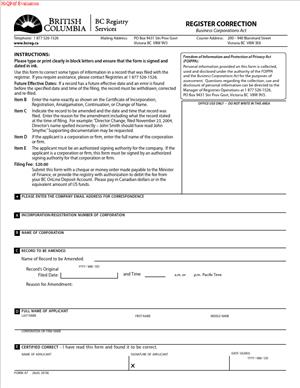
Form 47 – Application to Correct the Corporate Register
Fill out nowJurisdiction: Country: Canada | Province/State: British Columbia
What is a Form 47 – Application to Correct the Corporate Register?
Form 47 is the formal request you use to fix an error on the public record for a company in British Columbia. The corporate register is the official database held by the Registrar of Companies. It shows key facts about your company, such as its legal name, incorporation number, registered office, directors, share structure, and filing history. If that record contains a mistake, you use Form 47 to ask the Registrar to correct it.
This form does not create a change. It corrects a record that is wrong. That distinction matters. If you want to change your directors or your registered office going forward, you file the regular change form. If the register shows a fact that was never true, or a filing captured the wrong information, a correction is the right tool.
Who typically uses this form?
Directors, officers, in-house legal teams, external counsel, corporate paralegals, and corporate service firms use it often. Accountants use it when they discover a filing error during year-end work. Lenders and investors sometimes ask a company to file it after they find discrepancies in due diligence.
You would need this form if the public record has an error that could mislead others or block a transaction. Common cases include a director who appears on the register even though they never consented to serve. Another is a registered office address that shows the wrong suite number due to a filing typo. You may also need it if the system captured an incorrect effective date, or if a share structure filed during an alteration is missing a class description you submitted.
Typical usage scenarios
- Routine corporate housekeeping and in deal work.
- You might discover a mismatch between your minute book and what the register shows.
- You might see that an annual report recorded the wrong person as signing director.
- You might notice that a name change filing shows an error in spelling that does not match the consented name.
- If your company was shown as dissolved due to a data entry error, you may also need to start with a correction request.
- In some cases, the Registrar can correct that.
- In others, you will need a restoration process.
- The form helps the Registrar determine the right path.
In practice, Form 47 is a structured letter to the Registrar. It identifies your company, explains the error, shows what should appear instead, and attaches evidence to support the correction. If the Registrar accepts the request, the register is corrected and the affected filing or data point shows as corrected. The history will usually show that a correction took place, which helps preserve transparency.
When Would You Use a Form 47 – Application to Correct the Corporate Register?
Use Form 47 when you spot a specific mistake in the Corporate Registry record that is not simply a change you want to make now. You are telling the Registrar that the record has been wrong since the filing date or effective date, and that you can prove it.
You might use it after a director appointment filing lists the wrong individual because two people share a similar name. The wrong person might appear as a director with their residential address, which raises privacy concerns. You need to remove the wrong name and ensure the right director is shown. You would prepare Form 47, explain the mix-up, and attach the signed consent and appointment for the true director.
You might use it after a registered office change filing transposed the street number. If the register shows 1500 rather than 5100, service of documents could fail. You would apply to correct the address with proof of the intended address, such as your board resolution or a signed landlord letter for the correct premises. This is a correction because the former address was never accurate.
Another scenario is an annual report that recorded the wrong date or skipped a director who still serves. You might have filed the report in a rush and selected the wrong checkboxes. The register now shows a director left the board when they did not. You file Form 47 to fix the error so that the list of current directors is correct.
Share structure errors are also a trigger. Suppose you altered your share structure to add Class A and Class B shares. The filed text for Class B rights did not upload in full, and the register shows incomplete text. You would ask the Registrar to correct the filed alteration to reflect the full, approved text you submitted. You attach the special resolution and the complete share terms.
You would also use Form 47 for an effective date issue. If you lodged a change with a future effective date and the system posted it immediately, the public record could misstate your history. You would ask for a correction to reflect the intended date, with your filing confirmation showing the scheduled effective date.
Not every problem calls for Form 47. If your director actually resigned today, you file the standard notice of change. If you want to move the registered office now, you file the change of office form. If the company was validly dissolved for failure to file annual reports, you restore it, not correct it. The correction route is for errors, not for backdating a change or rewriting history.
Typical users include small business owners who manage their own filings and discover an error later. You also see corporate paralegals fixing a predecessor’s mistake in a client’s record. Lenders often require correction before funding. Buyers in an acquisition may insist on a clean record before closing. Auditors and tax advisors flag errors that could affect compliance status. In each case, Form 47 provides a controlled, documented remedy.
Legal Characteristics of the Form 47 – Application to Correct the Corporate Register
Form 47 is an administrative application under the corporate laws of British Columbia. It asks the Registrar of Companies to exercise the statutory power to correct the corporate register. It is not a contract between private parties and it is not a court order. Its legal force comes from the Registrar’s authority to maintain an accurate register and to correct it when shown it contains an error.
When the Registrar approves your application, the correction becomes part of the official record. That corrected record is what third parties and government agencies may rely on. The register is public and carries weight in commercial transactions. If a corrected filing replaces or amends an earlier one, the database will reflect the current, corrected fact. The history often shows that a correction occurred and on what date. That history supports transparency and reliance by others.
What ensures enforceability?
Enforceability rests on two features. First, the enabling statute authorizes the Registrar to correct the register and to issue records that reflect the corrected information. Second, you must support your request with evidence that is credible and specific. The Registrar will not correct the record based on assertions alone. You need documents that show the error and the right information. Examples include a director consent, a resignation letter, a board resolution, minutes approving a change, or a filing receipt showing the intended date. In some cases, the Registrar may ask for a statutory declaration from someone with direct knowledge of the facts. If multiple parties are affected, the Registrar may ask for their consents.
A correction does not rewrite corporate acts that never occurred. It brings the public record into line with the facts and documents that existed at the relevant time. The Registrar may decline a correction and direct you to the proper process if the issue is not an error. For example, if you want to remove a director retroactively because of a dispute, but the records show they were validly appointed and never resigned, a correction is not the right tool. That is a governance issue for the company to resolve, and future filings can record the change when it occurs.
There are other legal considerations. A correction may have effective dates that impact compliance or qualifications to do business. If the register showed a wrong address, service of documents might have been attempted at that address. A later correction does not erase actions taken based on the public record at the time. It updates the register going forward and clarifies the historical record. You should also consider the impact on third parties who relied on the earlier record. If a lender relied on the wrong director list, you may need to provide them with the corrected output and an explanatory letter.
Privacy matters as well. Director residential addresses appear on the register unless you have set up an alternative service address. If an incorrect person was listed, you should move quickly to correct that entry to limit exposure. You may need to ask the Registrar to suppress certain personal information that was posted in error. The Registrar may consider such requests on a case-by-case basis.
Fees apply to corrections, and processing times can vary. The Registrar has discretion to ask for more evidence or to refuse a request. If refused, you can revise and resubmit with stronger support. In rare cases, a court order may be needed if the facts are complex or disputed. Most routine corrections resolve at the registry level without going to court.
How to Fill Out a Form 47 – Application to Correct the Corporate Register
Before you start, confirm that a correction is the right remedy. Pull the company’s ledger and the specific filing that appears wrong. Compare it to your minute book and source documents. Make a list of what the register says, what it should say, and the evidence you have to prove it.
1) Identify the company accurately
Enter the company’s full legal name and incorporation or registration number. Use the exact name as shown on the register, including “Ltd.” or “Inc.” as applicable. If the name itself is the subject of the correction due to a spelling error in a recent filing, still use the current name and explain the requested correction in your narrative.
2) Identify the applicant and contact
Provide your name, role, and contact details. State your relationship to the company, such as director, officer, lawyer, or authorized filing agent. Include an email and phone number for the examiner to reach you. If you are an external representative, confirm that you are authorized to act for the company.
3) Describe the error clearly
Set out a concise statement of the error. Reference the specific filing type and date if applicable. For example, say “Annual Report filed on June 30, 2024 shows John Doe ceased as director on May 31, 2024. John Doe did not cease. The checkbox was selected in error.” If an address is wrong, set out what was filed and the intended address. If share terms are incomplete, note the missing text and the correct text that was approved.
4) State the requested correction
Tell the Registrar exactly what you want the record to show. Use plain language and mirror the field names on the register where possible. For a director error, say “Please correct the company’s director list to show John Doe as a current director, with a start date of March 1, 2021, and remove the cessation date.” For an address, give the full correct address, including suite, street, municipality, province, and postal code. For share terms, insert the complete class terms that should appear.
5) Cite the relevant filing(s) and dates
Identify the filing that introduced the error. Attach a copy of the filing receipt or system confirmation if you have it. If the error relates to a future effective date that was not applied, include the receipt showing the scheduled date. If the error traces to an incorporation or name change document, include those records as well.
6) Attach supporting documents
Attach the documents that prove your facts. Include the director consent or resolution for appointments. Include resignation letters for directors who should have been removed, if relevant to the context of the error. For address issues, attach the board resolution changing the office and, if helpful, a lease or landlord letter confirming the correct address. For share structure corrections, attach the special resolution and the full text of the class rights as approved. If you rely on a statutory declaration from someone with knowledge, attach that as well. Label your exhibits and refer to them in your narrative.
7) Obtain consents from affected parties if needed
If the correction affects an individual’s listing, such as removing someone who was shown as a director in error, include their written confirmation when possible. If you cannot get it, explain why and provide other evidence that shows the error, such as a lack of consent to act. The Registrar may accept alternate proof or may ask for more detail.
8) Explain the cause of the error without assigning blame
State whether the issue was a data entry mistake, an upload problem, a system glitch, or an internal mix-up. Keep it factual. For example, “The uploaded share terms document truncated at page 2 of 3 due to a file size issue.” This helps the examiner understand why the register should not rely on the filed data.
9) Address effective dates
If timing matters, explain what the effective date should be and why. Provide the resolution date, consent date, or filing confirmation that shows the intended date. Ask the Registrar to apply the correction as of that date if appropriate. If the date does not change the legal effect but matters for clarity, say so.
10) Complete the declaration and signature
Sign the application. Use your full name and state your capacity, such as Director, Corporate Secretary, or Authorized Agent. By signing, you confirm the facts are true to the best of your knowledge. If the Registrar requires a statutory declaration or affidavit, sign before a commissioner or notary as instructed. Keep the tone and content consistent across your declaration and the application text.
11) Include schedules for complex corrections
If you are correcting multiple items, add schedules. Use Schedule A to list each error and the matching correction in a simple itemized format. Use Schedule B to list all attached documents and exhibits. Use Schedule C for a timeline of events if dates are central to your request. This structure helps the examiner follow the story.
12) Prepare a cover narrative that ties it together
On the first page or in a cover letter section, summarize the request in one paragraph. State who you are, the company, the error, the remedy sought, and the key documents attached. Keep it short and precise. This sets the stage for the detailed sections that follow.
13) Check alignment with the current register
Log in and confirm the current published record right before you submit. Take a screenshot or download a current entity summary. Include it as a reference if helpful. This ensures you and the examiner are looking at the same baseline.
14) Pay the applicable fee and submit through the accepted channel
File the form through the corporate registry’s accepted submission method. Provide payment by the accepted payment method. Include your file reference so you can track the request. If you submit through an account portal, keep the submission confirmation.
15) Respond promptly to examiner questions
You may receive a request for clarification or more evidence. Reply quickly and provide what is asked. If you cannot get a requested item, explain what you can provide instead and why it should suffice. Keep the tone factual and cooperative. The goal is to give the Registrar enough comfort to update the record.
16) Confirm the correction and update your minute book
Once approved, download or print the corrected record or certificate. File it in your minute book behind the affected tab. Note the date of correction and what changed. If the correction affects third parties, send them the updated record. For example, provide a lender with the corrected director list or the corrected share terms.
Practical examples
- If the wrong director appears due to a mistaken identity, you would attach the signed consent to act for the actual director, the board resolution appointing them, and a statement from the wrongly listed person confirming they never consented. Your requested correction would remove the incorrect director entry and show the true director with the correct start date. You would ask to remove the residential address of the person who never served.
- If a registered office address was mis-keyed, you would attach your resolution approving the move, a proof of the correct address (such as a lease page or landlord letter), and the filing receipt. You would ask the Registrar to correct the address field to the true address as of the change date shown in your resolution.
- If share terms were filed incompletely, you would attach the special resolution and the complete text of the class terms. Your narrative would explain that the upload truncated, leaving out paragraph 5. You would ask the Registrar to replace the text in the public record with the full approved terms. You might also include a statutory declaration from the corporate secretary confirming the text adopted by shareholders.
- If an annual report shows a director ceased in error, you would provide the current director confirmations, board minutes confirming ongoing service, and an explanation of the checkbox error. You would ask to remove the cessation date and restore the director’s status as current. If a new director was added in error, you would show that no consent to act was given and ask to remove that entry.
- If an effective date posted wrong, you would show the scheduled effective date from the filing confirmation. You would ask the Registrar to adjust the effective date on the register so that the sequence of events matches the resolutions and filing intent.
Two cautions can save time
- First, do not use Form 47 to try to backdate a change that did not happen. The Registrar will reject that. Make the change now with the proper form.
- Second, if the company was validly dissolved for non-compliance, do not file a correction to undo that. Use the restoration process. If the dissolution posting itself was a mistake, a correction may still be possible, but you will need strong proof that the dissolution should not have occurred.
Keep your writing simple and your evidence organized. The examiner’s job is easier when your facts line up with your documents. If you show that the register is wrong and you provide clear proof of what it should say, your correction should be straightforward.
Legal Terms You Might Encounter
- Corporate register: This is the official public record that lists your company’s key details. It includes your company name and number, directors, registered and records office, and key historical filings. Form 47 asks the Registrar to correct something on that public record that is wrong.
- Registrar: This is the government office that keeps the corporate register. When you file Form 47, you are asking the Registrar to fix an error in the register for your company.
- Applicant: This is the person or company submitting Form 47. You, as the applicant, explain the error and provide the correct information. You also confirm your authority to make the request.
- Error of record: This is the specific mistake on the corporate register you want to correct. It could be a misspelled director name, a wrong filing date, or a registered office address that was recorded incorrectly. Form 47 must describe this error precisely.
- Correction: A correction fixes a mistake in the register so the public record matches the facts. It is not a change to your company’s current information. If you want to change current details, you need the proper change filing, not Form 47.
- Supporting evidence: These are documents that prove the error and show the correct information. Common examples include a director’s signed consent, a government-issued ID, a prior filing receipt, or a dated letter from the records office. Form 47 relies on clear evidence to succeed.
- Effective date: This is the date on which the corrected information should be recognized. Sometimes you ask for the register to reflect the correction as of a past date, such as the date of the original filing.
- Notice of Articles: This is the document that summarizes your key corporate information. If a past Notice of Articles was recorded with an error, Form 47 can be used to fix the register so the filed record aligns with the actual facts.
- Registered and records office: This is the official address for legal notices and corporate records. If the register shows the wrong address due to a filing error, Form 47 can correct it to the proper address.
- Certificate or receipt: These are official outputs from a filing, such as a filing receipt or a certificate issued for that filing. You may reference these documents in Form 47 to identify the filing that contains the error and to show what should be corrected.
FAQs
Do you use Form 47 for a simple change, like a new director or address?
No. Use the standard filing for a new director or a new address. Use Form 47 only when the register shows a mistake about what was true at the time of the original filing.
Do you need to attach proof with Form 47?
Yes. You should attach documents that prove the error and show the correct information. Include clear, dated, and legible records. Use official documents where possible.
Do you need a director resolution or consent?
Often, yes. If the correction relates to director appointments, names, or consents, include a signed resolution or consent. If the correction concerns the registered office, include a letter from the records office confirming the correct address and date.
Do you have to pay a fee?
A filing fee usually applies. Be prepared to provide payment when you submit the form. If you refile due to rejection, you may incur additional fees.
Do you need original signatures or can you sign electronically?
Follow the current filing standards. If electronic signatures are accepted, use a recognized format. If wet ink signatures are required, sign in ink and scan clearly. Keep the original with your corporate records.
Do you need to serve or notify anyone after filing?
If the correction affects listed directors, officers, or the registered office, notify them once the correction is accepted. If lenders, regulators, or partners rely on your public record, send them updated details or extracts.
Can you correct a historic error from years ago?
Yes, if you can prove the error and the true facts at that time. Older corrections may need more evidence. Expect closer review and possible follow-up questions.
How long does Form 47 processing take?
Time varies. Complex or historic corrections can take longer. You can reduce delays by submitting complete, consistent evidence and by responding quickly to any requests for clarification.
Checklist: Before, During, and After the Form 47 – Application to Correct the Corporate Register
Before signing: Gather information and documents
- Your company name and incorporation number.
- The exact filing that contains the error (name and date).
- A clear description of the error on the register.
- The correct information that should appear on the register.
- Evidence supporting the correction (ID, resolutions, consents, letters).
- Contact details for the applicant and a daytime phone number.
- Your role and authority to apply (director, officer, authorized agent).
- The effective date you want the correction to reflect.
- Any related filings that may also need correction for consistency.
- Payment method for the filing fee.
- Internal approval, if your company requires it (e.g., a board resolution).
During signing: Verify every section
- Confirm the company name and number match your records.
- Confirm the filing you cite is the one with the error.
- Use the same names and dates across the form and attachments.
- Describe the error precisely and state the exact correction.
- State the requested effective date, if applicable.
- Attach all evidence and label each attachment.
- Make sure signatures and dates are in the correct places.
- If using an agent, include proof of authorization.
- Review legibility of scans or copies before submission.
- Double-check that the form and attachments tell a complete story.
After signing: File, notify, and store
- File Form 47 using the accepted submission channel.
- Pay the filing fee and keep the receipt.
- Record the submission date and any reference number.
- Track status and respond promptly to any questions.
- After approval, download or save the confirmation and updated records.
- Notify directors, officers, and the registered office, if affected.
- Update internal registers and your minute book.
- Alert banks, lenders, or partners who rely on the register.
- Keep a copy of the form, evidence, and approval in your records.
- Calendar a post-filing check to confirm the register now shows the correction.
Common Mistakes to Avoid in Form 47 – Application to Correct the Corporate Register
- Using Form 47 for a change, not a correction. This form fixes an error about what was true at the time. If you want to make a new change, use the proper change filing. Don’t forget: mixing the two leads to rejection and delays.
- Vague or incomplete error description. If you write “director info wrong” without specifics, the Registrar cannot fix it. State the exact name, date, and detail that is wrong, and the exact correction. Vague requests cause back-and-forth and added fees.
- Missing or weak evidence. Assertions are not enough. Include documents that prove the true facts on the relevant date. Missing evidence risks rejection. Weak evidence invites extra questions and delay.
- Mismatch between the form and attachments. If dates or names differ across documents, the request looks unreliable. Align all details. Mismatches reduce credibility and slow approval.
- Ignoring related filings. Correcting one filing while leaving connected filings wrong creates inconsistency. Inconsistencies can block your correction or trigger further fixes. Map all needed corrections before you file.
What to Do After Filling Out Form 47 – Application to Correct the Corporate Register
- File the form and pay the fee. Use the accepted method and keep proof of submission.
- Monitor status. Track your reference number and check for messages.
- Respond fast to questions. Provide any additional documents requested.
- If rejected, fix and refile. Address the stated reason clearly. Attach stronger evidence if needed.
- Once approved, verify the public record. Confirm the corrected data and effective date.
- Align related filings. File any necessary follow-on corrections so everything matches.
- Notify affected parties. Tell directors, the records office, lenders, and key partners as needed.
- Update internal records. Refresh your minute book, registers, and compliance calendar.
- Retain a tidy package. Keep the form, evidence, approval, and correspondence together.
- Consider preventive steps. Review your filing workflows to reduce future errors.
Disclaimer: This guide is provided for informational purposes only and is not intended as legal advice. You should consult a legal professional.